Tdesktop: Telegram permanently increases Windows timer resolution (causing reduced battery life)
Steps to reproduce
- Open Telegram and let it run in background
- Run, from an elevated command prompt, "powercfg /energy"
- Open the generated report. Scroll to the "warnings" section and notice that Telegram has increased the timer resolution from 15.6 ms to 1 ms
Expected behaviour
Telegram should not permanently increase the Windows timer resolution, since this can lead to greatly reduced battery life (up to 25%, according to this and this)
Actual behaviour
Telegram permanently increases the Windows timer resolution, even when in background
Configuration
Operating system: Windows 10 (version 1803, build 17134.112)
Version of Telegram Desktop: 1.3.9
Used theme: Built-in night theme
 madriani
All 4 comments
You can use this to monitor in realtime rather than keep generating powercfg reports:
https://vvvv.org/contribution/windows-system-timer-tool
 DoulosTrieste
on 30 Aug 2018
DoulosTrieste
on 30 Aug 2018
Same issue with 1.4 in Linux: #4854
 RussianNeuroMancer
on 29 Oct 2018
RussianNeuroMancer
on 29 Oct 2018
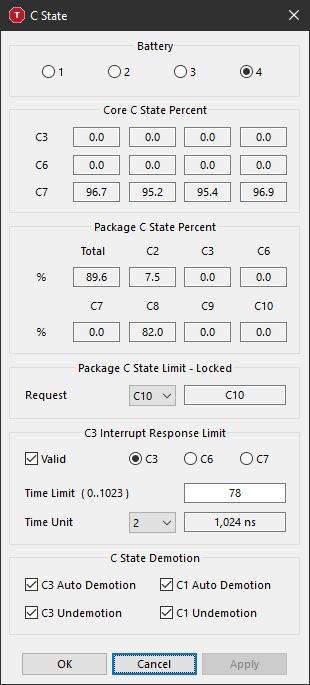
By using software like Throttlestop, you can monitor the c-states of the processor when using Telegram Desktop. When Telegram is not running, the stats (in my case) look like this:
When launching Telegram and unlocking it, it idles ca. like this:
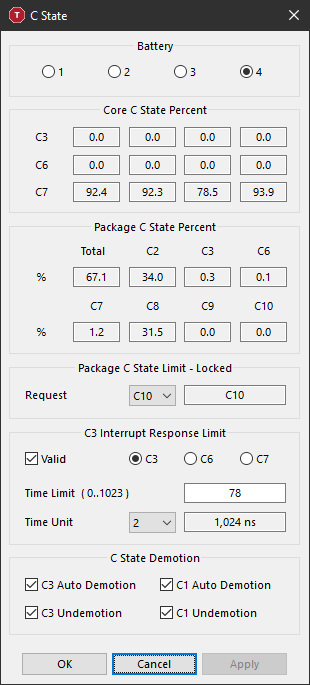
So the amount of percentage the CPU idles in C8 is much lower and it hits battery life hard.
 kocane
on 6 Apr 2019
kocane
on 6 Apr 2019
 Aokromes
on 25 Jan 2020
Aokromes
on 25 Jan 2020
Related issues
 ArmeF97
·
3Comments
ArmeF97
·
3Comments
 Justinzobel
·
3Comments
Justinzobel
·
3Comments
 DRSDavidSoft
·
3Comments
DRSDavidSoft
·
3Comments
 Mindstormer619
·
3Comments
Mindstormer619
·
3Comments
 TotalKrill
·
3Comments
TotalKrill
·
3Comments
Most helpful comment
By using software like Throttlestop, you can monitor the c-states of the processor when using Telegram Desktop. When Telegram is not running, the stats (in my case) look like this:


When launching Telegram and unlocking it, it idles ca. like this:
So the amount of percentage the CPU idles in C8 is much lower and it hits battery life hard.