Tdesktop: Window size is decreased after closing the right panel
Steps to reproduce
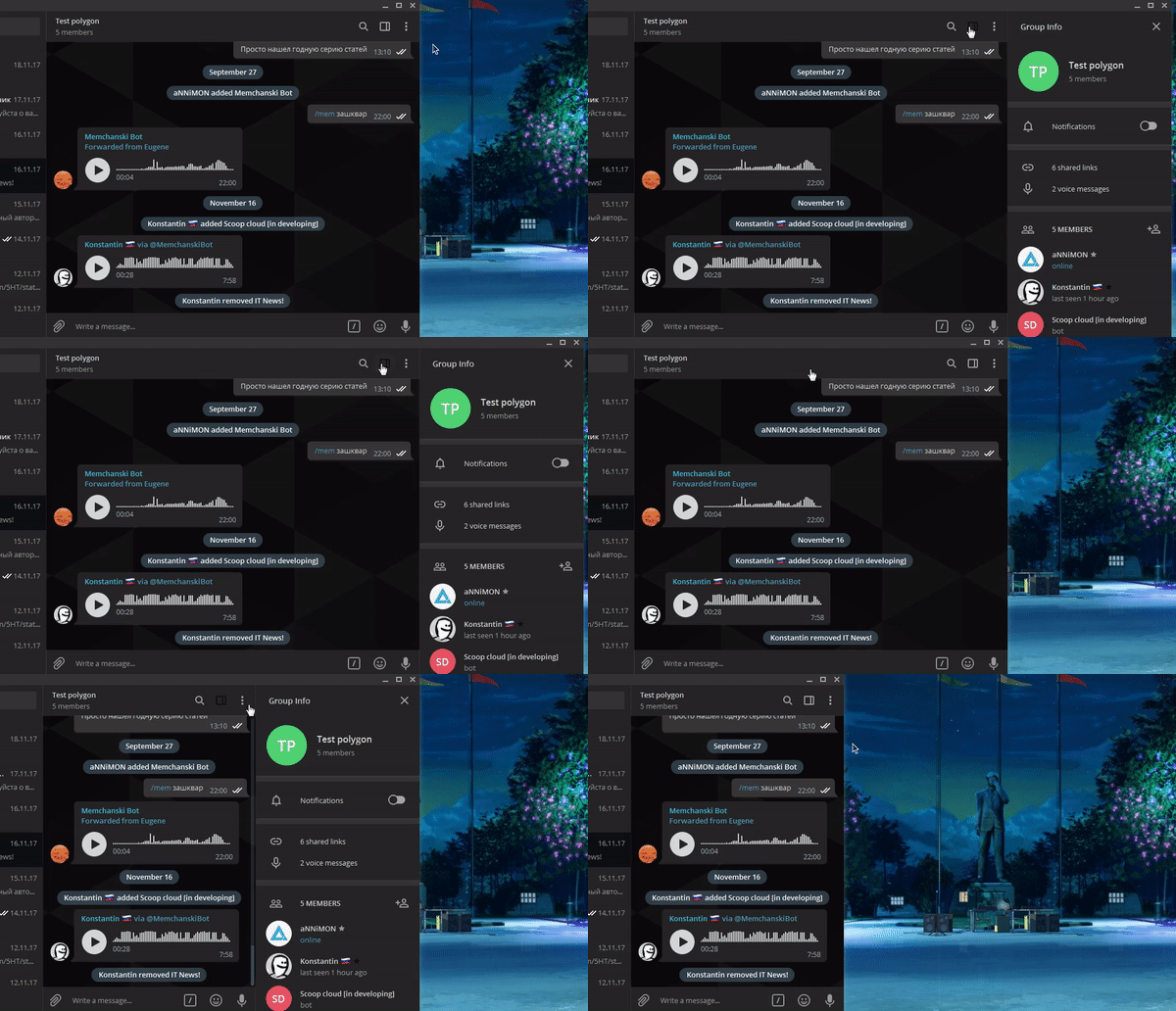
- Open a group info by clicking on top panel (a group name or an empty space). See gif below
- Right side panel have opened and window width remains the same
- Close the right panel
Expected behaviour
Window width should remain the same
Actual behaviour
Window width is decreased
Configuration
Operating system: Win 7 / Arch Linux
Version of Telegram Desktop: 1.1.24 alpha
Used theme: Any
 aNNiMON
All 4 comments
The same problem here. Also, please, take atention to the icon. It gets dark on dark background sometimes.
 sorenvonsarvort
on 29 Nov 2017
sorenvonsarvort
on 29 Nov 2017
I think we need a feature to completely disable this annoying panel.
 xvitaly
on 30 Nov 2017
xvitaly
on 30 Nov 2017
@aNNiMON In this GIF the first closing is correct (the column was showed with the window being expanded and then was hidden with the window being shrinked), but the second one is a bug (the column was shown "inside" the window, without chaning window size, so it should be hidden the same way).
 john-preston
on 30 Nov 2017
john-preston
on 30 Nov 2017
@khorrth This depends on the color theme used. But perhaps I'll change the used key from the active buttons background to active text foreground (so that those icons would have the color of clickable links by default).
john-preston
on 30 Nov 2017
Related issues
 Justinzobel
·
3Comments
Justinzobel
·
3Comments
 whywhyy
·
3Comments
whywhyy
·
3Comments
 ghost
·
3Comments
ghost
·
3Comments
 ArmeF97
·
3Comments
ArmeF97
·
3Comments
 DRSDavidSoft
·
3Comments
DRSDavidSoft
·
3Comments
Most helpful comment
I think we need a feature to completely disable this annoying panel.