Tasmota: Showing periodically wrong power data when using SML (energy meter)
PROBLEM DESCRIPTION
Showing wrong power amount when using SML.
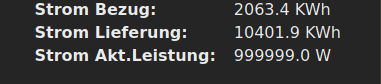
I got periodically wrong power data (SML 10.70.00), please see screenshots. As the data changes every second, it is hard to figure out what is wrong. Maybe some SML messages are not correct and these should be ignored.
For 99% the display is correct.
REQUESTED INFORMATION
_Make sure your have performed every step and checked the applicable boxes before submitting your issue. Thank you!_
- [x ] Read the Contributing Guide and Policy and the Code of Conduct
- [x ] Searched the problem in issues
- [x ] Searched the problem in the docs
- [x ] Searched the problem in the forum
- [ x] Searched the problem in the chat
- [x ] Device used (e.g., Sonoff Basic): ESP07
- [ x] Tasmota binary firmware version number used: _____
- [ ] Pre-compiled
- [x ] Self-compiled
- [x ] IDE / Compiler used: Visual Studio Code
- [x ] Flashing tools used: integrated and OTA
[ x] Provide the output of command:
Backlog Template; Module; GPIO 255:
11:24:56 MQT: stat/ESP07_Module/RESULT = {"NAME":"Generic","GPIO":[1,1,1,1,1,1,1,1,1,1,1,1,1,1],"FLAG":0,"BASE":18}Configuration output here:
- [ ] If using rules, provide the output of this command: `Backlog Rule1; Rule2; Rule3`:
Rules output here:
- [x] Provide the output of this command: `Status 0`:
STATUS 0 output here:
11:25:58 MQT: stat/ESP07_Module/STATUS = {"Status":{"Module":18,"DeviceName":"ESP-07","FriendlyName":["ESP-07"],"Topic":"ESP07_Module","ButtonTopic":"0","Power":0,"PowerOnState":3,"LedState":1,"LedMask":"FFFF","SaveData":1,"SaveState":1,"SwitchTopic":"0","SwitchMode":[0,0,0,0,0,0,0,0],"ButtonRetain":0,"SwitchRetain":0,"SensorRetain":0,"PowerRetain":0}}
11:25:58 MQT: stat/ESP07_Module/STATUS1 = {"StatusPRM":{"Baudrate":115200,"SerialConfig":"8N1","GroupTopic":"tasmotas","OtaUrl":"http://ota.tasmota.com/tasmota/release/tasmota-DE.bin","RestartReason":"Software/System restart","Uptime":"1T21:59:11","StartupUTC":"2020-11-27T12:26:47","Sleep":50,"CfgHolder":4617,"BootCount":103,"BCResetTime":"2020-10-15T16:13:55","SaveCount":539,"SaveAddress":"FA000"}}
11:25:58 MQT: stat/ESP07_Module/STATUS2 = {"StatusFWR":{"Version":"9.1.0(tasmota)","BuildDateTime":"2020.11.27 09:52:16","Boot":31,"Core":"2_7_4_5","SDK":"2.2.2-dev(38a443e)","CpuFrequency":80,"Hardware":"ESP8266EX","CR":"400/699"}}
11:25:58 MQT: stat/ESP07_Module/STATUS3 = {"StatusLOG":{"SerialLog":2,"WebLog":3,"MqttLog":0,"SysLog":1,"LogHost":"","LogPort":514,"SSId":["xxx",""],"TelePeriod":60,"Resolution":"558180C0","SetOption":["00008009","2805C8000100060000005A00000000000000","01000000","00006000","00000000"]}}
11:25:58 MQT: stat/ESP07_Module/STATUS4 = {"StatusMEM":{"ProgramSize":633,"Free":368,"Heap":15,"ProgramFlashSize":1024,"FlashSize":8192,"FlashChipId":"1740EF","FlashFrequency":40,"FlashMode":3,"Features":["00000407","87DAE797","043E8001","000007CF","000013C4","C000F989","0000400C","00000000"],"Drivers":"1,2,3,4,5,6,7,8,9,10,12,16,18,19,20,21,22,24,26,27,29,30,35,37","Sensors":"1,2,3,4,5,6,7,8,9,31,53,65"}}
11:25:58 MQT: stat/ESP07_Module/STATUS5 = {"StatusNET":{"Hostname":"ESP07","IPAddress":"xxx","Gateway":"xxx","Subnetmask":"255.255.255.0","DNSServer":"xxx","Mac":"18:FE:xxx","Webserver":2,"WifiConfig":4,"WifiPower":17.0}}
11:25:58 MQT: stat/ESP07_Module/STATUS6 = {"StatusMQT":{"MqttHost":"192.168.1.100","MqttPort":1883,"MqttClientMask":"DVES_%06X","MqttClient":"DVES_9FB3F8","MqttUser":"DVES_USER","MqttCount":2,"MAX_PACKET_SIZE":1200,"KEEPALIVE":30}}
11:25:58 MQT: stat/ESP07_Module/STATUS7 = {"StatusTIM":{"UTC":"2020-11-29T10:25:58","Local":"2020-11-29T11:25:58","StartDST":"2020-03-29T02:00:00","EndDST":"2020-10-25T03:00:00","Timezone":99,"Sunrise":"08:20","Sunset":"16:56"}}
11:25:58 MQT: stat/ESP07_Module/STATUS10 = {"StatusSNS":{"Time":"2020-11-29T11:25:58","SI7020":{"Temperature":27.9,"Humidity":31.0,"DewPoint":9.2},"BMP280":{"Temperature":28.6,"Pressure":1028.6},"CCS811":{"eCO2":626,"TVOC":34},"WP":{"WP_Total":150.3106,"WP_HT":67.0551,"WP_NT":83.2555,"WP_Total_Liefer":0.0014,"WP_HT_Liefer":0.0013,"WP_NT_Liefer":0.0001,"WP_WL_P1":62.3,"WP_WL_P2":4.4,"WP_WL_P3":653.5,"WP_AktLeist":64.8},"Strom":{"StromBezug":2063.5,"StromLiefer":10401.9,"AktLeist":1304.0},"PressureUnit":"hPa","TempUnit":"C"}}
11:25:58 MQT: stat/ESP07_Module/STATUS11 = {"StatusSTS":{"Time":"2020-11-29T11:25:58","Uptime":"1T21:59:11","UptimeSec":165551,"Heap":17,"SleepMode":"Dynamic","Sleep":50,"LoadAvg":20,"MqttCount":2,"Wifi":{"AP":1,"SSId":"xxx","BSSId":"xxx","Channel":11,"RSSI":100,"Signal":-31,"LinkCount":2,"Downtime":"0T00:00:07"}}}
- [ ] Provide the output of the Console log output when you experience your issue; if applicable:
_(Please use_weblog 4_for more debug information)_
Console output here:
TO REPRODUCE
Problem arises periodically during normal operation
EXPECTED BEHAVIOUR
Wrong SML messages should be ignored.
SCREENSHOTS

ADDITIONAL CONTEXT
_Add any other context about the problem here._
(Please, remember to close the issue when the problem has been addressed)
 Jambola77
All 22 comments
I am using 9.1.0.
Normally the "Strom Akt.Leistung" (Actual power consumption) is not greater than 4000W.
Jambola77
on 29 Nov 2020
How about posting your script code, too?
 kugelkopf123
on 29 Nov 2020
kugelkopf123
on 29 Nov 2020
Here is the script:
>D
>B
->sensor53 r
>M 2
+1,14,s,0,9600,WP
1,77070100010800ff@1000,Total,KWh,WP_Total,4
1,77070100010801ff@1000,HT,KWh,WP_HT,4
1,77070100010802ff@1000,NT,KWh,WP_NT,4
1,77070100020800ff@1000,Total_Liefer,KWh,WP_Total_Liefer,4
1,77070100020801ff@1000,HT_Liefer,KWh,WP_HT_Liefer,4
1,77070100020802ff@1000,NT_Liefer,KWh,WP_NT_Liefer,4
1,77070100240700ff@1,P1_AktLeist,W,WP_WL_P1,1
1,77070100380700ff@1,P2_AktLeist,W,WP_WL_P2,1
1,770701004c0700ff@1,P3_AktLeist,W,WP_WL_P3,1
1,77070100100700ff@1,AktLeist,W,WP_AktLeist,1
+2,2,s,0,9600,Strom
2,77070100010800ff@1000,Bezug,KWh,StromBezug,1
2,77070100020800ff@1000,Lieferung,KWh,StromLiefer,1
2,77070100100700ff@1,Akt.Leistung,W,AktLeist,1
#
>D
>B
->sensor53 r
>M 2
+1,14,s,16,9600,WP
1,77070100010800ff@1000,Total,KWh,WP_Total,4
1,77070100010801ff@1000,HT,KWh,WP_HT,4
1,77070100010802ff@1000,NT,KWh,WP_NT,4
1,77070100020800ff@1000,Total_Liefer,KWh,WP_Total_Liefer,4
1,77070100020801ff@1000,HT_Liefer,KWh,WP_HT_Liefer,4
1,77070100020802ff@1000,NT_Liefer,KWh,WP_NT_Liefer,4
1,77070100240700ff@1,P1_AktLeist,W,WP_WL_P1,1
1,77070100380700ff@1,P2_AktLeist,W,WP_WL_P2,1
1,770701004c0700ff@1,P3_AktLeist,W,WP_WL_P3,1
1,77070100100700ff@1,AktLeist,W,WP_AktLeist,1
+2,2,s,16,9600,Strom
2,77070100010800ff@1000,Bezug,KWh,StromBezug,1
2,77070100020800ff@1000,Lieferung,KWh,StromLiefer,1
2,77070100100700ff@1,Akt.Leistung,W,AktLeist,1
#
Try this!
kugelkopf123
on 30 Nov 2020
Ok, I will try it with the flag=16.
Jambola77
on 30 Nov 2020
I have now inserted the 16, but now I do not get negativ values. As I have a photovoltaic system some values can become negativ.
Here is a sample of two SML telegrams:
12:48:20 : 77 07 01 00 10 07 00 ff 01 72 62 01 62 00 62 1b 52 fe 53 aa 0c 01 01 01 63 e6 d3 00 76 05 b9 03 4e 09 62 00 62 00 72 63 02 01 71 01 63 a9 c1 00 00
12:48:21 : 77 07 01 00 10 07 00 ff 01 72 62 01 62 00 62 1b 52 fe 53 a9 59 01 01 01 63 8b 9e 00 76 05 bc 03 4e 09 62 00 62 00 72 63 02 01 71 01 63 fa 4c 00 00
Maybe the flag=16 does ignore negativ values or make them positive?
Jambola77
on 30 Nov 2020
@Jambola77 Good Question. Flag 16 is a Median on the values you read. But it should work with negative values as wel. Perhaps @gemu2015 knows something more about it.
kugelkopf123
on 30 Nov 2020
it should work with negative values. however it may have a delay of up to 5 sequences because it is a 5 value median filter.
e.g. if your meter emits values every 3 seconds it may take up to 15 seconds to update.
since my photovoltaik feeds a large battery i have no more negativ values (at least in winter time) so i can't test now
it is however strange that you have wrong values only on one entry.
is it really only that specific sml code that fails ? (2,77070100100700ff@1,Akt.Leistung,W,AktLeist,1)
99999 means the type of entry wasn't found
if i would silently discard this result we could not recognize that something goes wrong
try to use a hardware serial for this faulty meter interface.
using 2 software serial ports may introduce errors sometimes
 gemu2015
on 30 Nov 2020
gemu2015
on 30 Nov 2020
Hello gemu2015,
I have now switched from flag=16 back to flag=0 and did a reboot. But I cannot see any negative values, only wrong values. 600W equals approx. -28W in reality.

Jambola77
on 1 Dec 2020
@Jambola77 How about gemu2015 other questions?
And what is the model of your meter?
Have you tried switching to HW Serial?
I have now switched from flag=16 back to flag=0 and did a reboot. But I cannot see any negative values, only wrong values. 600W equals approx. -28W in reality.
Then it seams that it has nothing to do with the median.
kugelkopf123
on 1 Dec 2020
The model of my meter is DWS7412. No, I have not switched to serial.
How to switch to HW_Serial? Using the RX Pin (GPIO3) and select "Serial RX" in the template? Or leave the GPIO3 pin as "none"?
Jambola77
on 1 Dec 2020
the dws74 has a firmware bug!
use the define in the source code to fix it.
search these lines and uncomment the define
// addresses a bug in meter DWS74
//#define DWS74_BUG
gemu2015
on 1 Dec 2020
Yes, I have already done this.
Jambola77
on 1 Dec 2020
The model of my meter is DWS7412. No, I have not switched to serial. ...
@Jambola77 Do Not set anything in the device settings. Everything you need are you doing in the scripter.
Just use the rx pin and set your meter definition to gpio 3 in place of 2.
When the rx pin is connected you aren’t able to flash your device. Hold this in mind when Trying to flash it.
kugelkopf123
on 1 Dec 2020
i am not sure if every DWS has this firmware bug. did you try both variants ?
i ask again. is this bug only with the current value ? (Akt.Leistung)
if yes it is most likely not a serial port issue. serial issues would also affect the other values.
gemu2015
on 1 Dec 2020
I will try both versions. Hopefully tomorrow we have more sun, otherwise I cannot test this. :-)
It only shows up with this value, as this is the only one which can become negative.
Jambola77
on 1 Dec 2020
so it is most probably not a serial issue
would be helpful to have an SML telegram for a positive and negative value
of type 2,77070100100700ff@1,Akt.Leistung,W,AktLeist,1
gemu2015
on 1 Dec 2020
12:48:20 : 77 07 01 00 10 07 00 ff 01 72 62 01 62 00 62 1b 52 fe 53 aa 0c 01 01 01 63 e6 d3 00 76 05 b9 03 4e 09 62 00 62 00 72 63 02 01 71 01 63 a9 c1 00 00
12:48:21 : 77 07 01 00 10 07 00 ff 01 72 62 01 62 00 62 1b 52 fe 53 a9 59 01 01 01 63 8b 9e 00 76 05 bc 03 4e 09 62 00 62 00 72 63 02 01 71 01 63 fa 4c 00 00
I think they are both negative.
Jambola77
on 1 Dec 2020
these values are both in the same polarity . (aa0c, a959)
with DWS bug repair they both report positive values
without DWS bug repair negativ values
i need a positive AND a negative value telegram example
gemu2015
on 2 Dec 2020
Here is a sample of a positive value:
77 07 01 00 10 07 00 ff 01 72 62 01 62 00 62 1b 52 fe 53 0b e6 01 01 01 63 5f ee 00 76 05 fd 81 55 09 62 00 62 00 72 63 02 01 71 01 63 5d 24 00 00
this should be a negative value:
77 07 01 00 10 07 00 ff 01 72 62 01 62 00 62 1b 52 fe 53 f9 67 01 01 01 63 fa a3 00 76 05 56 86 55 09 62 00 62 00 72 63 02 01 71 01 63 22 73 00 00
Both without DWS bug repair.
Jambola77
on 2 Dec 2020
the dump function shows raw values so the bug repair is not involved
your meter does NOT have this bug!
results are
30,46
and
-16,89
so you should get negative values as desired
if you still have occasionally wrong values, try with median filter. it definitely works with negative values
or try the hardware serial port
gemu2015
on 2 Dec 2020
I have now changed the script to use flag=16 and I have no more spikes anymore. Negative values are also present.
Thanks a lot for the support!!
I will close the issue.
Jambola77
on 4 Dec 2020
Related issues
 he-so
·
3Comments
he-so
·
3Comments
 garret
·
3Comments
garret
·
3Comments
 smadds
·
3Comments
smadds
·
3Comments
 j4k3
·
3Comments
j4k3
·
3Comments
 belidzs
·
3Comments
belidzs
·
3Comments