Tasmota: Serial over TCP for UBLOX GPS Config
Have you looked for this feature in other issues and in the docs?
Yes
Is your feature request related to a problem? Please describe.
_A clear and concise description of what the problem is._
Not a real problem, I am trying to debug a GPS Module connected to a D1 Mini via RX/TX pins.
Unfortunately using the D1 Mini directly on the PC doesn't work because I cannot get a GPS Fix, so I need to move the GPS module somewhere else, but to then use it with u-centre I need to use a Virtual COM (or a TCP connection) to the D1 Mini to read the Serial output and see all the GPS information (this might aswell apply to debug different sensors connected via Serial).
Describe the solution you'd like
_A clear and concise description of what you want to happen._
An option to enable/disable a TCP Listener which, once connected, send the Serial output via TCP.
Describe alternatives you've considered
_A clear and concise description of any alternative solutions or features you've considered._
I did check the ability to have a Virtual COM Port over MQTT but apparently nothing like that exists.
Additional context
_Add any other context or screenshots about the feature request here._

Clicking on Network Connections I can click on "New" which show me this:
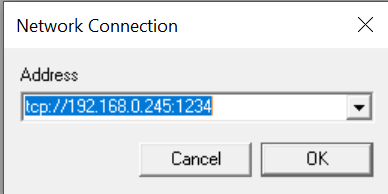
Having a TCP Port open on Tasmota that allow me to send/read Serial commands would allow me to remotely debug GPS Module (and others aswell if needed in the future or for someone else).
(Please, remember to close the issue when the problem has been addressed)
 SeLLeRoNe
All 18 comments
I think this would be quite useful too.
 wvdv2002
on 8 Jan 2020
wvdv2002
on 8 Jan 2020
Take a look at https://tasmota.github.io/docs/#/Commands?id=serial-bridge
Use 2 wemos mini. On one is the GPS unit connected (transmitter) the second is connected
to your PC (receiver)
 Jason2866
on 8 Jan 2020
Jason2866
on 8 Jan 2020
I took a look at that now for the 3rd time since I started to check if this remote connection was possible.
As far as I can see I cannot specify MQTT Topic where to send (or where to receive from) those serial data nor anywhere where to set a remote IP (for the receiver to got the data) for the D1 Mini.
To be honest I am not sure how that's supposed to work, the docs aren't that clear in that matter (please note, it can also be simply me not understanding them the way they were intended)
SeLLeRoNe
on 8 Jan 2020
Take a look at https://tasmota.github.io/docs/#/Subscribe-&-Unsubscribe?id=subscribe
subscribe device 2 to device 1
Jason2866
on 8 Jan 2020
I tried your way and so far I am stuck on sending the serial data to MQTT because it requires a string, and I don't have one (as far as I understood).
But meanwhile I found also another ESP8266 project that does exactly this in few lines of code, which in my opinion should be fairly simple to implement).
If interested it is here: https://raw.githubusercontent.com/roboremo/ESP8266-WiFi-UART-Bridge/master/v1.1/sketch_esp_WiFi_UART_Bridge.ino
SeLLeRoNe
on 8 Jan 2020
I will give it a try. Maybe we can get away with very few additional code.
 Staars
on 9 Jan 2020
Staars
on 9 Jan 2020

I must admit, that this is somehow entertaining 😁
This did work the first time and I shortened the code example even more. What I would like to figure out is, how big the buffer has to be.
Currently this is implemented as an additional command to the GPS-driver, but there is nothing u-blox-specific in this part of the code. So every serial device could be tested with it.
For me that means two options:
1) add this to the GPS-driver (it could be easily re-factored out to option 2 later)
2) create a stand-alone virtual-port-driver with extra gpio-pins. I have no idea for real-world-use-cases for this ATM.
Some notes:
The function is tested for 5 minutes now, so further testing is definitely necessary.
There are no functions to deal with time outs, packet losses and what not.
Ideas welcome ...
Staars
on 10 Jan 2020
ahah that's great! Is it already inside the master repo so that I can try it aswell?
I would say that this is gonna work with way more things rather just GPS, so my suggestion would bve to have it by default and activable via console commands (with default behaviour to deactivate upon retart unless some other configuration is enabled to have it to "start on boot")
I would also say that, still if possible, another configurable option via console might be the port where to listen to.
If I have additional idea I'll post them ;)
In the meantime, thanks!
SeLLeRoNe
on 10 Jan 2020
Out of curiosity, did you set the PIN to GPS RX/TX or SerialRX/TX?
Becuase I was thinking, maybe if the pins are set to GPS RX/TX it can still send those serial commands even if it's not sending them to the console.
This will allow to have it working as a normal gps module, with the ability to remotely connect to it via u-centre to see specific info (this is just an example).
So far, the only way to have this working with u-centre when I was connected via USB was to set them to Serial rather than GPS.
Unless I did something wrong of course :)
SeLLeRoNe
on 10 Jan 2020
If want to test it, here is the hot-needle-version:
https://gist.github.com/Staars/3eda49fbf1a3c27a887f60084e76c8af
sensor60 14 will start the virtual port (port:1234).
I did not even implement a deactivation command yet -> you must restart for now.
Keep in mind, that for a stand-alone-driver individual pins must be (re-)assigned, because it is not trivial to figure out, which serial device is currently connected in order to re-use the pins of that device for the virtual port. That way you would have to change GPS_RX to something like VPORT_RX and so on, then restart to hand over to the individual virtual port driver.
For now I would suggest to add this function to the GPS-driver, but first please test, if this does work at all for you.
Staars
on 10 Jan 2020
You must use the GPS-pins.
Staars
on 10 Jan 2020
I am not sure what do you mean by "You must use the GPS-pins", you mean the RX/TX on the D1 Mini or select GPS RX/TX in the dropdown inside the module configuration?
Also, and this is probably a stupid question, do I have to take that file in the tasmota folder (replacing any file?) or simply create a new sketch just with that file?
I have actually tried both but it fails to compile on each scenario.
When adding this single file to the tasmtoa sketch it says "TasmotaSerial does not name a type".
Any help appreciated :)
SeLLeRoNe
on 10 Jan 2020
Okay, let's move to discord for this. I will contact you (later).
Staars
on 10 Jan 2020
So, I did test it a bit and I found some miss-behaviour:
1 - If I disable the VCOM Port (sensor60 15) and I enable it back (sensor60 14) I don't receive serial data
2 - If I restart from UI the device and I enable VCOM (sensor60 14) I stil don't see serial data, but the odd thing is that I do have a fix already, so that might be somehow causing the issue (?) (having data on the local UI I ean, odd but worth a check).
Additional note: I've noticed that in u-centre I can see the coordinates correctly "retrievered", but no information about satellites nor text console (for serial output) is received.
For future impovments:
1 - The GPS data should be shown in the UI even if the VCOM is enabled, so that MQTT implementation keep working even if "someone" is connected for debug via VCOM
So at right now, since I had it working and disabled the VCOM, I can re-enable the VCOM, connect to it, see the coordiantes but no serial "log" nor satellites informations are incoming.
I tried also to power cycle the all thing, but it gets a fixture too quickly now that by the time I connect is already too late.
I will try to bring it back inside now to see if not having a fix helps :)
SeLLeRoNe
on 10 Jan 2020
Ok confirmed, if it doesn't get a fix, it send the serual data as soon as you enable the VCOM, if it does have a fix before you issue the "sensor60 14" command, it will enable the VCOM but will not send serial info, only GPS coordiantes (not visible in text console but visible in the U-Centre information graphs)
SeLLeRoNe
on 10 Jan 2020
I tried my "old" D1 Mini with the NEO-6M and with this (of course I did push the new "update") I cannot manage to have serial data at all, I can connect, I receive the GPS coordiantes (invalid because of no fix), but I don't have any serial text nor satellite showing up, as it was doing with the other D1 Mini with Neo-7M with a fix.
SeLLeRoNe
on 10 Jan 2020
Back to the 7M, apparently now I can connect even after it did get a fix and see the satellites, not the serial details still, but at least it does show an error:
16:02:34 ERROR: txbuf alloc
SeLLeRoNe
on 10 Jan 2020
Closing this issue as it has been added.
 ascillato2
on 18 Jan 2020
ascillato2
on 18 Jan 2020
Related issues
 he-so
·
3Comments
he-so
·
3Comments
 smadds
·
3Comments
smadds
·
3Comments
 abzman
·
3Comments
abzman
·
3Comments
 Ndrinta
·
3Comments
Ndrinta
·
3Comments
 Joeyhza
·
3Comments
Joeyhza
·
3Comments