I2C device "PCF8574" is working generally, all Ports are configured as output:

- power1-7 work fine
- power8 has no function (on the console I see the change, but the relais is not responding)
- power0 acting on all relais (1-7 - not 8)
so Relais 8 cannot be triggered.

Tried on 6.7.1 and currently running dev. 7.0.0.1
- [x] Searched the problem in issues
- [x] Searched the problem in the wiki
- [x] Searched the problem in the forum
- [x] Searched the problem in the chat
- [x] Device used (e.g., Sonoff Basic): wemos D1 mini
- [x] Tasmota binary firmware version number used: 7.0.0.1
- [x] Self-compiled
- [x] IDE / Compiler used: Arduino 1.8.10 / esp8266 V2.3.0
- [x ] Flashing tools used: Arduino 1.8.10
- [x] Provide the output of command:
Backlog Template; Module; GPIO:
16:30:19 MQT: SmartHome/Garten/stat/ESP-RELAIS-8X-01/RESULT = {"NAME":"Generic","GPIO":[255,255,255,255,255,255,255,255,255,255,255,255,255],"FLAG":15,"BASE":18}
16:30:19 MQT: SmartHome/Garten/stat/ESP-RELAIS-8X-01/RESULT = {"Module":{"18":"Generic"}}
16:30:19 MQT: SmartHome/Garten/stat/ESP-RELAIS-8X-01/RESULT = {"GPIO0":{"0":"None"},"GPIO1":{"0":"None"},"GPIO2":{"0":"None"},"GPIO3":{"0":"None"},"GPIO4":{"0":"None"},"GPIO5":{"0":"None"},"GPIO12":{"5":"I2C SCL"},"GPIO13":{"0":"None"},"GPIO14":{"6":"I2C SDA"},"GPIO15":{"0":"None"},"GPIO16":{"0":"None"}}
Configuration output here:
- [x] Provide the output of this command:
Status 0:
STATUS 0 output here:
6 MQT: SmartHome/Garten/stat/ESP-RELAIS-8X-01/STATUS = {"Status":{"Module":18,"FriendlyName":["ESP-RELAIS-8X-01","ESP-RELAIS-8X-012","ESP-RELAIS-8X-013","ESP-RELAIS-8X-014"],"Topic":"ESP-RELAIS-8X-01","ButtonTopic":"0","Power":0,"PowerOnState":3,"LedState":1,"LedMask":"FFFF","SaveData":1,"SaveState":1,"SwitchTopic":"0","SwitchMode":[0,0,0,0,0,0,0,0],"ButtonRetain":0,"SwitchRetain":0,"SensorRetain":0,"PowerRetain":0}}
16:32:36 MQT: SmartHome/Garten/stat/ESP-RELAIS-8X-01/STATUS1 = {"StatusPRM":{"Baudrate":115200,"GroupTopic":"tasmotas","OtaUrl":"http://192.168.1.1/sonoff.bin","RestartReason":"Software/System restart","Uptime":"0T00:15:58","StartupUTC":"2019-10-27T15:16:38","Sleep":50,"CfgHolder":4617,"BootCount":7,"SaveCount":50,"SaveAddress":"3FA000"}}
16:32:36 MQT: SmartHome/Garten/stat/ESP-RELAIS-8X-01/STATUS2 = {"StatusFWR":{"Version":"7.0.0.1(tasmota)","BuildDateTime":"2019.10.27 16:11:47","Boot":31,"Core":"2_4_1","SDK":"2.2.1(cfd48f3)"}}
16:32:36 MQT: SmartHome/Garten/stat/ESP-RELAIS-8X-01/STATUS3 = {"StatusLOG":{"SerialLog":2,"WebLog":2,"MqttLog":0,"SysLog":0,"LogHost":"192.168.1.1","LogPort":514,"SSId":["WLAN","WLAN2"],"TelePeriod":300,"Resolution":"558180C0","SetOption":["00008009","2805C8000100060000005A00000000000000","80000000"]}}
16:32:36 MQT: SmartHome/Garten/stat/ESP-RELAIS-8X-01/STATUS4 = {"StatusMEM":{"ProgramSize":446,"Free":2624,"Heap":9,"ProgramFlashSize":4096,"FlashSize":4096,"FlashChipId":"164020","FlashMode":2,"Features":["00000407","0F002186","000083A0","00000085","000000C0","00000200"],"Drivers":"1,2,3,4,9,10,16,28","Sensors":"1,2,3,6"}}
16:32:36 MQT: SmartHome/Garten/stat/ESP-RELAIS-8X-01/STATUS5 = {"StatusNET":{"Hostname":"ESP-RELAIS-8X-01","IPAddress":"192.168.3.111","Gateway":"192.168.1.250","Subnetmask":"255.255.252.0","DNSServer":"192.168.1.3","Mac":"EC:00:00:00:D8:31","Webserver":2,"WifiConfig":4}}
16:32:36 MQT: SmartHome/Garten/stat/ESP-RELAIS-8X-01/STATUS6 = {"StatusMQT":{"MqttHost":"192.168.1.197","MqttPort":1883,"MqttClientMask":"ESP-RELAIS-8X-01","MqttClient":"ESP-RELAIS-8X-01","MqttUser":"USER","MqttCount":1,"MAX_PACKET_SIZE":1000,"KEEPALIVE":30}}
16:32:36 MQT: SmartHome/Garten/stat/ESP-RELAIS-8X-01/STATUS7 = {"StatusTIM":{"UTC":"Sun Oct 27 15:32:36 2019","Local":"Sun Oct 27 16:32:36 2019","StartDST":"Sun Mar 31 02:00:00 2019","EndDST":"Sun Oct 27 03:00:00 2019","Timezone":"+01:00","Sunrise":"07:10","Sunset":"17:09"}}
16:32:36 MQT: SmartHome/Garten/stat/ESP-RELAIS-8X-01/STATUS10 = {"StatusSNS":{"Time":"2019-10-27T16:32:36"}}
16:32:36 MQT: SmartHome/Garten/stat/ESP-RELAIS-8X-01/STATUS11 = {"StatusSTS":{"Time":"2019-10-27T16:32:36","Uptime":"0T00:15:58","UptimeSec":958,"Heap":9,"SleepMode":"Dynamic","Sleep":50,"LoadAvg":19,"MqttCount":1,"POWER1":"OFF","POWER2":"OFF","POWER3":"OFF","POWER4":"OFF","POWER5":"OFF","POWER6":"OFF","POWER7":"OFF","POWER8":"OFF","Wifi":{"AP":1,"SSId":"WLAN","BSSId":"E0:00:00:00:83:DE","Channel":12,"RSSI":70,"LinkCount":1,"Downtime":"0T00:00:09"}}}
would be great to have all 8 Relais working!
Thanks in common!
BR
Seq
EXPECTED BEHAVIOUR
_A clear and concise description of what you expected to happen._
SCREENSHOTS
_If applicable, add screenshots to help explain your problem._
ADDITIONAL CONTEXT
_Add any other context about the problem here._
(Please, remember to close the issue when the problem has been addressed)
 Sequenzial
All 21 comments
This core is NOT supported
16:32:36 MQT: SmartHome/Garten/stat/ESP-RELAIS-8X-01/STATUS2 = {"StatusFWR":{"Version":"7.0.0.1(tasmota)","BuildDateTime":"2019.10.27 16:11:47","Boot":31,"Core":"2_4_1","SDK":"2.2.1(cfd48f3)"}}
Please compile with Core Pre 2.6. See wiki how to use in Arduino IDE https://github.com/arendst/Tasmota/wiki/Arduino-IDE
 Jason2866
on 27 Oct 2019
Jason2866
on 27 Oct 2019
Have you tried power0 ?
 andrethomas
on 27 Oct 2019
andrethomas
on 27 Oct 2019
Yes, power0 switches all (1-7) relais, except 8.
... and yes the relais is ok ;-)
I´ll try compiling with vsc -> pre 2.6.
Sequenzial
on 27 Oct 2019
Ok, I have compiled the firmware using Visual Studio Code with Core PRE 2.6
Now all 8 relais work fine.
Thanks for the support!
BR
Seq
Sequenzial
on 27 Oct 2019
if i am using it as input instead of output.. how to know the status of the pin. thanks in advance
 yogesh102011
on 23 Jan 2020
yogesh102011
on 23 Jan 2020
if i make all 8 as output..its working fine with relay. but one problem i am facing is if all the 8 relays are on.. while restarting none of the relay is in onstate. but in web interface it show all are on. if i off one relay all are getting on except the one which is off
yogesh102011
on 23 Jan 2020
How did you set the PCF8574 up ? I can see it with i2cscan. But I found nothing in the docs and can not control it.
 ITTV-tools
on 1 Mar 2020
ITTV-tools
on 1 Mar 2020
When you got a firmware with PCF8574 integrated (no in these you can download), you have to set SDC and SDA to the correct GPIOS (those they are connected to).
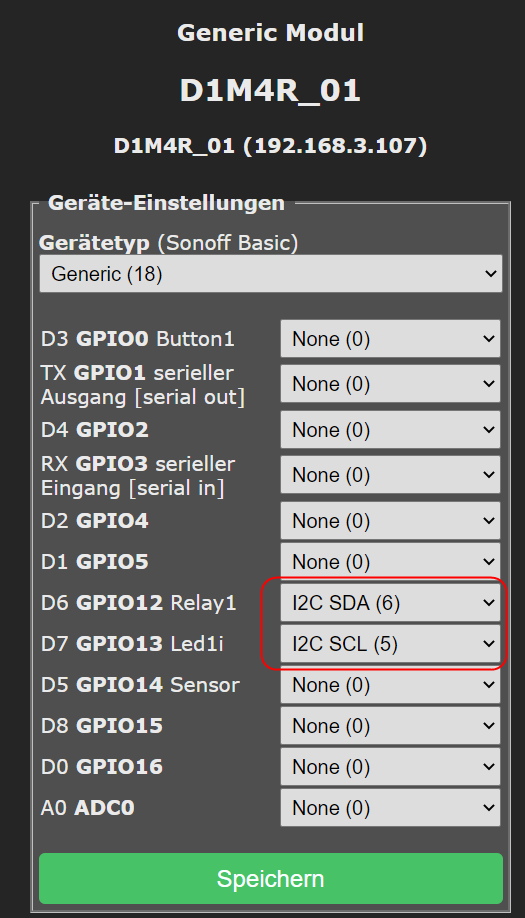
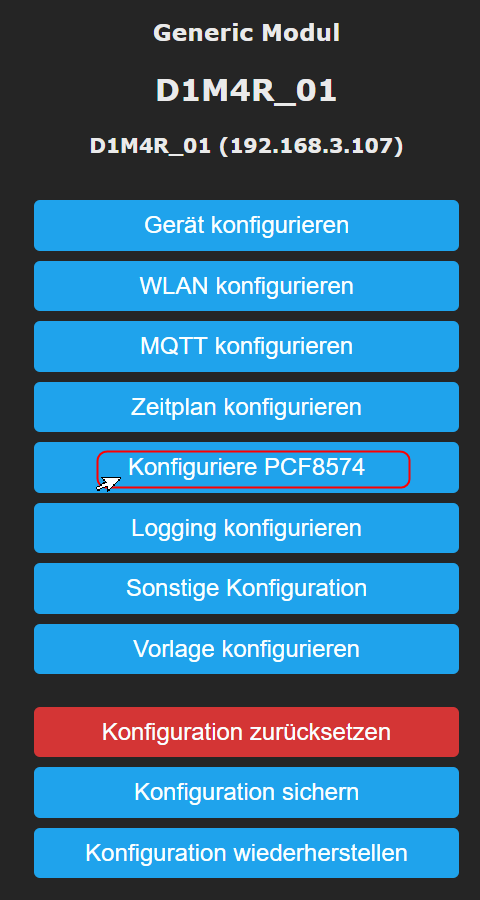
When everything is correct, you will get an extra option under settings:
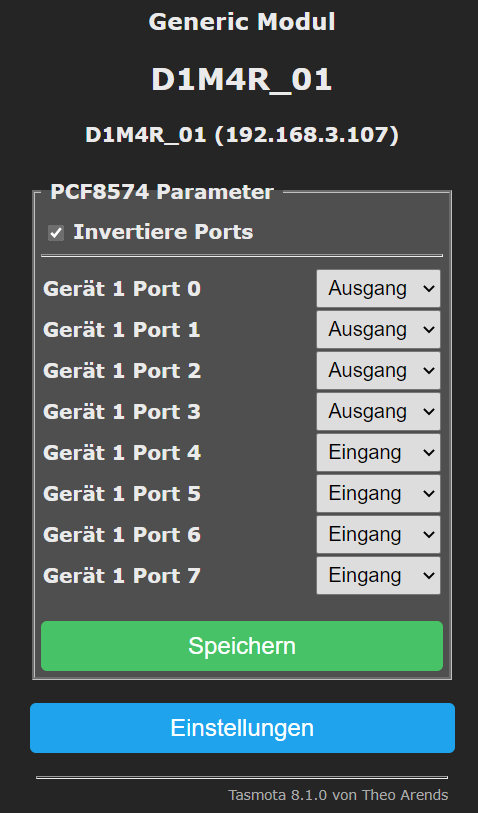
where you can define if the ports are IN- or OUT-Put (for each):
That´s it. The Output ports are shown as regular ports:
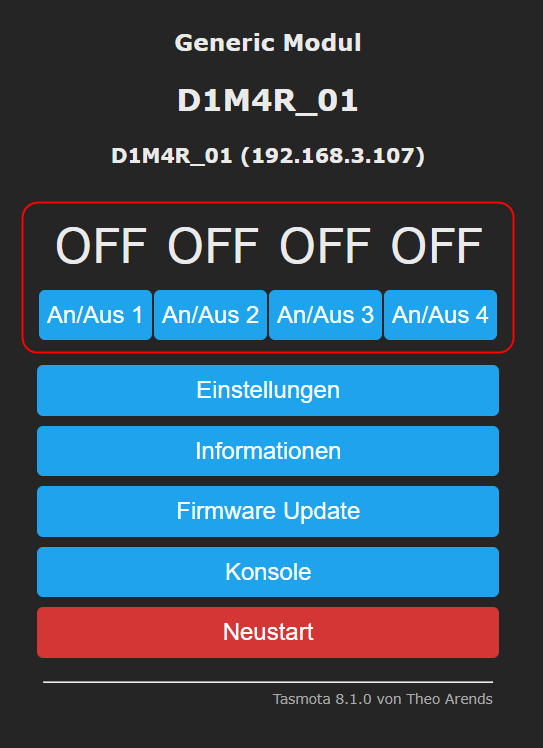
Inputs I did not use yet.
Sequenzial
on 1 Mar 2020
(sorry I only have the german interface available in the pictures ...)
Sequenzial
on 1 Mar 2020
german is fine :) The changelog says there is support for this chip. I would compile it myself but I don’t know what to add it in „user_config_override“ for example. How have you done it ? Or wich firmware have you used ?
ITTV-tools
on 1 Mar 2020
Just remove the //
#define USE_PCF8574 // [I2cDriver2] Enable PCF8574 I/O Expander (I2C addresses 0x20 - 0x26 and 0x39 - 0x3F) (+1k9 code)

Then you can use it.
Sequenzial
on 1 Mar 2020
https://github.com/arendst/Tasmota/wiki/Prerequisites
https://github.com/arendst/Tasmota/wiki/Hardware-preparation
I personally still use Arduino IDE, because I get usable results.
Sequenzial
on 1 Mar 2020
--- > The changelog says there is support for this chip.
I assume the i2c protocoll can see a device, but if the firmware does not contain the correct driver, it won´t work.
You have to compile a firmware yourself or get an modified version somewhere.
Sequenzial
on 1 Mar 2020
I have compiled the "basic 8.1" and enabled MCP230xx and PCF8574
tasmota_8.1_MCP230xx+PCF8574.zip
With 600 kb it is pretty big, so you need to flash an minimal firmware first.
Sequenzial
on 1 Mar 2020
thanks
ITTV-tools
on 2 Mar 2020
Hi guys, im experimenting with this but i found unreliable the operation. First, when esp8266 boots it briefly pulls high all pcf8574 pins high. Then, if i power on off a pin from webui or console, sometimes doesnt really do anything. My 3rd problem is that i cannot use the pins as inputs. Has any of you had these problems?
 KostasHelsinki
on 21 Jun 2020
KostasHelsinki
on 21 Jun 2020
I am also interested in using some of the pins in PCF8574 as inputs. Any ideas?
 alxferraz
on 27 Jun 2020
alxferraz
on 27 Jun 2020
Anybody please post how to use PCF8574 as input?
 kumaran512
on 22 Aug 2020
kumaran512
on 22 Aug 2020
Dear All,
please share information how to check the state of PCF8574 as input
 snaiperr
on 12 Sep 2020
snaiperr
on 12 Sep 2020
I have compiled the "basic 8.1" and enabled MCP230xx and PCF8574
tasmota_8.1_MCP230xx+PCF8574.zip
With 600 kb it is pretty big, so you need to flash an minimal firmware first.
Could you please confirm if I should first firmware the ESP with tasmota-minimal.bin (from i.e. http://thehackbox.org/tasmota/release/) and after that firmware with file from you?
Is it Ok to use first 8.5.0 (minimal) and that 8.1.0 (tasmota_8.1_MCP230xx+PCF8574)?
 1Ombree
on 5 Oct 2020
1Ombree
on 5 Oct 2020
Could you please confirm if I should first firmware the ESP with tasmota-minimal.bin (from i.e. http://thehackbox.org/tasmota/release/) and after that firmware with file from you?
yes, minimal first then the other one.
Is it Ok to use first 8.5.0 (minimal) and that 8.1.0 (tasmota_8.1_MCP230xx+PCF8574)?
I suggest you get and flash the minimal 8.1 and then flash the other 8.1 one.
Or: create a fresh image.
At all it is not too difficult to compile it yourself (eg. running on 8.5).
I am not a programmer and just followed the instructions on the wiki.
Then use the minimal 8.5 and your fresh compiled image.
Sequenzial
on 6 Oct 2020
Related issues
 kckepz
·
3Comments
kckepz
·
3Comments
 Joeyhza
·
3Comments
Joeyhza
·
3Comments
 belidzs
·
3Comments
belidzs
·
3Comments
 jensuffhaus
·
3Comments
jensuffhaus
·
3Comments
 Vujagig
·
3Comments
Vujagig
·
3Comments
Most helpful comment
Hi guys, im experimenting with this but i found unreliable the operation. First, when esp8266 boots it briefly pulls high all pcf8574 pins high. Then, if i power on off a pin from webui or console, sometimes doesnt really do anything. My 3rd problem is that i cannot use the pins as inputs. Has any of you had these problems?