Tasmota: Houzetek AWP07L Smart WiFi Plug
I just bought this nice and compact Smart Plug with Energy Meter on Amazon.
There is the app for Android/iOS but I'll love to flash Tasmota to make it works with all my Sonoff/Node Red system.
This is the website:
https://www.houzetek.com/product-awp07l-smart-wifi-plug-eu1
Amazon Link:
https://www.amazon.it/Intelligente-Houzetek-programmabile-Telecomando-casaPresa/dp/B07FNQNQYD
Unluckily, as you can see in the pictures of the board, there is no indication sign for programming the plug.
Any idea?
Thanks.
Sandro.


 xenio
xenio
All 30 comments
Hi,
Seems difficult, but to flash Tasmota you will need to solder wires there.
If you want to do that, then you will need to figure out which GPIOs are being used. You can set module Generic to test it.
Thanks.
 ascillato2
on 6 Nov 2018
ascillato2
on 6 Nov 2018
Someone posted a "pinout" at google groups:
https://groups.google.com/forum/#!msg/sonoffusers/v0hEUKN5hpQ/jhW3NKIvAAAJ
 hwacookie
on 30 Nov 2018
hwacookie
on 30 Nov 2018
Thank, very helpful.
Anyway I destroyed one of my smart plug and I've go all the pins on the back. :)
Esp8266 back picture and link to a similar board datasheet ESP8266-S1
https://fccid.io/2AKBPESP8266/User-Manual/User-Manual-3192780

xenio
on 1 Dec 2018
Thank, very helpful.
Anyway I destroyed one of my smart plug andi I've go all the pins on the back. :)Esp8266 back picture and link to a similar board datasheet ESP8266-S1
https://fccid.io/2AKBPESP8266/User-Manual/User-Manual-3192780
hi bottom photo for power meter installed ??
HLW8012 ???
 oremic
on 15 Mar 2019
oremic
on 15 Mar 2019
@xenio Where you able to flash it with Tasmota?
Thanx!
 seritos
on 15 Mar 2019
seritos
on 15 Mar 2019
@seritos Yes, I've got a second plug and soldered the pins to flash it with tasmota.
I think the original firmware is Tuya, there is a way to flash it over the air without opening it. Just check "digiblurDIY" video on YouTube.
xenio
on 15 Mar 2019
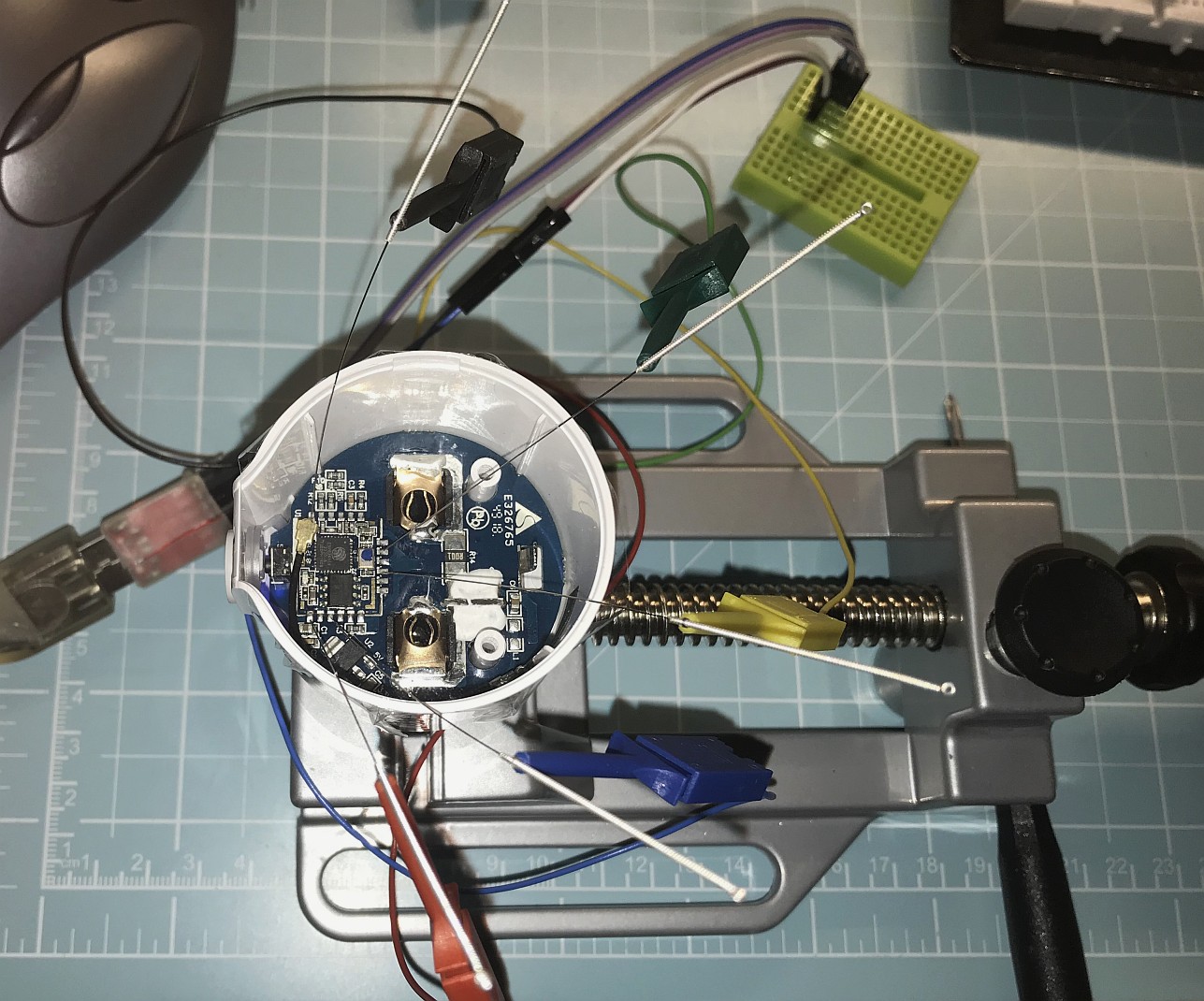
I can recommend "Traditional Chinese Flashing" with this plugs.
Stick some tesa-film over open device and place acupuncture needles trough the film to the pins.
Works great for me. No soldering needed.
 JoeLoginIsAlreadyTaken
on 20 Mar 2019
JoeLoginIsAlreadyTaken
on 20 Mar 2019
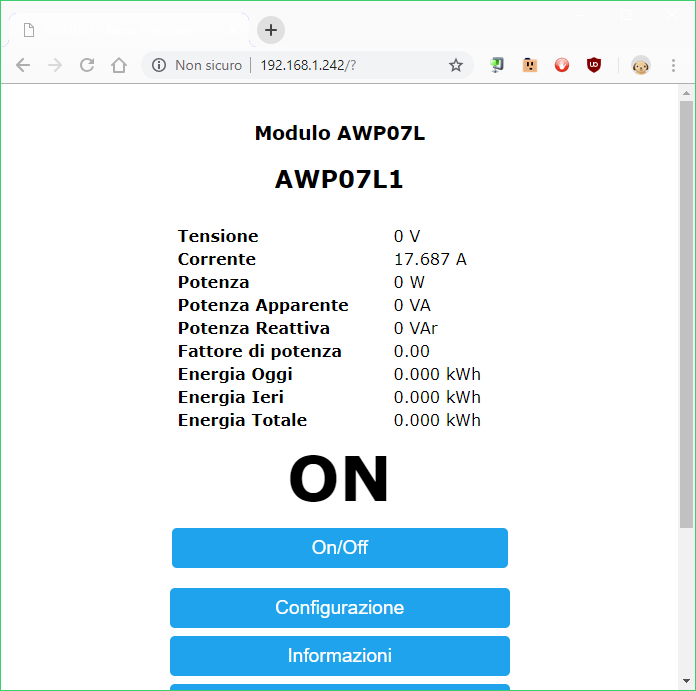
can i reopen this or have to do a new one? i just flashed this via tuya-convert, all fine, there's also a template on https://blakadder.github.io/templates/avatar.html but the device seems not getting voltage readings...
11:35:13 CMD: status 0
11:35:13 RSL: STATUS = {"Status":{"Module":0,"FriendlyName":["AWP07L1"],"Topic":"sonoff","ButtonTopic":"0","Power":1,"PowerOnState":3,"LedState":1,"SaveData":1,"SaveState":1,"SwitchTopic":"0","SwitchMode":[0,0,0,0,0,0,0,0],"ButtonRetain":0,"SwitchRetain":0,"SensorRetain":0,"PowerRetain":0}}
11:35:13 RSL: STATUS1 = {"StatusPRM":{"Baudrate":115200,"GroupTopic":"sonoffs","OtaUrl":"http://thehackbox.org/tasmota/release/sonoff-IT.bin","RestartReason":"Software/System restart","Uptime":"0T00:02:47","StartupUTC":"2019-03-23T10:32:26","Sleep":50,"CfgHolder":4617,"BootCount":3,"SaveCount":14,"SaveAddress":"F6000"}}
11:35:13 RSL: STATUS2 = {"StatusFWR":{"Version":"6.5.0(release-sonoff)","BuildDateTime":"2019-03-19T12:35:37","Boot":4,"Core":"2_3_0","SDK":"1.5.3(aec24ac9)"}}
11:35:13 RSL: STATUS3 = {"StatusLOG":{"SerialLog":2,"WebLog":2,"SysLog":0,"LogHost":"","LogPort":514,"SSId":["Shark-HOME2","SharkAzzo2"],"TelePeriod":300,"Resolution":"55A180C0","SetOption":["00008001","280500000100000000000000000000000000","00000000"]}}
11:35:13 RSL: STATUS4 = {"StatusMEM":{"ProgramSize":508,"Free":492,"Heap":13,"ProgramFlashSize":1024,"FlashSize":1024,"FlashChipId":"144068","FlashMode":3,"Features":["00000410","0FDAE394","000783A0","23B617CE","00003BC0"]}}
11:35:13 RSL: STATUS5 = {"StatusNET":{"Hostname":"sonoff-7009","IPAddress":"192.168.1.242","Gateway":"192.168.1.1","Subnetmask":"255.255.255.0","DNSServer":"192.168.1.1","Mac":"CC:50:E3:2C:BB:61","Webserver":2,"WifiConfig":4}}
11:35:13 RSL: STATUS7 = {"StatusTIM":{"UTC":"Sat Mar 23 10:35:13 2019","Local":"Sat Mar 23 11:35:13 2019","StartDST":"Sun Mar 31 02:00:00 2019","EndDST":"Sun Oct 27 03:00:00 2019","Timezone":"+01:00","Sunrise":"06:47","Sunset":"19:06"}}
11:35:13 RSL: STATUS9 = {"StatusPTH":{"PowerDelta":80,"PowerLow":0,"PowerHigh":0,"VoltageLow":0,"VoltageHigh":0,"CurrentLow":0,"CurrentHigh":0}}
11:35:13 RSL: STATUS10 = {"StatusSNS":{"Time":"2019-03-23T11:35:13","ENERGY":{"TotalStartTime":"2019-03-23T11:26:54","Total":0.000,"Yesterday":0.000,"Today":0.000,"Power":1,"ApparentPower":2,"ReactivePower":2,"Factor":0.40,"Voltage":0,"Current":17.660}}}
11:35:13 RSL: STATUS11 = {"StatusSTS":{"Time":"2019-03-23T11:35:13","Uptime":"0T00:02:47","Vcc":3.226,"SleepMode":"Dynamic","Sleep":50,"LoadAvg":19,"POWER":"ON","Wifi":{"AP":1,"SSId":"Shark-HOME2","BSSId":"C4:EA:1D:0C:19:51","Channel":8,"RSSI":88,"LinkCount":1,"Downtime":"0T00:00:04"}}}
 fragolinux
on 23 Mar 2019
fragolinux
on 23 Mar 2019
Hi, for support, please use the Tasmota support chat. Github issues are for Tasmota Software Bug reporting with the template completed. Thanks
 ascillato
on 23 Mar 2019
ascillato
on 23 Mar 2019
Hi, for support, please use the Tasmota support chat. Github issues are for Tasmota Software Bug reporting with the template completed. Thanks
sorry, i thought it was best here where answers can be searched by others, too, and someone can read even after time, while in chat the support request is soon passed by other comments... ok, i'll go there, anyway, thanks :)
fragolinux
on 23 Mar 2019
i thought it was best here where answers can be searched by others
We understand, but after trying a lot of ways of organizing issues and for providing a better support, we end up moving support for general questions and usage to the Tasmota Support Chat. The chat is a better and more dynamic channel for helping you. Github issues are meant for Tasmota Software Bug Reporting.
Please check the Contributing Guideline and Policy and the Support Guide.
Thanks.
Support Information
See Wiki for more information.
See Chat for more user experience.
See Community for forum.
See Code of Conduct
ascillato2
on 23 Mar 2019
thanks, solved thanks to chat, this is the correct template:
{"NAME":"AWP07L","GPIO":[56,255,255,130,255,134,255,255,0,17,132,21,255],"FLAG":0,"BASE":18}

fragolinux
on 23 Mar 2019
acupuncture needles
I can recommend "Traditional Chinese Flashing" with this plugs.
Stick some tesa-film over open device and place acupuncture needles trough the film to the pins.
Works great for me. No soldering needed.
Thanks for the picture.
I see 5 needles, I understand the four I named in the picture, what is the fifth for?

I've tried the tuya.convert, but something went wrong and now the plug seems to be dead.
So now I would like to try to load tasmota on it...
 woody4165
on 24 Mar 2019
woody4165
on 24 Mar 2019
Hi woody4165!
If you compare the pin position with the image from the back, is that ??? Pin labeled IO0. I suspect that this must be set to Ground as with other ESP chips to enter the flash mode...
 markushl
on 28 Mar 2019
markushl
on 28 Mar 2019
Thanks, luckily I've rescued the smart plug using a Proxmox installation of Tuya Convert, so without opening it.
woody4165
on 31 Mar 2019
I used tuya-convert to install Tasmota on this plug but I experience repeated clicks and reboots. I used the following template: {"NAME":"AWP07L","GPIO":[56,255,255,255,255,134,255,255,130,17,132,21,255],"FLAG":1,"BASE":18}
I tried to reflash firmware OTA (even sonoff-basic) without any luck.
Any suggestion?
 stepic
on 17 Apr 2019
stepic
on 17 Apr 2019
Hi stepic,
I successfully use the following template (go to Configure Template):

markushl
on 17 Apr 2019
Hi stepic,
I successfully use the following template (go to Configure Template):
I have the same template and it keeps turning off/on
stepic
on 17 Apr 2019
Do you have second SSID defined?
woody4165
on 17 Apr 2019
I have no secondary SSID defined
Il Mer 17 Apr 2019, 13:31 woody4165 notifications@github.com ha scritto:
Do you have second SSID defined?
—
You are receiving this because you commented.
Reply to this email directly, view it on GitHub
https://github.com/arendst/Sonoff-Tasmota/issues/4289#issuecomment-484045429,
or mute the thread
https://github.com/notifications/unsubscribe-auth/AAovB-julbXrty_pX_KsYgjSm24-EIkTks5vhwX9gaJpZM4YQAJo
.
stepic
on 17 Apr 2019
Does anyone has the original Firmware of this plug? I think I have broken it when flashing it... I would like to download the original firmware and see if I have any chance of recovering it.
Thanx!
seritos
on 9 Dec 2019
The original firmware is linked to the mac address of your device. Using other people's firmware will make theirs to disconnect from the APP and from the cloud and yours will behave the same. That is why, it is recommended to backup your firmware before uploading any alternative firmware.
ascillato
on 9 Dec 2019
Thanx @ascillato2 for your answer.
I have a problem with this device. It only supports Tasmota. If I try to upload the thirdparty bin from the tuya ( via cable ) HAA from Ranvecore or any other alternative FW except tasmota it doesn't work.
Do you know if it has been done something special to make this device compatible? Would be awesome to know to transfer it to other alternative FW.
Thx!
seritos
on 15 Dec 2019
I don't know those firmware, sorry. You should ask them how to flash those firmwares.
ascillato
on 15 Dec 2019
@ascillato2, the fact is more if it has been something changes in the tasmota FW to make it compatible.
thanx
seritos
on 15 Dec 2019
No, there isn't. The serial flashing process is more less the same for all firmwares. But, It is a must to erase before flashing.
ascillato
on 15 Dec 2019
thanks, solved thanks to chat, this is the correct template:
{"NAME":"AWP07L","GPIO":[56,255,255,130,255,134,255,255,0,17,132,21,255],"FLAG":0,"BASE":18}
Looking at your values this doesn't really seems to work? I tried it with my recently bought Avatar AWP07L and it does not work.. Voltage seems ok but the Rest is not. Current just stays to whatever i calibrate it.. and POwer works quite ok before cailbration and after only for the calibrated load and no other :( :(
 muhkuhgh
on 13 Jan 2020
muhkuhgh
on 13 Jan 2020
The original firmware is linked to the mac address of your device. Using other people's firmware will make theirs to disconnect from the APP and from the cloud and yours will behave the same. That is why, it is recommended to backup your firmware before uploading any alternative firmware.
Hi, I bought a new one. Sam model. I would like to make a backup, but I don't know te commands to proceed. Any recommendation?
I have this one, but I don't know if its correct:
esptool.py --port /dev/tty.usbserial-00000000 read_flash 0x00000 0x100000 backup.bin
Should I change the address if I unknown the memory size?
Thanks
Thank
seritos
on 2 Feb 2020
Check the flashing article in the Tasmota docs - http://tasmota.com
 meingraham
on 2 Feb 2020
meingraham
on 2 Feb 2020
Check the flashing article in the Tasmota docs - http://tasmota.com
great, thnx
seritos
on 2 Feb 2020
Related issues
 garret
·
3Comments
garret
·
3Comments
 jensuffhaus
·
3Comments
jensuffhaus
·
3Comments
 renne
·
3Comments
renne
·
3Comments
 esp32x
·
3Comments
esp32x
·
3Comments
 luisfpinto
·
3Comments
luisfpinto
·
3Comments
Most helpful comment
I can recommend "Traditional Chinese Flashing" with this plugs.
Stick some tesa-film over open device and place acupuncture needles trough the film to the pins.
Works great for me. No soldering needed.