Tasmota: Need new feature: minimum switch press time
Hello, after a few weeks of torment and tinkering i am kindly asking for a feature to be implemented.
What i see is missing is a modifier for any switchmode to have a minimum time required for button to be pressed.
My problem is long wires for sonoff switch attached to GND and GPIO14 are picking up interference. I added a pullup resistor, a small capacitor and a ferite bead. It helped my issie 90% but i still get flickering. (I have no way of separating cables from AC lines or using shielded or twisted cables)
So i think the best solution would be to add a minimum time to switch so the momentary interference switching doesnt triger a state change.
Thank You.
 Argo8
Argo8
All 42 comments
Like many requests, this is not the first time it has been requested.
https://github.com/arendst/Sonoff-Tasmota/wiki/Commands
SetOption32
 Frogmore42
on 25 Aug 2018
Frogmore42
on 25 Aug 2018
Thank you for quick response,
I was under the impression that SetOption32 controls "hold" time which is a part of switchmode 5 and 6 with switchtopic1. I tried it nonetheless and i stil can switch on instantly... correct me if i am wrong, i hope i am.
Argo8
on 26 Aug 2018
@Argo8 you are correct. There is a feature for counters to set the minimum time the state must be held, but it does not appear to be implemented for switches or buttons.
Frogmore42
on 26 Aug 2018
So my request still stands.
I searched all over and there are so many people with flickering problem, and the solution is so simple...
Argo8
on 26 Aug 2018
Minimum switch debounce time now is 50mS.
You might want to try 100mS by moving line 1904 to 1855 in sonoff.ino
 arendst
on 26 Aug 2018
arendst
on 26 Aug 2018
So i need to reflash the sonoff?
Argo8
on 26 Aug 2018
Yes, that's the idea to let me know if that satisfies your situation.
If successful I'll move the debounce (back) to 100mS
arendst
on 26 Aug 2018
Is there any way to do this over the air? My sonoffs are all buried in a wall boxes and its far too much work to take them out and back in. I have 11 sonoffs and most are flickering.
Argo8
on 26 Aug 2018
See the wiki.
Coarse steps are:
- Recompile the code with the changes suggested
- Open the webpage on a device and select Firmware Upgrade
- Select option Upgrade by file upload and choose the newly compiled version
- The device will upload and restart
Before you do this it's wise to provide the output of command status 0 first as was requested when you opened this issue. It may provide important information which may lead to extra steps to take before you can upload the new firmware.
arendst
on 26 Aug 2018
Oh, thank you very much... what if i want to make it 500ms?
Here is status 0 of one of them:
10:48:48 CMD: Status 0
10:48:48 MQT: stat/sonoffZ0/STATUS = {"Status":{"Module":1,"FriendlyName":["Sonoff"],"Topic":"sonoffZ0","ButtonTopic":"0","Power":0,"PowerOnState":3,"LedState":1,"SaveData":1,"SaveState":1,"ButtonRetain":0,"PowerRetain":0}}
10:48:48 MQT: stat/sonoffZ0/STATUS1 = {"StatusPRM":{"Baudrate":115200,"GroupTopic":"sonoffs","OtaUrl":"http://sonoff.maddox.co.uk/tasmota/sonoff.bin","RestartReason":"Software/System restart","Uptime":"0T12:28:01","StartupUTC":"2018-08-25T21:20:47","Sleep":0,"BootCount":242,"SaveCount":1112,"SaveAddress":"F9000"}}
10:48:48 MQT: stat/sonoffZ0/STATUS2 = {"StatusFWR":{"Version":"6.1.1","BuildDateTime":"2018-07-31T17:59:09","Boot":31,"Core":"2_3_0","SDK":"1.5.3(aec24ac9)"}}
10:48:48 MQT: stat/sonoffZ0/STATUS3 = {"StatusLOG":{"SerialLog":2,"WebLog":2,"SysLog":0,"LogHost":"","LogPort":514,"SSId":["OurPlace",""],"TelePeriod":300,"SetOption":["00008009","55818000"]}}
10:48:48 MQT: stat/sonoffZ0/STATUS4 = {"StatusMEM":{"ProgramSize":536,"Free":464,"Heap":17,"ProgramFlashSize":1024,"FlashSize":1024,"FlashMode":3,"Features":["00000809","0FDAE794","0C000000","03B6179E","00000000"]}}
10:48:48 MQT: stat/sonoffZ0/STATUS5 = {"StatusNET":{"Hostname":"sonoffZ0-1134","IPAddress":"192.168.0.101","Gateway":"192.168.0.1","Subnetmask":"255.255.255.0","DNSServer":"192.168.0.15","Mac":"5C:CF:7F:7A:64:6E","Webserver":2,"WifiConfig":2}}
10:48:48 MQT: stat/sonoffZ0/STATUS6 = {"StatusMQT":{"MqttHost":"192.168.0.15","MqttPort":1883,"MqttClientMask":"DVES_%06X","MqttClient":"DVES_7A646E","MqttUser":"DEVuser","MqttType":1,"MAX_PACKET_SIZE":1000,"KEEPALIVE":15}}
10:48:48 MQT: stat/sonoffZ0/STATUS7 = {"StatusTIM":{"UTC":"Sun Aug 26 09:48:48 2018","Local":"Sun Aug 26 10:48:48 2018","StartDST":"Sun Mar 25 02:00:00 2018","EndDST":"Sun Oct 28 03:00:00 2018","Timezone":1,"Sunrise":"05:58","Sunset":"19:45"}}
10:48:48 MQT: stat/sonoffZ0/STATUS10 = {"StatusSNS":{"Time":"2018-08-26T10:48:48","Switch1":"OFF"}}
10:48:48 MQT: stat/sonoffZ0/STATUS11 = {"StatusSTS":{"Time":"2018-08-26T10:48:48","Uptime":"0T12:28:01","Vcc":3.186,"POWER":"OFF","Wifi":{"AP":1,"SSId":"OurPlace","RSSI":40,"APMac":"D4:6A:6A:37:F0:52"}}}
Argo8
on 26 Aug 2018
Your current firmware flash size is to large to use the procedure described before. You will need to insert some extra steps by loading a smaller image first before the newly compiled one.
- Get the sonoff-minimal version from the Tasmota release page
- Recompile the code with the changes suggested
- Open the webpage on a device and select Firmware Upgrade
- Select option Upgrade by file upload and choose the sonoff-minimal version
- The device will upload and restart
- Wait one minute and then select option Main Menu
- Select option Upgrade by file upload and choose the newly compiled version
- The device will upload and restart
You cannot easily change to 500mS as the switch hold functionality timing depends on the timing of the loop. With your patch the timing is already off by half. There is no easy location for the function to make it 500mS. This timing will also make it very slow reacting what is what you not want.
arendst
on 26 Aug 2018
Did I in any way make my flash size large or is it normal tasmota o sonoff?
I will try the steps today and will leave it till tomorrow and watch the log.
Why do i need to upload 2 times? Is it unmodified first and then modified second?
Argo8
on 26 Aug 2018
My other idea is to use switchmode 5 or 6 and use "hold" command that already has time adjustment with setoption32 but then i would need to deactivate the short press mqtt. I tried that but i found no way to do that. Do you have any idea if it is posible to isolate or change topic of only short press so we could ignore 1 topic and use the other?
Btw thank you very much for quick responses.
Argo8
on 26 Aug 2018
I see that your current flash size is 536k and your free area is only 464k. The firmware upgrade process needs a free area the same size as the new firmware. Using the two step approach you will load sonoff-minimal first which will fit in the current free area allowing you to load the final bigger firmware in the then larger free area.
Some released versions of sonoff are bigger then half the available memory and therefor you will need this step.
Future versions will have less initial config functionality leading to smaller images which can be uploaded in one step.
Regarding hold you must be able to detect hold by a different kind of result message. You might want to look in to command switchtopic.
arendst
on 26 Aug 2018
I understan now thank you.
Is there room to flash minimum and then modified full version? Just a question, not so important.
I tried switchtopic and no with custom switchtopic it changes topics for both short press and hold, so no use there since they both end up the same...
Argo8
on 26 Aug 2018
I re-read the your instructions and i see that is exacly what you ment... not modifying minimal but full...
Argo8
on 26 Aug 2018
To clarify my switchtopic problem.
For hold command i can only change statetext4 which is ok and i can bounce it back or use for whatever, but the short press still sends toggle command and it still switches. Switchtopic sets the same topic for both short and hold and if i want to use hold, shortpress mqtt cmd still gets sent and it triggers sonoff with toggle.
Argo8
on 26 Aug 2018
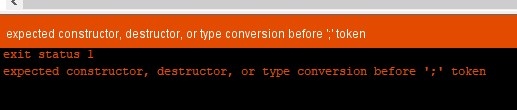
@arendst Are you sure you gave me the right line numbers? Line 1904 is a "}" and i cut it to 1805 line and now i get:
Argo8
on 26 Aug 2018
Well the line numbers were based on the development branch ….
For the 6.1.1 master branch the numbers are 1872 and 1823.
You just need to move line
SwitchHandler(0);
@arendst
I managed to get it working after using version 5.14
My wifi got busted totaly with latest version. I needed to dig it out and reflash it localy. Now if i use 5.14 on any sonoff it works. Thanks, ill monitor the behaviour now and report back.
Argo8
on 26 Aug 2018
Great! Pity you had to dig it up but going up and down versions will ruin the settings any way.
arendst
on 26 Aug 2018
@arendst
Sadly that didnt help... still get random on/off. 100ms is still too short i think. 😕
Argo8
on 26 Aug 2018
Hi,
Sorry to hear that. If 100ms of debounce is not enough means that you are experiencing a lot of noise in the wires to your sonoff. More debounce time I think won't help.
What is the value of your pull up resistor? I use 10K with no capacitor.
 ascillato
on 27 Aug 2018
ascillato
on 27 Aug 2018
If you are having noise problems use a really strong pull-up, something like 1K ohm. The i^2r rule for power puts that at 11mW when the switch closed, so not too bad.
More debounce time also means more latency from when the switch is actuated till the action happens. 100mS is noticeable and 500mS is usually intolerable (your acceptance of latency might be different).
Frogmore42
on 27 Aug 2018
I use 4.7k, and tried both 33pF and 6mF capacitors to see if i can lowwer the low pass filter freq. cap. No change between two.
One of my interferences is from AC wire that powers led lights (220 V) controlled with potentiometer in the wall next to my switch that controls the sonoff. Flickering is happening only when that light is on.
Argo8
on 27 Aug 2018
@Frogmore42 so i can add 2 more 4.7k with just twisting wires around existing one and that should give me 1,56K? Its a problem now to solder anything... Im not usually familiar with electronics or programing, learning as i go... had no idea what pull up is 2 weeks ago.
Argo8
on 27 Aug 2018
Sure, that will work to lower the resistance and make it harder for noise to trigger the input.
Frogmore42
on 27 Aug 2018
Ahhh, Ok.
So, that dimmer may be is sending a lot of noise pulses per each AC Mains cycle. So, indeed it is a lot of noise.
Sorry, that noise won't be eliminated by debounce time nor by pullup resistor and capacitors.
A 3.3Vdc + Ground pair of wires next to AC Mains with dimmer is super difficult to make it work.
A solution for that is use AC mains for everything but that is not possible with a sonoff. Please, consider changing that particular sonoff for a shelly 1
ascillato
on 27 Aug 2018
well, damn i just fell in love with the shelly 1 instantly :D
its a shame since i was so proud with design of that particular configuration of sonoffs (i use 2 of them and an AC relay to control my blinds).
Argo8
on 27 Aug 2018
Yes,
But the focus in the design for each device is different. So Shelly is adequate for some things and Sonoff is better for others. An explanation for that is at https://www.youtube.com/watch?v=J20hxfUTP9I
ascillato
on 27 Aug 2018
Thank you very much on this advice, i am ordering couple of shellies as soon as i find where to buy them :D.
Going back to main topic: with flicker pulses that last less then quarter second i still think a hold time would help, since i have no problem with holding a switch for a second or 2 for moving my curtains, and in less then that time the dimmer pulses wouldn't trigger movement of my curtain. So i hope a hold only function gets implemented in near future.
Argo8
on 27 Aug 2018
Hi,
I have just realized that the HOLD function is already implemented in Tasmota for use with rules. :smile:
It was not documented in the wiki. I have just added the following as an example.
Behaviour: DISABLE BUTTON1 SHORT PRESS AND TURN RELAY1 ONLY WHEN HOLDING BUTTON1 FOR 2 SECONDS.
In the console type:
buttontopic 0
setoption1 1
setoption32 20
rule on button1#state=3 do power1 2 endon on button1#state=2 do delay endon
rule 1
Commands Explanation
buttontopic 0 : (default) To not use topics for buttons
setoption1 1 : Allow only single, double and hold press button actions
setoption32 20 : Set key hold time from 0.1 to 10 seconds (20 = 2 seconds)
rule on button1#state=3 do power1 2 endon : When holding the button1 for 2 seconds it wil toggle relay 1
on button1#state=2 do delay endon : Do nothing when short pressing the button1
rule 1 : To enable rules
Hope this is the requested behaviour you asked.
ascillato
on 27 Aug 2018
I tried exactly what you typed in and nothing changed, still short pressing.
Should it maybe be switch1 instead of button1?
Argo8
on 27 Aug 2018
The hold function is only for buttons
ascillato
on 27 Aug 2018
You need to configure your gpio as button
ascillato
on 27 Aug 2018
Ok, now could you help me with figuring out how to configure gpio14 as button1. All i see is button2, 3...
Edit: i figured it out yeeey...
So i just define my device as "generic" and then define GPIO12 as relay1 and GPIO14 as button1. Then using your instructions i finaly got a controlable variable for time needed to press a button. (Setoption32)
You guys are awesome and i love your work.
Thank you so much.
Argo8
on 27 Aug 2018
One more thing might be a problem but i think is solvable. Double press still works, so if we get 2 consecutive interferences it would trigger. Can we disable double click too?
Argo8
on 27 Aug 2018
The example say Button1 but can be any button number. Just use the same number in your gpio config and in the rule.
ascillato
on 27 Aug 2018
And it will still switch relay1? Just tried it with also changing gpio14 to button2 and it didnt work, im happy as how it is. Any idea on disabling double click?
Argo8
on 27 Aug 2018
You can add relay2 to any free gpio
ascillato
on 27 Aug 2018
Got it.. so a dummy relay makes power1 appear.... aaand double click is gone too.
Recap:
using said instructions with button1 changed to button2.
Sonoff configured as sonoff-basic
Gpio14 is button2
Gpio4 is relay2
All works as expected... thank you thank you thank you
Argo8
on 27 Aug 2018
Very happy to know that it is working for you!
I have learnt new stuff with this issue.
Thanks for all the test and you patience. :+1:
Closing this issue as it is solved.
 ascillato2
on 27 Aug 2018
ascillato2
on 27 Aug 2018
Related issues
 ximonline
·
3Comments
ximonline
·
3Comments
 esp32x
·
3Comments
esp32x
·
3Comments
 luisfpinto
·
3Comments
luisfpinto
·
3Comments
 wirelesssolution
·
3Comments
ximonline
·
3Comments
wirelesssolution
·
3Comments
ximonline
·
3Comments