Hi folks,
I know there are some issues already on this topic, however I could not find any solution yet. I have two sonoff basic and one s20. The basic successfully flashed and work well connected to the AC, no problem. I just tried to flash my s20, but if I connect it to the ftdi adapter, it does not switch up as the basic. Furthermore, it does not flash at all, I get the usual esp errors. I used the same adapter as for the others. Do you know which the problem could be? Thank you very much for the attention and replies.
 SSkull995
All 52 comments
Probably a dumb question, but just to be sure: Did you double-check the connector pinout? (I'm not sure if it's the same for Basic and S20.)
The button is on GPIO0 on both Basic and S20, so that's probably not the issue here.
 fnordsh
on 17 Jul 2018
fnordsh
on 17 Jul 2018
And, since this is certainly not a code issue - is there a policy what qualifies as (GitHub-)issue and what should rather be discussed on the mailing list? (I'm unsure myself - it feels to me like GitHub should be mainly about coding stuff, but OTOH I loathe Google Groups and would be happy to discuss stuff here.)
fnordsh
on 17 Jul 2018
Wait, what do you mean about coding? I saw many discussions just about the flashing problem.
I really don't know why it does not switch up, I will try using the pin 3.3v on the board itself
SSkull995
on 17 Jul 2018
My bad - carry on, then :-)
What do you mean by "the pin 3.3v on the board itself"?
What other pin would you use to supply the power?
Can you post a sketch or a photo?
fnordsh
on 17 Jul 2018
I tried to use the other 3.3v pin I have on the fdti, but nothing works. Really don't know. the plug works if connected to AC
SSkull995
on 17 Jul 2018
FTDI often fails due to the fact the dont deliever not enough current on the 3.3V pin.
Use a CH340 USB serial adapter OR Power the device (for flashing) with a extra sufficent 3.3 V power supply
There are many issues about that....
 Jason2866
on 17 Jul 2018
Jason2866
on 17 Jul 2018
Yes, the issues are Littered with Many people having issues with flashing. I keep telling people that the manufacturer of the FTDI part says they can't deliver enough current to flash an esp8266. But, it works often enough that people seem loathe to believe it.
Part of the problem is there are many variants and copies of those. So you never really know what you are getting. I discovered that my FTDI sourced converter actually supplies VBUS (typically 5V) on the VCC line. It actually worked fine on several Sonoffs till I discovered the issue when I was having problems with a Dual. I then added a regulator to drop the voltage, but the damage was already done to the dual.
Finally, generally, Github issues are not supposed to be used to get help on how to use things or discuss things. That is the purpose of forums. But, making that happen for this project appears to be much harder than flashing an esp8266 with an FTDI 😀
 Frogmore42
on 17 Jul 2018
Frogmore42
on 17 Jul 2018
well thank you very much then. I will try the usb ch340 later and I hope it will work. I did not know about the current drop of the ftdi honestly. Thanks Jason
-
-
SSkull995
on 18 Jul 2018
Hi, so I bought a ch340 wemos ttl adapter. I will try with it, I hope it will work. This adapter has a dedicated 3.3v output, let's see
SSkull995
on 18 Jul 2018
ok so I tried the wemos serial ttl, 3.3v set. Nothing works! It doesn't switch up!
SSkull995
on 19 Jul 2018
@SSkull995
Wemos???
Jason2866
on 19 Jul 2018
@Jason2866
Yeah it’s a board I found at a shop here in Eindhoven. I post the link:
https://www.tinytronics.nl/shop/nl/arduino/wemos/wemos-ch340-3.3v-5v-ttl-usb-serial-port-adapter?search=Wemos
SSkull995
on 19 Jul 2018
It has a regulator separated form the main board, which I had to solder to 3.3v. However, nothing appears to work. I tried sonOTA, but I get err0 after connectin back to my home WiFi
SSkull995
on 19 Jul 2018
The plug works with its own app
SSkull995
on 19 Jul 2018
How do you have it hooked up? Take a picture and post it. Take multiple to show both sides of the board(s).
Frogmore42
on 19 Jul 2018
As far as i can see this is a variant of a usual ch340 usb serial adapter.
You need no app... you have to install the ch340 drivers on your pc and connect it via usb cable to it.
The connect to the sonoff is made via the black connector.
As Frogmore42 said we need pictures of your setup...
Jason2866
on 19 Jul 2018
At banggood i found this for the adapter:
Customize R/C port:
RTS:Connect R/C port to RTS, it can flash ESP8266 module(such as: ESP-01 02 ... 12F)
CTS:Connect R/C port to CTS, it can flash Arduino boards(such as: Arduino pro mini)
Operating voltage:
5V (The max current depends on your USB port, usually 500mA)
3.3V (Using LDO, 300mA MAX)
Jason2866
on 19 Jul 2018
Hi as soon as I reach home here I post a pic of the connections and everything. Actually with this module I could flash the sonoff basic I have here, not the s20 DAMNNN ahahahah. I will post the figure of everything ASAP, thanks for replies!
SSkull995
on 19 Jul 2018
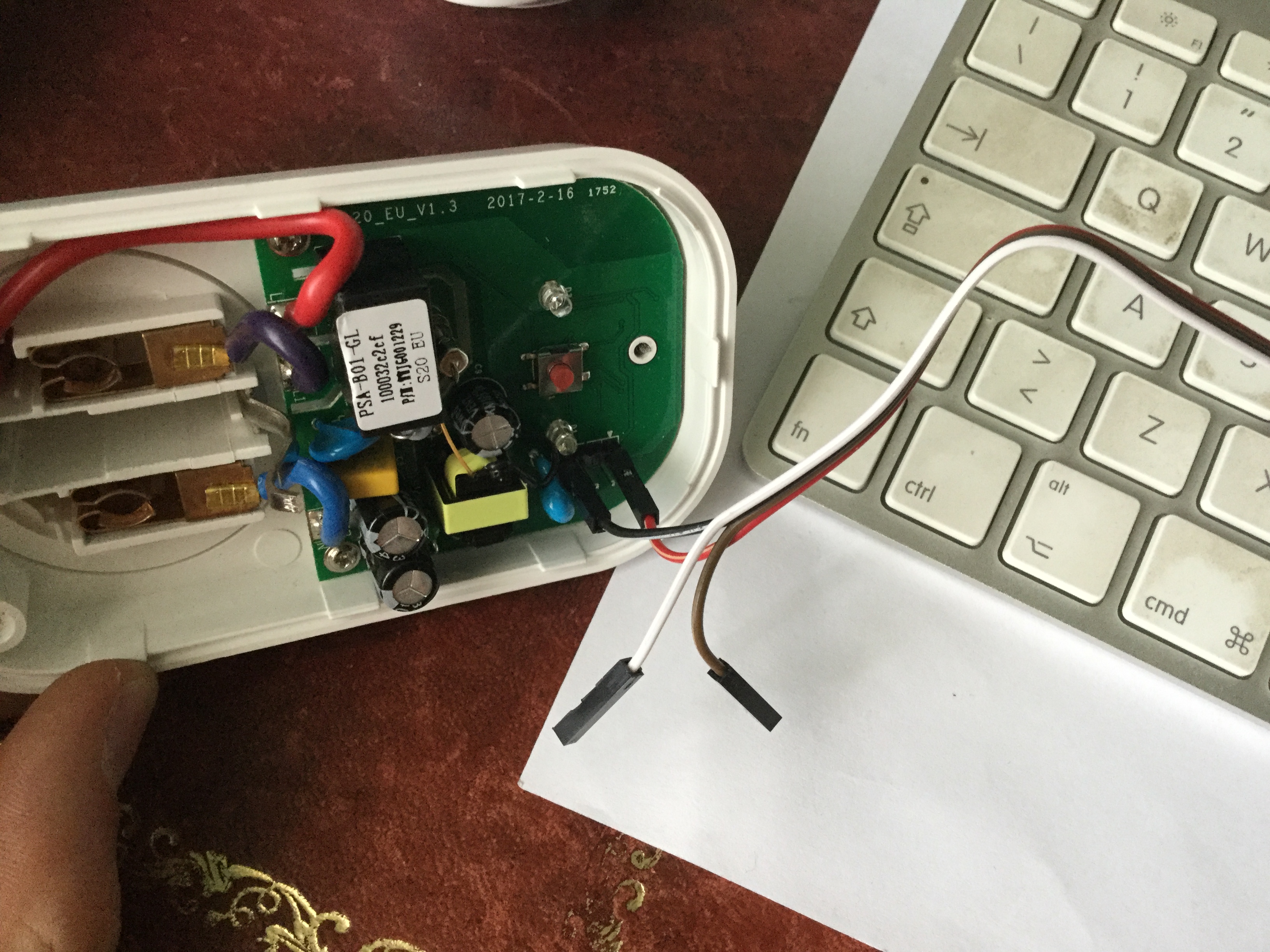
SSkull995
on 20 Jul 2018
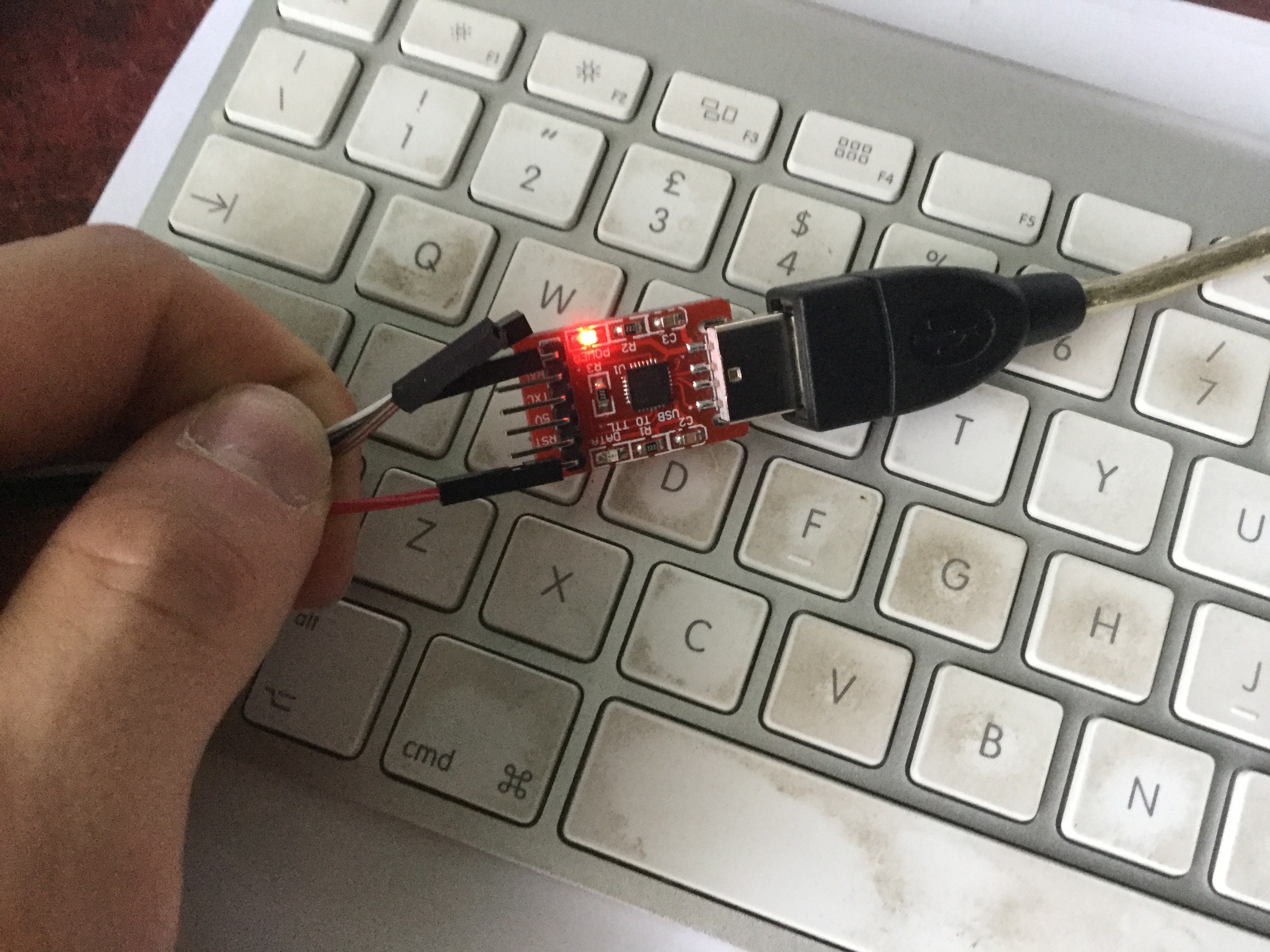
SSkull995
on 20 Jul 2018
This is another adapter I found in the house. I am sorry if I reply just know buy yesterday I landed late and reached home even later
SSkull995
on 20 Jul 2018
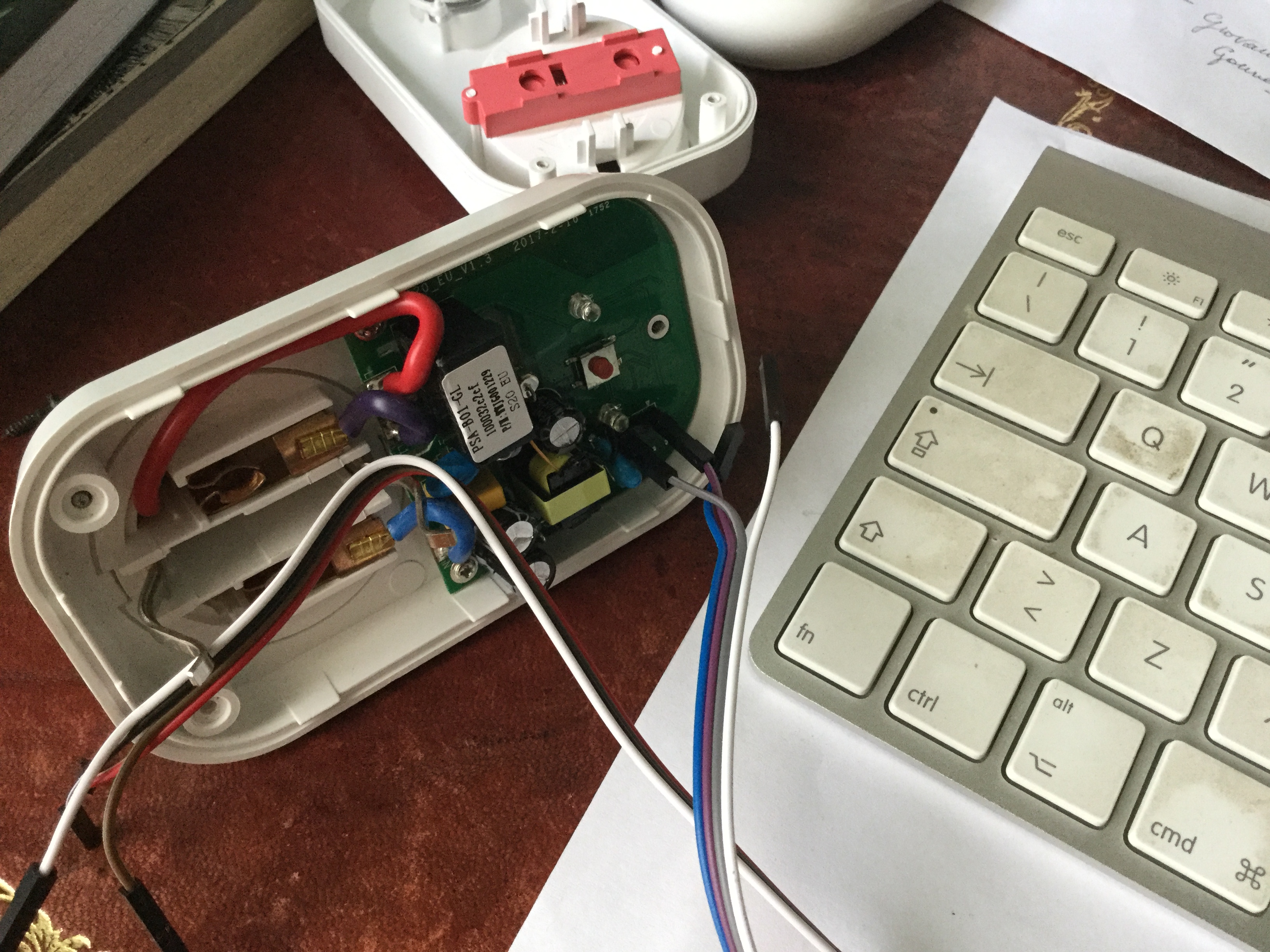
SSkull995
on 20 Jul 2018
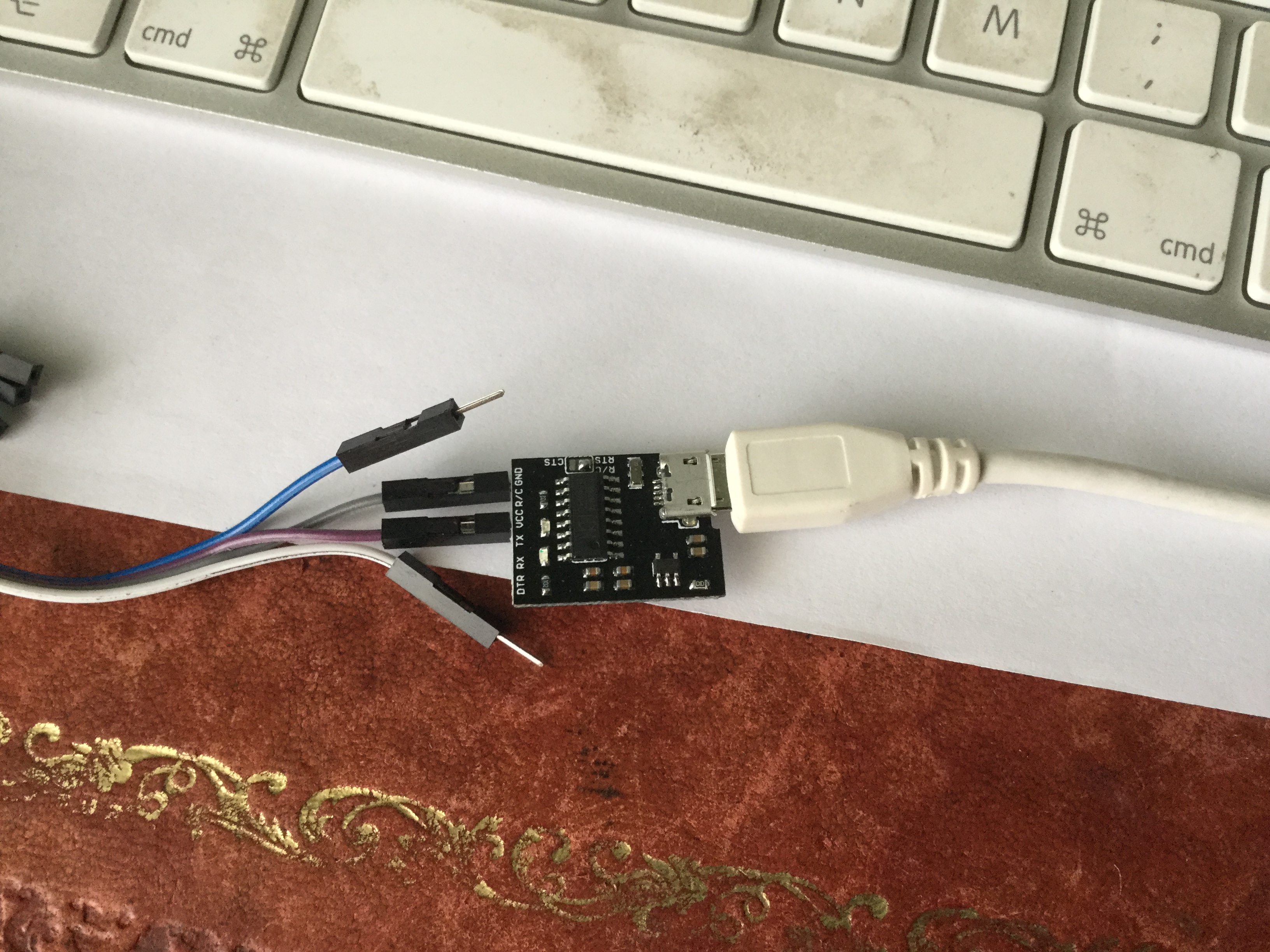
SSkull995
on 20 Jul 2018
this is the demos I talked about. As it is possible to see, with just the power and the end cables the s20 does not switch on at all
SSkull995
on 20 Jul 2018
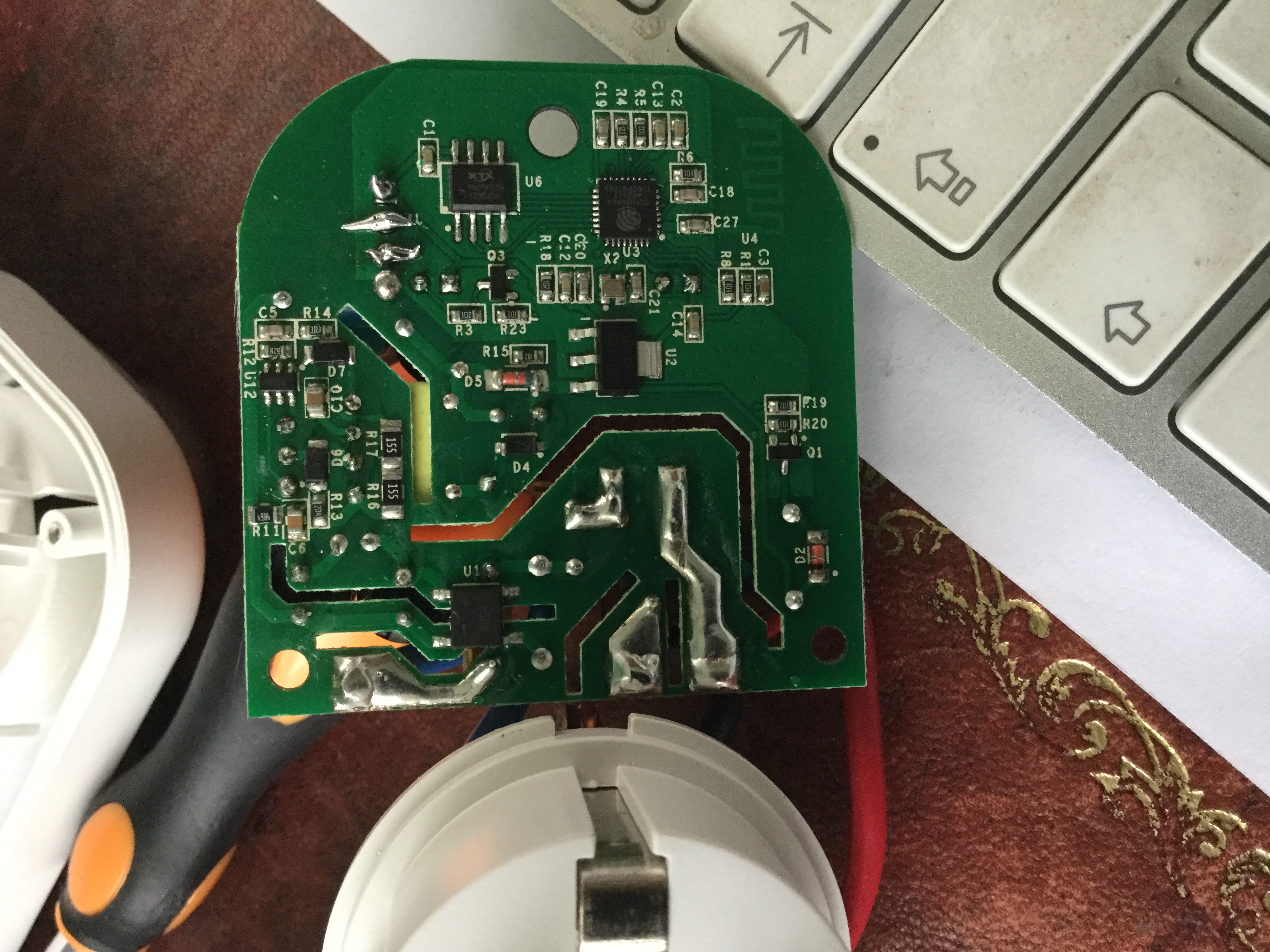
SSkull995
on 20 Jul 2018
tisi the back of the s20, with the soldered pins
SSkull995
on 20 Jul 2018
It is normal that relais is not switching when powered with 3.3 Volt (via adapter or 3.3 power supply)
If flashing is successfull everything is fine. Disconnect the wires and reasemble the Sonoff.
Put it in the Power Socket an configure it....
Jason2866
on 20 Jul 2018
I understood it as "the ESP does not power on at all", not just the relais.
Have you checked that your soldered connections are really okay?
fnordsh
on 20 Jul 2018
@gertmenke @Jason2866 what I meant is that if I connect the adapter to the basic sonoff the led starts to blink. While if I connect it to the s20, no led blinks
SSkull995
on 20 Jul 2018
I will check the soldered pins and @Jason2866 if I try to flash it the error about upload memory comes up with all the other ESPs and thus no flash succeeds
SSkull995
on 20 Jul 2018
I think the LED should probably blink on the S20 too, but nevertheless, could you get a connection with esptool? (Or whatever tool you use to flash.)
fnordsh
on 20 Jul 2018
no nothing @gertmenke, I use the platformio based atom
SSkull995
on 20 Jul 2018
this damn sonoff is driving me crazy
SSkull995
on 20 Jul 2018
So you get the same output as when you don't connect the thing at all, correct?
fnordsh
on 20 Jul 2018
yes like no possibility to connect to the s20, no connection at all
SSkull995
on 20 Jul 2018
My best bet would be the soldering, those joints don't look very good, TBH.
fnordsh
on 20 Jul 2018
Do you have a continuity tester?
fnordsh
on 20 Jul 2018
yeah actually I saw it when I was taking the pictures. I don't know why but the tin does not really keep sticked to the pins
SSkull995
on 20 Jul 2018
Yes, I will try to see the voltage output from the adapter. Just a minute
SSkull995
on 20 Jul 2018
ok so the adapters works well, 3.4 and 3.3 output from each
SSkull995
on 20 Jul 2018
no voltage drop from them
SSkull995
on 20 Jul 2018
Yeah, but do those 3.3V really make it to the sonoff board, that's the question. :-)
fnordsh
on 20 Jul 2018
aaah, right . I am going to see, one minute :)
SSkull995
on 20 Jul 2018
I would follow the traces on the board and find an exposed point that should be directly connected to the pin. Then try to measure continuity between the pin and this point. So that the current needs to flow through the solder joint in question.
fnordsh
on 20 Jul 2018
Can't hurt to redo those in any case, however.
fnordsh
on 20 Jul 2018
In order to detect the voltage on the sonoff, how should I do rather that testing the soldered pins on the board?
I connected the flasher with the jumper cables to s20 and checked the voltage on the soldered pins, something more to do? Thanks btw, really really thank you
SSkull995
on 20 Jul 2018
my Mac did not loaded the page, I will try as you suggested @gertmenke
SSkull995
on 20 Jul 2018
ok so i re-soldered the pins. I also tried some components on the boards and the current is always 3.3 everywhere. However, no led blinks
SSkull995
on 20 Jul 2018
What does platformio/atom say when you try to flash? Any difference to before?
fnordsh
on 20 Jul 2018
I maaaaaaaaade it, I just disconnected the gnd soldered pin and I used a male jumper. Done!!!
Thank you very much to both of you, really thank you!
SSkull995
on 20 Jul 2018
I'm happy to hear that.
Cheers!
fnordsh
on 20 Jul 2018
If it works now, you should probably close the issue.
Have fun! :-)
fnordsh
on 20 Jul 2018
Related issues
 jensuffhaus
·
3Comments
jensuffhaus
·
3Comments
 garret
·
3Comments
garret
·
3Comments
 renne
·
3Comments
renne
·
3Comments
 esp32x
·
3Comments
esp32x
·
3Comments
 belidzs
·
3Comments
belidzs
·
3Comments
Most helpful comment
I maaaaaaaaade it, I just disconnected the gnd soldered pin and I used a male jumper. Done!!!
Thank you very much to both of you, really thank you!