Tasmota: v5.0.8 >> v5.14.0 - Does not turn off in Home Assistant
First of all, I suspect that it may be a bug, but since I'm not sure, I posting as troubleshooting. Maybe something changed and it's just a matter of configuration.
I'm using several Sonoff Basics flashed with Tasmota v5.0.8 with Home Assistant. Working perfectly for months.
Then I decided to update to latest v5.14.0. I don´t know the reason, but then, Home Assistant panel can turn on the Sonoff, but can't turn it off. But Hadashboard works as expected. Weird.
So I downgraded again to 5.0.8 (just one at the moment) and now it works as it should.
All Sonoff had the same issue (upgraded by OTA).
Anyone knows what it could be? Is it a bug? What can be done about it?
Thanks!
PS: I should say that I'm using Home Assistant v0.72.0
 opep
opep
All 64 comments
Hi, It is not a bug. It is just a configuration problem. I have HA v0.72 with last Tasmota an all works as expected.
As we need more information to help you, please complete the troublesoothing template with your Tasmota v5.14 status 0.
Also please, share also your configuration in HA of that device.
 ascillato
on 26 Jun 2018
ascillato
on 26 Jun 2018
Thanks for your fast response. Nice to know it's not a bug.
Status 0: (Changed some personal information (ssid, MAC, IP)
00:34:39 MQT: stat/sonoff01/STATUS = {"Status":{"Module":1,"FriendlyName":["Sonoff"],"Topic":"sonoff01","ButtonTopic":"0","Power":0,"PowerOnState":3,"LedState":1,"SaveData":1,"SaveState":1,"ButtonRetain":0,"PowerRetain":0}}
00:34:39 MQT: stat/sonoff01/STATUS1 = {"StatusPRM":{"Baudrate":115200,"GroupTopic":"sonoffs","OtaUrl":"http://sonoff.maddox.co.uk/tasmota/sonoff.bin","RestartReason":"Software/System restart","Uptime":"0T17:59:14","StartupUTC":"2018-06-25T05:35:25","Sleep":0,"BootCount":1739,"SaveCount":5117,"SaveAddress":"F5000"}}
00:34:39 MQT: stat/sonoff01/STATUS2 = {"StatusFWR":{"Version":"5.14.0","BuildDateTime":"2018-05-15T15:29:54","Boot":4,"Core":"2_3_0","SDK":"1.5.3(aec24ac9)"}}
00:34:39 MQT: stat/sonoff01/STATUS3 = {"StatusLOG":{"SerialLog":2,"WebLog":2,"SysLog":0,"LogHost":"domus1","LogPort":514,"SSId":["TARUGO","indebuurt2"],"TelePeriod":300,"SetOption":["55800009","55818000"]}}
00:34:39 MQT: stat/sonoff01/STATUS4 = {"StatusMEM":{"ProgramSize":526,"Free":476,"Heap":19,"ProgramFlashSize":1024,"FlashSize":1024,"FlashMode":3}}
00:34:39 MQT: stat/sonoff01/STATUS5 = {"StatusNET":{"Hostname":"sonoff01-5285","IPAddress":"192.168.1.101","Gateway":"192.168.1.1","Subnetmask":"255.255.255.0","DNSServer":"192.168.1.1","Mac":"5C:CF:7F:98:54:A5","Webserver":2,"WifiConfig":3}}
00:34:39 MQT: stat/sonoff01/STATUS6 = {"StatusMQT":{"MqttHost":"192.168.1.10","MqttPort":1883,"MqttClientMask":"DVES_%06X","MqttClient":"DVES_9854A5","MqttUser":"osmar","MqttType":1,"MAX_PACKET_SIZE":1000,"KEEPALIVE":15}}
00:34:39 MQT: stat/sonoff01/STATUS7 = {"StatusTIM":{"UTC":"Mon Jun 25 23:34:39 2018","Local":"Tue Jun 26 00:34:39 2018","StartDST":"Sun Mar 25 02:00:00 2018","EndDST":"Sun Oct 28 03:00:00 2018","Timezone":1,"Sunrise":"04:48","Sunset":"20:58"}}
00:34:39 MQT: stat/sonoff01/STATUS10 = {"StatusSNS":{"Time":"2018-06-26T00:34:39","Switch2":"ON"}}
00:34:39 MQT: stat/sonoff01/STATUS11 = {"StatusSTS":{"Time":"2018-06-26T00:34:39","Uptime":"0T17:59:14","Vcc":3.252,"POWER1":"OFF","Wifi":{"AP":1,"SSId":"MYSSID","RSSI":100,"APMac":"E4:E7:C6:02:18:82"}}}
Configuration in Home Assistant:
  - platform: mqtt
    name: "Sonoff01"
    command_topic: "cmnd/sonoff01/power"
    state_topic: "stat/sonoff01/POWER"
    qos: 1
    payload_on: "ON"
    payload_off: "OFF"
    retain: true
your config seems ok
can you type on the tasmota console weblog 4 and then, share what is displayed on the Tasmota console when you send the command power on and off from HA ?
ascillato
on 26 Jun 2018
Power On (in Home Assistant the swtich doesn't keep on, so I included the messeges when OFF from the Hadashboard.
```
00:55:14 CMD: weblog 4
00:55:14 RSL: Received Topic /weblog, Data Size 1, Data 4
00:55:14 RSL: Group 0, Index 1, Command WEBLOG, Data 4
00:55:14 MQT: stat/sonoff01/RESULT = {"WebLog":4}
00:55:14 MQT: cmnd/sonoff01_motion/POWER2 = OFF
00:55:16 WIF: Checking connection...
00:55:16 WIF: Connected
00:55:26 RSL: Received Topic cmnd/sonoff01/power, Data Size 2, Data ON
00:55:26 RSL: Group 0, Index 1, Command POWER, Data ON
00:55:26 MQT: stat/sonoff01/RESULT = {"POWER1":"ON"}
00:55:26 MQT: stat/sonoff01/POWER1 = ON
00:55:26 CFG: Saved to flash at F7, Count 5123, Bytes 2560
00:55:39 WIF: Checking connection...
00:55:39 WIF: Connected
00:56:01 WIF: Checking connection...
00:56:01 WIF: Connected
00:56:06 RSL: Received Topic cmnd/sonoff01/power, Data Size 2, Data ON
00:56:06 RSL: Group 0, Index 1, Command POWER, Data ON
00:56:06 MQT: stat/sonoff01/RESULT = {"POWER1":"ON"}
00:56:06 MQT: stat/sonoff01/POWER1 = ON
00:56:15 RSL: Received Topic cmnd/sonoff01/power, Data Size 3, Data OFF
00:56:15 RSL: Group 0, Index 1, Command POWER, Data OFF
00:56:15 MQT: stat/sonoff01/RESULT = {"POWER1":"OFF"}
00:56:15 MQT: stat/sonoff01/POWER1 = OFF
00:56:16 CFG: Saved to flash at F6, Count 5124, Bytes 2560
00:56:24 WIF: Checking connection...
00:56:24 WIF: Connected
opep
on 26 Jun 2018
Your Tasmota behaviour seems ok also.
Please, try in your HA to change retain: true to retain: false and restart HA and your Tasmota
ascillato
on 26 Jun 2018
Same behavior.. :|
opep
on 26 Jun 2018
Which Mqtt broker are you using?
ascillato
on 26 Jun 2018
Mosquitto
opep
on 26 Jun 2018
Working with hadashboard makes no sense to me.
opep
on 26 Jun 2018
Let's try this config in your HA:
switch:
    - platform: mqtt
      name: "Sonoff01"
      state_topic: "stat/sonoff01/POWER1"
      command_topic: "cmnd/sonoff01/POWER1"
      availability_topic: "tele/sonoff01/LWT"
      qos: 1
      payload_on: "ON"
      payload_off: "OFF"
      payload_available: "Online"
      payload_not_available: "Offline"
      retain: false
Sadly, no change. The switch turns on but it returns to off.
opep
on 26 Jun 2018
The HA Dashboard never shows if a device is online or not. But HA do that. That is why is that behaviour.
Seems that HomeAssistant is not receiving correctly the response from Tasmota after it sends the command.
do you have in your home assistant config the line state_topic: "stat/sonoff01/POWER1" with the 1 in power?
ascillato
on 26 Jun 2018
Makes sense.
Answering your question, no. All my sonoffs are configured with:
    command_topic: "cmnd/sonoff01/power"
    state_topic: "stat/sonoff01/POWER"
But I have in some of them (for motion sensor):
    command_topic: "cmnd/sonoff01_motion/power2"
    state_topic: "cmnd/sonoff01_motion/POWER2"
can you try using power1 ?
ascillato
on 26 Jun 2018
in your HA config
ascillato
on 26 Jun 2018
But this is not the same configuration that we have already tested? (that you gave me)
opep
on 26 Jun 2018
stat/sonoff01/POWER is different in mqtt than stat/sonoff01/POWER1
Have you also tried power1 ?
ascillato
on 26 Jun 2018
Your config is still running. So should I test it changing to:
  - platform: mqtt
    name: "Sonoff01"
    command_topic: "cmnd/sonoff01/power1"
    state_topic: "stat/sonoff01/POWER1"
    qos: 1
    payload_on: "ON"
    payload_off: "OFF"
    retain: true
Sorry being asking. I don't know these differences.
opep
on 26 Jun 2018
yes, but remember POWER1 is uppercase.
I recommend you to copy and paste the following to test:
switch:
    - platform: mqtt
      name: "Sonoff01"
      state_topic: "stat/sonoff01/POWER1"
      command_topic: "cmnd/sonoff01/POWER1"
      availability_topic: "tele/sonoff01/LWT"
      qos: 1
      payload_on: "ON"
      payload_off: "OFF"
      payload_available: "Online"
      payload_not_available: "Offline"
      retain: false
I have exactly that and working fine
ascillato
on 26 Jun 2018
Now it worked!
I missed a detail in your firt configuration.
Used (sorry):
    state_topic: "stat/sonoff/POWER1"
    command_topic: "cmnd/sonoff01/POWER1"
Instead of
    state_topic: "stat/sonoff01/POWER1"
    command_topic: "cmnd/sonoff01/POWER1"
Now I will extend the configuration to the others.
I think I can keep retain true, since it remember the mqtt state if a shutdown happen. It shoud work.
Also, can you tell me what is the role of the new lines as:
availability_topic?
payload_available?
payload_not_available?
So what do you think the problem was? My configuration was incomplete? I know many people use like this. As you see, the logs were right. Just trying to understand what's is going on.
One more question that doesn't have much to do with the problem, but I would like to know and maybe you can help one more time. When my raspberry pi 3 is down, my sonoffs get crazy, alternating ON and OFF. I would like they try to connect but change state only by the physical button in sonoff. Do you know how?
Thanks a lot for your help. Really!
opep
on 26 Jun 2018
Another test.
on the console try: SetOption26 1
ascillato
on 26 Jun 2018
great that now is working!
some comments:
I think I can keep retain true, since it remember the mqtt state if a shutdown happen. It shoud work.
I never use retain because when a sonoff reconnects it will register it's own state at the MQTT Broker. If you retain, your MQTT broker can overwrite your sonoff status with the one your mqtt server remembers. I think it is better to leave the remembering of the state to the sonoff itself.
availability_topic?
payload_available?
payload_not_available?
Just to let HA to know that the sonoff is online or not.
When my raspberry pi 3 is down, my sonoffs get crazy, alternating ON and OFF
I don't know. That is from the same device (sonoff01)?
ascillato
on 26 Jun 2018
I will try to use retain false to see how it works.
Yes, same device and other sonoffs too.
opep
on 26 Jun 2018
Are you using switch instead of button as GPIO config? If that is the case, If you dont have mqtt and you have switch1 and switch2 for example and you dont have relay2, the switch2 will toggle the relay1.
So, may be a config problem. Please, read the wiki for the commands switchmode and switchtopic.
ascillato
on 26 Jun 2018
Configured sonoff using (if I understood your question):
http://sonoff_IP/cm?cmnd=SwitchTopic2%20sonoff01_motion
http://sonoff_IP/cm?cmnd=SwitchMode2%201
How is configured your pins in the web menu of tasmota at Configuration/Module?
ascillato
on 26 Jun 2018
Are you asking this?
GPIO0  >> Topic  >> cmnd/sonoff02/POWER
GPIO14 >> Topic  >> cmnd/sonoff02_motion/POWER2
can you give a screenshot of that menu?
ascillato
on 26 Jun 2018
Extended configuration changes to the other sonoffs. All the others are now working as expected.
But the one that I downgraded to 5.0.8 have the same problem. Turns on but the button doesn't keep ON, so it can't turn sonoff OFF.
I thought that it would work as the others.
opep
on 26 Jun 2018
5.0.8 is very old and respond the mqtt messages as powerinstead of power1. it is just that
ascillato
on 26 Jun 2018
I don't know which menu you are talking about.
Just used in console:
To set GPIO 14 to Switch2
http://sonoff_IP/cm?cmnd=SwitchTopic2%20sonoff01_motion
GPIO 0 is already set to POWER (relay)
I'm bringing it from my annotations...
opep
on 26 Jun 2018
The menu of the webserver of tasmota, example:
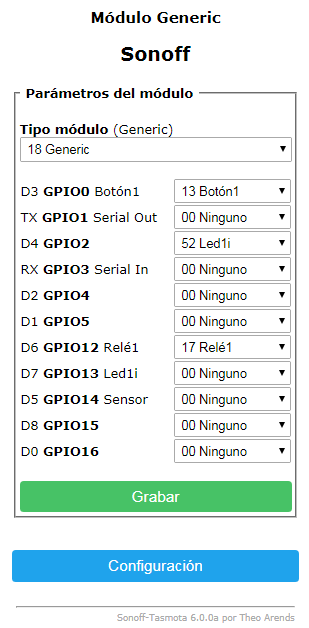
If you have a switch2 defined without a relay2 defined, switch2 will toggle your relay1
ascillato
on 26 Jun 2018
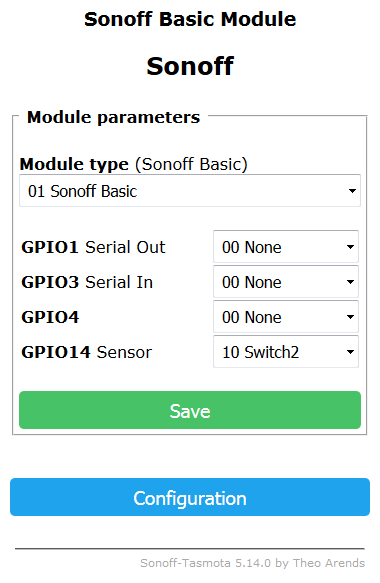
Switch 2 do not interfere with relay.
opep
on 26 Jun 2018
switch2 will not interfere with relay1 while you have MQTT server online. When it goes offline, Switchtopic is ignored and switch2 will change relay1 if there is not defined a relay2 (like if that is a virtual relay - any unused pin)
ascillato
on 26 Jun 2018
Hmm. I see now. Good point.
What is your suggestion to solve this problem?
Define as buttons? I will have to read it all over again, I guess.
opep
on 26 Jun 2018
Use your unused pin GPIO4 as relay2
ascillato
on 26 Jun 2018
this should solve your crazy behaviour you explain
ascillato
on 26 Jun 2018
The point is that to use GPIO4 we have to do a very delicate soldering in the chip. Very tinny.
But now I see that this is my challenge now.
opep
on 26 Jun 2018
you dont need to solder anything. what you want to solder there?
you define that gpio as relay but connect nothing to there. as a virtual relay. not real one
ascillato
on 26 Jun 2018
when switch2 toggles, will toggle relay2 (nothing connected there) but will toggle ONLY relay2 and not relay1
ascillato
on 26 Jun 2018
if you do not define a relay2, switch2 WILL toggle relay1 when there is no mqtt.
But nothing is needed to be connected on relay2
ascillato
on 26 Jun 2018
It seems that I'm learning many things today..
Still thinking..
Looking here how to do it. I will have to do it.
opep
on 26 Jun 2018
Looking here how to do it. I will have to do it.
Sorry, do what?
Now, just make
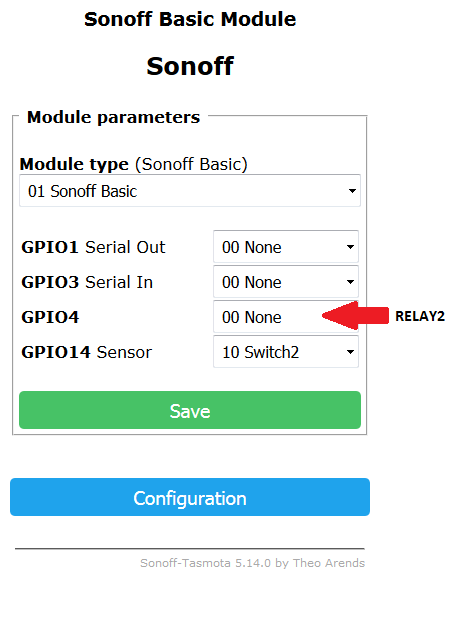
No soldering, no nothing else.
ascillato
on 26 Jun 2018
In Configuration Module
Just select Relay 2 for GPIO4.
Save and Voila?
opep
on 26 Jun 2018
yes! :+1:
ascillato
on 26 Jun 2018
That should solve your crazy behaviour when no MQTT server is online.
If this solve your issue, please close it. Thanks :+1:
ascillato
on 26 Jun 2018
Great! Thank you very much for your help and taking your time. I don't know your local time, but here is 00h15m... Have to sleep.
opep
on 26 Jun 2018
Yes. Will do it now. I'm sure it will be helpful to other people.
opep
on 26 Jun 2018
That's my time too!!!!
ascillato
on 26 Jun 2018
Where are you from?
ascillato
on 26 Jun 2018
Brazil. And you?
opep
on 26 Jun 2018
Argentina
ascillato
on 26 Jun 2018
Great! Hermanos!
Muchas Gracias! Bye
opep
on 26 Jun 2018
Well, please, then test it, and If this solve your issue, please close it. Thanks :+1
ascillato
on 26 Jun 2018
bye! :+1:
ascillato
on 26 Jun 2018
Just to inform that it worked. No crazyness anymore.
The only problem is that when the Broker is down, sonoffs enters in a mode that stays trying to connect. So it fails to respond to the physical switch sometimes. Other times it works. Or works with a delay.
I suppose that relating to this there is not much to do about.
opep
on 26 Jun 2018
There is a solution also for that.
The lag is been made by the MQTT Library called PUBSUBCLIENT.
You have to change the library to use TASMOTAMQTT instead.
For that, you can:
- change the _user_config.h_ file and build tasmota from source (as explained in the wiki)
OR
ascillato
on 26 Jun 2018
What a great news!
Sorry for the lack of knowledge, I couldn't find in the wiki specific about TASMOTAMQTT.
I will search further.
Anyway, it would need to reflash it.
It may be an easier path to use the pre-compiled files. Then, all I have to do is to flash with a minimal version, and then flash again with "Sonoff-Tasmota_KNX v5.14.0b", for example for sonoff devices (1Mb).
That's it?
opep
on 26 Jun 2018
Yes, minimal First and then, the version you want.
a Hint: Better is the last version :+1:
ascillato
on 26 Jun 2018
Then you are talking about v6.0.0a, right?
I didn't understand because as far as I know the last version of Tasmota is 5.14.
opep
on 26 Jun 2018
Yes, the last release is v5.14.0 but the last development is v6.0.0a
ascillato
on 26 Jun 2018
Ok. Good night. Thanks again for your valuable help.
opep
on 26 Jun 2018
:+1:
ascillato
on 26 Jun 2018
Related issues
 grizewald
·
3Comments
grizewald
·
3Comments
 smadds
·
3Comments
smadds
·
3Comments
 JoergZ2
·
3Comments
JoergZ2
·
3Comments
 abzman
·
3Comments
abzman
·
3Comments
 renne
·
3Comments
renne
·
3Comments
Most helpful comment
There is a solution also for that.
The lag is been made by the MQTT Library called PUBSUBCLIENT.
You have to change the library to use TASMOTAMQTT instead.
For that, you can:
OR
use the precompiled bins from: here or here
If this solves your issue, please close it. Thanks :+1: