Tasmota: UI change: configuration buttons smaller than toggle/control buttons
Requesting a slight UI change to make the more often used function more prominent on the embedded web server. Did a small change that others might also find more appealing (make the configuration buttons smaller):

Just some slight additions to the stylesheet and configuration button class.
 dry-tt
All 12 comments
we have to save flash size, so advanced styling should be avoided.
 reloxx13
on 10 Jun 2018
reloxx13
on 10 Jun 2018
Agreed, but the style code in my example weighs in at less than 150 bytes (even less if just the sizing elements are included)
xdrv_02_webserver.ino:
".sm{background-color:#1fa3ec;color:#fff;line-height:1.6rem;font-size:0.8rem;width:100%;}"
".sm:hover{background-color:#0e70a4;}"
<button class=sm>" D_CONSOLE "</button>
dry-tt
on 10 Jun 2018
This issue has been automatically marked as stale because it has not had recent activity. It will be closed if no further activity occurs. Thank you for your contributions.
![stale[bot] picture](https://avatars3.githubusercontent.com/in/1724?v=4&s=40) stale[bot]
on 25 Jul 2018
stale[bot]
on 25 Jul 2018
This issue will be auto-closed because there hasn't been any activity for a few months. Feel free to open a new one if you still experience this problem.
stale[bot]
on 9 Aug 2018
Agreed, but the style code in my example weighs in at less than 150 bytes (even less if just the sizing elements are included)
xdrv_02_webserver.ino:
".sm{background-color:#1fa3ec;color:#fff;line-height:1.6rem;font-size:0.8rem;width:100%;}" ".sm:hover{background-color:#0e70a4;}"
<button class=sm>" D_CONSOLE "</button>
I've been playing with this code and managed to reduce the size of the buttons while producing a 520kb file. I've made repeated attempts to change certain things and each time I have been successful in flashing my firmware.bin file to my sonoff basic.
I reduced the buttons to 60% width but would like to centre the buttons, as for the moment, they are all positioned to the left side of the screen - anyone know how to centre the buttons. I don't fully understand CSS, I've tried numerous times with numerous bits of code, but have only succeeded in resizing buttons but not centering them...?
 Markkyboy
on 20 Feb 2019
Markkyboy
on 20 Feb 2019
I put the buttons in a 2 column table and used the style just to control the size and colour.
The table should start just before the D_CONFIGURE button (line 287 in the latest release 6.4.1.17) and end after the D_CONSOLE button.
dry-tt
on 20 Feb 2019
Thanks for your reply @dry-tt
I'm using a sonoff basic, so there is no such file xrdv_01_webserver.ino - my system has xrdv_02_webserver.ino instead.
Also, my understanding (for now) of css is very, very limited. Any and all input appreciated though :)
Markkyboy
on 21 Feb 2019
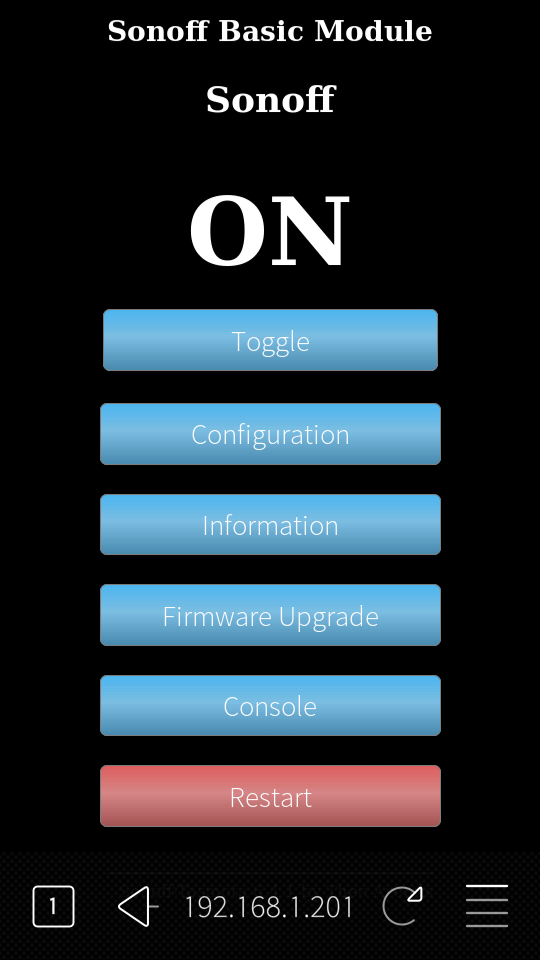
Okay, after a little crash course in CSS (I'm still no expert) I finally have what I was after and my file size is still only 520kb., still well within the limit with regard to flashing the file, which works just fine @reloxx13
Initially, I just wanted narrower buttons, then I decided on a dark background as well.
The required changes were all contained in (xrdv_01_webserver.ino) one line, for me, the line number: 207 originally looked like this; "<div style='text-align:left;display:inline-block;min-width:340px;'>"
after editing, it looks like this;
"<div style='text-align:left;display:inline-block;min-width:200px;color:#fff;'>"
Then, on line 192 which originally looked like this;
"body{text-align:center;font-family:verdana;}"
after editing, looks like this;
"body{text-align:center;font-family:verdana;background-color:#000;}"
Markkyboy
on 21 Feb 2019
somehow dark always looks good :)
How does it look like if one button text requires more than 200px?
iphone so i typo
 joba-1
on 21 Feb 2019
joba-1
on 21 Feb 2019
somehow dark always looks good :) How does it look like if one button text requires more than 200px? -- iphone so i typo
Yep :)
I don't know how to change only one button, they appear to be in a block, so changing parameters to the buttons, affects all buttons globally. I only get to see the changes once I've compiled the firmware and flashed it - I need to find a way to view my changes using Atom without having to compile/flash and hope for the best each time.
Markkyboy
on 21 Feb 2019
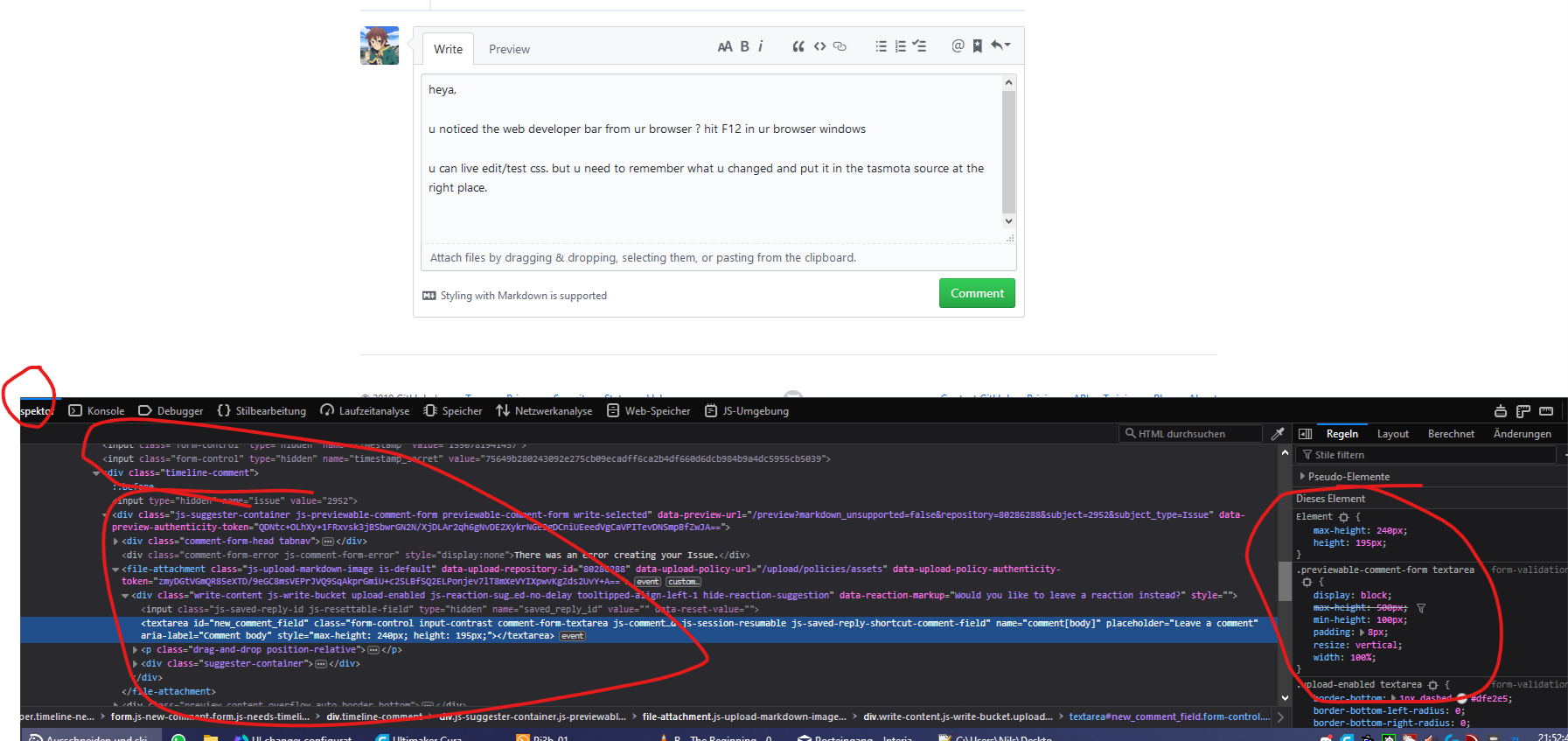
heya,
u noticed the web developer bar from ur browser ? hit F12 in ur browser windows
u can live edit/test css. but u need to remember what u changed and put it in the tasmota source at the right place.
reloxx13
on 21 Feb 2019
Excellent hint reloxx13 - much appreciated, albeit, I did suss that after posting my last comment, thanks :)
Markkyboy
on 21 Feb 2019
Related issues
 garret
·
3Comments
garret
·
3Comments
 he-so
·
3Comments
he-so
·
3Comments
 TylerDurden23
·
3Comments
TylerDurden23
·
3Comments
 Joeyhza
·
3Comments
Joeyhza
·
3Comments
 smadds
·
3Comments
smadds
·
3Comments
Most helpful comment
Okay, after a little crash course in CSS (I'm still no expert) I finally have what I was after and my file size is still only 520kb., still well within the limit with regard to flashing the file, which works just fine @reloxx13
Initially, I just wanted narrower buttons, then I decided on a dark background as well.
The required changes were all contained in (xrdv_01_webserver.ino) one line, for me, the line number: 207 originally looked like this;
"<div style='text-align:left;display:inline-block;min-width:340px;'>"after editing, it looks like this;
"<div style='text-align:left;display:inline-block;min-width:200px;color:#fff;'>"Then, on line 192 which originally looked like this;
"body{text-align:center;font-family:verdana;}"after editing, looks like this;
"body{text-align:center;font-family:verdana;background-color:#000;}"