Tasmoadmin: No version number visible with Tasmota 7.1.1.1
Hello
since Tasmota 7 I have some issues
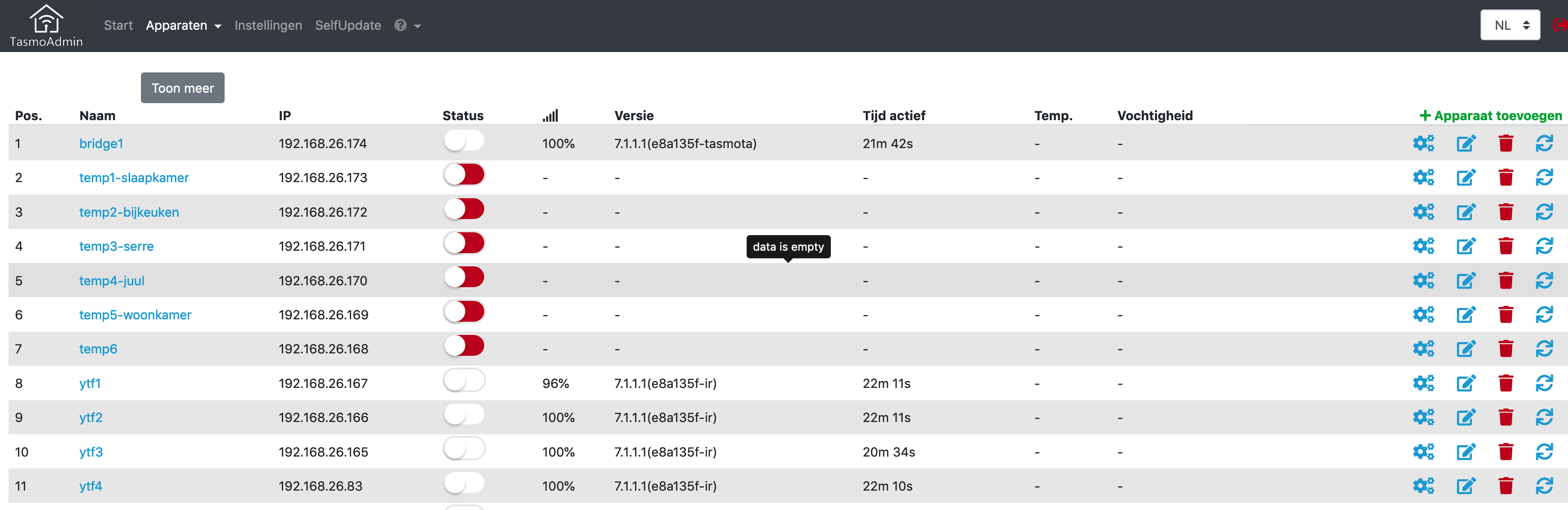
- with the last Tasmota 7.1.1.1 in web gui there is no data visible
Program Version | 7.1.1.1(45d5999-tasmota)
2019-12-02T21:00:10
- also OTA upgrade does not work => 6.6.0(release-sonoff) to 6.7.1(sonoff) fails, also upgrade to 7 is not working (but *.bin is the correct one)
Firmware erfolgreich von GitHUB geladen!
Sprache: DE | Version: v7.1.1 | Datum 2019-12-01T12:30:37Z
 slowfinger
All 36 comments
Same problem with not data visible, oddly 1 out of 12 sockets shows data, the others don't but work fine.
 cyablo
on 3 Dec 2019
cyablo
on 3 Dec 2019
heya,
im on 7.0.0.6 right now and so far works fine. updated by uploading selfcompiled bins.
please post me a status 0 response from your device.
 reloxx13
on 3 Dec 2019
reloxx13
on 3 Dec 2019
can you add a screenshot, not sure what u mean with no data displayed, it cannot connect ?
reloxx13
on 3 Dec 2019

cyablo
on 3 Dec 2019
Oddly they're ALL on the same firmware (from http://thehackbox.org/tasmota/). They're working perfectly fine via MQTT, Web-Interface is also working, no problems.
cyablo
on 3 Dec 2019
tasmoadmin does not see my TH10 devices anymore after upgrading to 7.1.1.1 ..
RF Bridge and YFT devices are visible
 Eddie-BS
on 3 Dec 2019
Eddie-BS
on 3 Dec 2019
Okay thank you!
the status 0 message is left, could be a json change or bugged/corrupted json.
Im at home in the evening to check it myself (11am here now).
To get the status 0:
http://YOUR_DEVICE_IP/cm?cmnd=status%200
if you use firefox, click on "raw" data at the top tabs and copy the json.
this is the data tasmoadmin use to parse and display information, if sth is wrong or changed there, tasmoadmin cannot parse it.
reloxx13
on 3 Dec 2019
Here you go:
11:01:29 MQT: stat/tasmota11/STATUS = {"Status":{"Module":51,"FriendlyName":["neonroehre"],"Topic":"tasmota11","ButtonTopic":"0","Power":0,"PowerOnState":3,"LedState":1,"LedMask":"FFFF","SaveData":1,"SaveState":1,"SwitchTopic":"0","SwitchMode":[0,0,0,0,0,0,0,0],"ButtonRetain":0,"SwitchRetain":0,"SensorRetain":0,"PowerRetain":0}}
11:01:29 MQT: stat/tasmota11/STATUS1 = {"StatusPRM":{"Baudrate":115200,"GroupTopic":"sonoffs","OtaUrl":"http://192.168.1.26:80/sonweb/data/firmwares/tasmota.bin","RestartReason":"Software/System restart","Uptime":"0T13:11:00","StartupUTC":"2019-12-02T20:50:29","Sleep":250,"CfgHolder":4617,"BootCount":326,"SaveCount":1010,"SaveAddress":"FA000"}}
11:01:29 MQT: stat/tasmota11/STATUS2 = {"StatusFWR":{"Version":"7.1.1.1(45d5999-tasmota)","BuildDateTime":"2019-12-02T21:00:10","Boot":31,"Core":"2_6_1","SDK":"2.2.2-dev(38a443e)","Hardware":"ESP8266EX"}}
11:01:29 MQT: stat/tasmota11/STATUS3 = {"StatusLOG":{"SerialLog":2,"WebLog":2,"MqttLog":0,"SysLog":0,"LogHost":"","LogPort":514,"SSId":["wifi-2-4",""],"TelePeriod":300,"Resolution":"55C180C0","SetOption":["00000009","2805C8000100060000005A00000000170700","001000C1","00000000"]}}
11:01:29 MQT: stat/tasmota11/STATUS4 = {"StatusMEM":{"ProgramSize":562,"Free":440,"Heap":23,"ProgramFlashSize":1024,"FlashSize":1024,"FlashChipId":"1440E0","FlashMode":3,"Features":["00000809","8FDAE397","043683A0","22B617CD","01001BC0","00007881"],"Drivers":"1,2,3,4,5,6,7,8,9,10,12,16,18,19,20,21,22,24,26,29","Sensors":"1,2,3,4,5,6,7,8,9,10,14,15,17,18,20,22,26,34"}}
11:01:29 MQT: stat/tasmota11/STATUS5 = {"StatusNET":{"Hostname":"neonroehre","IPAddress":"192.168.1.55","Gateway":"192.168.1.2","Subnetmask":"255.255.255.0","DNSServer":"192.168.1.18","Mac":"60:01:94:51:AA:EA","Webserver":2,"WifiConfig":2}}
11:01:29 MQT: stat/tasmota11/STATUS6 = {"StatusMQT":{"MqttHost":"192.168.1.26","MqttPort":1883,"MqttClientMask":"DVES_%06X","MqttClient":"DVES_51AAEA","MqttUser":"DVES_USER","MqttCount":2,"MAX_PACKET_SIZE":1000,"KEEPALIVE":30}}
11:01:29 MQT: stat/tasmota11/STATUS7 = {"StatusTIM":{"UTC":"Tue Dec 03 10:01:29 2019","Local":"Tue Dec 03 11:01:29 2019","StartDST":"Sun Mar 31 02:00:00 2019","EndDST":"Sun Oct 27 03:00:00 2019","Timezone":99,"Sunrise":"08:24","Sunset":"16:55"}}
11:01:29 MQT: stat/tasmota11/STATUS10 = {"StatusSNS":{"Time":"2019-12-03T11:01:29"}}
11:01:29 MQT: stat/tasmota11/STATUS11 = {"StatusSTS":{"Time":"2019-12-03T11:01:29","Uptime":"0T13:11:00","UptimeSec":47460,"Heap":23,"SleepMode":"Dynamic","Sleep":250,"LoadAvg":7,"MqttCount":2,"POWER":{"STATE":"OFF"},"Wifi":{"AP":1,"SSId":"wifi-2-4","BSSId":"64:70:02:67:56:19","Channel":6,"RSSI":100,"LinkCount":1,"Downtime":"0T00:00:07"}}}
cyablo
on 3 Dec 2019
@cyablo this is from the console output not by url/http request, those are diffrent
reloxx13
on 3 Dec 2019
http://192.168.1.55/cm?cmnd=status%200 gives me:
{"WARNING":"Need user=<username>&password=<password>"}
With user & pass provided:
{"Status":{"Module":51,"FriendlyName":["neonroehre"],"Topic":"tasmota11","ButtonTopic":"0","Power":0,"PowerOnState":3,"LedState":1,"LedMask":"FFFF","SaveData":1,"SaveState":1,"SwitchTopic":"0","SwitchMode":[0,0,0,0,0,0,0,0],"ButtonRetain":0,"SwitchRetain":0,"SensorRetain":0,"PowerRetain":0},"StatusPRM":{"Baudrate":115200,"GroupTopic":"sonoffs","OtaUrl":"http://192.168.1.26:80/sonweb/data/firmwares/tasmota.bin","RestartReason":"Software/System restart","Uptime":"0T14:01:23","StartupUTC":"2019-12-02T20:50:29","Sleep":250,"CfgHolder":4617,"BootCount":326,"SaveCount":1010,"SaveAddress":"FA000"},"StatusFWR":{"Version":"7.1.1.1(45d5999-tasmota)","BuildDateTime":"2019-12-02T21:00:10","Boot":31,"Core":"2_6_1","SDK":"2.2.2-dev(38a443e)","Hardware":"ESP8266EX"},"StatusLOG":{"SerialLog":2,"WebLog":2,"MqttLog":0,"SysLog":0,"LogHost":"","LogPort":514,"SSId":["wifi-2-4",""],"TelePeriod":300,"Resolution":"55C180C0","SetOption":["00000009","2805C8000100060000005A00000000170700","001000C1","00000000"]},"StatusMEM":{"ProgramSize":562,"Free":440,"Heap":23,"ProgramFlashSize":1024,"FlashSize":1024,"FlashChipId":"1440E0","FlashMode":3,"Features":["00000809","8FDAE397","043683A0","22B617CD","01001BC0","00007881"],"Drivers":"1,2,3,4,5,6,7,8,9,10,12,16,18,19,20,21,22,24,26,29","Sensors":"1,2,3,4,5,6,7,8,9,10,14,15,17,18,20,22,26,34"},"StatusNET":{"Hostname":"neonroehre","IPAddress":"192.168.1.55","Gateway":"192.168.1.2","Subnetmask":"255.255.255.0","DNSServer":"192.168.1.18","Mac":"60:01:94:51:AA:EA","Webserver":2,"WifiConfig":2},"StatusMQT":{"MqttHost":"192.168.1.26","MqttPort":1883,"MqttClientMask":"DVES_%06X","MqttClient":"DVES_51AAEA","MqttUser":"DVES_USER","MqttCount":2,"MAX_PACKET_SIZE":1000,"KEEPALIVE":30},"StatusTIM":{"UTC":"Tue Dec 03 10:51:52 2019","Local":"Tue Dec 03 11:51:52 2019","StartDST":"Sun Mar 31 02:00:00 2019","EndDST":"Sun Oct 27 03:00:00 2019","Timezone":99,"Sunrise":"08:24","Sunset":"16:55"},"StatusSNS":{"Time":"2019-12-03T11:51:52"},"StatusSTS":{"Time":"2019-12-03T11:51:52","Uptime":"0T14:01:23","UptimeSec":50483,"Heap":23,"SleepMode":"Dynamic","Sleep":250,"LoadAvg":3,"MqttCount":2,"POWER":{"STATE":"OFF"},"Wifi":{"AP":1,"SSId":"wifi-2-4","BSSId":"64:70:02:67:56:19","Channel":6,"RSSI":100,"LinkCount":1,"Downtime":"0T00:00:07"}}}
cyablo
on 3 Dec 2019
json looks fine and is not corrupted
i updated one device to 7.1.1.1 and its working fine, too.
do you have the username/password set in tasmoadmin?


reloxx13
on 3 Dec 2019
by default there is no username/password, i checked it at tasmota github
https://github.com/arendst/Tasmota/blob/development/tasmota/my_user_config.h#L132
reloxx13
on 3 Dec 2019
Yes, it's set. It's the same configuration I use for months now. Didn't change anything on tasmoadmin, just updated my sockets from 7.0.x to 7.1.1 yesterday. Before all was working fine.
cyablo
on 3 Dec 2019
Btw: There are some PHP warnings in firmware update menu:
Warning: strpos(): Offset not contained in string in /var/www/html/sonweb/pages/upload_form.php on line 58
And on modul config menu:
Warning: strtolower() expects parameter 1 to be string, object given in /var/www/html/sonweb/includes/Sonoff.php on line 589
Warning: strtolower() expects parameter 1 to be string, object given in /var/www/html/sonweb/includes/Sonoff.php on line 591
cyablo
on 3 Dec 2019

cyablo
on 3 Dec 2019
For me TasmoAdmin also stopped working. I haven't updated all my switches to 7.X yet, but still, no one is reachable via TasmoAdmin, sure I can access it by it's IP address.
I get the error on load:
Problem accessing /cm

JSON ERROR => 4: Syntax error
The JSON returns:
{"Status":{"Module":8,"FriendlyName":["Kristof Room Floor Lamp"],"Topic":"sonoff_s20","ButtonTopic":"0","Power":0,"PowerOnState":3,"LedState":1,"LedMask":"FFFF","SaveData":1,"SaveState":1,"SwitchTopic":"0","SwitchMode":[0,0,0,0,0,0,0,0],"ButtonRetain":0,"SwitchRetain":0,"SensorRetain":0,"PowerRetain":1},"StatusPRM":{"Baudrate":115200,"GroupTopic":"sonoffs","OtaUrl":"http://thehackbox.org/tasmota/tasmota.bin","RestartReason":"Software/System restart","Uptime":"0T00:04:46","StartupUTC":"2019-12-03T12:08:17","Sleep":50,"CfgHolder":4617,"BootCount":216,"SaveCount":986,"SaveAddress":"F8000"},"StatusFWR":{"Version":"7.1.1.1(e8a135f-tasmota)","BuildDateTime":"2019-12-03T00:00:10","Boot":31,"Core":"2_6_1","SDK":"2.2.2-dev(38a443e)","Hardware":"ESP8266EX"},"StatusLOG":{"SerialLog":2,"WebLog":2,"MqttLog":0,"SysLog":0,"LogHost":"","LogPort":514,"SSId":["fujijama",""],"TelePeriod":300,"Resolution":"558180C0","SetOption":["00008029","2805C8000100060000005AFF000000000000","00000000","00000000"]},"StatusMEM":{"ProgramSize":562,"Free":440,"Heap":24,"ProgramFlashSize":1024,"FlashSize":1024,"FlashChipId":"14405E","FlashMode":3,"Features":["00000809","8FDAE397","043683A0","22B617CD","01001BC0","00007881"],"Drivers":"1,2,3,4,5,6,7,8,9,10,12,16,18,19,20,21,22,24,26,29","Sensors":"1,2,3,4,5,6,7,8,9,10,14,15,17,18,20,22,26,34"},"StatusNET":{"Hostname":"kristof-floor-lamp","IPAddress":"10.0.0.195","Gateway":"10.0.0.2","Subnetmask":"255.255.255.0","DNSServer":"10.0.0.3","Mac":"EC:FA:BC:12:83:9F","Webserver":2,"WifiConfig":2},"StatusMQT":{"MqttHost":"10.0.0.135","MqttPort":1883,"MqttClientMask":"DVES_%06X","MqttClient":"DVES_12839F","MqttUser":"admin","MqttCount":1,"MAX_PACKET_SIZE":1000,"KEEPALIVE":30},"StatusTIM":{"UTC":"Tue Dec 03 12:13:03 2019","Local":"Tue Dec 03 13:13:03 2019","StartDST":"Sun Mar 31 02:00:00 2019","EndDST":"Sun Oct 27 03:00:00 2019","Timezone":"+01:00","Sunrise":"07:12","Sunset":"15:53"},"StatusSNS":{"Time":"2019-12-03T13:13:03"},"StatusSTS":{"Time":"2019-12-03T13:13:03","Uptime":"0T00:04:46","UptimeSec":286,"Heap":26,"SleepMode":"Dynamic","Sleep":50,"LoadAvg":19,"MqttCount":1,"POWER":{"STATE":"OFF"},"Wifi":{"AP":1,"SSId":"fujijama","BSSId":"54:B8:0A:23:3D:B4","Channel":2,"RSSI":64,"LinkCount":1,"Downtime":"0T00:00:08"}}}
Tried recreating the Docker container, but it didn't helped...
 radokristof
on 3 Dec 2019
radokristof
on 3 Dec 2019
Problem accessing /cm
@radokristof do you have set a password, too?
seems like a curl problem with authentication, ill have to test it with a password myself.
there is a negotiate curl option which i dont use but could be the problem.
reloxx13
on 3 Dec 2019
No passwords. /cm?cmnd=status%200 gives the status above. No need to specify any other parameter.
However it seems for me that this is some Docker problem maybe... I'm glad if we could somehow investigate this problem.
radokristof
on 3 Dec 2019
"StatusSTS":{,"POWER":{"STATE":"OFF"},
this is new, i think its also a setOption flag
it was
"StatusSTS":{,"POWER":"OFF",
and
"StatusSTS":{,"POWER_1":"OFF",,"POWER_2":"OFF",,"POWER_3":"OFF",
in past.
ill have to migrate this
reloxx13
on 3 Dec 2019
And what about this?
{"Status":{"Module":1,"FriendlyName":["Kitchen Lights"],"Topic":"sonoff","ButtonTopic":"0","Power":0,"PowerOnState":3,"LedState":1,"LedMask":"FFFF","SaveData":1,"SaveState":1,"SwitchTopic":"0","SwitchMode":[7,0,0,0,0,0,0,0],"ButtonRetain":0,"SwitchRetain":0,"SensorRetain":0,"PowerRetain":1},"StatusPRM":{"Baudrate":115200,"GroupTopic":"sonoffs","OtaUrl":"http://10.0.0.135:8081/data/firmwares/sonoff.bin","RestartReason":"Software/System restart","Uptime":"24T02:58:37","StartupUTC":"2019-11-09T10:19:59","Sleep":50,"CfgHolder":4617,"BootCount":7,"SaveCount":790,"SaveAddress":"FB000"},"StatusFWR":{"Version":"6.7.1(sonoff)","BuildDateTime":"2019-10-26T13:19:13","Boot":31,"Core":"STAGE","SDK":"2.2.2-dev(38a443e)"},"StatusLOG":{"SerialLog":2,"WebLog":2,"MqttLog":0,"SysLog":0,"LogHost":"domus1","LogPort":514,"SSId":["fujijama","indebuurt2"],"TelePeriod":100,"Resolution":"558180C0","SetOption":["00000029","2805C8000100060000005AFF000000000000","00000001"]},"StatusMEM":{"ProgramSize":564,"Free":440,"Heap":23,"ProgramFlashSize":1024,"FlashSize":1024,"FlashChipId":"14405E","FlashMode":3,"Features":["00000809","8FDAE397","043683A0","22B617CD","01001BC0","0000F081"],"Drivers":"1,2,3,4,5,6,7,8,9,10,12,16,18,19,20,21,22,24,26,30","Sensors":"1,2,3,4,5,6,7,8,9,10,14,15,17,18,20,22,26,34"},"StatusNET":{"Hostname":"kitchen-lights","IPAddress":"10.0.0.175","Gateway":"10.0.0.2","Subnetmask":"255.255.255.0","DNSServer":"10.0.0.3","Mac":"EC:FA:BC:14:83:26","Webserver":2,"WifiConfig":2},"StatusMQT":{"MqttHost":"10.0.0.135","MqttPort":1883,"MqttClientMask":"DVES_%06X","MqttClient":"DVES_148326","MqttUser":"admin","MqttCount":2,"MAX_PACKET_SIZE":1000,"KEEPALIVE":30},"StatusTIM":{"UTC":"Tue Dec 03 13:18:36 2019","Local":"Tue Dec 03 14:18:36 2019","StartDST":"Sun Mar 31 02:00:00 2019","EndDST":"Sun Oct 27 03:00:00 2019","Timezone":"+01:00","Sunrise":"07:12","Sunset":"15:53"},"StatusSNS":{"Time":"2019-12-03T14:18:36","Switch1":"OFF"},"StatusSTS":{"Time":"2019-12-03T14:18:36","Uptime":"24T02:58:37","UptimeSec":2084317,"Heap":23,"SleepMode":"Dynamic","Sleep":50,"LoadAvg":19,"MqttCount":2,"POWER":"OFF","Wifi":{"AP":1,"SSId":"fujijama","BSSId":"54:B8:0A:23:3D:B4","Channel":2,"RSSI":64,"LinkCount":1,"Downtime":"0T00:00:07"}}}
This is also not working in TasmoAdmin, and this is on the old 6.7 firmware.
radokristof
on 3 Dec 2019
Hi @reloxx13
yes, "StatusSTS":{,"POWER":{"STATE":"OFF"}, is indeed new. There is no setoption for that. It was added in that way in order to let users use tele messages as rule triggers.
 ascillato
on 3 Dec 2019
ascillato
on 3 Dec 2019
thank you for that info :D
ill add a fix to parse it correctly.
reloxx13
on 3 Dec 2019
when will this fix be availiable, selfupdate mentions it but does not apply the patch ?
Eddie-BS
on 3 Dec 2019
Looks good, with one exception. I've got an Sonoff with two switches (second switch over GPIO) which still does not show up:
{"Status":{"Module":1,"FriendlyName":["carport","klingel-garten"],"Topic":"carport","ButtonTopic":"0","Power":0,"PowerOnState":3,"LedState":1,"LedMask":"FFFF","SaveData":1,"SaveState":1,"SwitchTopic":"","SwitchMode":[0,2,0,0,0,0,0,0],"ButtonRetain":0,"SwitchRetain":0,"SensorRetain":0,"PowerRetain":0},"StatusPRM":{"Baudrate":115200,"GroupTopic":"sonoffs","OtaUrl":"http://192.168.1.26:80/sonweb/data/firmwares/tasmota.bin","RestartReason":"Software/System restart","Uptime":"0T19:02:49","StartupUTC":"2019-12-02T20:50:14","Sleep":250,"CfgHolder":4617,"BootCount":1823,"SaveCount":3280,"SaveAddress":"FB000"},"StatusFWR":{"Version":"7.1.1.1(45d5999-tasmota)","BuildDateTime":"2019-12-02T21:00:10","Boot":4,"Core":"2_6_1","SDK":"2.2.2-dev(38a443e)","Hardware":"ESP8266EX"},"StatusLOG":{"SerialLog":2,"WebLog":2,"MqttLog":0,"SysLog":0,"LogHost":"","LogPort":514,"SSId":["wifi-2-4",""],"TelePeriod":300,"Resolution":"55C180C0","SetOption":["00008009","2805C8000100060000005A00000000170700","00100000","00000000"]},"StatusMEM":{"ProgramSize":562,"Free":440,"Heap":21,"ProgramFlashSize":1024,"FlashSize":1024,"FlashChipId":"1440EF","FlashMode":3,"Features":["00000809","8FDAE397","043683A0","22B617CD","01001BC0","00007881"],"Drivers":"1,2,3,4,5,6,7,8,9,10,12,16,18,19,20,21,22,24,26,29","Sensors":"1,2,3,4,5,6,7,8,9,10,14,15,17,18,20,22,26,34"},"StatusNET":{"Hostname":"carport","IPAddress":"192.168.1.38","Gateway":"192.168.1.2","Subnetmask":"255.255.255.0","DNSServer":"192.168.1.18","Mac":"60:01:94:07:4E:E6","Webserver":2,"WifiConfig":4},"StatusMQT":{"MqttHost":"192.168.1.26","MqttPort":1883,"MqttClientMask":"DVES_%06X","MqttClient":"DVES_074EE6","MqttUser":"DVES_USER","MqttCount":13,"MAX_PACKET_SIZE":1000,"KEEPALIVE":30},"StatusTIM":{"UTC":"Tue Dec 03 15:53:03 2019","Local":"Tue Dec 03 16:53:03 2019","StartDST":"Sun Mar 31 02:00:00 2019","EndDST":"Sun Oct 27 03:00:00 2019","Timezone":"+01:00","Sunrise":"08:24","Sunset":"16:55"},"StatusSNS":{"Time":"2019-12-03T16:53:03","Switch2":{"STATE":"OFF"}},"StatusSTS":{"Time":"2019-12-03T16:53:03","Uptime":"0T19:02:49","UptimeSec":68569,"Heap":21,"SleepMode":"Dynamic","Sleep":250,"LoadAvg":3,"MqttCount":13,"POWER1":{"STATE":"OFF"},"POWER2":{"STATE":"OFF"},"Wifi":{"AP":1,"SSId":"wifi-2-4","BSSId":"64:70:02:67:56:19","Channel":6,"RSSI":14,"LinkCount":2,"Downtime":"0T00:00:09"}}}
cyablo
on 3 Dec 2019
yep, multi switches i had left open cause i had no json here.
Im at home now and will do it and a release will follow.
reloxx13
on 3 Dec 2019
I have updated to beta, had the same problems. Now I have recreated the container and it won't even start:
nginx: [emerg] open() "/etc/nginx/nginx.conf" failed (40: Symbolic link loop)
radokristof
on 3 Dec 2019
heya,
first do a backup of you data dir.
( on a pi eg cp -rf /home/pi/tasmoadmin/data /home/pi/tasmoadmin/data_bk )
if a nginx.conf is in it, remove it. ( eg. rm -rf /home/pi/tasmoadmin/data/nginx )
then restart. recreate
i released the new version as stable, you can try to go back to latest tag, too.
reloxx13
on 3 Dec 2019
I have tried deleting the config folder completely after I stopped the container. Same results unfortunately.... I will try to go back to latest and again, delete the folder...
radokristof
on 3 Dec 2019
ill add "workaround" fix for it to not happen again in the future.
the problem now is if you dont recreate the container, there is a linked nginx.conf in the container.
this link is getting copied to your data dir and linked to the link in the container :D
in future ill create a backup of the orginal and copy this and not the link in your data dir.
but i dont know why your data dir did not have a nginx folder from your last stable version.
only if this folder does not exists, the nginx.conf gets copied.
delete the nginx.conf in the data/nginx folder and wget the default nginx.conf
cd /home/pi/tasmoadmin/data/nginx (restart the container if it does not exist)
wget https://raw.githubusercontent.com/reloxx13/TasmoAdmin/master/.docker/rootfs/etc/nginx/nginx.conf
Ok this solved the issue.
However I have deleted everything to start from scratch. If I enter the IP of on of the devices, it can't connect to it.
I get this:
`Device not found
JSON ERROR => 4: Syntax error
Please copy the whole error message and copy it in a new issue on GitHub. Somehow the Tasmota Firmware answered a wrong formatted JSON string which needs to get adjusted in TasmoAdmin.
JSON Answer =>`
Yes it looks like there is no answer, but this is a correct IP address. For me it seems like the Docker container can't reach the host network...
radokristof
on 3 Dec 2019
lets make another issue or join discord to not spam the others here
reloxx13
on 3 Dec 2019
Sure, thanks!
radokristof
on 3 Dec 2019
Do you have a Discord channel for TasmoAdmin? Or can you contact me there?
radokristof
on 3 Dec 2019
reloxx13
on 3 Dec 2019
@reloxx13
I'm reverting back this change in Tasmota's status message due to it is breaking backwards compatibility with several tools and setups. The new Tasmota version will have the previous status message.
ascillato
on 7 Dec 2019
okay, but it doesnt matter now, it works with and without in tasmoadmin now.
i would not have this reverted, some changes needs to be done and once its released there will always be a few with exaclty this version, due that devs have to implement/support it now to avoid confused users.
reloxx13
on 7 Dec 2019
Related issues
ascillato
·
6Comments
 arendst
·
8Comments
arendst
·
8Comments
 danmed
·
10Comments
danmed
·
10Comments
 timota
·
4Comments
reloxx13
·
4Comments
timota
·
4Comments
reloxx13
·
4Comments