Tasks: Tasks doesn't work after upgrade Nextcloud from 19 to 20
Steps to reproduce
- Start a browser
- Login to Nextcloud
- Start Tasks
Expected behaviour
Tasks page view inside Nextcloud environment
Actual behaviour
Nextcloud crashes with error message:
Page unavailable. The site did not send data.
ERR_EMPTY_RESPONSE
Another Nextcloud applications works fine
Server configuration
Operating system: Ubuntu Server 20.4
Web server: Apache 2.4.41
Database: MySQL 10.3.22
PHP version: 7.4
Nextcloud version: 20.0.0
Tasks version: 0.13.3
Updated from an older Nextcloud or fresh install: Nextcloud updated from 19.0 то 20.0
Signing status:
No errors have been found.
List of activated apps:
Enabled:
  - appointments: 1.7.7
  - apporder: 0.11.0
  - bruteforcesettings: 2.0.1
  - calendar: 2.1.2
  - cloud_federation_api: 1.3.0
  - cms_pico: 1.0.10
  - comments: 1.10.0
  - contacts: 3.4.0
  - contactsinteraction: 1.1.0
  - dav: 1.16.0
  - event_update_notification: 1.1.0
  - external: 3.7.0
  - federatedfilesharing: 1.10.1
  - files: 1.15.0
  - files_external: 1.11.1
  - files_markdown: 2.3.1
  - files_readmemd: 1.1.4
  - files_rightclick: 0.17.0
  - files_sharing: 1.12.0
  - files_trashbin: 1.10.1
  - files_versions: 1.13.0
  - files_videoplayer: 1.9.0
  - logreader: 2.5.0
  - lookup_server_connector: 1.8.0
  - nextcloud_announcements: 1.9.0
  - notifications: 2.8.0
  - oauth2: 1.8.0
  - ojsxc: 4.1.1
  - password_policy: 1.10.1
  - photos: 1.2.0
  - privacy: 1.4.0
  - provisioning_api: 1.10.0
  - qownnotesapi: 20.9.0
  - serverinfo: 1.10.0
  - settings: 1.2.0
  - tasks: 0.13.3
  - theming: 1.11.0
  - twofactor_backupcodes: 1.9.0
  - updatenotification: 1.10.0
  - user_status: 1.0.0
  - viewer: 1.4.0
  - weather_status: 1.0.0
  - workflowengine: 2.2.0
Disabled:
  - accessibility
  - activity
  - admin_audit
  - dashboard
  - encryption
  - federation
  - files_pdfviewer
  - files_texteditor
  - firstrunwizard
  - recommendations
  - richdocuments
  - richdocumentscode
  - sharebymail
  - spreed
  - support
  - survey_client
  - systemtags
  - text
  - user_ldap
Nextcloud configuration:
{
    "system": {
        "instanceid": "***REMOVED SENSITIVE VALUE***",
        "passwordsalt": "***REMOVED SENSITIVE VALUE***",
        "secret": "***REMOVED SENSITIVE VALUE***",
        "trusted_domains": [
            "cloud.tmpower.ru"
        ],
        "datadirectory": "***REMOVED SENSITIVE VALUE***",
        "dbtype": "mysql",
        "version": "20.0.0.9",
        "overwrite.cli.url": "http:\/\/77.221.145.159\/nextcloud",
        "dbname": "***REMOVED SENSITIVE VALUE***",
        "dbhost": "***REMOVED SENSITIVE VALUE***",
        "dbport": "",
        "dbtableprefix": "oc_",
        "dbuser": "***REMOVED SENSITIVE VALUE***",
        "dbpassword": "***REMOVED SENSITIVE VALUE***",
        "installed": true,
        "maintenance": false,
        "app_install_overwrite": [
            "files_reader",
            "spgverein",
            "ojsxc",
            "caniupdate",
            "files_readmemd"
        ],
        "theme": "",
        "loglevel": 2,
        "updater.release.channel": "beta",
        "mysql.utf8mb4": true,
        "share_folder": "\/common\/",
        "filelocking.enabled": false,
        "updater.secret": "***REMOVED SENSITIVE VALUE***"
    }
}
Are you using external storage, if yes which one: local/smb/sftp/...
Are you using encryption: yes/no
Are you using an external user-backend, if yes which one: LDAP/ActiveDirectory/Webdav/...
LDAP configuration (delete this part if not used)
With access to your command line run e.g.:
sudo -u www-data php occ ldap:show-config
from within your Nextcloud installation folder

Without access to your command line download the data/nextcloud.db to your local
computer or access your SQL server remotely and run the select query:
SELECT * FROM `oc_appconfig` WHERE `appid` = 'user_ldap';


Eventually replace sensitive data as the name/IP-address of your LDAP server or groups.
Client configuration
Browser: Chrome
Operating system: Windows 10
CalDAV-clients:
Logs
Web server error log
Insert your webserver log here
Nextcloud log (data/nextcloud.log)
Insert your Nextcloud log here
Browser log
Insert your browser log here, this could for example include:

a) The javascript console log
b) The network log
c) ...
 nikorn
All 67 comments
I can not reproduce your issue. Tasks works fine for me on NC20. Please check your server and browser log. You can also try to reinstall the app.
 raimund-schluessler
on 3 Oct 2020
raimund-schluessler
on 3 Oct 2020
Uninstall/install and a server reboot doesn't help. I continue searching a reason of the error.
nikorn
on 3 Oct 2020
Please try occ maintenance repair. The css is generated by the server from the scss source files.
raimund-schluessler
on 4 Oct 2020
And please make sure to not just uninstall/disable the app, but also really remove the tasks folder.
raimund-schluessler
on 4 Oct 2020
Check the server log as requested. Especially for anything related to css, scss and tasks.
raimund-schluessler
on 4 Oct 2020
I tried the repair command and it still did not work. The dir was deleted after uninstall so there was nothing to delete
I've got the same result.
Also It seems web-server's logs contains no error messages
By the way android caldav clients (Calengoo, Tasks) work fine
nikorn
on 4 Oct 2020
By the way android caldav clients (Calengoo, Tasks) work fine
That's no surprise as the CalDAV code is part of the server and not handled by Tasks. But I have no idea why the Tasks CSS would be broken for you. I just upgraded my production server and everything is fine.
Maybe try to clear all caches (server and browser), do repair again (sometimes it doesn't work on the first try), reboot the server and hope for the best 😉
raimund-schluessler
on 4 Oct 2020
A downgrade to Nextcloud 19.0.3 resolwes all my problems
Actually many applications don't work yet in version 20.0: dashbord, markdown editor...
Perhaps there are internal problems of Nextcloud 20.0
nikorn
on 5 Oct 2020
Same problem here in a new setup of NC 20.* at a SharedWebserver. When i clickted at Tasks-Icon, the browser window getting blanc. I have yesterday setup my NC-Instanz an install today the Tasks-Addon.
 leuveg
on 5 Oct 2020
leuveg
on 5 Oct 2020
Checking the log it is stuck at
SCSSCacher: scss cache file locked for /custom_apps/tasks/css/tasks.scss
Things I tried (based on https://help.nextcloud.com/t/file-is-locked-how-to-unlock/1883 and searching around)
- Putting
'filelocking.enabled' => false, into the config.php - Running
DELETE FROM oc_file_locks WHERE 1;against my SQLite DB using the sqlcipher commandline - Removing
'memcache.local' => '\\OC\\Memcache\\APCu'from the config.php - Running
occ files:scan --all,occ files:scan-app-dataandocc maintenance:repair - Manually applying https://github.com/nextcloud/server/pull/21059
Unfortunately to no avail
 stoically
on 6 Oct 2020
stoically
on 6 Oct 2020
Do you have configured a custom apps directory?
@skjnldsv Any idea?
raimund-schluessler
on 6 Oct 2020
Do you have configured a custom apps directory?
Not that I'm aware, my Nextcloud instance is running as the default docker image (nextcloud:latest) and the config.php contains
  'apps_paths' =>
  array (
    0 =>
    array (
      'path' => '/var/www/html/apps',
      'url' => '/apps',
      'writable' => false,
    ),
    1 =>
    array (
      'path' => '/var/www/html/custom_apps',
      'url' => '/custom_apps',
      'writable' => true,
    ),
  ),
Well, these are custom app directories.
raimund-schluessler
on 6 Oct 2020
It's the docker containers default configuration. Just checked, just spawning a new nextcloud with
docker run -d -p 8080:80 nextcloud
and then installing Tasks triggers the same issue
stoically
on 6 Oct 2020
Do you have configured a custom apps directory?
@skjnldsv Any idea?
https://github.com/nextcloud/tasks/blob/04235ac45a3c6477bf91f7b974ed24ea031fe6d8/webpack.common.js#L17
Not compatible with node-sass@^4.0.0.
Move to the https://github.com/nextcloud/webpack-vue-config or implement the changes here https://github.com/nextcloud/webpack-vue-config/pull/24 :)
 skjnldsv
on 6 Oct 2020
skjnldsv
on 6 Oct 2020
Do you have configured a custom apps directory?
@skjnldsv Any idea?
Not compatible with
node-sass@^4.0.0.Move to the https://github.com/nextcloud/webpack-vue-config or implement the changes here https://github.com/nextcloud/webpack-vue-config/pull/24 :)
Interesting. But why would that cause the SCSS compilation by the server to fail? Is this done by node-sass as well? Also, it still works on my instance.
raimund-schluessler
on 6 Oct 2020
I got the same error, I resolved it by removing and reinstalling Tasks. However, the issue reported by the browser console is:
VM1238:25 GET https://...apps/tasks/css/tasks.css?v=cfd83474-1 net::ERR_ABORTED 404 (Not Found)Basically the CSS is broken and everything looks terrible =(
I even did a new install
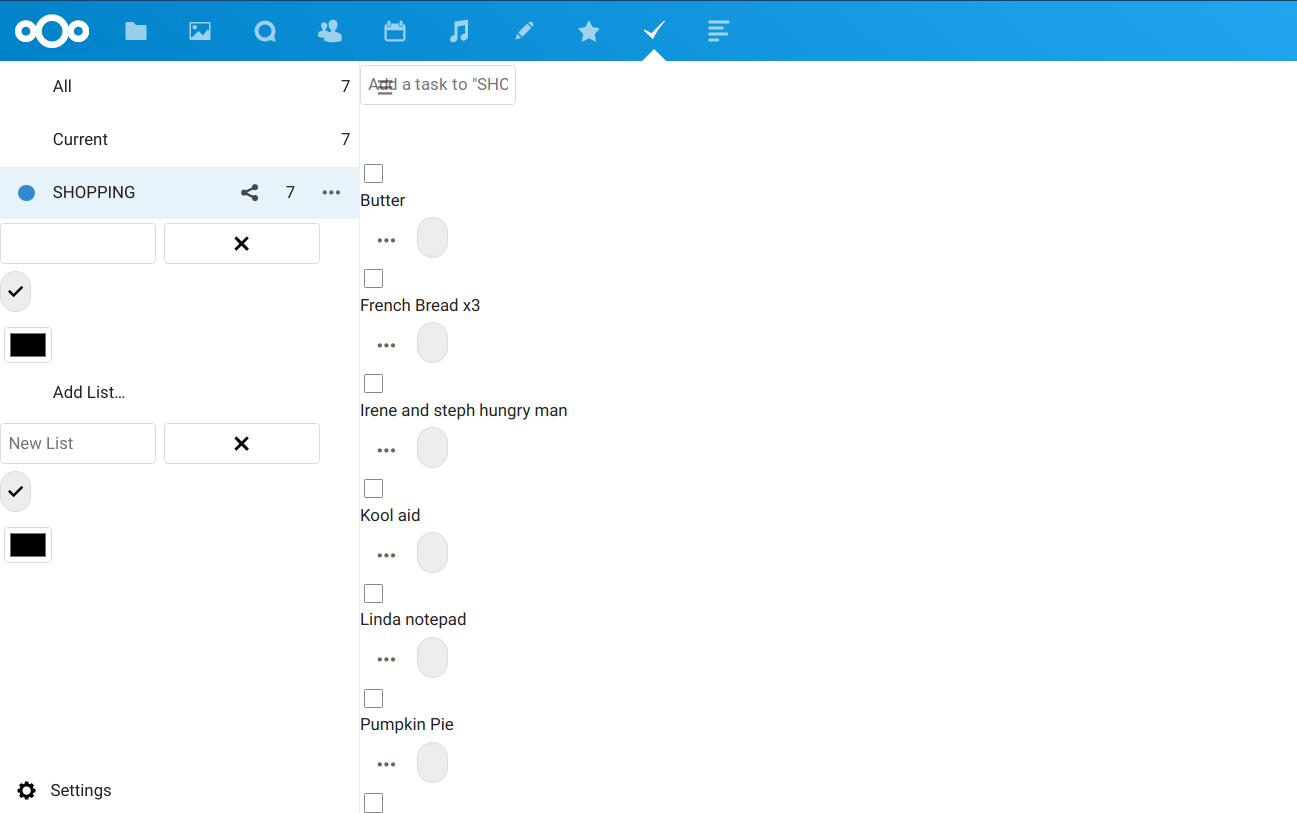
Also got this problem from an upgrade to v20
 netbofia
on 6 Oct 2020
netbofia
on 6 Oct 2020
Interesting. But why would that cause the SCSS compilation by the server to fail? Is this done by node-sass as well? Also, it still works on my instance.
Ah, then I have no idea. I assumed this was your vue app css :)
skjnldsv
on 6 Oct 2020
I am also experiencing this issue after upgrading to 20.
 robwolff3
on 6 Oct 2020
robwolff3
on 6 Oct 2020
I also have the same issue with Tasks on NC 20. I'm on stable, running it in Docker containers.
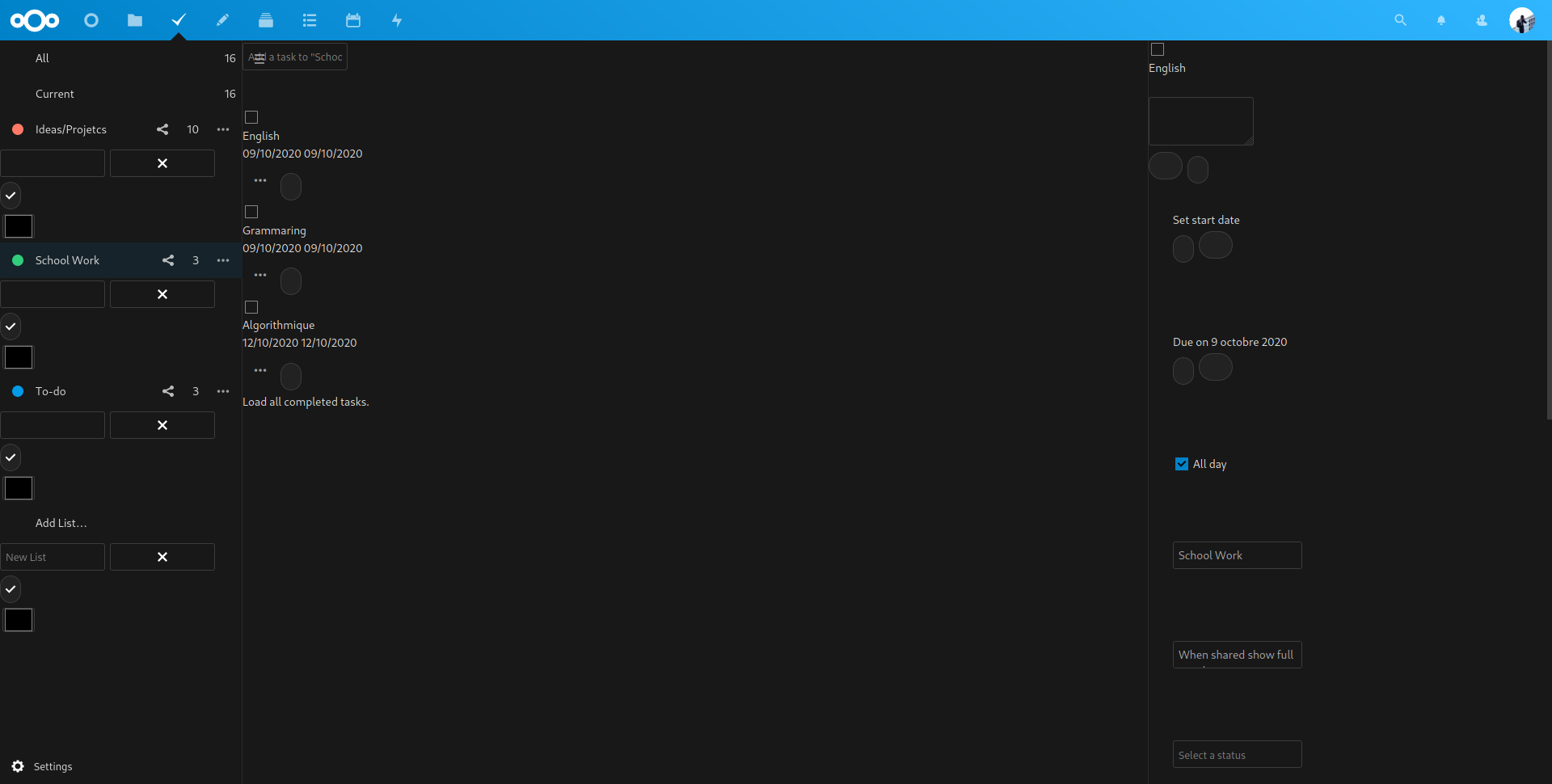
I tried removing tasks and reinstalling it both from the CLI and the Web interface, didn't fix it. Seems to be a SCSS error, as I have a message telling me "Failed to compile and/or save /var/www/html/custom_apps/tasks/css/tasks.scss".
I am using Redis as cache, tried flushing it with "flushall" which returned OK but I still have the same problem.
I am using MariaDB as my database.
I also checked the permissions on the scss files.
 LouisVallat
on 6 Oct 2020
LouisVallat
on 6 Oct 2020
Failed to compile and/or save /var/www/html/custom_apps/tasks/css/tasks.scss
I guess there is a typo somewhere? :shrug:
@LouisVallat can you share the full error log entry please?
skjnldsv
on 6 Oct 2020
@skjnldsv How can I share it conveniently and where can I find it? Do I upload the whole file obtained from "download logs" on the Logging entry in the admin settings?
LouisVallat
on 6 Oct 2020
You can open the log file and search for the error.
Then just copy/paste the whole line containing the error here.
skjnldsv
on 6 Oct 2020
{"reqId":"654sblUBd6C5b1Vs7SwV","level":0,"time":"2020-10-06T09:43:47+00:00","remoteAddr":"147.210.204.186","user":"louis","app":"core","method":"GET","url":"/apps/tasks/","message":"SCSSCacher: scss cache file locked for /custom_apps/tasks/css/tasks.scss","userAgent":"Mozilla/5.0 (X11; Linux x86_64; rv:81.0) Gecko/20100101 Firefox/81.0","version":"20.0.0.9"}
{"reqId":"rpp1kZsu8LQ4cQO4FQA4","level":0,"time":"2020-10-06T09:43:48+00:00","remoteAddr":"147.210.204.186","user":"louis","app":"core","method":"GET","url":"/apps/tasks/","message":"SCSSCacher: scss cache file locked for /custom_apps/tasks/css/tasks.scss","userAgent":"Mozilla/5.0 (X11; Linux x86_64; rv:81.0) Gecko/20100101 Firefox/81.0","version":"20.0.0.9"}
{"reqId":"654sblUBd6C5b1Vs7SwV","level":0,"time":"2020-10-06T09:43:48+00:00","remoteAddr":"147.210.204.186","user":"louis","app":"core","method":"GET","url":"/apps/tasks/","message":"SCSSCacher: scss cache file locked for /custom_apps/tasks/css/tasks.scss","userAgent":"Mozilla/5.0 (X11; Linux x86_64; rv:81.0) Gecko/20100101 Firefox/81.0","version":"20.0.0.9"}
{"reqId":"rpp1kZsu8LQ4cQO4FQA4","level":0,"time":"2020-10-06T09:43:49+00:00","remoteAddr":"147.210.204.186","user":"louis","app":"core","method":"GET","url":"/apps/tasks/","message":"SCSSCacher: scss cache file locked for /custom_apps/tasks/css/tasks.scss","userAgent":"Mozilla/5.0 (X11; Linux x86_64; rv:81.0) Gecko/20100101 Firefox/81.0","version":"20.0.0.9"}
{"reqId":"654sblUBd6C5b1Vs7SwV","level":0,"time":"2020-10-06T09:43:49+00:00","remoteAddr":"147.210.204.186","user":"louis","app":"core","method":"GET","url":"/apps/tasks/","message":"SCSSCacher: scss cache file locked for /custom_apps/tasks/css/tasks.scss","userAgent":"Mozilla/5.0 (X11; Linux x86_64; rv:81.0) Gecko/20100101 Firefox/81.0","version":"20.0.0.9"}
{"reqId":"rpp1kZsu8LQ4cQO4FQA4","level":0,"time":"2020-10-06T09:43:50+00:00","remoteAddr":"147.210.204.186","user":"louis","app":"core","method":"GET","url":"/apps/tasks/","message":"SCSSCacher: Giving up scss caching for /custom_apps/tasks/css/tasks.scss","userAgent":"Mozilla/5.0 (X11; Linux x86_64; rv:81.0) Gecko/20100101 Firefox/81.0","version":"20.0.0.9"}
{"reqId":"rpp1kZsu8LQ4cQO4FQA4","level":2,"time":"2020-10-06T09:43:50+00:00","remoteAddr":"147.210.204.186","user":"louis","app":"core","method":"GET","url":"/apps/tasks/","message":"Failed to compile and/or save /var/www/html/custom_apps/tasks/css/tasks.scss","userAgent":"Mozilla/5.0 (X11; Linux x86_64; rv:81.0) Gecko/20100101 Firefox/81.0","version":"20.0.0.9"}
{"reqId":"rpp1kZsu8LQ4cQO4FQA4","level":0,"time":"2020-10-06T09:43:50+00:00","remoteAddr":"147.210.204.186","user":"louis","app":"tasks","method":"GET","url":"/apps/tasks/","message":"Could not find resource file \"/custom_apps/tasks/css/tasks.css\"","userAgent":"Mozilla/5.0 (X11; Linux x86_64; rv:81.0) Gecko/20100101 Firefox/81.0","version":"20.0.0.9"}
{"reqId":"654sblUBd6C5b1Vs7SwV","level":0,"time":"2020-10-06T09:43:50+00:00","remoteAddr":"147.210.204.186","user":"louis","app":"core","method":"GET","url":"/apps/tasks/","message":"SCSSCacher: Giving up scss caching for /custom_apps/tasks/css/tasks.scss","userAgent":"Mozilla/5.0 (X11; Linux x86_64; rv:81.0) Gecko/20100101 Firefox/81.0","version":"20.0.0.9"}
{"reqId":"654sblUBd6C5b1Vs7SwV","level":2,"time":"2020-10-06T09:43:50+00:00","remoteAddr":"147.210.204.186","user":"louis","app":"core","method":"GET","url":"/apps/tasks/","message":"Failed to compile and/or save /var/www/html/custom_apps/tasks/css/tasks.scss","userAgent":"Mozilla/5.0 (X11; Linux x86_64; rv:81.0) Gecko/20100101 Firefox/81.0","version":"20.0.0.9"}
{"reqId":"654sblUBd6C5b1Vs7SwV","level":0,"time":"2020-10-06T09:43:50+00:00","remoteAddr":"147.210.204.186","user":"louis","app":"tasks","method":"GET","url":"/apps/tasks/","message":"Could not find resource file \"/custom_apps/tasks/css/tasks.css\"","userAgent":"Mozilla/5.0 (X11; Linux x86_64; rv:81.0) Gecko/20100101 Firefox/81.0","version":"20.0.0.9"}
{"reqId":"kzO5KXMJoqDC63liHjUy","level":0,"time":"2020-10-06T09:43:51+00:00","remoteAddr":"147.210.204.186","user":"louis","app":"apporder","method":"GET","url":"/custom_apps/tasks/css/tasks.css?v=cfd83474-0","message":"/appinfo/app.php is deprecated, use \\OCP\\AppFramework\\Bootstrap\\IBootstrap on the application class instead.","userAgent":"Mozilla/5.0 (X11; Linux x86_64; rv:81.0) Gecko/20100101 Firefox/81.0","version":"20.0.0.9"}
I included a few lines around the one I found, as I think it may help you.
According to the logs there could be (as I am interpreting it) a locking issue, but flushing the Redis cache or reinstalling the Tasks app didn't change anything.
I think it may be some noise, as on the last lines of my log file, there's only
{"reqId":"mKy06aA1wJDS4iap528p","level":2,"time":"2020-10-06T09:48:43+00:00","remoteAddr":"147.210.204.186","user":"louis","app":"core","method":"GET","url":"/apps/tasks/","message":"Failed to compile and/or save /var/www/html/custom_apps/tasks/css/tasks.scss","userAgent":"Mozilla/5.0 (X11; Linux x86_64; rv:81.0) Gecko/20100101 Firefox/81.0","version":"20.0.0.9"}
and nothing else.
LouisVallat
on 6 Oct 2020
Could not find resource file "/custom_apps/tasks/css/tasks.css"
skjnldsv
on 6 Oct 2020
Could not find resource file "/custom_apps/tasks/css/tasks.css"
Well yeah if it doesn't compile/save it and fails at this step, then it couldn't find the CSS file, at least that's what I'm understanding.
LouisVallat
on 6 Oct 2020
Failed to compile and/or save /var/www/html/custom_apps/tasks/css/tasks.scss
I guess there is a typo somewhere? :shrug:
@LouisVallat can you share the full error log entry please?
I don't think it's a typo, but rather a server issue. It works with NC19.0.3, but breaks with NC20. There was no change in the code of Tasks.
raimund-schluessler
on 6 Oct 2020
I don't think it's a typo, but rather a server issue. It works with NC19.0.3, but breaks with NC20. There was no change in the code of Tasks.
I can confirm it broke only on NC20. Is there anything I could do or should I just wait for the server team to fix this bug?
LouisVallat
on 6 Oct 2020
I can't seem to find any issue in the server repo that matches the issue described here (searching for "file locked" and "failed to compile" doesn't give anything recent), so maybe it'd need to get reported upstream?
stoically
on 6 Oct 2020
I don't think it is related to the "file locked" issue, as flushing the lock cache didn't fix anything.
Edit: just checked again and there isn't any "locked file" message around "failed to compile" messages anymore. The issue is still present.
Edit2: Someone just added an issue on the server repo https://github.com/nextcloud/server/issues/23231#issue-715709294
LouisVallat
on 6 Oct 2020
hm, the problem is also exists in a fresh install NextCloud 20.* with a new database in a clean setup without any data in tasks.
How i can generate helpfull Data?
I use a shared Webserver.
leuveg
on 6 Oct 2020
I received the problem/error. Disable/remove and reinstall failed to fix the problem. maintenance:repair failed to fix the problem. Found the following in the logs
{"reqId":"X3zWzo4RBwyk9LXf2XxpfwAFkhI","level":3,"time":"2020-10-06T20:42:55+00:00","remoteAddr":"76.120.5.247","user":"myadmin","app":"PHP","method":"GET","url":"/index.php/apps/tasks/","message":"Allowed memory size of 2147483648 bytes exhausted (tried to allocate 20480 bytes) at /home/saxxfwve/public_html/lib/private/Log/ExceptionSerializer.php#163","userAgent":"Mozilla/5.0 (Windows NT 10.0; Win64; x64) AppleWebKit/537.36 (KHTML, like Gecko) Chrome/87.0.4272.0 Safari/537.36 Edg/87.0.654.0","version":"20.0.0.9"}
 mani2jeff
on 7 Oct 2020
mani2jeff
on 7 Oct 2020
This same problem here after a upgrade from NC 19 to NC 20.
On log I can see this message:
"Warning core Failed to compile and/or save /var/www/html/custom_apps/tasks/css/tasks.scss"
 welrbraga
on 7 Oct 2020
welrbraga
on 7 Oct 2020
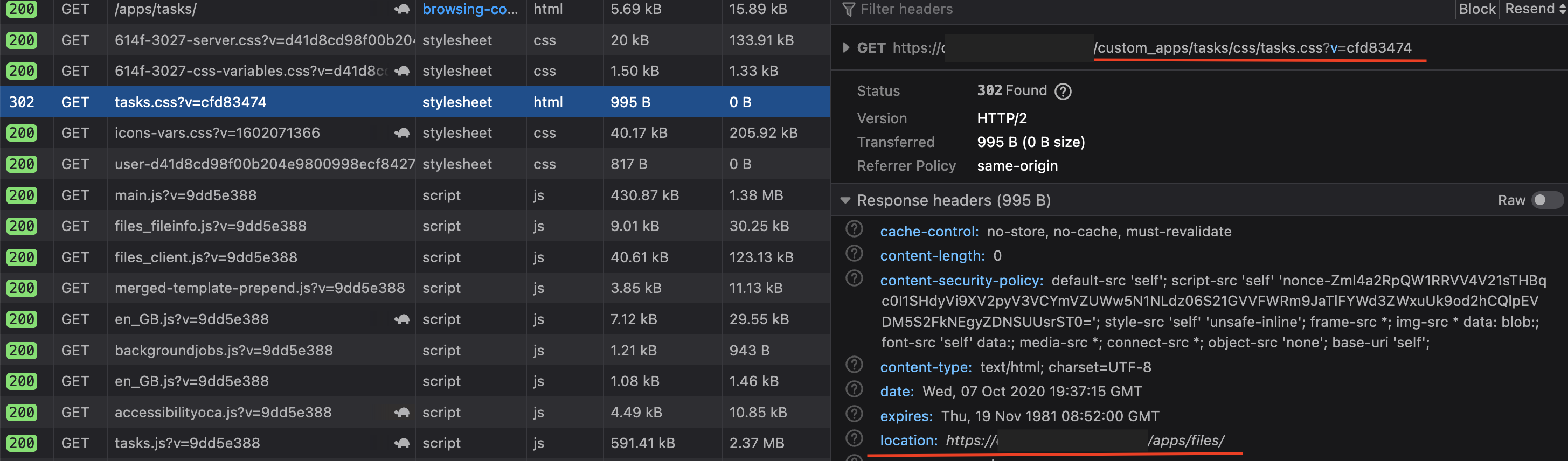
Same here. Seems like path has changed?
HTTP 302 (found) means that resource path has changed and should be found in the path provided by the location header...
 tborychowski
on 7 Oct 2020
tborychowski
on 7 Oct 2020
This is broken on my Watchtower upgraded NC20. Will wait for a fix rather than fannying around with uninstalling etc.
 jt196
on 8 Oct 2020
jt196
on 8 Oct 2020
I have the same issue after upgrading from 19.0.3 to 19.0.4.
Relevant Nextcloud log line: "Failed to compile and/or save /is/htdocs/nextcloud/apps/tasks/css/tasks.scss"
PHP error log does not seem to show anything relevant to the bug.
 denwald
on 8 Oct 2020
denwald
on 8 Oct 2020
Could someone maybe provide a VM or the exact steps to reproduce this with a docker container? Then I could investigate this.
raimund-schluessler
on 8 Oct 2020
I mean, install Nextcloud via docker and install the Tasks app? Seems like it's occurring on vanilla docker installs.
 FuzzyMistborn
on 8 Oct 2020
FuzzyMistborn
on 8 Oct 2020
Mine is a Docker installation - upgraded from 19 to 20. I'd try @FuzzyMistborn's suggestion. Or potentially run a v19 Docker install, then upgrade it if that doesn't work.
jt196
on 8 Oct 2020
@raimund-schluessler
Could someone maybe provide a VM or the exact steps to reproduce this with a docker container? Then I could investigate this.
docker run -d -p 8080:80 nextcloud
Go to http://localhost:8080, Install with default settings, Install tasks
If you previously had used the docker image, you might need to update with docker pull nextcloud:latest first
stoically
on 8 Oct 2020
Here is my docker-compose file (slightly redacted to not include private information: I just tested a vanilla install : boot up this docker-compose file and just create an admin account, then install the Tasks app and open it. That's all I had to do to reproduce this bug.
EDIT: Just tested with a basic docker run -d -p 8080:80 nextcloud and could reproduce it too.
Steps:
- Setup install (admin account)
- Go to Apps
- Install Tasks App
- Open Tasks App
version: '3'

services:
    app:
        image: nextcloud
        container_name: "cloud"
        restart: always
        ports:
            - 8080:80
        volumes:
            - ./html:/var/www/html
        environment:
            - REDIS_HOST=cloud_redis_cache
            - REDIS_HOST_PASSWORD=myredactedpassword
            - MYSQL_HOST=cloud_database
            - MYSQL_PASSWORD=myredactedpassword
            - MYSQL_DATABASE=nextcloud
            - MYSQL_USER=nextcloud
        depends_on:
            - db
            - cache
        networks:
            - backend

    cron:
        image: nextcloud
        container_name: "cloud_cron"
        restart: always
        depends_on:
            - db
            - app
            - cache
        volumes:
            - ./html:/var/www/html
        entrypoint: /cron.sh
        networks:
            - backend

    db:
        image: mariadb
        container_name: "cloud_database"
        command: --transaction-isolation=READ-COMMITTED --binlog-format=ROW
        restart: always
        volumes:
            - ./mariadb:/var/lib/mysql
        environment:
            - MYSQL_ROOT_PASSWORD=mysuperredactedpassword
            - MYSQL_PASSWORD=myredactedpassword
            - MYSQL_DATABASE=nextcloud
            - MYSQL_USER=nextcloud
        networks:
            - backend

    cache:
        image: "redis:alpine"
        command: redis-server --requirepass myredactedpassword
        container_name: "cloud_cache"
        restart: always
        environment:
            - REDIS_REPLICATION_MODE=master
        networks:
            - backend
        volumes:
            - ./redis/data:/var/lib/redis
            - ./redis/redis.conf:/usr/local/etc/redis/redis.conf

networks:
    backend:
I also reconfigured the network part so you can access it through the port 8080 without needing NGINX-Proxy.
LouisVallat
on 8 Oct 2020
Same problem here. NC19->20 update on the offical nextcloud docker image. Get segmentation fault and client apps won't sync. Any ideas?
 dprandzioch
on 8 Oct 2020
dprandzioch
on 8 Oct 2020
For me it tries to compile markdown and fails. markdown.scss is missing variables I guess.
If I comment this out it works, @import './src/markdown';
I think no one notices because they already have a working tasks.css file and the failure doesn't delete it.
I don't see markdown in task notes either - even after manually adding the missing variables, so I think something is broken.
 Terrox
on 9 Oct 2020
Terrox
on 9 Oct 2020
For me it tries to compile markdown and fails. markdown.scss is missing variables I guess.
If I comment this out it works, @import './src/markdown';
I think no one notices because they already have a working tasks.css file and the failure doesn't delete it.
I don't see markdown in task notes either - even after manually adding the missing variables, so I think something is broken.
That's weird, I just tried this possible solution but commenting out this import doesn't change anything. I even tried to comment everything in this scss but it still doesn't fix the issue...
LouisVallat
on 9 Oct 2020
For me it tries to compile markdown and fails. markdown.scss is missing variables I guess.
If I comment this out it works, @import './src/markdown';
I think no one notices because they already have a working tasks.css file and the failure doesn't delete it.
I don't see markdown in task notes either - even after manually adding the missing variables, so I think something is broken.
Could you figure out which variables are missing? And maybe post a screenshot of the markdown notes?
raimund-schluessler
on 9 Oct 2020
I just wanted to note I have the same issue with Tasks after upgrading 19.0.3 to 19.0.4, my screens look identically malformed. The only difference is I get a 302 Bad Gateway on the first access of the /apps/tasks/ url, the next reload I then get the corrupted rendering.
 Eszartek
on 9 Oct 2020
Eszartek
on 9 Oct 2020
For me it tries to compile markdown and fails. markdown.scss is missing variables I guess.
If I comment this out it works, @import './src/markdown';
I think no one notices because they already have a working tasks.css file and the failure doesn't delete it.
I don't see markdown in task notes either - even after manually adding the missing variables, so I think something is broken.That's weird, I just tried this possible solution but commenting out this import doesn't change anything. I even tried to comment everything in this scss but it still doesn't fix the issue...
Did you reload apache and FPM? I had to do that to see changes. I'll reinstall Tasks to be sure.
Terrox
on 9 Oct 2020
I changed /var/www/html/custom-apps/tasks/css/tasks.sccs to look like this:
`@import '/var/www/html/custom-apps/tasks/css/sprites-color';
@import '/var/www/html/custom-apps/tasks/css/sprites-bw';
@import '/var/www/html/custom-apps/tasks/css/src/style';
@import '/var/www/html/custom-apps/tasks/css/src/markdown';
@import '/var/www/html/custom-apps/tasks/css/src/Calendars/Calendar.scss';
@import '/var/www/html/custom-apps/tasks/css/src/Calendars/CalendarShares.scss';
`
Seems to have worked.
 wd5gnr
on 9 Oct 2020
wd5gnr
on 9 Oct 2020
@wd5gnr That's the same, it should still fail.
/* put this on line 4 of apps/tasks/css/src/markdown.scss and reload apache/FPM */
$color-lightgrey: #bbbbbb;
$color-main-background: #ddd;
$color-darkgrey:#666;
My Nextcloud is 19.0.4
When it fails to compile I get Service Unavailable error once, then it never tries again until the scss file date changes and the server is reloaded.
However I do NOT see markdown in the edit box of Tasks and I don't think I ever have, only in Deck.
Terrox
on 9 Oct 2020
Well I haven't dug into the code, but my guess is that from 19.x where this worked and 20.0 where it doesn't the working directory for whatever is compiling the sccs has changed. So in fact, it fixed it for me. I agree it should be the same, but it clearly isn't. Unless just touching the file somehow made it compile successfully, but that seems unlikely.
wd5gnr
on 9 Oct 2020
I am still on 19.0.4 where it fails to compile, but I think my CSS was flushed after update because I did manual update (?) and then it failed to compile on PHP 7.4 + FPM
Terrox
on 9 Oct 2020
on unrelated note: I don't see why the github is missing sprites-bw.scss & sprites-color.scss though, those files do end up in the packaged .zip download. I guess there's something else going on in the packaging of the .zip file? - https://github.com/nextcloud/tasks/tree/master/css
Terrox
on 9 Oct 2020
Removing the markdown include got my Tasks working under NextCloud 20
 lyallp
on 10 Oct 2020
lyallp
on 10 Oct 2020
I'm seeing this error after upgrading from 19.0.3 -> 19.0.4.
...
SCSSCacher: scss cache file locked for /custom_apps/tasks/css/tasks.scss
...
UPDATE
The fix mentioned above worked for me (single comment below for markdown) along with these steps:
<REDACTED>:/var/www/html$ cat custom_apps/tasks/css/tasks.scss
/**
 * Nextcloud - Tasks
 *
 * @author Raimund Schlüßler
 * @copyright 2018 Raimund Schlüßler <[email protected]>
 *
 * This library is free software; you can redistribute it and/or
 * modify it under the terms of the GNU AFFERO GENERAL PUBLIC LICENSE
 * License as published by the Free Software Foundation; either
 * version 3 of the License, or any later version.
 *
 * This library is distributed in the hope that it will be useful,
 * but WITHOUT ANY WARRANTY; without even the implied warranty of
 * MERCHANTABILITY or FITNESS FOR A PARTICULAR PURPOSE.  See the
 * GNU AFFERO GENERAL PUBLIC LICENSE for more details.
 *
 * You should have received a copy of the GNU Affero General Public
 * License along with this library.  If not, see <http://www.gnu.org/licenses/>.
 *
 */

@import './sprites-color';
@import './sprites-bw';
@import './src/style';
//@import './src/markdown';

@import './src/Calendars/Calendar.scss';
@import './src/Calendars/CalendarShares.scss';
 paulcalabro
on 10 Oct 2020
paulcalabro
on 10 Oct 2020
I can confirm that @Terrox comment (adding the variables in the markdown.scss file) fixed the issue for me, as you can see:
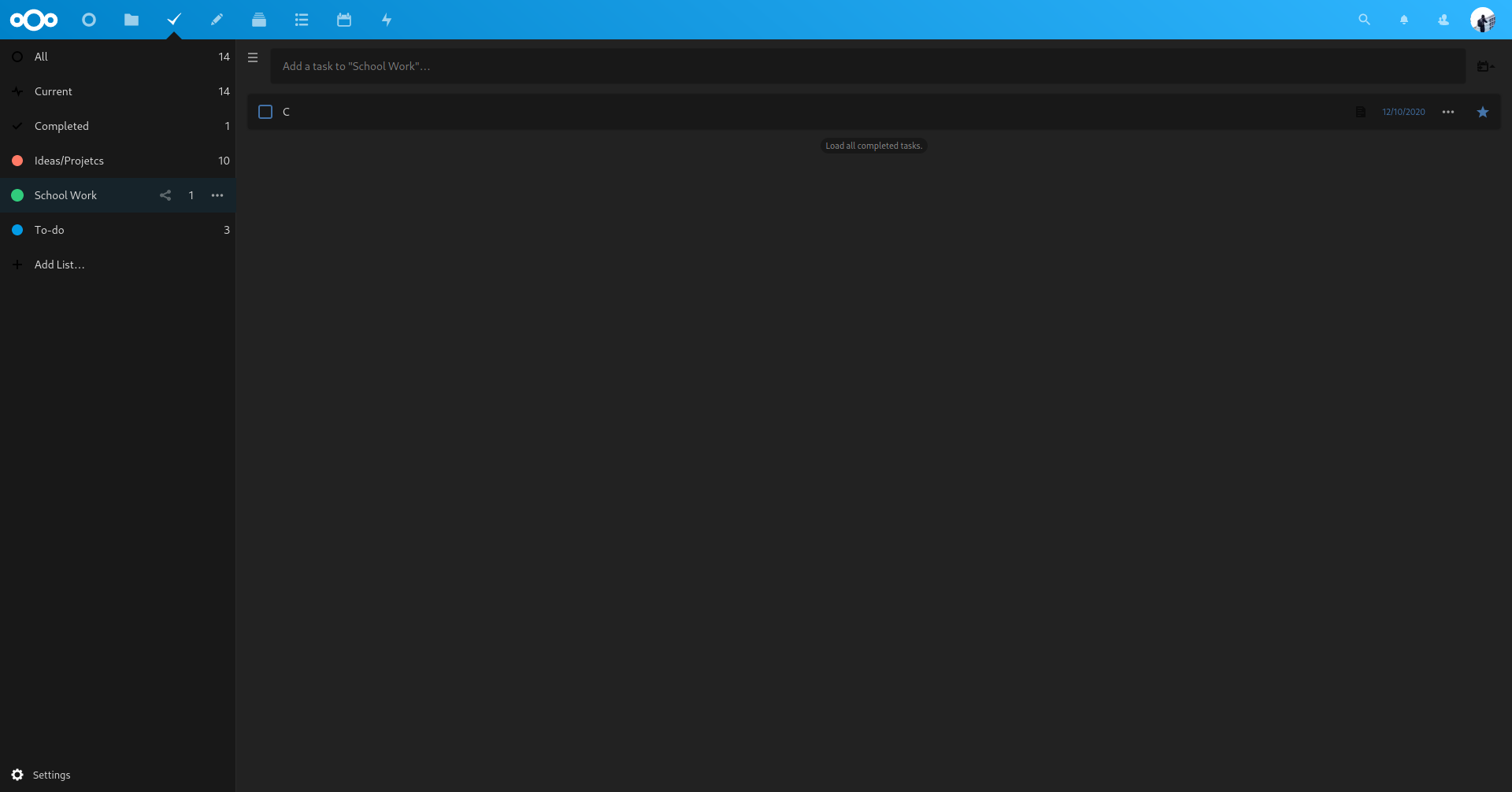
I think it is the issue as commenting the markdown import worked too.
EDIT: just tested adding the variables in the markdown.scss file after a vanilla install of Tasks on NC19.0.3 (so it wouldn't break everything on older versions). This doesn't replace good old testing but I don't see a reason why it would break some stuff on these older versions. I'll be doing a pull request for this fix.
LouisVallat
on 10 Oct 2020
There is an updated PR in https://github.com/nextcloud/tasks/pull/1262. Please check if this fixes the issue for you.
This is the built app for simpler testing: tasks.tar.gz
raimund-schluessler
on 10 Oct 2020
Can confirm that the fix works with a freshly started docker container, thanks!
Though, my old instance somehow still refuses to accept the fix, it logs now
SCSSCacher: unable to cache: tasks.scss
Failed to compile and/or save /var/www/html/custom_apps/tasks/css/tasks.scss
Not sure what's going on, but probably just something odd with my installation
stoically
on 10 Oct 2020
@stoically you should check the permissions on your instance's files!
As I said in my comment on the PR, this fix worked for me on a fresh vanilla docker install so all good for me! :100:
LouisVallat
on 10 Oct 2020
Yeah, I've recreated the container, ran chown -R www-data.www-data on my data directory and tried to unlock, but it still says
SCSSCacher: unable to cache: tasks.scss
Any ideas welcome - but in the worst case I'll just start from scratch again I guess
stoically
on 10 Oct 2020
Everything works now, also on my old instance. Sorry for the noise!
What happened:
message":{"Exception":"Error","Message":"file_put_contents(/var/www/html/data/appdata_
/css/tasks/cfd8-e8ec-tasks.css): failed to open stream: No such file or directory
While trying to work around the issue I've indeed deleted the tasks directory inside appdata/css. Recreating it with the right permissions and putting the fix in place and everything is smooth again.
stoically
on 10 Oct 2020
The PR also works for me.
 svde
on 11 Oct 2020
svde
on 11 Oct 2020
@raimund-schluessler wrote:
There is an updated PR in #1262. Please check if this fixes the issue for you.
This is the built app for simpler testing: tasks.tar.gz
Thank you. Here's one more passing ad-hoc user test, in case it helps. This tarball worked for me. I disabled and removed the tasks app from the app store, exploded the tarball into my apps directory, fixed ownership, then ran php occ app:enable tasks in the Nextcloud container (I'm using Docker).
 meonkeys
on 11 Oct 2020
meonkeys
on 11 Oct 2020
Thanks everyone for testing. I think this is enough feedback to release a fixed version. This will come in the next hours.
raimund-schluessler
on 11 Oct 2020
I released a fixed version of Tasks https://github.com/nextcloud/tasks/releases/tag/v0.13.4.
Unfortunately, the appstore is down at the moment, so I cannot upload it there. I will catch up on that as soon as the appstore is up again. You can still manually update with the tarball from the release page.
raimund-schluessler
on 11 Oct 2020
It's in the appstore now.
raimund-schluessler
on 12 Oct 2020
I saw that as soon as you posted it, will update as soon as my instance will detect it!
EDIT Updated and everything is looking alright! I'm going to link this issue to the one on the server repo so it can be closed too. Thank you again!
LouisVallat
on 12 Oct 2020
Got the update, finally have it working propery. Many thanks.
netbofia
on 12 Oct 2020
Related issues
 ghost
·
4Comments
ghost
·
4Comments
 Viveur
·
3Comments
Viveur
·
3Comments
 smirkybg
·
6Comments
smirkybg
·
6Comments
 robingenz
·
7Comments
robingenz
·
7Comments
 thomas-mc-work
·
3Comments
thomas-mc-work
·
3Comments
Most helpful comment
I released a fixed version of Tasks https://github.com/nextcloud/tasks/releases/tag/v0.13.4.
Unfortunately, the appstore is down at the moment, so I cannot upload it there. I will catch up on that as soon as the appstore is up again. You can still manually update with the tarball from the release page.