Tampermonkey: "Limited runtime host permissions might break some Tampermonkey features like script update, GM_xmlhttpRequest and others!"
On chrome 73 Canary/Dev on both Linux and windows using the latest dev version of Tampermonkey im getting this yellow banner at the top of the tampermonkey settings:
"Limited runtime host permissions might break some Tampermonkey features like script update, GM_xmlhttpRequest and others!"
Initial setup and sync enabling worked after 2 fresh browser installs and it grabbed the scripts I had on the cloud, but right after that message popped up.
Anyone know what this error is about and how to fix it?
 BaronKrause
All 39 comments
Ended up being the fault of an old script (I assume). After updating manually to a newer version of it that error no longer pops up.
BaronKrause
on 25 Jan 2019
Please see https://developer.chrome.com/extensions/runtime_host_permissions for more information. This message should only be shown if Chrome doesn't grant the "all hosts" permission to Tampermonkey.
 derjanb
on 30 Jan 2019
derjanb
on 30 Jan 2019
However, i have granted "all hosts" to Tampermonkey, but this still exist, screenshot below:

Google Chrome | 73.0.3683.20 (Official Build) (64-bit)
Revision | 8e2b610813e167eee3619ac4ce6e42e3ec622017-refs/branch-heads/3683@{#191}
Edit after i update to Chrome Beta 73.0.3683.27 (Official Build) (32-bit) , this message disappears.
 ayanamist
on 8 Feb 2019
ayanamist
on 8 Feb 2019
Seconding @ayanamist but on the Brave browser:
Version 0.59.35 Chromium: 72.0.3626.81 (Official Build) (64-bit)
Version 0.59.34 Chromium: 72.0.3626.81 (Official Build) (64-bit)
And userscripts don't appear to be working, although Tampermonkey reports that they ran.
Strangely, works for me on Chrome Version 72.0.3626.96 (Official Build) (64-bit) where I don't get the warning.
Have also logged this there https://community.brave.com/t/limited-runtime-host-permissions-for-extensions-tampermonkey/44413?u=niv
 nivinj
on 8 Feb 2019
nivinj
on 8 Feb 2019
Can also confirm @ayanamist's findings. After updating to Chrome Version 72.0.3626.96 (Official Build) (64-bit) I'm experiencing similar issues. Have granted "On all hosts" for Tampermonkey, but get the limited runtime host permission warnings and userscript and Tampermonkey functionality seems hampered (can't update userscripts from TM menu, for instance).
 shinmai
on 11 Feb 2019
shinmai
on 11 Feb 2019
What Tampermonkey are you using?
derjanb
on 11 Feb 2019
I can confirm as well that the permission pop-up is happening on all pages, not only those that have limited permissions.

E: missed including Chrome version: Version 72.0.3626.96 (Official Build) (64-bit)
 joelunder
on 11 Feb 2019
joelunder
on 11 Feb 2019
Same here in the beginning
Tampermonkey 4.7.54
Chrome 72.0.3626.81 (Official Build) beta (64-bit)
MacOS 10.14.2

But it disappeared after I updated Chrome Beta to 73.0.3683.27
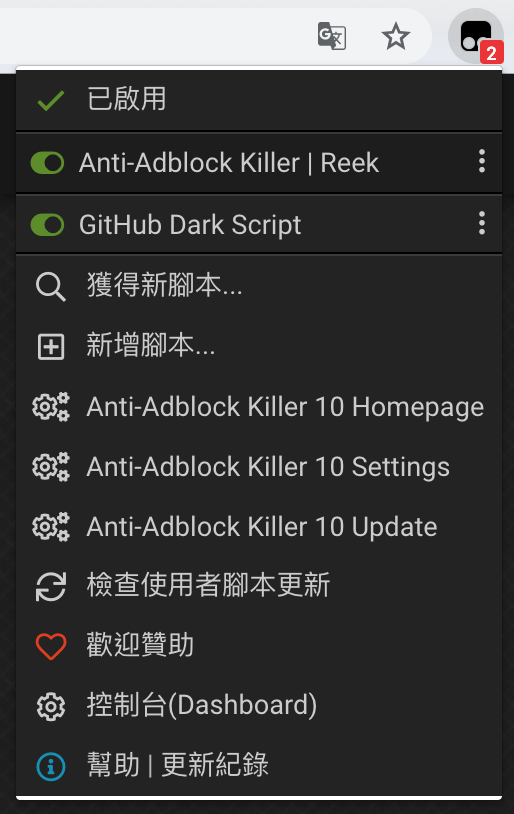
 goodjack
on 12 Feb 2019
goodjack
on 12 Feb 2019
I ran into the same issue and was able to fix it by disallowing access (right click on extension, hover over this can read and change site data, select when you click the extension) and then reallowing access (same steps as earlier, this time select on all sites). I might have done something else, so YMMV
 vikaspotluri123
on 12 Feb 2019
vikaspotluri123
on 12 Feb 2019
Thanks @vikaspotluri123
That suggestion caused the scripts to actually start running on the pages where they are supposed to, but I am still getting the warning text, so there is clearly something still up.
joelunder
on 12 Feb 2019
I get this box, too, but only with a fresh install on a second profile I was going to use for testing. I tested the Amazon Smile Redirect script, and it worked just fine. I also manually modified it and then did a manual update, and that worked just fine, too.
If anyone has a script that can test if anything is actually broken, I'd try it. It could be a false alarm.
Edit: Note that the second profile is running at the same time as my Default profile.
 trlkly
on 13 Feb 2019
trlkly
on 13 Feb 2019
I may have figured something out.
I right clicked on Tampermonkey and chose "Manage Extensions." There I enabled everything I normally enable: allowing Tampermonkey access to file:// URLs and access in Incognito mode. I also, for good measure, moved it from "On all sites" to "On click" and back.
(I note that doing what was described in vikaspotluri123's post did not work.)
Upon refreshing a website in another tab, the error was gone, and did not recur even after closing the profile and then launching it again.
trlkly
on 13 Feb 2019
@trlkly Yes, this seems to work (also found by @vikaspotluri123 https://github.com/Tampermonkey/tampermonkey/issues/640#issuecomment-462615761).
Can someone that is seeing the warning please execute the following at Tampermonkey's background page console and post the output:
chrome.permissions.getAll(function(e) { console.log('getAll', e.origins.join(' | ')) });
chrome.permissions.contains({ origins: ['<all_urls>'] }, function(r) { console.log('contains', r); });
Thanks.
derjanb
on 13 Feb 2019
trlkly
on 13 Feb 2019
Additional information:
When I enable file URLs and Incognito mode, that last line changes to contains true, and the problem goes away.
If I then disable file URLs, it changes back to contains false. However, the tampermonkey warning remains gone.
The first line never changes.
Changing that last line to chrome.permissions.contains({ origins: ['*://*/*'] }, function(r) { console.log('contains', r); }); returns true whether file URLs are enable or not.
It however returns false if I turn change Tampermonkey's permissions to anything other than "On all sites".
trlkly
on 13 Feb 2019
contains false OK, so this is the culprit. :-( Even though the permission is granted (getAll returned it), contains returns false.
derjanb
on 13 Feb 2019
As I said in my previous post, I think using contains on *://*/* is the better check. It returns false if Tampermonkey does not have all site access. But it returns true when it does.
trlkly
on 13 Feb 2019
The good news is that this is kind of a cosmetic issue. If Tampermonkey believes the
Chromium bug report: https://bugs.chromium.org/p/chromium/issues/detail?id=931816
derjanb
on 13 Feb 2019
@derjanb As a cosmetic issue, is there any way to hide it without enabling the file:\/\/\/ permissions?
trlkly
on 14 Feb 2019
Sure, but this will hide all warnings and not only this one!
Set "Config Mode" to Advanced and add this to the "Custom CSS" option:
.action.status .global_hint_warning {
    display: none;
}
then press "Save".
derjanb
on 14 Feb 2019
It looks the issue is gone with TM 4.8.
 mikolajek
on 14 Feb 2019
mikolajek
on 14 Feb 2019
@mikolajek No, it just shows the message if the first request needs to be done.
BTW: the latest TM beta version (4.9.5914) includes a workaround.
derjanb
on 14 Feb 2019
@derjanb I am running the latest TM beta as well as the latest Chrome production (not beta) and I am having issues with updating scripts. I have the settings set to "all sites", but 50% of the time, updating the scripts just gives a spinning wheel. If I kill all chrome windows, then open Chrome and immediately run an "update", I can get them to update. But after some time, updates stop working.
 dBsooner
on 26 Feb 2019
dBsooner
on 26 Feb 2019
https://raw.githubusercontent.com/chainofhonor/-/master/%E6%B2%B9%E7%8C%B4%E5%85%81%E8%AE%B8%E8%AE%BF%E9%97%AE%E6%96%87%E4%BB%B6%E7%BD%91%E5%9D%80.png
把这个选项勾上就行了
 chainofhonor
on 1 Mar 2019
chainofhonor
on 1 Mar 2019
I have the same message as @ayanamist (https://github.com/Tampermonkey/tampermonkey/issues/640#issuecomment-461679807) running Chrome OS 72 & GM 4.8 but scripts still appear to be working. Read and change site data is enabled on all sites.
 nathgit
on 2 Mar 2019
nathgit
on 2 Mar 2019
I use Iridium now. No orange nag message. Ungoogled Chromium may also be a solution, did not test.
 nilslindemann
on 2 Mar 2019
nilslindemann
on 2 Mar 2019
@nathgit As stated above, you can work around the issue by right clicking on the button, and choosing Manage Extensions, and then enabling file:// URL access.
trlkly
on 2 Mar 2019
@trlkly I had access to file urls enabled in chrome, but then also, when using @grant GM.xmlHttpRequest in a script and making Ajax requests to loacalhost, then i got the orange nag messages.
Iridium will not show these.
nilslindemann
on 6 Mar 2019
@nathgit As stated above, you can work around the issue by right clicking on the button, and choosing Manage Extensions, and then enabling file:// URL access.
Thank you. This works!
 0x7FFFFFFFFFFFFFFF
on 12 Mar 2019
0x7FFFFFFFFFFFFFFF
on 12 Mar 2019
@nathgit As stated above, you can work around the issue by right clicking on the button, and choosing Manage Extensions, and then enabling file:// URL access.
Works
 ehusky
on 13 Mar 2019
ehusky
on 13 Mar 2019
I found out my issue was because of Google Sync. When I had that enabled, it was actually what caused TamperMonkey to stop updating. Google Sync was getting hung. Like I said, it worked fine if you did it right upon opening Chrome, but stopped working sometime there after. Disabling Google Sync completely fixes the issue.
dBsooner
on 13 Mar 2019
🔥If anyone running into this warning on Chrome:
It appears due to the changed user restricted access and can be dismissed by navigating to menu -> More tools -> Extensions -> Tampermonkey -> Details -> Enable Allow access to file URLs.
Reload Tampermonkey and you're good to go!
 DevDavido
on 19 Mar 2019
DevDavido
on 19 Mar 2019
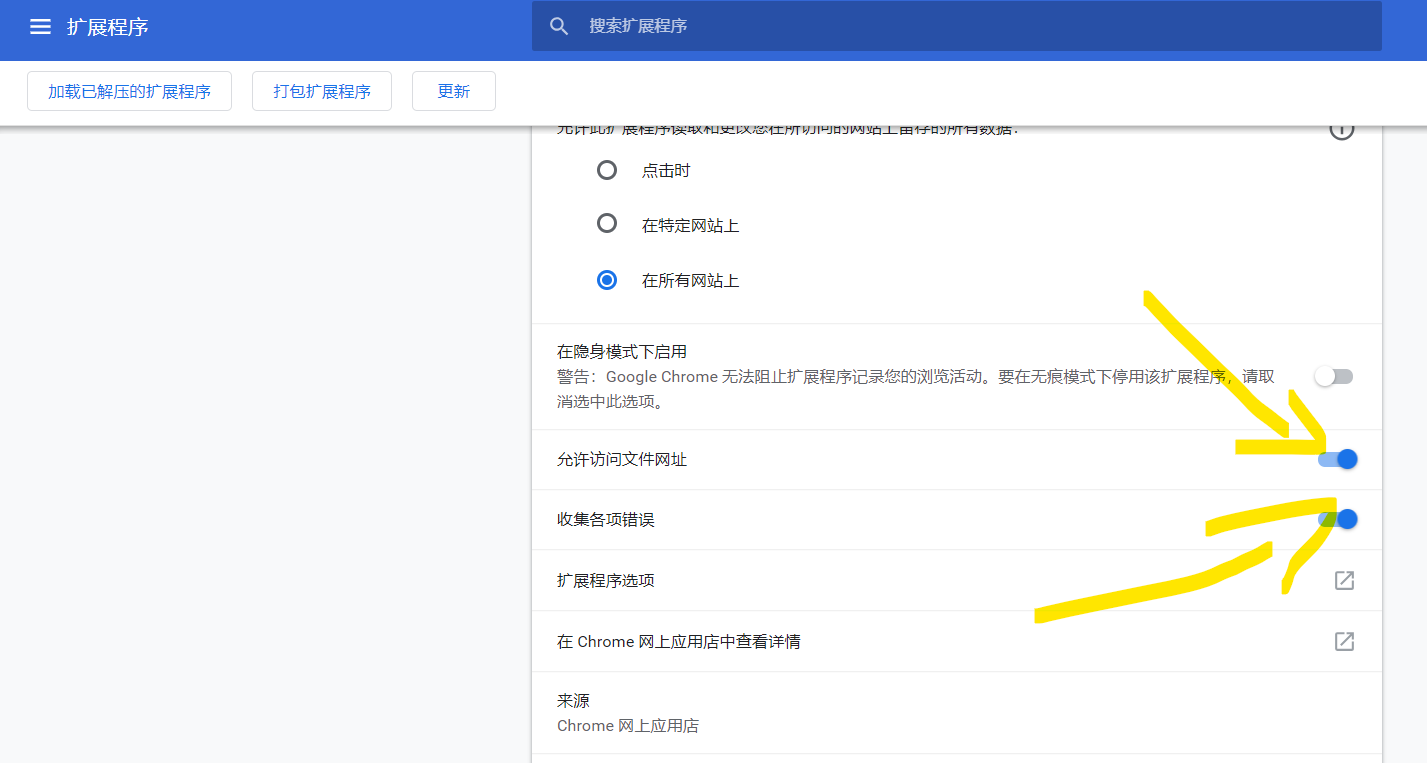
in chrome extension setting, after i grant this permission, the message disappear..
 wy-luke
on 21 Mar 2019
wy-luke
on 21 Mar 2019
In chrome Extension settings, enabling "Allow access to file URLs" got rid of it for me
 N1N74
on 21 Mar 2019
N1N74
on 21 Mar 2019
I may have figured something out.
I right clicked on Tampermonkey and chose "Manage Extensions." There I enabled everything I normally enable: allowing Tampermonkey access to file:// URLs and access in Incognito mode. I also, for good measure, moved it from "On all sites" to "On click" and back.
(I note that doing what was described in vikaspotluri123's post did not work.)
Upon refreshing a website in another tab, the error was gone, and did not recur even after closing the profile and then launching it again.
This worked for me! Thanks
 bruiseviolet
on 26 Mar 2019
bruiseviolet
on 26 Mar 2019
visit the extension
chrome://extensions/?id=dhdgffkkebhmkfjojejmpbldmpobfkfoturn on the button "Allow access to file URLs"

 hackdapp
on 27 Mar 2019
hackdapp
on 27 Mar 2019
Is there any way to close this so we don't keep getting the same workaround
posted over and over again?
On Tue, Mar 26, 2019 at 10:50 PM zhangliang notifications@github.com
wrote:
>
1.
visit the extension
chrome://extensions/?id=dhdgffkkebhmkfjojejmpbldmpobfkfo
2.turn on the button "Allow access to file URLs"
—
You are receiving this because you were mentioned.
Reply to this email directly, view it on GitHub
https://github.com/Tampermonkey/tampermonkey/issues/640#issuecomment-476960668,
or mute the thread
https://github.com/notifications/unsubscribe-auth/AFNSrmnVNRd9VLwfLvBzPvrBItQFgyi4ks5vauppgaJpZM4aSOQY
.
trlkly
on 27 Mar 2019
Even though I understand (after reading this conversation) what the problem is and what the solution might be, I think the warning that is shown should be improved. As it is, it doesn't say what the problem is or how it could be solved. Even a link back to this issue might be of help.
 wodim
on 12 Apr 2019
wodim
on 12 Apr 2019
Chrome 74 (which fixes the linked Chromium bug) is now generally available.
 danielsamuels
on 24 Apr 2019
danielsamuels
on 24 Apr 2019
Related issues
 AlfonsoML
·
4Comments
AlfonsoML
·
4Comments
 momocow
·
5Comments
momocow
·
5Comments
 darkred
·
7Comments
darkred
·
7Comments
 PiotrSss
·
4Comments
PiotrSss
·
4Comments
 Mottie
·
4Comments
Mottie
·
4Comments
Most helpful comment
https://raw.githubusercontent.com/chainofhonor/-/master/%E6%B2%B9%E7%8C%B4%E5%85%81%E8%AE%B8%E8%AE%BF%E9%97%AE%E6%96%87%E4%BB%B6%E7%BD%91%E5%9D%80.png把这个选项勾上就行了