Tampermonkey: Google Drive login is constantly opened
Ever since I enabled cloud backup to Drive and logged in via my Google account, the logging in with google tab keeps getting opened. It is opened every time the browser starts, even though I'm already logged into my Google account, and if I close it without logging in again it will just re-open after a while.
Expected Behavior
I should not be asked to log in with Google when I already have.
Specifications
- Firefox: 62.0 (64-bit)
- TM: 4.8.5847
- OS: Arch Linux
 Storm-Engineer
All 20 comments
This problem is still up to date btw.
Chrome 64-bit
Win10 64-bit
 Remonell
on 21 Jan 2019
Remonell
on 21 Jan 2019
Still an issue.
Chrome MacOS
 genevera
on 1 Mar 2019
genevera
on 1 Mar 2019
I've investigated this a little bit an according to the documentation you should be asked only once:
https://developers.google.com/identity/protocols/OAuth2UserAgent#redirecting > OAUTH 2.0 ENDPOINTS > Parameters > prompt:
Optional. A space-delimited, case-sensitive list of prompts to present the user. If you don't specify this parameter, the user will be prompted only the first time your app requests access.
Even the selected account should be remembered, which is working here as well. So I'm not sure why Google forgets your decision.
 derjanb
on 5 Mar 2019
derjanb
on 5 Mar 2019
I wonder if it's AdNauseum borking it; that plus my ad-blocking dnsmasq config do cut out many google hostnames.
genevera
on 6 Mar 2019
I'm getting this on both Firefox and Chrome. I think sync is still working though.
(I don't know if that is relevant: I have two Google accounts, one work and one personal. So when apps ask me to sign in, I must choose which account to use.)
Any suggestions for how to debug?
 joeytwiddle
on 8 May 2019
joeytwiddle
on 8 May 2019
This is probably relevant to the not closing issue. Google Chrome:
oauth.php:7 Scripts may close only the windows that were opened by it.
and Firefox:
Scripts may not close windows that were not opened by script. (oauth.php:7:15)
But there is still the question why it keeps opening the authentication process in the first place.
joeytwiddle
on 24 May 2019
@joeytwiddle Did you make any progress solving this issue or finding out why it is misbehaving?
@derjanb Do you have any idea what the issue might be? Can we support you somehow by sending log data for example to figure this issue out?
Remonell
on 24 Jun 2019
In Chromium Edge too
Meanwhile using hibernate mode
 SmartManoj
on 5 Jul 2019
SmartManoj
on 5 Jul 2019
Workaround
// ==UserScript==
// @name         TM sync
// @namespace    http://tampermonkey.net/
// @version      0.1
// @description  try to take over the world!
// @author       You
// @match        https://accounts.google.com/AccountChooser?*tampermonkey*

// @grant        none
// ==/UserScript==

(function() {
    'use strict';
document.querySelector('#choose-account-0').click();
    // Your code here...
})();
Still an issue with:
- Chrome 76.0.3809.87 (Official Build) (64-bit)
- TM: 4.8.41
- OS: elementary OS 5.0 (Ubuntu 18.04 LTS based)
 anddam
on 31 Jul 2019
anddam
on 31 Jul 2019
@anddam So that the issue is still open
SmartManoj
on 1 Aug 2019
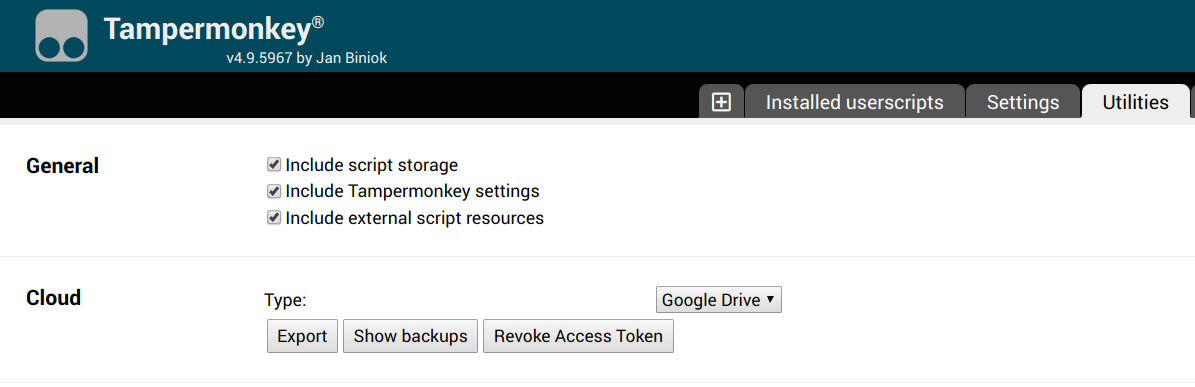
This should be fixed at TM BETA 4.9.5967
Be sure to revoke the existing access token at the utilities tab in order to benefit from the fix.
https://chrome.google.com/webstore/detail/gcalenpjmijncebpfijmoaglllgpjagf
https://firefox.tampermonkey.net/firefox-current-beta.xpi
derjanb
on 29 Aug 2019
@derjanb I freshly installed TamperMonkey Beta. On version 4.10.6104. This is still an issue and happens daily. Did everything you mentioned before.
Remonell
on 5 Dec 2019
@Remonell can you please disable sync, restart Chrome, open Tampermonkey's background page (https://www.tampermonkey.net/faq.php#Q600), open the network tab and filter XHR requests?
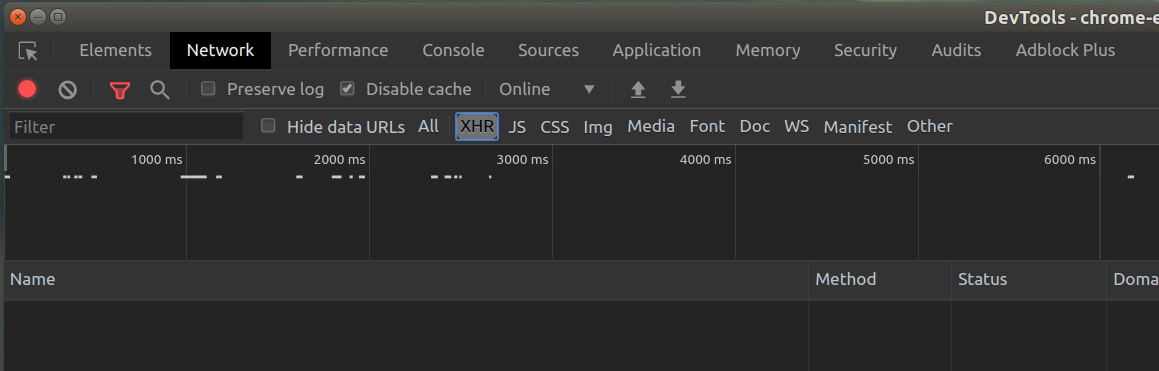
Then please enable sync again and sent a screenshot of the network and the console tab via mail (https://www.tampermonkey.net/imprint.php).
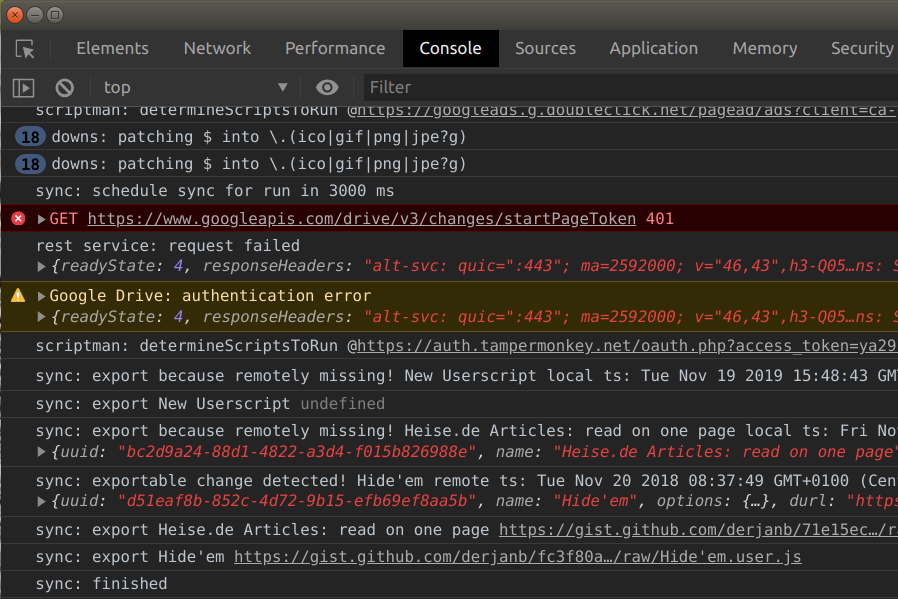
Thanks.
derjanb
on 12 Dec 2019
Hi Jan, thanks for taking your time. Here are the screenshots.
The last entry in network got created, when I disabled sync, saved and reenabled sync again. I did that because I was hoping for more output.
Remonell
on 12 Dec 2019
Looks good. The problem (Google authentication screen) didn't happen when you made the screenshots, right?
Also please make sure "Log Level" is set to "Debug".
And next time please send the screenhsots via mail (https://www.tampermonkey.net/imprint.php). When a re-authentication is done, they might contain sensitive data like access tokens.
derjanb
on 12 Dec 2019
Correct, the authentication screen did not happen. Normally it happens when I boot up the computer in the morning plus randomly 2-3 times during the day (couldn't detect a certain pattern that triggers it).
I redid the procedure you described with the corrected loglevel. Same relevant output.
Remonell
on 12 Dec 2019
I'm still getting this as well on 4.9, but the beta fixed it. Is this intended? Or has the fix been released (chrome)
 BlueDrink9
on 26 Jan 2020
BlueDrink9
on 26 Jan 2020
@derjanb has the beta fix mentioned here made it into regular releases yet?
BlueDrink9
on 10 Feb 2020
For anyone still getting this, I see in the changelog:
Use refresh tokens for less Google Drive re-authorization requests
_Note: you need to revoke existing access tokens at the utilities tab to make use of this_
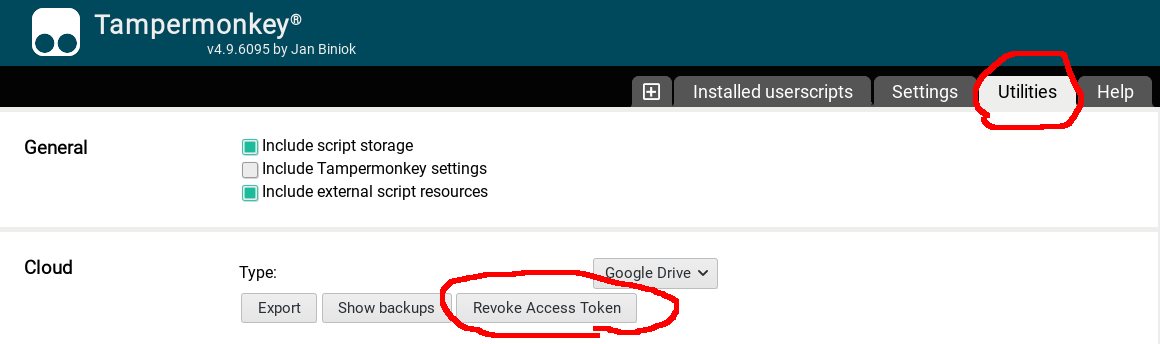
After doing that and two restarts, the second restart did not ask me! :heart:
Edit: But when I booted my other browser, it started asking me again. :-/
I have multiple Google accounts, which may be why Tampermonkey is asking which one to choose. Related: #904
joeytwiddle
on 24 Apr 2020
Related issues
 AhmetEmsal
·
4Comments
AhmetEmsal
·
4Comments
 mikhoul
·
5Comments
mikhoul
·
5Comments
 darkred
·
7Comments
darkred
·
7Comments
 momocow
·
5Comments
momocow
·
5Comments
 PiotrSss
·
4Comments
PiotrSss
·
4Comments