Tampermonkey: [Safari] Tampermonkey as 'Safari App Extension' ?
Hi,
Apparently .safariextz style extensions are deprecated (but still operable) in the upcoming Safari 12, and 12 is 'the last release to support them', so either Safari 13 or possibly 12.1(?) will completely drop them. See https://developer.apple.com/documentation/safariextensions for details.
The replacement schema is at https://developer.apple.com/documentation/safariservices/safari_app_extensions/building_a_safari_app_extension, with supposed conversion doc at https://developer.apple.com/documentation/safariservices/safari_app_extensions/converting_a_safari_extension_to_a_safari_app_extension
As far as I can tell, this is Apple's official 'we're getting out of the browser business, just shoot us now' announcement. Instead of adding support for WebExtensions (even borked support like in Edge), they're jumping a fleet of buses over an ocean of sharks, off into some weird Neverland where every browser extension has to have a bag-on-the-side MacOS native app attached to it. But I may be misreading. It's sure as heck presented like that, anyway.
Be that as it may:
Can authors of userscripts rely on any hope of Tampermonkey bridging over this ridiculous gap and continuing to work on Safari 13?
 filbo
filbo
All 216 comments
Apple said:
New submissions to the Safari Extensions Gallery will be accepted until the end of 2018.
If it's going to be deprecated/eol'd why on earth would they want to do this? I literally just documented this installation process in the last week.
Apple's official 'we're getting out of the browser business, just shoot us now' announcement.
If only this were a real quotation. ;)
 Martii
on 5 Jun 2018
Martii
on 5 Jun 2018
Can authors of userscripts rely on any hope of Tampermonkey bridging over this ridiculous gap and continuing to work on Safari 13?
I'll port Tampermonkey to this new technology if it's doable with reasonable effort. My second child was born these days, therefore it might take a little bit.
I'm not a MacOS user, I use it only to debug Tampermonkey. Does anyone know or can estimate when Safari 13 will be released?
 derjanb
on 5 Jun 2018
derjanb
on 5 Jun 2018
Does anyone know or can estimate when Safari 13 will be released?
I've never looked into this as that platform is my least utilized, and liked, however they do make announcements at https://developer.apple.com/news/ from a quick search.
Martii
on 5 Jun 2018
Your question is 'when will 13 be the normal consumer browser', i.e. 'when will current Tampermonkey fully stop working for random Mac users?' -- right?
Not 'when can I get ahold of Safari 13 to test this crap?', which is what I started to answer as 'when can I get ahold of any version of Safari which would display this fecure?'
Along those lines I had written the following (before realizing I was answering the wrong question):
====
Judging by https://twitter.com/digital_saas/status/1003910017953640448 -- Mac OS 'Mojave' is out in beta and apparently (as one might expect) comes with the beta of the next Safari, i.e. 12. If you have a virtualization environment on your Mac, you could install the beta in that.
There's also https://developer.apple.com/safari/download/, which currently claims to be offering release '57' (?!?), posted May 28th, which _might_ be new enough. I don't have a Mac to try it on. (Hmm, I downloaded and busted it apart and it appears to be build '13606.1.18' which the Internet says is only Safari 11.2. Also, the associated Release Notes haven't even mentioned Extensions since release 44, and 'App Extension' isn't mentioned at all. And I am now angry at Apple for having a beta series whose version numbers are completely unrelated to the release product's version numbers, and no dates in the beta log!)
====
Returning to your real question: careful parsing of https://wikipedia.org/wiki/Safari_version_history shows that Safari N.0 has been released along with Mac OS 10.(N+2).0, for Safari versions 6 through 11. Therefore Safari 13 will likely accompany Mac OS 10.15. Mac OS since 11.7 has been released on a fairly regular 12-month cycle, so we can predict official release of Mac OS 10.15 + Safari 13 around 2019-09-01, ~15 months from today.
filbo
on 5 Jun 2018
@derjanb Developer signed .safariextz extensions are "unsupported", and any such extensions will be removed and cannot be reenabled when Mojave launches in September. Safari Extension Gallery Extensions are "supported", but get disabled by default, and support for them will likely be removed with macOS 10.15 next year.
Here's what the RN for Beta 1 says:

 yashendra2797
on 6 Jun 2018
yashendra2797
on 6 Jun 2018
Returning to your real question: careful parsing of https://wikipedia.org/wiki/Safari_version_history shows that Safari N.0 has been released along with Mac OS 10.(N+2).0, for Safari versions 6 through 11. Therefore Safari 13 will likely accompany Mac OS 10.15. Mac OS since 11.7 has been released on a fairly regular 12-month cycle, so we can predict official release of Mac OS 10.15 + Safari 13 around 2019-09-01, ~15 months from today.
@filbo Thanks. This was exactly what I was looking for. :) Given this timeframe, I'm confident to port Tampermonkey (if technically possible).
Developer signed .safariextz extensions are "unsupported",
@yashendra2797 I do have a official developer certificate from Apple (99€ per year), but my request to be added to the app store was denied some years ago. So yes it's signed by me, but by using a certificate from Apple. From what I've read the difference is that developer self-signed extensions are not updated automatically while developer(-via-apple-certificate)-signed extensions are updated. So at least at this point there is a difference which makes me hope that "developer-signed .safariextz extensions" means the self-signed unofficial ones.
derjanb
on 6 Jun 2018
So at least at this point there is a difference which makes me hope that "developer-signed .safariextz extensions" means the self-signed unofficial ones.
Yeah but Apple is trying to make the MAS the only way to have an extension work on Safari, and for every extension wants you to make a pseudo app.
That reminds me, couldn't you theoretically use a cert to make an app and use that to push extensions? You can disable Gatekeeper in macOS, and if its anything like installing an app, you could maybe use that to push an extension, unless Apple simply closes down Safari from any and all non MAS shenanigans.
yashendra2797
on 6 Jun 2018
@filbo
I don't have a Mac to try it on.
macOS 10.13.5 as of yesterday
Your Safari Technology Preview download link yields this UA externally after installation:
Mozilla/5.0 (Macintosh; Intel Mac OS X 10_13_5) AppleWebKit/605.1.15 (KHTML, like Gecko) Version/11.2 Safari/605.1.15
Right clicking and opening with Safari Technology Preview... yields installation success and also script incercept/injection for runtime occurs as expected.
Ping me with a mention if a test is needed. I usually keep that system up to date (whenever I connect to it) but rarely use it.
Martii
on 6 Jun 2018
@Martii the 'Safari Technology Preview' is pre-11.2, while the version people are getting in their Mac OS Mojave betas is pre-12. As far as any of their doc seems to indicate (though actually they're just completely unclear about it), these new-degraded 'Safari App Extension' things are new with 12. So if you want to provide @derjanb with a test platform for that, you would need to upgrade your whole OS on that test machine to pre-Mojave; or install that in a VM. (Unlike other x86 OSes, Mac OS insists that it may only be installed into a VM on official Apple hardware; while I'm sure there are software workarounds for whatever copy-protection-ish method they use to enforce this, the most straightforward route to having a Mac OS VM is to do it on a Mac.)
I think I got that @derjanb does have his own Mac. Probably the best route (in his copious spare time...) is for him to install a Mojave VM on his own machine. Not upgrade the whole OS, because then he'd lose the ability to easily support the majority of Tampermonkey-on-Safari users who will be on the current official release version.
filbo
on 6 Jun 2018
@filbo
or install that in a VM.
Haven't had much luck with that in vbox or even getting a download medium that doesn't crap out (Apple has a bad history of deleting their installation files much like Adobe)... but that's usually under Linux. Not sure the machine is good enough for a VM though... and never again will I waste thousands of dollars on a machine that can be outperformed for much less. :) So when it dies it'll die... or more likely be eol'd like they did my PPC from the Intel switch.
need to upgrade your whole OS on that test machine
Test bed is definitely not for that. Even though it's rarely used I usually need release status instead of beta/alpha (or whatever apple is calling it these days... I'm old school).
Thanks for the intel.
Martii
on 6 Jun 2018
@derjanb The wording is: 'Safari no longer supports developer-signed .safariextz packaged legacy Safari Extensions. At first launch of Safari on macOS 10.14, if users have any legacy developer-signed
extensions installed, they will be notified such extensions are no longer supported. These extensions cannot be reenabled.' -- I would take that to mean that your extension will stop working; will only work if you can get them to accept it into their 'store' (Safari Extensions Gallery).
They should accept it, as otherwise Safari will completely lack any ability to run the large pool of userscripts extant in the world (as there is no official 'Gallery' port of Violentmonkey or Greasemonkey, nor do those seem likely); and this is a large impairment for a browser. However, they might take that as a feature, i.e. keeping riff-raff external code out of their walled garden.
And their statement is that while the _technology_ (.safariextz) will keep working through the Safari 12 / Mac OS 10.14 timeframe, the _delivery mechanism_ you're using (developer-signed .safariextz not hosted in the 'Gallery') is completely disabled ('cannot be reenabled') starting with Safari 12.
Either way, it seems clear you're going to need to get into the 'Gallery' -- probably within 3 months (with an Apple-corporate-signed .safariextz) if Safari 12 users are going to have a userscript runner at release time, and definitely within 15 months (with a 'Safari App Extension') for Safari 13 users.
Bleah.
filbo
on 6 Jun 2018
derjanb
on 7 Jun 2018
They should accept it, as otherwise Safari will completely lack any ability to run the large pool of userscripts extant in the world (as there is no official 'Gallery' port of Violentmonkey or Greasemonkey, nor do those seem likely); and this is a large impairment for a browser. However, they might take that as a feature, i.e. keeping riff-raff external code out of their walled garden.
This is what I got 3 years ago when I tried to submit Tampermonkey to the Safari Extensions Gallery:
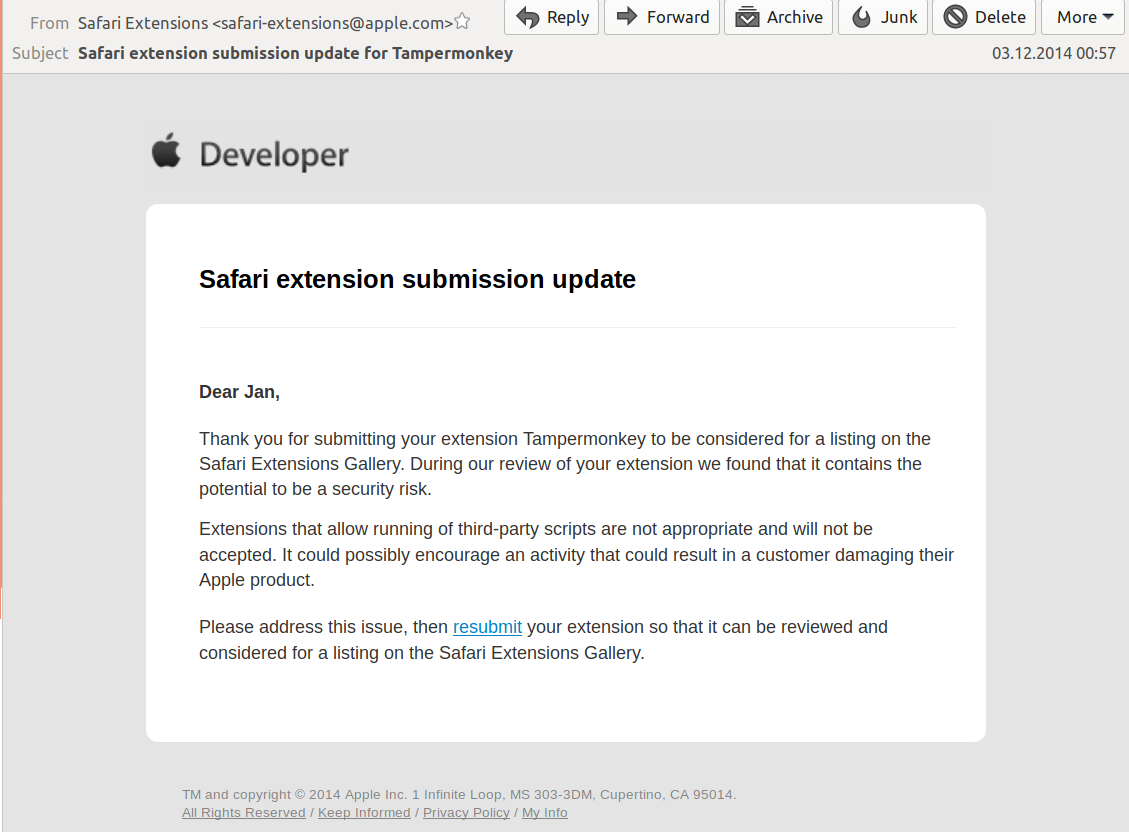
Honestly, I'm not sure whether they would accept Tampermonkey this time...
derjanb
on 7 Jun 2018
What's ironic is other browsers can run extensions on macOS... so this is two-faced for fact. Reminds me of the litigation against IE and integration into the OS... perhaps it's time to create another one for apple. And people wonder why apple products are my least favorite... bloated and beyond egocentric imho.
Anyhow... they should elaborate more on why instead of a generic scripted response. You will never know until you try.
Martii
on 8 Jun 2018
@derjanb There's at least one extension relatively newly on the Gallery at the moment which has a feature for injecting custom scripts. I won't name it in case it wasn't meant to be approved since it's not the main goal of the extension, but also isn't a hidden feature so but it might indicate they've changed their stance. Also thanks for the link to my blog post, that solution works perfectly for me in the meantime and by the number of views I'm getting on that post it seems like other people too!
 grgarside
on 8 Jun 2018
grgarside
on 8 Jun 2018
It is obvious that you cannot 'address' the 'issue' per se; you cannot remove the ability to run 3rd party scripts from a tool whose entire and only purpose is to run 3rd party scripts.
The alternative approach is to present that this is a capability which is widely desired and used in the real world. Include whatever download statistics you have for Tampermonkey-on-Safari (which is entirely through your own properties, since they haven't put it in the 'Gallery'); and perhaps similar statistics re: Chrome, Opera, Edge, even Firefox -- giving both broken out and combined stats for 'store' vs. your own site, since in some of those cases it is downloadable from both.
Including stats for multiple browsers shows broad as well as deep interest. I think >10M downloads and 4.69 stars (right now) on Chrome Store should be at least a little persuasive...
In resubmitting, I would recommend referencing both of these Wikipedia pages: Userscript (on the general concept) and Wikipedia:User_scripts/List (as an exemplar of what they're for, why people want and use them).
HOWEVER, before doing that, someone(*) ought to update the Wikipedia pages Userscript and Userscript_manager to mention Tampermonkey & Violentmonkey, and de-emphasize Scriptish (which appears to be effectively defunct). The wiki pages are something like 3-5 years stale. (Do mention Violentmonkey in the wikipedia page, as it is another currently viable solution and again demonstrates broad interest in such capabilities.) (* Not me, I am not a Wikipedia editor...)
@grgarside, your linked 'how to install safariextz-like-Tampermonkey in new degraded Safari' page is currently in flux due to (1) not starting automatically, (2) user reporting settings being lost on restart. Would you mind posting a comment here when these issues are resolved? In the end I'll be wanting to refer Social Fixer users to that as a temporary pinprick through the veil of stupidity being drawn over Safari...
filbo
on 9 Jun 2018
@filbo I've updated the article with what I can, ⑴ an AppleScript for automatically running the extension and ⑵ a way to avoid the settings being lost by locking the preferences file. I will continue looking for improvements to the process — if I end up having to write a completely separate app for managing these kinds of extensions then so be it! Let me know your thoughts
grgarside
on 9 Jun 2018
I think >10M downloads and 4.69 stars (right now) on Chrome Store should be at least a little persuasive...
>10M weekly users! 😉
HOWEVER, before doing that, someone(*) ought to update the Wikipedia pages Userscript and Userscript_manager to mention Tampermonkey
Tampermonkey was listed some time ago but removed including some other extensions with the comments "removed obvious advertising and promotion" and "rmv link spam". So naming the script manager that is used by maybe 90% of all userscript users is SPAM/advertising. 😂
However, I'm working on submitting Tampermonkey to extension galery again. We'll see how this works out. If it succeeds, then I can start to investigate the new Safari App Extension API. Otherwise it doesn't make sense to work on this if there is no chance to be hosted by Apple.
derjanb
on 12 Jun 2018
Well they may get some constructive negative PR from an official source if they aren't clearer on why. Saying a Safari extension would damage a mac is ludicrous imho. If that's ever true that would be apples responsibility/fault exclusively for not fixing their security issues... sticking their head in the sand and say it is secure isn't a wise idea. ;) I wish you good luck @derjanb :) *crosses things*.
Martii
on 12 Jun 2018
I am unfamiliar with app extensions and have been reading conflicting information. However, while it appears Safari App Extensions are the only way forward, some developers are saying that you can distribute an app binary outside of the Mac App Store that contains a Safari App Extension using Developer ID. They don't necessarily need to be approved by Apple in the MAS to be able to run on our machines.
Theoretically, Tampermonkey could be distributed as a signed (and eventually notarized) app package that contains the extension. This is assuming, of course, the API makes it technically possible for Tampermonkey and userscripts to run at all.
Is anyone more experienced able to confirm if Safari App Extensions can be installed outside the MAS with Developer ID?
 yuusharo
on 13 Jun 2018
yuusharo
on 13 Jun 2018
I was able to build a macOS containing app with a Safari app extension, and gave the signed app to a friend. He was able to open the app and have the extension install automatically, though he had to manually tick a checkbox in Safari's preferences to actually enable the extension. No app store required, though $99/yr Mac dev certificate still required. So I don't think you necessarily have to have MAS approval to release an App Extension, unless Apple changes this policy in the future.
Still it seems like a serious amount of work may be required to port non-trivial legacy extensions like tampermonkey for safari. I've been porting a few .safariextz extensions I use for myself to the app extension model, just to see how this works. The simple ones that just inject a start/end script are easy. But the App Extension API (currently) provides no Javascript-friendly global.html / background.html. Code that used to be in global.js / background.js has to be rewritten in native Swift or Objective-C code, to run in the app extension's native process. Seems like a lot to ask browser extension devs to do for a niche browser.
 isolinear
on 14 Jun 2018
isolinear
on 14 Jun 2018
But the App Extension API (currently) provides no Javascript-friendly global.html / background.html. Code that used to be in global.js / background.js has to be rewritten in native Swift or Objective-C code, to run in the app extension's native process. Seems like a lot to ask browser extension devs to do for a niche browser.
I hope that I can embed something like a WebView that loads my background page with the possibility to send messages to native Swift or Objective-C. This is how the Android apps are working...
derjanb
on 14 Jun 2018
Note that Safari App Extensions are also available on macOS 10.13, so you can develop and test there without having to use the 10.14 beta or the Safari Technology Preview.
 rcombs
on 21 Jun 2018
rcombs
on 21 Jun 2018
Post a link and I'll send $20 towards your developer account ;) hopefully others would join too.
All apps have sandboxes. Extension runs within the sandbox of the app which installed it. Same approach as on iOS. Creating downloadable extension installer should be a long-term solution. uBlock have just released their "app" on Apple Store. For TamperMonkey it would have to be manual download.
 romaninsh
on 22 Jun 2018
romaninsh
on 22 Jun 2018
Please do your best to find a way to make it work. Safari 12 seems to much faster than Chrome and I don't want to g back to that resource hog.
I don't mind donating too but I think that if you publish it to Appstore you can charge like $1 for it and nobody will complain. As long you don't try to make a profit out of it, people would be happy to pay a little bit for assuring that development continues and that we can use user scripts in Safari.
 ssbarnea
on 9 Jul 2018
ssbarnea
on 9 Jul 2018
As signing a Safari extension currently already requires a developer certificate, which requires a $99 developer account already, is the $99 actually the problem here?
 ys-chung
on 9 Jul 2018
ys-chung
on 9 Jul 2018
is the $99 actually the problem here?
No, I already do have a developer account to sign Tampermonkey.
derjanb
on 10 Jul 2018
It looks like either Tampermonkey is not notable or I'm a bad Wikipedia editor or maybe even both. 😞

Anyway, I've submitted Tampermonkey to the Safari Extensions Gallery again. Unfortunately there is no field to add some notes for the reviewers. We'll see what happens.

derjanb
on 19 Jul 2018
@derjanb
or maybe even both
There's at least one error in there:
- OUJS came before GF. Jason was impatient with the pace of OUJS so he "de"rail'ed his own. ;)
- Your change from GPL to proprietary (which I won't get into)
- Missing your icon
Without reading Wikipedia's full guidelines I wouldn't know what they mean. Seems comparable to GM's though.
Safari Extensions Gallery again.
Hope it passes for the Safari folks. :) *crosses things again*
Martii
on 19 Jul 2018
@derjanb as a former Wikipedia contributor I would encourage you to read these before submitting the article again:
Wikipedia's Notability guidelines which determines if a subject is notable enough to get its own article.
IMO more important in this case, Wikipedia's conflict of interest guidelines or the Wikipedia's simple conflict of interest guide. As you are the main contributor of Tampermonkey, I would strongly discourage you to contribute to Tampermonkey's article.
ys-chung
on 20 Jul 2018
Before this passes Apple blessing, can you please provide a small howto on how to load it on "Safari Technology Preview"? I am sure it must be a way to load it from outside the appstore for development purposes, something similar to the Chrome feature.
ssbarnea
on 20 Jul 2018
@ssbarnea Please see https://github.com/Tampermonkey/tampermonkey/issues/558#issuecomment-395570798
derjanb
on 22 Jul 2018
as a former Wikipedia contributor I would encourage you to read these before submitting the article again:
@alphachung I don't have any plans to submit the article again.
derjanb
on 22 Jul 2018
Did you hear back from Apple?
 WillBishop
on 4 Aug 2018
WillBishop
on 4 Aug 2018
Any updates from Apple? I am also curious about the license aspect as I initially had the impression that tampermonkey was using an OSI approved open source license but I just observed the warning from the readme about GPLv3 and the "proprietary license" (without even a license body, a top secret license?). I am not a big supporter of GPL due to its distributions issues (app store), so I was hopping to hear that the new license would be something like MIT or BSD like, which do not posses the same limitations.
ssbarnea
on 21 Aug 2018
My first submission was rejected on 2018-07-21 because the "Description" manifest field was missing (it wasn't necessary in 2014). I've fixed this two or three days later and now I'm waiting again.
derjanb
on 21 Aug 2018
@derjanb Thanks for the update. In its current form is not practically possible to use the tampermonkey safari workaround because every time safari reloads (Safari TP version does this often...), you lose the extension and you need to add it again. Even worse each time the extension starts from zero, without any scripts, so you need to import them from somewhere. A real PITA thanks for Apple, clearly made it such way that you cannot use it for more than testing.
ssbarnea
on 21 Aug 2018
Are there any plans top port Tapermonkey as native Safari App Extension ?
 daslicht
on 22 Aug 2018
daslicht
on 22 Aug 2018
I'm a huge fan of Tampermonkey for Safari. I use it daily with many, many scripts. I'm able to get the current version to work on Safari 12 just fine with the Safari Extension Builder, but I can't create an actual extension because I don't have a developer certificate. Am I correct in understanding that a person with a certificate would be able to build a copy of the extension that doesn't throw the "Unsafe extension" error, or does this require a huge rewrite? A user pointed out above that it should still be possible to distribute an "app extension" outside the app store-I hope this is the case, as I can't imagine Apple approving it (although of course they should).
 prohtex
on 30 Aug 2018
prohtex
on 30 Aug 2018
@prohtex as far as I know all Safari Extension will be no longer supported in future.
The author of an Extension needs to port it to a Safari App Extension which needs to be built with XCode.
see:
https://developer.apple.com/documentation/safariservices/safari_app_extensions/converting_a_legacy_safari_extension_to_a_safari_app_extension
Besides Tampermonkey, there is NO script blocker for safari 12 I know of available :/
daslicht
on 30 Aug 2018
@daslicht 1Blocker works well and Safari 12. It would worth mentioning that Tampermonkey is a not really a script blocker, is more of a script injector and probably this is why Apple is delaying the approval. I am in the process of dropping Safari 12 due to this issue, even if I love its speed, still I really need a way to run custom JS on some websites.
ssbarnea
on 31 Aug 2018
Apple is not going to approve Tampermonkey. The question is, can it be distributed outside the app store? It sounds like it can.
 duckquack
on 31 Aug 2018
duckquack
on 31 Aug 2018
For clarity: if Tampermonkey was converted to a Safari App Extension (which may not require a complete rewrite, just some [admittedly rather complex] wrapper code to run the JS under JavaScriptCore in a separate process), it would be possible to distribute it outside the App Store.
Safari 12 does not provide a way to install non-Gallery extensions without user action on every launch.
rcombs
on 31 Aug 2018
Ok, but I’m using Omnikey and Ghostery, neither of which is an app extension, without issue.
duckquack
on 31 Aug 2018
@ssbarnea I know that Tamplermonkey is a script runner, i havnen said anything else. I just mentioned that there is now JS blocker I know of. 1Blocker can selectively block JS like JS Blocker ?
daslicht
on 31 Aug 2018
@rcombs the Gallery will be deprecated as well. App Extensions are distributed through the App store in future.
daslicht
on 31 Aug 2018
As far as I'm aware, there's been no indication that Developer ID-signed Mac apps will stop being able to include Safari App Extensions at any point.
rcombs
on 31 Aug 2018
Good news: Tampermonkey finally made it into the Safari Extension Gallery: https://safari-extensions.apple.com/details/?id=net.tampermonkey.safari-G3XV72R5TC 🙌🎉
derjanb
on 7 Sep 2018
Oh great! I've been waiting for weeks. Thanks @derjanb!
 riccoho
on 7 Sep 2018
riccoho
on 7 Sep 2018
Just donated to support this awesome project. Nice work @derjanb
 m-thomson
on 7 Sep 2018
m-thomson
on 7 Sep 2018
@derjanb I donated too! Thanks for managing it. Now all you have to do is to avoid doing evil stuff, as this would get you out of the store very easy.
ssbarnea
on 7 Sep 2018
Donated too! It's never easy to maintain a plugin for Safari. Thanks!
riccoho
on 7 Sep 2018
Me too! I should have done it a long time ago, but putting up with Apple's BS is waaay beyond the call of duty. Thanks and best news ever!
 GarthSnyder
on 7 Sep 2018
GarthSnyder
on 7 Sep 2018
OMG, I even have all my old scripts back. This is awesome. Those were going to be a bear to fish out and re-enter.
GarthSnyder
on 7 Sep 2018
This is such a relief. Donated as well, thank you @derjanb !
 dchevell
on 8 Sep 2018
dchevell
on 8 Sep 2018
What we need is an "Open in Chrome" extension.
 jpkelly
on 29 Sep 2018
jpkelly
on 29 Sep 2018
Nice work! DONATED!
jpkelly
on 29 Sep 2018
With Safari Technology Preview 80 ( https://webkit.org/blog/8825/release-notes-for-safari-technology-preview-80/ ), "Legacy Safari Extensions (.safariextz files) are no longer supported." It appears they've disabled legacy extension installations in this preview, so even extension gallery extensions are no longer installable.
I imagine the next major macOS update will push this preview into mainline Safari. Are there still plans for a Tampermonkey Safari app extension?
isolinear
on 18 Apr 2019
What is the status of keeping the extension updated?
The extension available on the store is v4.7 with v4.9 being the latest
 NorthIsUp
on 10 Jun 2019
NorthIsUp
on 10 Jun 2019
Any plans on submitting a version for the "Safari Extensions" section on the Mac App Store?
Apparently starting from Safari 13 (macOS 10.15) https://safari-extensions.apple.com/details/?id=net.tampermonkey.safari-G3XV72R5TC can no longer be installed.
 garily
on 13 Jun 2019
garily
on 13 Jun 2019
^^^ --- this. I'm going to personally put off updating macOS until there's a way to get Tampermonkey installed in Safari 13 (macOS Catalina's default version).
 lonkle
on 14 Jun 2019
lonkle
on 14 Jun 2019
Any plans on submitting a version for the "Safari Extensions" section on the Mac App Store?
Unfortunately I don't have a Tampermonkey "Safari App Extension" ready. I do have some kind of prototype, that is able to inject a JavaScript into pages and to communicate with a background page, but even this very limited functionality is very unstable. I'm sorry, but for the moment it looks like there will be no Tampermonkey for Safari 13 and above. 😢
derjanb
on 28 Jun 2019
Apple forcing an annual fee for free products has always bothered me, but they never did it for the desktop, until now. Safari is too fast to not use - and I've got some time. Do you have that prototype anywhere? I can maybe help finish it up for ya so you'd only need to maintain after that (which hopefully Apple made this new Safari extension mentality future proof enough for you to have to do not much).
lonkle
on 4 Jul 2019
the only thing i like on safari is its bookmark manager and the great its great looking fonts. Speed is the same with Firefox here even with a lot of addons :)
I haven't found an Safari App Extension which is able to block ads on youtube...
daslicht
on 4 Jul 2019
If I can no longer use tamper monkey in Safari, then I will have no choice but to switch back to Chrome. I just installed Catalina beta last night it was the first thing I noticed was that my extensions were gone.
 charleslaine
on 10 Jul 2019
charleslaine
on 10 Jul 2019
It's why I haven't updated yet. @derjanb - if you have that prototype, I'd love to be a beta tester of it! :)
lonkle
on 14 Jul 2019
@JoelStickney which adblocker for safari can block you tube ads ? I treid uBlock AdBlock Kaboom Magic Lasso non blocks youtube ads ?
daslicht
on 16 Jul 2019
I found this extension works in Safari 13 .
 Jax0rz
on 23 Jul 2019
Jax0rz
on 23 Jul 2019
@daslicht try adguard. it has appstore version.
 kfur
on 9 Aug 2019
kfur
on 9 Aug 2019
@kfur AdGuard didn't work at all when I tried it. That was, however, one or two Catalina betas ago.
Ghostery Lite does work - but not on YouTube.
(Never mind that what I want is uBlock Origin back...)
 Rhywun
on 9 Aug 2019
Rhywun
on 9 Aug 2019
you can easily add scripts by creating simple safari extension app in xcode. no code needed.
just edit Info.plist file

kfur
on 9 Aug 2019
@Rhywun maybe it beacuse you was using macos beta version.
i use it in my mac and iphone and it working gorgeously.
kfur
on 9 Aug 2019
@kfur Yep, no doubt. Just watching this space for any tips dealing with it.
Rhywun
on 9 Aug 2019
@daslicht try adguard. it has appstore version.
nice ! no add on youtube so far , awesome ! Thank you for the suggestion ! <3
daslicht
on 10 Aug 2019
@derjanb Is there any working download link to latest Tampermonkey.safariextz for Safari 11/12? thanks!
 mixmaxdp
on 18 Sep 2019
mixmaxdp
on 18 Sep 2019
 siffegh
on 19 Sep 2019
siffegh
on 19 Sep 2019
Just to make things clear.
Safari 13 will be the default version at release date on MacOS 10.15 "Catalina" next month.
However, Apple released today a Safari 13 update for both MacOS 10.14 ("Mojave") and MacOS 10.13 ("High Sierra"). All Safari users on these releases (the most common ones currently) will also end up losing Tampermonkey on Safari within a few days.
 frankahn
on 19 Sep 2019
frankahn
on 19 Sep 2019
I do have good news and also some bad news. :-)
The good news is that I make progress in porting Tampermonkey over to an Safari app extension. The bad news is that it will still take some time to complete. I have to learn more about macOS, Xcode, Safari App Extensions and regular macOS apps. 🤯

derjanb
on 19 Sep 2019
And you'll need a paying developer account to get it released on the Mac App Store or even just if you want most of the people to be able to launch the app.
frankahn
on 19 Sep 2019
@derjanb Much appreciated!
In the meantime I am using Firefox but I would like to return to Safari.
Rhywun
on 19 Sep 2019
I do have good news and also some bad news. :-)
The good news is that I make progress in porting Tampermonkey over to an Safari app extension. The bad news is that it will still take some time to complete. I have to learn more about macOS, Xcode, Safari App Extensions and regular macOS apps. 🤯
Happy to hear that, I am tired of chrome, it's too hot.
 YuntianCheng
on 20 Sep 2019
YuntianCheng
on 20 Sep 2019
Just to make things clear.
Safari 13 will be the default version at release date on MacOS 10.15 "Catalina" next month.
However, Apple released today a Safari 13 update for both MacOS 10.14 ("Mojave") and MacOS 10.13 ("High Sierra"). All Safari users on these releases (the most common ones currently) will also end up losing Tampermonkey on Safari within a few days.
I got the Safari 13 update notification yesterday and just went ahead and installed it. Unfortunately, didn't know that it was going to automatically remove TM. :-(
 murphysm2342
on 20 Sep 2019
murphysm2342
on 20 Sep 2019
Yup, I understand that. I lost it a few weeks ago, because I got a new Mac and after migrating, all non Apple Store extensions got turned off.
Hope you get it working eventually, I'll miss it! Apple doing its best to push us to Chrome I guess.
On Sep 20, 2019, at 9:35 AM, murphysm2342 notifications@github.com wrote:
Just to make things clear.
Safari 13 will be the default version at release date on MacOS 10.15 "Catalina" next month.
However, Apple released today a Safari 13 update for both MacOS 10.14 ("Mojave") and MacOS 10.13 ("High Sierra"). All Safari users on these releases (the most common ones currently) will also end up losing Tampermonkey on Safari within a few days.I got the Safari 13 update notification yesterday and just went ahead and installed it. Unfortunately, didn't know that it was going to automatically remove TM. :-(
—
You are receiving this because you are subscribed to this thread.
Reply to this email directly, view it on GitHub https://github.com/Tampermonkey/tampermonkey/issues/558?email_source=notifications&email_token=ACRJAWJUNYWSIM7XV3BOBZLQKTNRNA5CNFSM4FDI35PKYY3PNVWWK3TUL52HS4DFVREXG43VMVBW63LNMVXHJKTDN5WW2ZLOORPWSZGOD7G4KUY#issuecomment-533579091, or mute the thread https://github.com/notifications/unsubscribe-auth/ACRJAWNNEWTRY4HDUYMG2V3QKTNRNANCNFSM4FDI35PA.
--
Steve Martin
 cheezmo
on 20 Sep 2019
cheezmo
on 20 Sep 2019
@murphysm2342 same here. on first startup it told me that 4 extensions were removed, but I don't even remember all their names :(
 disrupted
on 20 Sep 2019
disrupted
on 20 Sep 2019
A nice pro for an App Extension is that you can get donations through in-app purchases.
 epsimatic
on 20 Sep 2019
epsimatic
on 20 Sep 2019
@murphysm2342 same here. on first startup it told me that 4 extensions were removed, but I don't even remember all their names :(
it also removed my onenote web clipper.
YuntianCheng
on 21 Sep 2019
@frankahn wrote:
you'll need a paying developer account to get it released on the Mac App Store
@derjanb wrote on 2018-06-05:
I do have a official developer certificate from Apple
... so at least that much seems to be under control. Also the screenshot looks quite promising :)
What is it taking to bring up TM as an app extension? Any tips for porting other extensions which might have similar habits?
filbo
on 21 Sep 2019
Is there any way I can help out? While I haven't done much in the way of developing for macOS, I am an iOS/Swift developer, and did successfully port a simple Safari extension of my own to a Safari app extension.
 bunnyhero
on 21 Sep 2019
bunnyhero
on 21 Sep 2019
And you'll need a paying developer account to get it released on the Mac App Store or even just if you want most of the people to be able to launch the app.
Just wanted to chime in that I'd be more than happy to donate in order to cover this fee, and I know so many others who would also contribute. In my usage, Safari 13 is completely neutered without TamperMoney. I knew this change was coming, and I braced myself for impact, but this... just... feels wrong, and sad. Mac users, or at the very least, power Mac users, really need a top shelf userscript manager for the OS' default web browser, and TamperMonkey is just such an amazing tool, it would be a real shame to lose it.
@derjanb, I thank you for your work on this, you are very much appreciated!
 Fofer
on 22 Sep 2019
Fofer
on 22 Sep 2019
on first startup it told me that 4 extensions were removed, but I don't even remember all their names :(
@disrupted, you should be able to see them all still listed in ~/Library/Safari/Extensions. These extensions are not deleted or moved to an "inactive" folder, they're just where they were first installed. Only now, they are inert, unable to load. Because once you upgrade to Safari 13, the app detects and ignores them. They can't be re-loaded.
There isn't even an Extensions Builder anymore in the Develop menu for manual activation. I was able to use that to prolong my enjoyment of the excellent extension Sessions for awhile. :(
For the record, I tried downgrading to my backup of Safari 12, and these disabled extensions _still_ don't load and no longer work. Yes, we were told this was coming. It just sucks to actually experience it. I'm not bothered enough to revert my entire OS from a previous backup in order to keep these extensions and TamperMonkey around. But I sure am close....
Fofer
on 22 Sep 2019
I do have good news and also some bad news. :-)
The good news is that I make progress in porting Tampermonkey over to an Safari app extension. The bad news is that it will still take some time to complete. I have to learn more about macOS, Xcode, Safari App Extensions and regular macOS apps. 🤯
That's the best news i hear before i update to safari 13! uBlock is forbidden and the only hope is tampermonkey can still use! Appreciate you and nobody can prevent me to donate for u! :)
 Tongzhao9417
on 23 Sep 2019
Tongzhao9417
on 23 Sep 2019
That's the best news i hear before i update to safari 13! uBlock is forbidden and the only hope is tampermonkey can still use! Appreciate you and nobody can prevent me to donate for u! :)
maybe you can try to use Adguard for macOS, although it's not free.
 Chandler-Lu
on 24 Sep 2019
Chandler-Lu
on 24 Sep 2019
Adguard for macOS/Safari is free. I don't know if there's a paid version but the free version exists, though it might not be FOSS (I haven't checked). It uses several extensions to circumvent Safari's filter restrictions, which is as close to UBO as you will get on Safari.
 chiffon-rouge
on 24 Sep 2019
chiffon-rouge
on 24 Sep 2019
uBlock-Safari authors made a good writeup on how to deal with ads after their extension is gone.
You might read it and pick one of options. If any questions about AD blocking in Safari 13+ remains, the linked issue would be a better place to discuss it.
epsimatic
on 24 Sep 2019
Adguard for macOS/Safari is free. I don't know if there's a paid version but the free version exists, though it might not be FOSS (I haven't checked). It uses several extensions to circumvent Safari's filter restrictions, which is as close to UBO as you will get on Safari.
I mean desktop version, not safari extension. This is a system-wide AD filtering software
Chandler-Lu
on 24 Sep 2019
I do have good news and also some bad news. :-)
The good news is that I make progress in porting Tampermonkey over to an Safari app extension. The bad news is that it will still take some time to complete. I have to learn more about macOS, Xcode, Safari App Extensions and regular macOS apps. 🤯
I don’t mean to speak out of turn, but when you do release TM into the App Store, please make it a paid app to cover your costs. I’d be more than happy to pay for such a useful tool. Thank you.
 heydonkey
on 25 Sep 2019
heydonkey
on 25 Sep 2019
That's the best news i hear before i update to safari 13! uBlock is forbidden and the only hope is tampermonkey can still use! Appreciate you and nobody can prevent me to donate for u! :)
maybe you can try to use Adguard for macOS, although it's not free.
Thanks Chandler, I have already switched to the Adguard, and as you say, it's powerful. But I don't like the solution which satisfied a requirements to install a software. However, maybe it's the only way to block ads. BTW, the AdGuard is so strong that block some innocent elements LOL. Thanks for u again!
Tongzhao9417
on 25 Sep 2019
Thanks Chandler, I have already switched to the Adguard, and as you say, it's powerful. But I don't like the solution which satisfied a requirements to install a software. However, maybe it's the only way to block ads. BTW, the AdGuard is so strong that block some innocent elements LOL. Thanks for u again!
emm,刚发现好像是国人?可以考虑把自动激活过滤器关掉,然后开几个必要的过滤器像 Easylist China + 默认的英语过滤器就好,还有误杀的话就网站直接加白啦。
emm, you can try to turn off "Activate filters automatically" function and enable a few necessary filter. Excessive rules maybe cause sth wrong.
Chandler-Lu
on 25 Sep 2019
Damn it I shouldn't have updated Safari so blindly... Tampermonkey made Safari great.
 Juicy0Steak
on 25 Sep 2019
Juicy0Steak
on 25 Sep 2019
It doesn't add much to the topic itself but with version 71 of Firefox Nightly on macOS it fairs much better when it comes to the consumption of resources. Tampermonkey is available for Firefox, as are many other add ons.
I use Firefox since the Phoenix days and it's my main browser everywhere else but on OS X/macOS I was (and am) hesitant to drop Safari entirely, because it is well integrated and used to use much less energy. Adguard is good, but at least for me it seems to slow down Safari a fair bit, where Nightly with UBO feels more "snappy". The removal of Tampermonkey was pretty much last nail. I'm still very interested in the porting to Safari 13 but I guess in the long run I will have to let Safari go as a standard browser, as is, because I don't believe serious devs will be able to keep up with the restrictions of Apple.
chiffon-rouge
on 25 Sep 2019
Is there a way to extract the UserScripts from the config files after the extension is no longer useable? I have not found a readable TM file in the ~/Library folder. So all my scripts are "lost"
 logopk
on 25 Sep 2019
logopk
on 25 Sep 2019
I have not found a readable TM file in the ~/Library folder
Extension data is stored at /User/user/Library/Preferences/com.apple.Safari.Extensions.plist
But I don't know what kind of file format this is.
derjanb
on 25 Sep 2019
@derjanb
That seems to be the binary plist form. You could get the xml format with this command:
plutil -convert xml1 -o /tmp/xmlform.plist <path to your binary plist>
Or use -o - to let plutil output to the stdout if you like. Otherwise it will inplace convert the format, which might be unexpected.
 icpz
on 25 Sep 2019
icpz
on 25 Sep 2019
Thanks Chandler, I have already switched to the Adguard, and as you say, it's powerful. But I don't like the solution which satisfied a requirements to install a software. However, maybe it's the only way to block ads. BTW, the AdGuard is so strong that block some innocent elements LOL. Thanks for u again!
emm,刚发现好像是国人?可以考虑把自动激活过滤器关掉,然后开几个必要的过滤器像 Easylist China + 默认的英语过滤器就好,还有误杀的话就网站直接加白啦。
emm, you can try to turn off "Activate filters automatically" function and enable a few necessary filter. Excessive rules maybe cause sth wrong.
哈哈,谢谢!我发现即使打开自动激活误杀的网站也不是很多,个别网站加白就好。只是它的加白按钮不是很好用,有时候加白了下次仍然过滤。不过这已经能找到的最好的办法了~再次感谢!
Tongzhao9417
on 26 Sep 2019
哈哈,谢谢!我发现即使打开自动激活误杀的网站也不是很多,个别网站加白就好。只是它的加白按钮不是很好用,有时候加白了下次仍然过滤。不过这已经能找到的最好的办法了~再次感谢!
= haha, thank you! I found that even if you open the website that automatically activates the manslaughter, it is not a lot. It's just that its white button is not very useful, sometimes it will be filtered next time. But this is the best way to find it again~ Thanks again!
Juicy0Steak
on 26 Sep 2019
I actually reverted my machine to an APFS snapshot from yesterday morning to get Safari 12 back and keep using this extension while the app extension is developed. I'd definitely be willing to pay for this kind of thing. Several web apps I use on a daily basis are nearly unusable without tweaking. Good luck, and I look forward to seeing this in the App Store!
 timkite
on 26 Sep 2019
timkite
on 26 Sep 2019
@murphysm2342 same here. on first startup it told me that 4 extensions were removed, but I don't even remember all their names :(
Your extensions are still there but disabled by Safari. You can check and compare. Go this is path "~/Library/Safari/Extensions". In the Finder (shift+command+G) and paste the path. 😉
 iFredOS
on 26 Sep 2019
iFredOS
on 26 Sep 2019
I actually reverted my machine to an APFS snapshot from yesterday morning to get Safari 12 back and keep using this extension while the app extension is developed. I'd definitely be willing to pay for this kind of thing. Several web apps I use on a daily basis are nearly unusable without tweaking. Good luck, and I look forward to seeing this in the App Store!
How have you done this "APFS snapshot" reversion?
iFredOS
on 26 Sep 2019
I actually reverted my machine to an APFS snapshot from yesterday morning to get Safari 12 back and keep using this extension while the app extension is developed. I'd definitely be willing to pay for this kind of thing. Several web apps I use on a daily basis are nearly unusable without tweaking. Good luck, and I look forward to seeing this in the App Store!
How have you done this "APFS snapshot" reversion?
This assumes your Mac's main drive is formatted APFS (it should be if you're on Mojave) and you still have a local snapshot that's old enough.
- Reboot
- Hold command + r when you hear the startup chime
- Choose "restore from time machine backup"
- Choose your local disk, providing your password to decrypt
- Pick a snapshot that was prior to you installing Safari 13
- Go through the restore. Unlike a Time Machine restore, it only takes a few minutes.
If you don't have a snapshot that's old enough (quite possible at this point), then your only fallback is a bare metal restore from Time Machine. The procedure is the same, but you'll need to make sure your Time Machine disk is available and you'll select it instead. Note that a bare metal Time Machine restore tends to take hours. If you don't have a Time Machine backup, then there's no way back.
I should also point out that you'll lose any local changes made since then!
timkite
on 26 Sep 2019
I actually reverted my machine to an APFS snapshot from yesterday morning to get Safari 12 back and keep using this extension while the app extension is developed. I'd definitely be willing to pay for this kind of thing. Several web apps I use on a daily basis are nearly unusable without tweaking. Good luck, and I look forward to seeing this in the App Store!
How have you done this "APFS snapshot" reversion?
This assumes your Mac's main drive is formatted APFS (it should be if you're on Mojave) and you still have a local snapshot that's old enough.
- Reboot
- Hold command + r when you hear the startup chime
- Choose "restore from time machine backup"
- Choose your local disk, providing your password to decrypt
- Pick a snapshot that was prior to you installing Safari 13
- Go through the restore. Unlike a Time Machine restore, it only takes a few minutes.
If you don't have a snapshot that's old enough (quite possible at this point), then your only fallback is a bare metal restore from Time Machine. The procedure is the same, but you'll need to make sure your Time Machine disk is available and you'll select it instead. Note that a bare metal Time Machine restore tends to take hours. If you don't have a Time Machine backup, then there's no way back.
I should also point out that you'll lose any local changes made since then!
Aaaahh! You are talking about Time Machine. I know already. I thought this was another solution I didn't know. Thank you anyway. 😄
iFredOS
on 26 Sep 2019
@Juicy0Steak If you want it, I made a copy of Safari 12.1.2 before updating to Safari 13 just now. I should run just fine.
 Rediwed
on 26 Sep 2019
Rediwed
on 26 Sep 2019
@Juicy0Steak If you want it, I made a copy of Safari 12.1.2 before updating to Safari 13 just now. I should run just fine.
When I tried doing that, I got a weird amalgam of the two, since a not-insignificant chunk of Safari exists outside of the Safari.app package. It said it was 12.1.2, but wouldn't load Tampermonkey and had the new style new tab page.
timkite
on 26 Sep 2019
Ah thanks. Guess I can throw away all my old Safari copies! :(
Rediwed
on 26 Sep 2019
I do have good news and also some bad news. :-)
The good news is that I make progress in porting Tampermonkey over to an Safari app extension. The bad news is that it will still take some time to complete. I have to learn more about macOS, Xcode, Safari App Extensions and regular macOS apps. 🤯
Hi @derjanb Are you taking dev help with this port? Would love to contribute.
 kismet-
on 27 Sep 2019
kismet-
on 27 Sep 2019
A quick update after many almost sleepless nights: I think the greater part is done. Options page, action menu and confirmation pages are working so far and a lot GM_* API is working fine as well. Now I need to cleanup some more things and fix some (hopefully) minor issues (GM_notification, GM_xhr issues, Cloud storage file upload, ...).
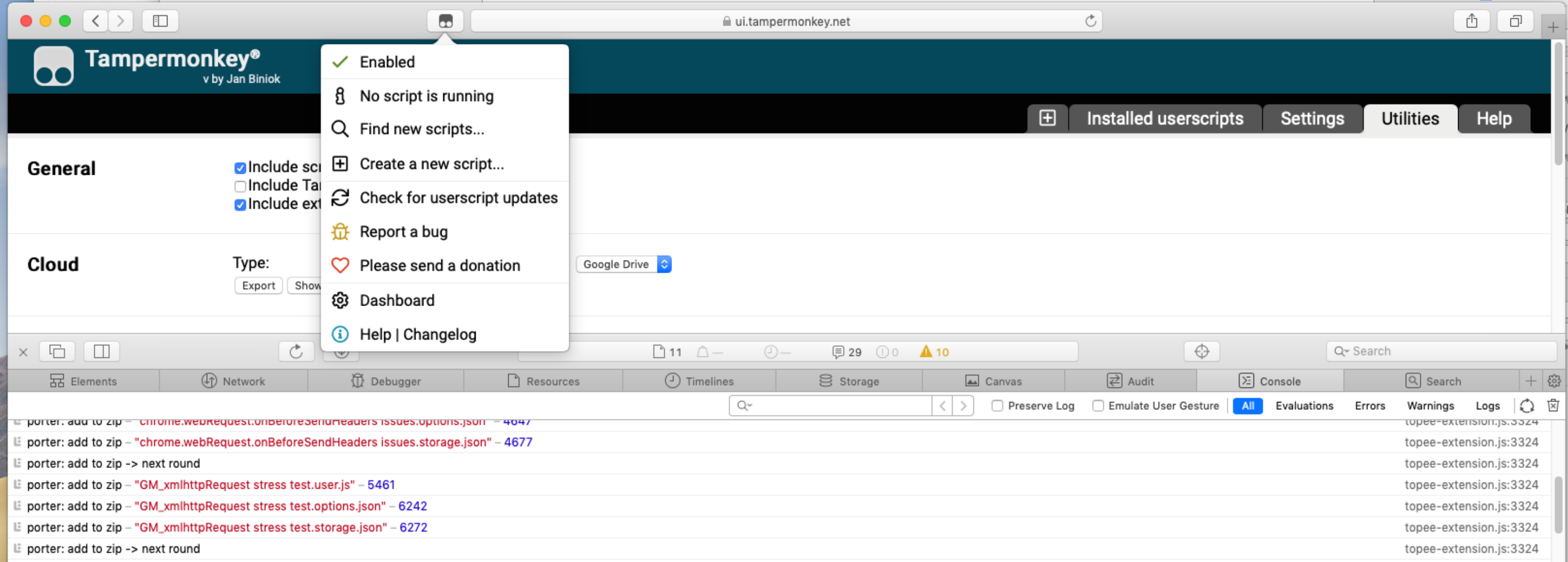
derjanb
on 28 Sep 2019
@derjanb awesome! Do you think some sort of (pre?)beta will be available soon? Is such a thing even possible within the walled-garden signed-app ecosystem?
filbo
on 29 Sep 2019
Hello,tampermonkey developers,
You can creat a Applications to install the Safari Extensions For mac Safari 13 and above,( even in 12.1.x).
In the future , the users can't install tampermonkey with Show Extension Builder (扩展构建器)in 10.15 or above and url “safari-extensions.apple.com/details/?id=*”,apple will be disabled in macOS 10.14.5,15 or above.
 LoveJessyChen
on 29 Sep 2019
LoveJessyChen
on 29 Sep 2019
I doubt this will get through, as I believe @derjanb deleted the
comment, and github seems to route all references through the comment.
I'd be willing to try to help the guy with the lost data, but don't know
how to contact him.
filbo
on 9 Oct 2019
Same here. Although the way he seemed to describe the situation, I think his Safari had auto-updated to version 13. If this is the case, then that means that that the userscripts are likely still there; they're just not accessible without Tampermonkey. That said, I think the simplest thing he can do for now is waiting until Tampermonkey is updated for Safari 13. But I could be wrong, and I'd be willing to help out too if and wherever I can.
 ghost
on 9 Oct 2019
ghost
on 9 Oct 2019
as I believe @derjanb deleted the comment
Which comment? 👀
BTW: Tampermonkey is in review (the third time now because the the first uploads had partly self-inflicted issues 🙈)
derjanb
on 9 Oct 2019
as I believe @derjanb deleted the comment
Which comment? 👀
BTW: Tampermonkey is in review (the third time now because the the first uploads had partly self-inflicted issues 🙈)
Finally!! THANK YOU!!
 ingjieye
on 9 Oct 2019
ingjieye
on 9 Oct 2019
If the email I received is correct, it might be @gitguys?
Looking forward to the release!
 TheSpyder
on 9 Oct 2019
TheSpyder
on 9 Oct 2019
It was indeed @gitguys, but his name doesn't produce a drop-down to choose it from. The comment was:
"I'm in a desperate situation and hoping against hope someone has a solution.
Even though I was running Safari 12.1.1 on Sierra 10.12.6, Apple decided to eliminate TamperMonkey and reset some Safari settings after I had to transfer my hard drive to another MacBook Pro. My backup drive just failed. I spent many months working on userscripts and the backup is gone.
Is there ANY way to recover my userscripts at all or has Apple completely deleted them along with disabling the extensions? This is devastating for my workflow and I’m in an emergency situation financially supporting a sick loved one.
If I can salvage the user scripts, I'm going to install them in Firefox after promptly backing them up on a new drive and use Firefox until Tampermonkey works with Safari again down the road.
Any help to salvage these user scripts would be a near literal life saver at this point."
siffegh
on 9 Oct 2019
It was indeed @gitguys, but his name doesn't produce a drop-down to choose it from. The comment was:
"I'm in a desperate situation and hoping against hope someone has a solution.
Even though I was running Safari 12.1.1 on Sierra 10.12.6, Apple decided to eliminate TamperMonkey and reset some Safari settings after I had to transfer my hard drive to another MacBook Pro. My backup drive just failed. I spent many months working on userscripts and the backup is gone.
Is there ANY way to recover my userscripts at all or has Apple completely deleted them along with disabling the extensions? This is devastating for my workflow and I’m in an emergency situation financially supporting a sick loved one.
If I can salvage the user scripts, I'm going to install them in Firefox after promptly backing them up on a new drive and use Firefox until Tampermonkey works with Safari again down the road.
Any help to salvage these user scripts would be a near literal life saver at this point."
I apologize, I didn't realize the message would email anyone. I figured out how to get all of my userscripts by copying preferences, etc. and then load them into a Mac with a slightly older version of macOS Sierra. I didn't want to waste anyone's time or distract from issues so I deleted my post.
For clarity, somehow Apple disabled my extensions on version 12.1.1 on Sierra. I'm not using version 13 and that's why I thought I was safe from Apple's meddling. Not sure what exactly trigged Apple to give the message that I could no longer use my extensions and then disable them.
All I did was transfer a hard drive from a dying laptop into another laptop and boot it. Because I disconnected and reconnected the battery, I did have to fix the date. Otherwise, I have no idea why Apple did that. I'm now running Tampermonkey and all my userscripts with the Extensions Builder and AppleScript trick.
If someone does have any clue as to why Apple disabled my extensions in 12.1.1 on Sierra, I'd like to know the answer and would love to reverse the issue and not depend upon the Extension Builder / AppleScript workaround.
Thanks to all.
 gitguys
on 10 Oct 2019
gitguys
on 10 Oct 2019
I'm not sure why that happened, but I'm glad you got it sorted out. As for not using the workaround, I'm not sure if it's possible, considering that the Safari Extensions Gallery is no longer accessible, and Safari 12 can only install regular, non-app extensions through that site. The Tampermonkey app extension seems to be right around the corner anyways, so I'd wait for that.
ghost
on 10 Oct 2019
@gitguys glad you got them back, can I now STRONGLY suggest you open the TamperMonkey console and export every script to the file system for safekeeping - and remember to re-export if you add or update any of the scripts!
 waider
on 10 Oct 2019
waider
on 10 Oct 2019
@gitguys glad you got them back, can I now STRONGLY suggest you open the TamperMonkey console and export every script to the file system for safekeeping - and remember to re-export if you add or update any of the scripts!
Indeed, walder, that's excellent advice. I had done so previously and it was on a backup that failed.
Due to staying on Safari 12.x and not going to 13 it appeared my local version was safe. It wasn't until that MBP's logic board failed that I needed to transfer that hard drive into another MBP.
Probably because I lost my local Apple Keychain that's tied to hardware all my extensions were hosed after they lost their certificates or something. When I ran Safari 12.x in that instance, Apple in its infinite wisdom laid waste to all my extensions without my permission and without warning.
There was apparently corruption issues within my backup from a bad SATA cable that has now since been replaced. So unfortunately even a dual backup would have been corrupted. It was just an unholy set of circumstances meant to destroy my workflow, LOL.
I'm just thankful that Apple at least didn't destroy the extension settings within some plists and I was able to transfer them to an older Mac and reclaim my userscripts. I'm very upset with Apple, but I will at least give them a nod for not actually destroying the settings in process of disabling extensions. They were sitting there completely intact, but inaccessible until I transferred them to an older Mac running a slightly older version of Sierra and Safari. If it wasn't for that, I'd be very stuck right now.
In the future, I'm going to actually clone my SuperDuper backup dmg to another drive and boot to it on occasion to make sure it works as expected especially after completing heavy workloads. So it doesn't interrupt my workflow too much, I'll clone it overnight and then simply boot it up in the morning. If the boot fails, I know there's a serious problem with it and deal with it from there.
As soon as I can afford it I'm going to purchase 4 hard drives and put them within a hardware RAID box I miraculously found at a thrift store, LOL and go nuts with redundancy that way as well.
Again, thanks to all here that made offers of help. It was very kind of you. And, thank you @derjanb for all your fantastic work with Tampermonkey and I look forward to the app version being released down the road!
gitguys
on 10 Oct 2019
I'm not sure why that happened, but I'm glad you got it sorted out. As for not using the workaround, I'm not sure if it's possible, considering that the Safari Extensions Gallery is no longer accessible, and Safari 12 can only install regular, non-app extensions through that site. The Tampermonkey app extension seems to be right around the corner anyways, so I'd wait for that.
Tampermonkey was up and running just fine until I transferred the entire drive with macOS Sierra with Safari 12 into another MacBook Pro. The only thing that changed was the hardware.
That makes me believe that the extensions were/are tied to the local Keychain. Apple's local Keychain is tied to the hardware and the hardware change must have triggered all my extensions to lose their "certification" or whatever and prompted Apple to hose them.
I don't like iCloud for various reasons and I didn't have my Keychain on iCloud to be able to transfer it that way, but I use 1Password and it's no big deal to re-enter Apple Mail passwords on the MacBook Pro now running the hard drive.
Perhaps if I could have brought over the local Keychain with iCloud before running Safari I might not have run into this issue. There's evidence to support this is because I was able to get my old MacBook Pro to boot by disabling the discrete graphics chip and the clone I copied to the hard drive didn't lose access to the local Keychain because the backup was from that same hardware. The Safari extensions are running fine there.
If it wasn't for being able to get a backup to run on the same hardware, I think I would have lost my userscripts forever without access to Tampermonkeys own export backup file that was on a backup drive that failed.
I'm just thankful this nightmare is over and I now have redundant backups of my Tampermonkey exported backup file in case anything unexpected happens in the future again.
Thank you and everyone for your responses! After a few days downtime dealing with various glitches, I'm nearly back up and running 100% and getting back to vital work. I probably popped a few new gray hairs, but I'm a happy camper and grateful because this could have been much worse.
I also think I'm going to start using iCloud for one thing only, storing my local Keychain to make a transition to new hardware easier in the future if/when I'm faced with either hardware failure or hardware upgrades and want to transfer over a clone.
gitguys
on 10 Oct 2019
any hope?
 codeninja-ru
on 11 Oct 2019
codeninja-ru
on 11 Oct 2019
any hope?
Patience. @derjanb will let us know when he will get an answer from Apple.
iFredOS
on 11 Oct 2019
Patience
😁
Tampermonkey was rejected, because the main app window of the hosting app, doesn't do anything but to open the extension settings page in Safari. I asked whether the review team would ignore the fact for the moment and that I'll address this "problem" later. We'll see... Otherwise it will take a little longer.
derjanb
on 11 Oct 2019
It may be worth distributing the app outside the App Store in the interim (unless you're intending to charge for it and don't want to deal with the hassle, which would be understandable). There's no requirement that Safari App Extensions must be distributed via the Mac App Store; Developer ID distribution should also work.
rcombs
on 11 Oct 2019
It may be worth distributing the app outside the App Store in the interim (unless you're intending to charge for it and don't want to deal with the hassle, which would be understandable). There's no requirement that Safari App Extensions must be distributed via the Mac App Store; Developer ID distribution should also work.
I’m sure he knows he can “notarize” for distribution outside the Mac App Store. But with the App Store can be distributed more easily and can bring more visibility for the extension. This can be great for the community. 😉
iFredOS
on 11 Oct 2019
There should be an early adopter 'beta' program anyway, so ex-appstore distribution is a good idea.
filbo
on 12 Oct 2019
(Does the App Store allow things like a 'beta channel' of an app? If so, in-band beta would be fine, except if it involves the same review delays then its value is greatly reduce...)
filbo
on 12 Oct 2019
I don't think you need much of an interface outside of Safari.
This is how one of the extensions I use looks like:
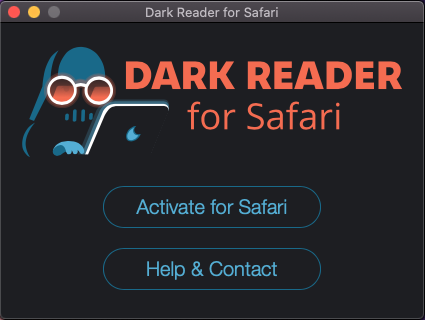
 Tackyou
on 12 Oct 2019
Tackyou
on 12 Oct 2019
Patience
😁
Tampermonkey was rejected, because the main app window of the hosting app, doesn't do anything but to open the extension settings page in Safari. I asked whether the review team would ignore the fact for the moment and that I'll address this "problem" later. We'll see... Otherwise it will take a little longer.
sounds very promising!! updated to safari 13 accidentally last month, having been suffering without tampermonkey since. chrome is just way too battery consuming on Macs.
aslo as mentioned above, the hosting app doesn't need to do anything fancy, it's simple trick but quite effective and unbreakable
 heyrrr
on 12 Oct 2019
heyrrr
on 12 Oct 2019
(Does the App Store allow things like a 'beta channel' of an app? If so, in-band beta would be fine, except if it involves the same review delays then its value is greatly reduce...)
I believe it does. Presto was in beta testing phase(via Test Flight) before appearing on iOS app store , but still every update was taking 1-2 months to get release. and beta signing for iOS apps are only 60 days :(
heyrrr
on 12 Oct 2019
Tampermonkey was rejected, because the main app window of the hosting app, doesn't do anything but to open the extension settings page in Safari. I asked whether the review team would ignore the fact for the moment and that I'll address this "problem" later. We'll see... Otherwise it will take a little longer.
I've uploaded a silly demo showing how Tampermonkey works in Safari by changing up the Google homepage. Hopefully if enough people see it, they'll understand what it does, want it and will support Jan Biniok in further development. I added donate link to Jan in description area of the YouTube video.
https://twitter.com/Cowicide/status/1183191874472820736?s=20
Direct YouTube link: https://youtu.be/q-JZasIN_fI
 Cowicide
on 13 Oct 2019
Cowicide
on 13 Oct 2019
Patience
😁
Tampermonkey was rejected, because the main app window of the hosting app, doesn't do anything but to open the extension settings page in Safari. I asked whether the review team would ignore the fact for the moment and that I'll address this "problem" later. We'll see... Otherwise it will take a little longer.
You are fantastic for even bothering to support what I assume is a pretty small portion of your userbase. Thanks!
 RobbyDM
on 13 Oct 2019
RobbyDM
on 13 Oct 2019
Thanks @derjanb for the Mac Support!
Juicy0Steak
on 13 Oct 2019
@Juicy0Steak How to use it in iOS ?
LoveJessyChen
on 13 Oct 2019
Thanks @derjanb for the iOS Support!
How do you mean, iOS support? Is there a way using Tampermonkey or userscripts on iOS?
 wolfissimo
on 13 Oct 2019
wolfissimo
on 13 Oct 2019
Thanks @derjanb for the iOS Support!
I think you are misunderstanding. This is bringing support back to Safari on MacOS through an Mac App Store release. No talk of an iOS version that I've seen.
cheezmo
on 13 Oct 2019
Yeah, that issue seems to have been addressed here: https://github.com/Tampermonkey/tampermonkey/issues/612
ghost
on 13 Oct 2019
Unrelated to the iOS question (I believe only content blocker extensions are allowed on iOS/iPadOS), but a suggestion. If the mini-app window that launches for an app extension needs to do something useful, maybe have it back up and restore userscripts in bulk? That would be a convenient way to set up a new installation.
timkite
on 13 Oct 2019
@cheezmo @wolfissimo @LoveJessyChen
Actually there is a way to use TamperMonkey in iOS.A Chinese developer has developed a browser called Gear, which supports using TamperMonkey (although there are certain compatibility issues)
Discussion:https://www.v2ex.com/t/607848
App Site:https://gear4.app/
App Store:https://apps.apple.com/cn/app/gear-browser/id1458962238?ls=1
 fanvinga
on 13 Oct 2019
fanvinga
on 13 Oct 2019
@fanvinga I can not find this function in this browser.
LoveJessyChen
on 14 Oct 2019
@LoveJessyChen According to the developer's introduction, to use the scripting feature, it seems that you need to subscribe PRO version
fanvinga
on 14 Oct 2019
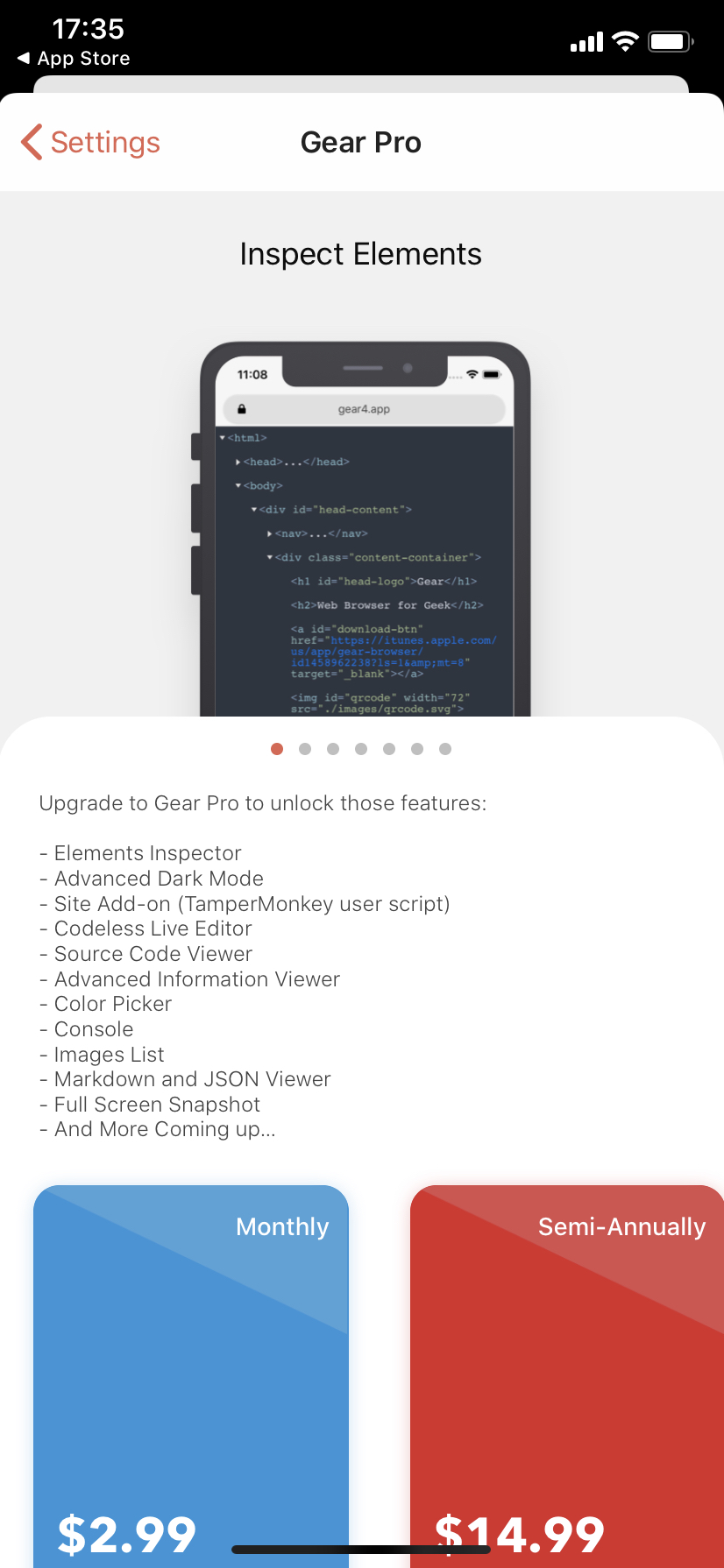
fanvinga
on 14 Oct 2019
@cheezmo Sorry for the confusion. I didn’t make a difference between iOS and MacOS. I meant MacOS by saying „iOS“.
Juicy0Steak
on 14 Oct 2019
@fanvinga Thanks,I am not interested in his pro version. Now, i unistall this browser.
LoveJessyChen
on 14 Oct 2019
Hi all, finally Tampermonkey made it into the app store. 🥳 Thank you all for your support and patience.
I decided to charge a little amount for Tampermonkey for the following reasons:
It is a much greater effort to create and maintain a Safari App Extension than was the case with legacy Safari extensions. I also need to buy new hardware. So far, I have used a virtual machine for development, but macOS does not support that very well. Updates can not be installed very often and then everything has to be setup from scratch again. This was not a problem in the past, because the Extension Builder was a rather small tool, but this does not work well for an IDE like Xcode.
In addition, I promised my two children and my wife a holiday in the Alps, as compensation for the fact that I had less time for them in the last few weeks. 😉
As a thank you for your support and patience, you are welcome to use a promo code from https://www.tampermonkey.net/promocodes.php and install Tampermonkey for free. (You can redeem it at the MacOS App Store App at the bottom of the "Discover" section).
In addition, anyone who has donated $2 or more in the past can later request a promo code with the transaction ID from me.
And finally one last request: please enable the option "Anonymous statistics" at least for a while, so that I can analyze internal crashes, which may not be visible to the outside world.
If you encounter issues please set "Log level" to "Debug" and check ~/Library/Containers/net.tampermonkey.SafariApp.Extension/Data/Documents/log.txt.
https://apps.apple.com/us/app/tampermonkey/id1482490089
Thank you and have fun using Tampermonkey. 😊
derjanb
on 15 Oct 2019
Just bought it (w/o promo codes, of course).
First of all: it works! 🎉
Second: the extension icon looks 0.5x squashed:
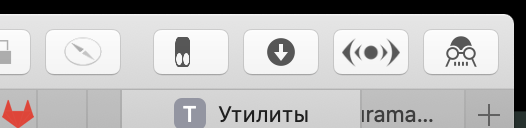
Third: it got stuck on importing Safari 12.x Tampermonkey backup (the «Please wait» spinner). No big deal because I've imported it successfully in Firefox before, plus, looks like most data is imported just fine.
I can try digging it down and opening an issue for that import issue.
Other than that, it is awesome! Thank you for your hard work Jan
epsimatic
on 15 Oct 2019
Hi Jan!
Just bought it, too.
No need for the promotion code. Thanks though!
And also thanks for your time and energy you invest!
Cheers
Marco
 webrockers
on 15 Oct 2019
webrockers
on 15 Oct 2019
Thanks so much for the effort! (I know it's a lot, I chose not to port my extension to Safari 13)
Just bought it and it works great. Have a great time in the Alps!
 nickvdp
on 15 Oct 2019
nickvdp
on 15 Oct 2019
Thanks to Jan for his hard work and wish you a wonderful holiday in the Alps and your family!
fanvinga
on 15 Oct 2019
Thank you so much for bringing Tampermonkey into Safari 13+.
Fun fact: My MacBook is out for repair, so I cannot test it for now ...
wolfissimo
on 15 Oct 2019
Bought and working fine here - thanks so much! Now I can ditch Firefox again.
Rhywun
on 15 Oct 2019
@derjanb Can you lower system requirements to macOS 10.13.6?
 Takohashi
on 15 Oct 2019
Takohashi
on 15 Oct 2019
Can you lower system requirements to macOS 10.13.6?
Unfortunately not, because one essential method is only available at 10.14.4+. 😔
derjanb
on 15 Oct 2019
Second: the extension icon looks 0.5x squashed
I've seen this at some App Store Review screenshots as well, but it's looking normal here. 🤔
Third: it got stuck on importing Safari 12.x Tampermonkey backup (the «Please wait» spinner).
I'll check this.
derjanb
on 15 Oct 2019
Oh happy day! 🙂
For some reason, searching the app store for "tampermonkey" and "tamper" both return no results. 🤔 I was able to get to the app through the link above, though.
GarthSnyder
on 15 Oct 2019
Hi, @derjanb . Thank You so much for your hard work on this extension! I'm excited to use Tampermonkey in Safari once again.
ghost
on 15 Oct 2019
Nice job! Just bought it, but I couldn't find it through search in MAS, only had access to it using your link in there. Why is that?
heyrrr
on 15 Oct 2019
Seems to be only available through US App Store.
webrockers
on 15 Oct 2019
Thanks for the work.
Finally I can have my Nyan cat progress bar back.
 zanderzhng
on 15 Oct 2019
zanderzhng
on 15 Oct 2019
Thank you for your hard work. It is an instant-buy.
As @epsimatic said, importing is stuck on "please waiting". I quit and restart Safari to see whether it solves the problem, but only find Tampermonkey is gone missing.
There is no icon on the toolbar. Uncheck/check the extension in preferences sees a flash of icon on the bar. Reinstall does not help either.
edit: removing tampermonkey relevant files in ~/Library and reinstalling brings it back. Importing is actually successful but scripts cannot be viewed in dashboard.
 robbielj
on 15 Oct 2019
robbielj
on 15 Oct 2019
@webrockers Could be. At least for me (location: Germany) Safari Extensions were always kinda tucked away in the depths of the macOS App Store. I could only search trough them when going trough the Safari Options or when I searched directly for the name of the app. But it won't show Tampermonkey, no matter what, even when searched directly for the name. I feel kinda cheap pointing this out, but the promo code doesn't work for me either, so I guess this might be location locked? Following Jan's link works, though.
chiffon-rouge
on 15 Oct 2019
Nice job!
I'm also having trouble importing zip or txt file from Chrome tampermonkey(lastest). It got stuck after selecting scripts to import and showed "Please wait". It's the same when installing a script from web.But some installed scripts seems to be working despite showing please wait on the installed page. BTW, this please wait hangs there even if you reinstall tampermonkey.
The animation for showing up the toolbar menu looks a bit weird. It seems coming from right side of the icon and suddenly jumps to middle.
 lonelykid
on 15 Oct 2019
lonelykid
on 15 Oct 2019
Similar to folks reporting that they’re stuck with importing on the “Please wait…” spinner, I’m stuck on that same thing, but I turned on script syncing via Dropbox. The scripts have, in fact, imported & are working, but I can’t view the dashboard.
 jeffbyrnes
on 15 Oct 2019
jeffbyrnes
on 15 Oct 2019
@chiffon-rouge: Same here. From Germany. Link did work, App Store search didn't.
@jeffbyrnes: I am getting also the spinner.
The other thing: Are all my old custom scripts gone?
webrockers
on 15 Oct 2019
Seems to be only available through US App Store.
but the thing is I'm using Canadian MAS, and the link redirects to MAS works for me. Typically if its not available in another country it would say item not available
heyrrr
on 15 Oct 2019
Nice job! Just bought it, but I couldn't find it through search in MAS, only had access to it using your link in there. Why is that?
I think this is because it is a Safari App Extension, not a stand-alone app. You will only find it via Safari > Extensions.
wolfissimo
on 15 Oct 2019
The other thing: Are all my old custom scripts gone?
Ah, sorry. Forgot to mention that. The old scripts were stored inside Safarie's storage and I don't think other apps can easily get access to that. I also found no information at the Safari legacy extension migration guide.
derjanb
on 15 Oct 2019
The other thing: Are all my old custom scripts gone?
Ah, sorry. Forgot to mention that. The old scripts were stored inside Safarie's storage and I don't think other apps can easily get access to that. I also found no information at the Safari legacy extension migration guide.
I managed to use "The Unarchiver" to extract the .js files from the old safari extensions (stored at
/Users/USERNAME/Library/Safari/Extensions/Tampermonkey.safariextz)
 laylyoldwild
on 15 Oct 2019
laylyoldwild
on 15 Oct 2019
Similar to folks reporting that they’re stuck with importing on the “Please wait…” spinner, I’m stuck on that same thing, but I turned on script syncing via Dropbox. The scripts have, in fact, imported & are working, but I can’t view the dashboard.
See https://github.com/Tampermonkey/tampermonkey/issues/778#issuecomment-542309705
derjanb
on 15 Oct 2019
I think this is because it is a Safari App Extension, not a stand-alone app. You will only find it via Safari > Extensions.
Not sure. :)
Nice job! Just bought it, but I couldn't find it through search in MAS, only had access to it using your link in there. Why is that?
Apple somewhere stated that it can take up to 24 hours to appear everywhere.
derjanb
on 15 Oct 2019
I feel kinda cheap pointing this out, but the promo code doesn't work for me either, so I guess this might be location locked?
No restraints! It's there to be used. ;)
I'm also located in Germany and we tried it with one colleague's Mac mini. When we entered the code the first time the app store app got stuck in showing a spinning wheel. A retry then showed a prompt to confirm some user agreement changes and after this the code was accepted and Tampermonkey installed.
derjanb
on 15 Oct 2019
The other thing: Are all my old custom scripts gone?
Ah, sorry. Forgot to mention that. The old scripts were stored inside Safarie's storage and I don't think other apps can easily get access to that. I also found no information at the Safari legacy extension migration guide.
I managed to use "The Unarchiver" to extract the .js files from the old safari extensions (stored at
/Users/USERNAME/Library/Safari/Extensions/Tampermonkey.safariextz)
Found the file, extracted to folder, couldn't find the custom scripts. Dang.
webrockers
on 15 Oct 2019
I have backup import problem triaged, and have a workaround for it, see #778
epsimatic
on 15 Oct 2019
Found the file, extracted to folder, couldn't find the custom scripts. Dang.
:( Could they be in a differently named folder in Extensions? I didn't have many scripts and I haven't checked how they're all stored. I do apparently have 3 versions of the same extension though...
laylyoldwild
on 15 Oct 2019
Long and tedious way to recover scripts is to:
- restore some older Time Machine backup (I hope you have one ;) ),
- start Safari 12,
- export Tampermonkey scripts,
- then go back to present day and reimport scripts.
If I had to do it, I'd create a Mac OS VM, or start Mac OS from external drive, then import my user from Time Machine, then export Tampermonkey scripts.
epsimatic
on 15 Oct 2019
I feel kinda cheap pointing this out, but the promo code doesn't work for me either, so I guess this might be location locked?
No restraints! It's there to be used. ;)
I'm also located in Germany and we tried it with one colleague's Mac mini. When we entered the code the first time the app store app got stuck in showing a spinning wheel. A retry then showed a prompt to confirm some user agreement changes and after this the code was accepted and Tampermonkey installed.
AFAIK App Store promo codes are for one use only, so once it is used it becomes invalid and does not work anymore. In fact, an error says that promo code was already used by someone else if I try to redeem it. I have already bought the app at full price with my account tho, so that may also be related.
Edit: just tried with my wife's account and it does not work either
 lopmot90
on 15 Oct 2019
lopmot90
on 15 Oct 2019
It'd probably be a good idea to lock this issue now, and advise people to file separate issues for specific problems they find with the app extension.
rcombs
on 15 Oct 2019
AFAIK App Store promo codes are for one use only, so once it is used it becomes invalid and does not work anymore. In fact, an error says that promo code was already used by someone else if I try to redeem. I have already bought the app at full price with my account tho, so that may also be related.
OK. Well this explains why one would need 100 of them. 😂 I'm sorry, I'm totally new to the Apple App Store universe. 🤦 I'll rework the page to send new codes per email.
derjanb
on 15 Oct 2019
Oh, and prefs from the old version are at ~/Library/Containers/com.apple.Safari/Data/Library/Preferences/com.apple.Safari.Extensions.plist. The Tampermonkey data in there is pretty easy to parse; if you just want to import old scripts, you should be able to copy and paste them and then just unescape the backslash- and XML-escapes. Other apps (like Tampermonkey) definitely don't have access to that due to sandbox restrictions, though, and I'm not sure if the file sticks around after updating to Safari 13.
rcombs
on 15 Oct 2019
It'd probably be a good idea to lock this issue now, and advise people to file separate issues for specific problems they find with the app extension.
Yes, occurring issues should be filed as new issues.
However, I'll leave this issue open for a little longer as it seems that it's beneficial to share some information between users.
derjanb
on 15 Oct 2019
I'll rework the page to send new codes per email.
Done. But please be patient, I'm processing the mails manually at the moment. 🥵
derjanb
on 15 Oct 2019
Hi, when I go to my dashboar to check out installed script, it is always loading showing please wait.
 paulzhang1992
on 15 Oct 2019
paulzhang1992
on 15 Oct 2019
@derjanb
Done. But please be patient, I'm processing the mails manually at the moment
Look forward to this. OUJS, via probably myself, will need one for documentation purposes. I am rarely on macOS but giving TM under Safari some PR needs one. Won't be able to request until this weekend though... still working through a few hw changes myself. :smiley:
Martii
on 15 Oct 2019
where do the files go when I "save to file"? On Firefox, I get a popup prompting me for a location; on Safari, I just get the "I'm busy" spinner briefly and then it goes away and I've no idea where the files have wound up.
(thanks for developing this into an app at such short notice, btw; I'm a diehard Safari fan and hate to have to use anything else)
waider
on 15 Oct 2019
Meta: on https://apps.apple.com/us/app/tampermonkey/id1482490089, the three 'Screenshots' images are too small to be useful, and do not seem to have any way (like hover or click) to see a larger version. This is when viewed from Opera on Linux; I wouldn't be at all surprised if it works much better on Safari. And, whatever this is, it's almost certainly an Apple web site problem, not your uploaded metadata...
filbo
on 15 Oct 2019
... must be browser incompatibility. Ripping into the source of the page, it offers no less than 8 different zooms of the 1st image, all the way up to a very clear 1280x800.
filbo
on 15 Oct 2019
@Martii No problem, I keep some codes for internal purposes. Just mail me to and I'll send you a code.
BTW: how do I recover my account at oujs?
derjanb
on 15 Oct 2019
where do the files go when I "save to file"? On Firefox, I get a popup prompting me for a location; on Safari, I just get the "I'm busy" spinner briefly and then it goes away and I've no idea where the files have wound up.
@waider Data should be stored at ~/Library/Containers/net.tampermonkey.SafariApp.Extension/Data/Downloads/ which should be linked to the user's Downloads folder. In case this fails files are stored at ~/Library/Containers/net.tampermonkey.SafariApp.Extension/Data/Documents/.
derjanb
on 15 Oct 2019
On 15 Oct 2019, at 22:52, Jan Biniok notifications@github.com wrote:
@waider Data should be stored at ~/Library/Containers/net.tampermonkey.SafariApp.Extension/Data/Downloads/ which should be linked to the user's Downloads folder. In case this fails files are stored at ~/Library/Containers/net.tampermonkey.SafariApp.Extension/Data/Documents/.
Aha, the Documents folder it is. Thanks!
Cheers,
Waider.
waider
on 15 Oct 2019
@paulzhang1992 Please see #778
derjanb
on 16 Oct 2019
This release made my day and I happily paid for it, no promo code needed. Enjoy your vacation, this is great work! Thank you!
Fofer
on 16 Oct 2019
Hi all, finally Tampermonkey made it into the app store. 🥳 Thank you all for your support and patience.
I decided to charge a little amount for Tampermonkey for the following reasons:
It is a much greater effort to create and maintain a Safari App Extension than was the case with legacy Safari extensions. I also need to buy new hardware. So far, I have used a virtual machine for development, but macOS does not support that very well. Updates can not be installed very often and then everything has to be setup from scratch again. This was not a problem in the past, because the Extension Builder was a rather small tool, but this does not work well for an IDE like Xcode.
In addition, I promised my two children and my wife a holiday in the Alps, as compensation for the fact that I had less time for them in the last few weeks. 😉As a thank you for your support and patience, you are welcome to use a promo code from https://www.tampermonkey.net/promocodes.php and install Tampermonkey for free. (You can redeem it at the MacOS App Store App at the bottom of the "Discover" section).
In addition, anyone who has donated $2 or more in the past can later request a promo code with the transaction ID from me.
And finally one last request: please enable the option "Anonymous statistics" at least for a while, so that I can analyze internal crashes, which may not be visible to the outside world.
If you encounter issues please set "Log level" to "Debug" and check ~/Library/Containers/net.tampermonkey.SafariApp.Extension/Data/Documents/log.txt.https://apps.apple.com/us/app/tampermonkey/id1482490089
Thank you and have fun using Tampermonkey. 😊
The best news I have heard today!!!!!
I have used it for a while, there are some little problems:
First is that the icon on the browser is a little bit weird ?

Second, when I try to install a script, the script is opened by Safari at first, then the install page will appear in a new tab.
YuntianCheng
on 16 Oct 2019
Also here

 gabrielferrari714
on 16 Oct 2019
gabrielferrari714
on 16 Oct 2019
Hi, when I go to my dashboar to check out installed script, it is always loading showing please wait.
Same here. I can't get my scripts to work properly, because they need to be arranged in a certain load order in Tampermonkey... but I can't access the dashboard, it's just the blue/green spinner forever. My Mac is 100% up to date with software as of now. Rebooted Mac, Tampermonkey still won't load Dashboard. I'm also seeing the icon graphical error that other users are reporting in the Safari Toolbar at the top.
 bengarland
on 16 Oct 2019
bengarland
on 16 Oct 2019
Hi, when I go to my dashboar to check out installed script, it is always loading showing please wait.
Same here. I can't get my scripts to work properly, because they need to be arranged in a certain load order in Tampermonkey... but I can't access the dashboard, it's just the blue/green spinner forever. My Mac is 100% up to date with software as of now. Rebooted Mac, Tampermonkey still won't load Dashboard. I'm also seeing the icon graphical error that other users are reporting in the Safari Toolbar at the top.
You can check out this:
https://github.com/Tampermonkey/tampermonkey/issues/778
but their method doesn't solve my loading problem.
YuntianCheng
on 16 Oct 2019
It seems like Tampermonkey is trying to load this, for some reason:
https://ui.tampermonkey.net/favicon.ico
But it's a 404
bengarland
on 16 Oct 2019
First of all: Thanks a lot for Tampermonkey and for porting it to the App Store!
It will be an instant buy (once I can use it, see below).
Leaving out the country should forward users to their current country’s App Store. So This works, unlike everything documented in QA1633.
Is there any chance you can do a release with deployment target 10.13? I’m stuck on High Sierra (old MacBooks) and Safari 13 has been released for 10.13, too.
 dhoepfl
on 16 Oct 2019
dhoepfl
on 16 Oct 2019
@dhoepfl Please see https://github.com/Tampermonkey/tampermonkey/issues/558#issuecomment-542256373 😞
derjanb
on 16 Oct 2019
@dhoepfl Please see #558 (comment) 😞
Sorry, missed this one.
I assume you already tried something like the following:
func tampermonkeyGetContainingTab(of page: SFSafariPage, completionHandler: @escaping (SFSafariTab) -> Void) {
   if #available(macOS 10.14, *) {
      page.getContainingTab(completionHandler: completionHandler)
   } else {
      SFSafariApplication.getAllWindows { windows: [SFSafariWindow] -> Void in
         for let window in windows {
            window.getAllTabs { tabs: [SFSafariTab] -> Void in
               for let tab in tabs {
                  tab.getPagesWithCompletionHandler { pages: [SFSafariPage]? -> Void in
                     if let pages = pages {
                        for let aPage in pages {
                           if page === aPage {
                              completionHandler(tab)
                           }
                        }
                     }
                  }
               }
            }
         }
      }
   }
}
If so: 😢
dhoepfl
on 16 Oct 2019
Great job.
Tampermonkey is working now.
Is there any way to restore my previous settings and scripts from safari 12?
codeninja-ru
on 17 Oct 2019
@derjanb The Apple Store says it requires macOS 10.14 or higher.
Is it possible to make it available for 10.12 and 10.13 in the future?
gitguys
on 18 Oct 2019
@gitguys he already answered that question here in this thread.
bengarland
on 18 Oct 2019
It is too expensive.
LoveJessyChen
on 22 Oct 2019
Just bought the application. Amazing work man, you made my day!
 Shaah
on 23 Oct 2019
Shaah
on 23 Oct 2019
Oh, and prefs from the old version are at
~/Library/Containers/com.apple.Safari/Data/Library/Preferences/com.apple.Safari.Extensions.plist. The Tampermonkey data in there is pretty easy to parse; if you just want to import old scripts, you should be able to copy and paste them and then just unescape the backslash- and XML-escapes. Other apps (like Tampermonkey) definitely don't have access to that due to sandbox restrictions, though, and I'm not sure if the file sticks around after updating to Safari 13.
It doesn't look like the file does stay around. At least on my pc it does not contain any tampermonkey data.
 Boelensman1
on 4 Nov 2019
Boelensman1
on 4 Nov 2019
Hi, is there a way to get Tampermonkey for Safari 13 on OS X 10.13.6? I am stuck at the moment after High Sierra upgrade which force upgrade Safari from 12 to 13 which broke Tampermonkey extension. The latest Tampermonkey on App Store will only work on OS X 10.14 which I don't want to upgrade to. Thank-you.
update - ok, I just re-read one comment above, looks like it's not possible. Will have to look to Chrome or Firefox, dang it.
 ursinus1
on 19 Dec 2019
ursinus1
on 19 Dec 2019
@ursinus1 Please see https://github.com/Tampermonkey/tampermonkey/issues/558#issuecomment-542256373
derjanb
on 19 Dec 2019
FYI: I found a way to make Tampermonkey work at macOS 10.13 as well, but there are some drawbacks! Please see https://github.com/Tampermonkey/tampermonkey/issues/854#issuecomment-573408146 for more information.
derjanb
on 12 Jan 2020
Related issues
 dotennin
·
3Comments
dotennin
·
3Comments
 jb222
·
4Comments
jb222
·
4Comments
 selevo
·
5Comments
selevo
·
5Comments
 jacklul
·
6Comments
jacklul
·
6Comments
 mikhoul
·
5Comments
mikhoul
·
5Comments
Most helpful comment
Hi all, finally Tampermonkey made it into the app store. 🥳 Thank you all for your support and patience.
I decided to charge a little amount for Tampermonkey for the following reasons:
It is a much greater effort to create and maintain a Safari App Extension than was the case with legacy Safari extensions. I also need to buy new hardware. So far, I have used a virtual machine for development, but macOS does not support that very well. Updates can not be installed very often and then everything has to be setup from scratch again. This was not a problem in the past, because the Extension Builder was a rather small tool, but this does not work well for an IDE like Xcode.
In addition, I promised my two children and my wife a holiday in the Alps, as compensation for the fact that I had less time for them in the last few weeks. 😉
As a thank you for your support and patience, you are welcome to use a promo code from https://www.tampermonkey.net/promocodes.php and install Tampermonkey for free. (You can redeem it at the MacOS App Store App at the bottom of the "Discover" section).
In addition, anyone who has donated $2 or more in the past can later request a promo code with the transaction ID from me.
And finally one last request: please enable the option "Anonymous statistics" at least for a while, so that I can analyze internal crashes, which may not be visible to the outside world.
If you encounter issues please set "Log level" to "Debug" and check ~/Library/Containers/net.tampermonkey.SafariApp.Extension/Data/Documents/log.txt.
https://apps.apple.com/us/app/tampermonkey/id1482490089
Thank you and have fun using Tampermonkey. 😊