Tampermonkey: [Chrome] Script editor disappears / is way to large / scrolls the complete page
![2019-09-13~17_56_56]
understanding gif video >> https://user-images.githubusercontent.com/13694921/64868343-2fd92b00-d650-11e9-8f57-6462e54d8eff.gif
- Chrome (76.0.3809.132 x64)
- TM: (i.e. 4.8.41)
- OS: (win 7x64)
 selevo
All 5 comments
Having the same issue.
Chrome 77.0.3865.75 (Official Build) (64-bit)
TM 4.8.41
Windows 10
Mostly happens when scrolling but sometimes clicking inside the editor sets it off. Pulling up the browser's console can bring it back most of the time but it's half the normal size.
 rundamnyou
on 13 Sep 2019
rundamnyou
on 13 Sep 2019
Already fixed at TM BETA, but not released yet, because the last release is in "Pending review" state since more than a week. 😢
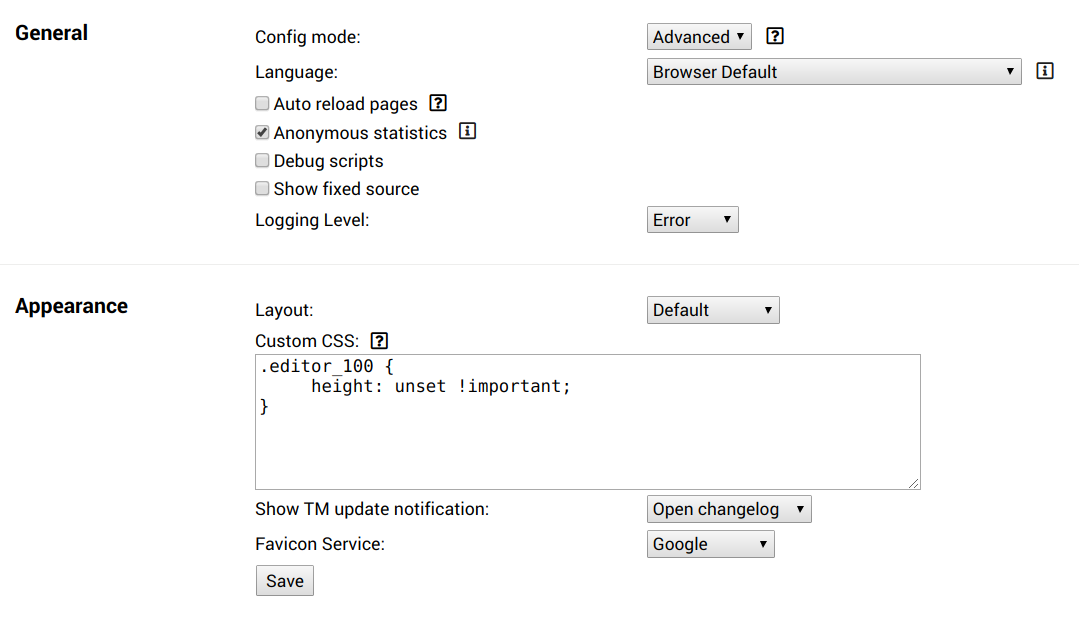
However, you can workaround this issue by setting "Config Mode" to "Advanced" and insert this at the "Custom CSS" option:
.editor_100 {
     height: unset !important;
}
 derjanb
on 13 Sep 2019
derjanb
on 13 Sep 2019
@derjanb Thanks for the fix!
 wefalltomorrow
on 27 Sep 2019
wefalltomorrow
on 27 Sep 2019
I was beginning to think Im going crazy. It was happening to me only on the first time I opened big scripts, but reloading the tab somehow fixed it. Custom layout css fixes it permanently, thanks.
 raszpl
on 13 Oct 2019
raszpl
on 13 Oct 2019
Sorry for the delay. Fixed at the beta version a month again, but review took that long. 😮
derjanb
on 16 Oct 2019
Related issues
 jb222
·
4Comments
jb222
·
4Comments
 momocow
·
5Comments
momocow
·
5Comments
 AlfonsoML
·
4Comments
AlfonsoML
·
4Comments
 Mottie
·
4Comments
Mottie
·
4Comments
 devnoname120
·
7Comments
devnoname120
·
7Comments
Most helpful comment
Already fixed at TM BETA, but not released yet, because the last release is in "Pending review" state since more than a week. 😢
However, you can workaround this issue by setting "Config Mode" to "Advanced" and insert this at the "Custom CSS" option: