Talk: I get "Cannot return null for non-nullable field UsernameStatus.status." after user object is returned from tokenUserNotFound plugin
Hi,
I implemented the SSO tokenUserNotFound plug in and I was able to see it is being triggered which means that the token is valid and the user is not found so this custom plugin is triggered.
Here is my code:
`
     const fetch = require('node-fetch');

     const UserModel = require('../../../models/user');

      module.exports = {
  profile={id:"111111","username": "hamedminaee"};
  let user = await UserModel.findOneAndUpdate({
    id: profile.id
  }, {
    id: profile.id,
    username: profile.username,
    lowercaseUsername: profile.username.toLowerCase(),
    roles: [],
    profiles: []
  }, {
    setDefaultsOnInsert: true,
    new: true,
    upsert: true
  });
     console.log(user);
  return user;
}

};
As you see instead of calling an external api to get the profile object for now just for testing I hard coded a profile object and pass it to findOneAndUpdate.
Here is my user object returned by the above function after printing it:
   { status:
   { username: { history: [] },
   banned: { status: false, history: [] },
   suspension: { until: null, history: [] } },
  role: 'COMMENTER',
  ignoresUsers: [],
  _id: 5b805fe8e1d3a333d93ab6f0,
  id: '111111',
  __v: 0,
  created_at: 2018-08-24T19:43:36.796Z,
  lowercaseUsername: 'hamedminaee',
  profiles: [],
  tags: [],
  tokens: [],
  updated_at: 2018-08-24T23:17:40.952Z,
  username: 'hamedminaee' }
But it seems that Talk does not like the returned user object and return the following error:
(node:13734) DeprecationWarning: collection.count is deprecated, and will be removed in a future version. Use collection.countDocuments or collection.estimatedDocumentCount instead
Error: Cannot return null for non-nullable field UsernameStatus.status.
    at completeValue (/hamed-test-talk-install-manual/talk/node_modules/graphql/execution/execute.js:599:13)
    at completeValueWithLocatedError (/hamed-test-talk-install-manual/talk/node_modules/graphql/execution/execute.js:546:21)
    at completeValueCatchingError (/hamed-test-talk-install-manual/talk/node_modules/graphql/execution/execute.js:515:12)
    at resolveField (/hamed-test-talk-install-manual/talk/node_modules/graphql/execution/execute.js:467:10)
    at /hamed-test-talk-install-manual/talk/node_modules/graphql/execution/execute.js:314:18
    at Array.reduce (<anonymous>)
    at executeFields (/hamed-test-talk-install-manual/talk/node_modules/graphql/execution/execute.js:311:42)
    at collectAndExecuteSubfields (/hamed-test-talk-install-manual/talk/node_modules/graphql/execution/execute.js:749:10)
    at completeObjectValue (/hamed-test-talk-install-manual/talk/node_modules/graphql/execution/execute.js:731:10)
    at completeValue (/hamed-test-talk-install-manual/talk/node_modules/graphql/execution/execute.js:628:12)
    at completeValue (/hamed-test-talk-install-manual/talk/node_modules/graphql/execution/execute.js:597:21)
    at completeValueWithLocatedError (/hamed-test-talk-install-manual/talk/node_modules/graphql/execution/execute.js:546:21)
    at completeValueCatchingError (/hamed-test-talk-install-manual/talk/node_modules/graphql/execution/execute.js:515:12)
    at resolveField (/hamed-test-talk-install-manual/talk/node_modules/graphql/execution/execute.js:467:10)
    at /hamed-test-talk-install-manual/talk/node_modules/graphql/execution/execute.js:314:18
    at Array.reduce (<anonymous>)
    at executeFields (/hamed-test-talk-install-manual/talk/node_modules/graphql/execution/execute.js:311:42)
    at collectAndExecuteSubfields (/hamed-test-talk-install-manual/talk/node_modules/graphql/execution/execute.js:749:10)
    at completeObjectValue (/hamed-test-talk-install-manual/talk/node_modules/graphql/execution/execute.js:731:10)
    at completeValue (/hamed-test-talk-install-manual/talk/node_modules/graphql/execution/execute.js:628:12)
    at completeValueWithLocatedError (/hamed-test-talk-install-manual/talk/node_modules/graphql/execution/execute.js:546:21)
    at completeValueCatchingError (/hamed-test-talk-install-manual/talk/node_modules/graphql/execution/execute.js:521:21)
Is there any specific format the profile object sent to findOneAndUpdate should follow? (Because later on the external service needs to send back this object and as far as I searched the documentation I could not find any documentation related to the format of it. If the profile object is in the right format (which seems to be because later on I can see the user object returned from the findOneAndUpdate) why Talks return with the above error? is there any other function should be use instead of this : UserModel.findOneAndUpdate?
 hminaeeBrunswicknews
All 6 comments
@kgardnr @wyattjoh Any idea?
hminaeeBrunswicknews
on 27 Aug 2018
@hminaeeBrunswicknews you'll need to make sure the username.status is set, it can't be null:
status.username.status = SET
You can see more here: https://github.com/coralproject/talk/issues/1703
 kgardnr
on 28 Aug 2018
kgardnr
on 28 Aug 2018
Thanks @kgardnr
when I get the user object back I added this line in my code:
status.username.status = SET
and it worked.
However when I load it in my page I see that the user is logged in as the user object I set in profile object but I get the following pop up asking for user email and password:
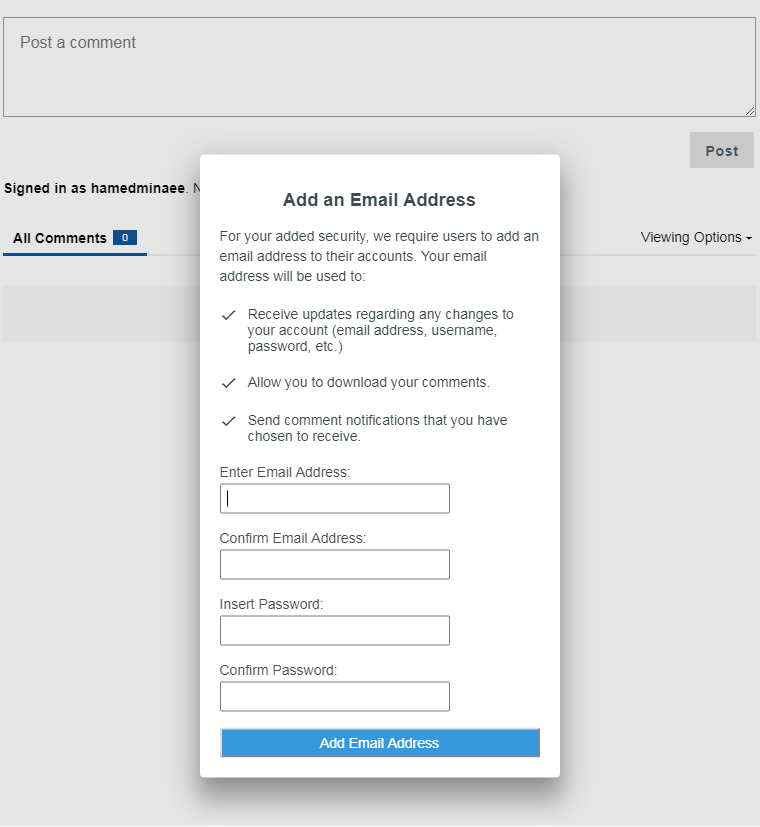
So I thought it might be related to the profile I am sending and I added another attribute there called email to avoid this but no result:
profile={id:"111111","username": "hamedminaee", "email":"[email protected]"};
How can I remove this popup?
hminaeeBrunswicknews
on 28 Aug 2018
Hey @hminaeeBrunswicknews ,
You need to add a provider='local' to your profile object. Also, there is no email field in the profile, you need to use the id for it.
If you want to add more information to your profile, you can use the meta field.
Ref: https://github.com/coralproject/talk/blob/master/models/schema/user.js#L19
 leeeandroo
on 28 Aug 2018
leeeandroo
on 28 Aug 2018
Thanks @leeeandroo
I updated my profile as follows:
profile={id:"[email protected]","username": "hamedminaee11","provider":"local"};
and in the logs I get:
`
  http error
  err: MongoError: E11000 duplicate key error collection: talk.users index:
  profiles.id_1_profiles.provider_1
  dup key: { : null, : null }
  at ./node_modules/mongodb-core/lib/connection/pool.js:580:63
  at authenticateStragglers (./node_modules/mongodb-core/lib/connection/pool.js:503:16)
  at Connection.messageHandler (./node_modules/mongodb-core/lib/connection/pool.js:539:5)
  at emitMessageHandler (./node_modules/mongodb-core/lib/connection/connection.js:309:10)
  at Socket.<anonymous> (./node_modules/mongodb-core/lib/connection/connection.js:452:17)
  at Socket.emit (events.js:182:13)
  at addChunk (_stream_readable.js:283:12)
  at readableAddChunk (_stream_readable.js:264:11)
  at Socket.Readable.push (_stream_readable.js:219:10)
  at TCP.onread (net.js:639:20)
   version: "4.6.1"
`
An I am sure the id and username I am passing is unique.
Just to make sure my username is unique I used the following :
`
      let email= "aaa"+(Math.floor(Math.random() * Math.floor(30000)))+"[email protected]";
  profile={id:email,"username": ("[email protected]")+(Math.floor(Math.random() * Math.floor(30000))),"provider":"local"};
`
I also I tried this as well:
     let email= "aaa"+(Math.floor(Math.random() * Math.floor(30000)))+"[email protected]";

      profile={id:email,"provider":"local",
            "metadata":{"username": ("[email protected]")+(Math.floor(Math.random() * Math.floor(30000)))}};
Here I used the metadata tag instead.
But still not working. Also it is noteworthy the error happens when executing this function : await UserModel.findOneAndUpdate({
@leeeandroo any idea?
hminaeeBrunswicknews
on 28 Aug 2018
Talk sets the user id, that's why the error is saying duplicate key. I took this from another newsroom's auth plugin to show you an example of how you should be setting these pieces, and the displayName too:
```// Upsert the user into Talk
const user = await UserModel.findOneAndUpdate(
{
id: jwt.ssoCode,
},
{
id: jwt.ssoCode,
username: data.email,
lowercaseUsername: data.email.toLowerCase(),
profiles: [
{
provider: 'My ID Service',
id: jwt.ssoCode,
},
],
status: {
username: {
status: 'SET',
history: [
{
status: 'SET',
},
],
},
},
metadata: {
displayName: data.displayName,
},
},
{
setDefaultsOnInsert: true,
new: true,
upsert: true,
}
);
return user;
```
kgardnr
on 28 Aug 2018
Related issues
 aliblackwell
·
4Comments
aliblackwell
·
4Comments
 mattlinares
·
3Comments
mattlinares
·
3Comments
 honzie
·
4Comments
honzie
·
4Comments
 Jetbo
·
4Comments
Jetbo
·
4Comments
 jvert
·
4Comments
jvert
·
4Comments
Most helpful comment
Talk sets the user id, that's why the error is saying duplicate key. I took this from another newsroom's auth plugin to show you an example of how you should be setting these pieces, and the
displayNametoo:```// Upsert the user into Talk
const user = await UserModel.findOneAndUpdate(
{
id: jwt.ssoCode,
},
{
id: jwt.ssoCode,
username: data.email,
lowercaseUsername: data.email.toLowerCase(),
profiles: [
{
provider: 'My ID Service',
id: jwt.ssoCode,
},
],
status: {
username: {
status: 'SET',
history: [
{
status: 'SET',
},
],
},
},
metadata: {
displayName: data.displayName,
},
},
{
setDefaultsOnInsert: true,
new: true,
upsert: true,
}
);
```