Taiga: Discord: Add option to hide fansub/raw group
Currently, it will show fansub/raw group where I get the anime from:
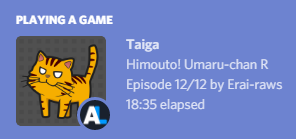
Here, the anime is by Erai-raws.
I would want to hide it, because I don't want to show that I'm actually watching the anime from a fansub/raw group, especially since I'm in a few anime-related Discord servers where fansubs or raw or illegal unlicensed contents are not allowed to be discussed at all.
All of anime I watch from fansub/raw group are the ones not available in my country only (either because all streaming services excluded rights for my region, or no one licensed them here, or it's banned because didn't pass censorship board), in other cases I'll try as much to watch legal streams.
It should just be an option, not remove it completely, because some people will want to show it, but there will also be people who want to hide it.
 mnh48
mnh48
All 4 comments
Edit: Post deleted, incorrect information not relevant to request - my apologies.
 purposelycryptic
on 10 Aug 2018
purposelycryptic
on 10 Aug 2018
I tried to change the string in the advanced setting, and restarted Taiga.
But it still shows the group name in Discord, even though it didn't show on notification anymore.
mnh48
on 10 Aug 2018
That option doesn't affect anything but episode notifications. What you see on Discord is currently not changable through the UI. However, you can do this:
- Close Taiga.
- Open
Taiga\data\settings.xmland search fordiscord. - Remove the
$if(%group%,by %group%)on that line and save the file. - Restart Taiga.
I don't want to show that I'm actually watching the anime from a fansub/raw group, especially since I'm in a few anime-related Discord servers where fansubs or raw or illegal unlicensed contents are not allowed to be discussed at all.
That sounds like a legitimate reason for the request. I'll see what I can do.
 erengy
on 10 Aug 2018
erengy
on 10 Aug 2018
@erengy, @MuhdNurHidayat - My apologies, did not intend to spread bad information; I have never actually used Discord, and mistakenly assumed that the option was meant as a universal formatting tool for Taiga's notification/status display functions. I should have properly tested/confirmed before writing, but my enthusiasm in thinking I could help got the better of me.
purposelycryptic
on 10 Aug 2018
Related issues
 Sivarius
·
7Comments
Sivarius
·
7Comments
 Cephel
·
3Comments
Cephel
·
3Comments
 otvenharom
·
6Comments
otvenharom
·
6Comments
 CeruleanSky
·
6Comments
CeruleanSky
·
6Comments
 hellflames21
·
5Comments
hellflames21
·
5Comments
Most helpful comment
That option doesn't affect anything but episode notifications. What you see on Discord is currently not changable through the UI. However, you can do this:
Taiga\data\settings.xmland search fordiscord.$if(%group%,by %group%)on that line and save the file.That sounds like a legitimate reason for the request. I'll see what I can do.