Hello, I have an issue after proceeding inference. After training every time when I try to use model from different checkpoints it gives the silent result.
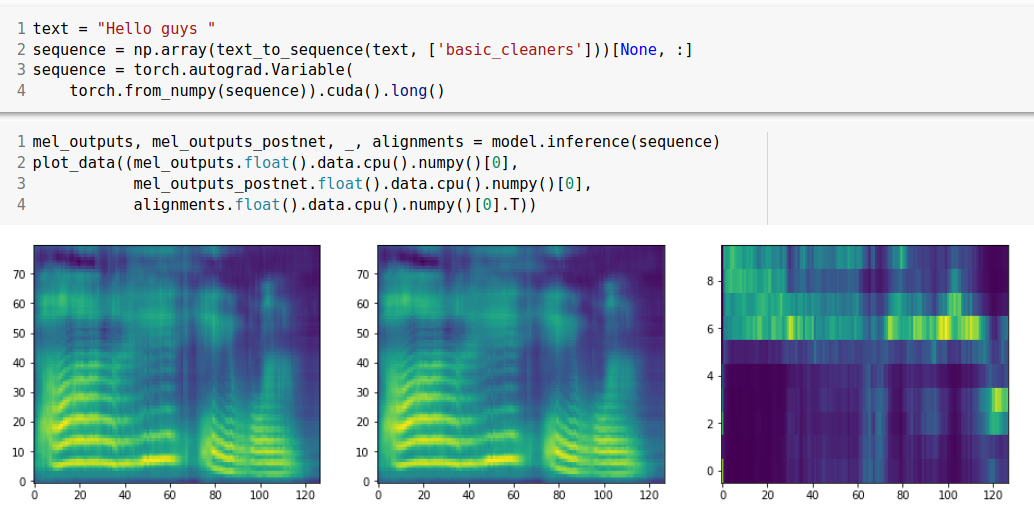
Below you can see my spectrograms:
Does anyone have suggestions how to solve it?
 OOps717
All 13 comments
You don't have your attention plot aligned yet.
Even without alignment, you should be hearing some kind of incomprehensible noise.
 ksaidin
on 20 May 2020
ksaidin
on 20 May 2020
I expected to hear something, but even with different checkpoints I don't hear anything
OOps717
on 20 May 2020
Nothing to do with different checkpoints, it will produce some random voice anyway even in 1000 iterations.
You need to double check your settings, packages, models etc. or even try resetting your kernel.
ksaidin
on 20 May 2020
btw, if you are using google colab, sometimes waveglow.infer may return array full of nans.
solution; factory reset runtime.
ksaidin
on 20 May 2020
I have tried it but still no progress. However, I noticed this warning
/usr/local/lib/python3.6/dist-packages/torch/serialization.py:657: SourceChangeWarning: source code of class 'glow.Invertible1x1Conv' has changed. you can retrieve the original source code by accessing the object's source attribute or set `torch.nn.Module.dump_patches = True` and use the patch tool to revert the changes.
warnings.warn(msg, SourceChangeWarning)
Maybe this is the problem, but I don't know how to solve it anyway :(
OOps717
on 21 May 2020
>> © You can ignore those warnings.
If you are using google colab, you can share ipynb so we can look at it.
ksaidin
on 21 May 2020
https://drive.google.com/file/d/12qSWw3DZcbxG5QVy1VTlAoINuFyRVRRe/view?usp=sharing
Also I am installing another version of numpy since every time after restarting runtime with numpy 1.13.3 my colab crushes.
OOps717
on 21 May 2020
remove all installations, (requirements.txt, numpy) google colab has almost everything preinstalled and works fine. just leave !pip install Unidecode and choose tensorflow version.
First, factory reset runtime.
%tensorflow_version 1.x
from google.colab import drive
drive.mount('/content/drive')
%cd '/content/drive/My Drive/nvidia_tacotron2'
!pip install Unidecode
rest is Tacotron 2 inference code.
ksaidin
on 21 May 2020
I have run with changes according to your suggestions however it still returns silence. However, I noticed that while synthesizing audio it also returns warning:
/usr/local/lib/python3.6/dist-packages/IPython/lib/display.py:135: RuntimeWarning: invalid value encountered in true_divide
scaled = np.int16(data/np.max(np.abs(data))*32767).tolist()
I think there is a problem with wave glow, as the mel spectrogram seems to be more or less okay, but I am not sure.
OOps717
on 21 May 2020
yes, you have mel_outputs_postnet which is not empty but waveglow.infer is returning empty array. (that last warning is about divide by NaN)
I've seen this problem before and it was solved by factory reset runtime and colab started to load waveglow properly.
btw, have you !git submodule updated?
ksaidin
on 21 May 2020
Yeap, I have done it. Have you run inference on colab ? I suppose maybe there is a problem with pretrained wave glow model or implementation of it in this notebook
OOps717
on 21 May 2020
You can try this model of waveglow. I've tested google colab with this one.
No, I didn't run your inference, it'd ask for oauth code. Btw, you don't have a matplotlib problem, you can basically remove plot_data for now if it is worrying you.
ksaidin
on 21 May 2020
I finally solved it by replacing :
waveglow_path = 'waveglow_256.pt'
waveglow = torch.load(waveglow_path)['model']
to
waveglow = torch.hub.load('nvidia/DeepLearningExamples:torchhub', 'nvidia_waveglow')
Related issues
 hadaev8
·
6Comments
hadaev8
·
6Comments
 aaronlex
·
5Comments
aaronlex
·
5Comments
 yliess86
·
6Comments
yliess86
·
6Comments
 danindiana
·
3Comments
danindiana
·
3Comments
 MXGray
·
5Comments
MXGray
·
5Comments
Most helpful comment
I finally solved it by replacing :
to