Tacotron2: CUDA out of memory with batch size of 2
I am trying to train Tacotron2 with a custom dataset of audio files with sampling rate 48 kHz but am getting CUDA out of memory issues with a very small batch size of 2. I am using GeForce RTX 2080 with 8GB memory. Sometimes the memory error happens right when I start training and other times it happens a couple minutes into training. Here is the stack trace:
Train loss 4397 0.526894 Grad Norm 1.423540 1.42s/it
Train loss 4398 0.472034 Grad Norm 0.999114 2.02s/it
Traceback (most recent call last):
  File "train.py", line 290, in <module>
    args.warm_start, args.n_gpus, args.rank, args.group_name, hparams)
  File "train.py", line 215, in train
    y_pred = model(x)
  File "/home/admin/anaconda3/envs/pytorch/lib/python3.6/site-packages/torch/nn/modules/module.py", line 489, in __call__
    result = self.forward(*input, **kwargs)
  File "/home/admin/anaconda3/envs/pytorch/lib/python3.6/site-packages/apex/amp/_initialize.py", line 179, in new_fwd
    **applier(kwargs, input_caster))
  File "/home/admin/tacotron2/model.py", line 508, in forward
    encoder_outputs, mels, memory_lengths=text_lengths)
  File "/home/admin/anaconda3/envs/pytorch/lib/python3.6/site-packages/torch/nn/modules/module.py", line 489, in __call__
    result = self.forward(*input, **kwargs)
  File "/home/admin/tacotron2/model.py", line 408, in forward
    decoder_input)
  File "/home/admin/tacotron2/model.py", line 363, in decode
    attention_weights_cat, self.mask)
  File "/home/admin/anaconda3/envs/pytorch/lib/python3.6/site-packages/torch/nn/modules/module.py", line 489, in __call__
    result = self.forward(*input, **kwargs)
  File "/home/admin/tacotron2/model.py", line 77, in forward
    attention_hidden_state, processed_memory, attention_weights_cat)
  File "/home/admin/tacotron2/model.py", line 60, in get_alignment_energies
    processed_query + processed_attention_weights + processed_memory))
RuntimeError: CUDA out of memory. Tried to allocate 1024.00 KiB (GPU 0; 7.77 GiB total capacity; 5.27 GiB already allocated; 1.56 MiB free; 1.79 GiB cached)
My hparams.py file looks like:
################################
# Experiment Parameters        #
################################
epochs=1500,
iters_per_checkpoint=1000,
seed=1234,
dynamic_loss_scaling=True,
fp16_run=True,
distributed_run=False,
dist_backend="nccl",
dist_url="tcp://localhost:54321",
cudnn_enabled=True,
cudnn_benchmark=False,
ignore_layers=['embedding.weight'],

################################
# Data Parameters             #
################################
load_mel_from_disk=False,
training_files='filelists/kate_audio_text_train_filelist.txt',
validation_files='filelists/kate_audio_text_valid_filelist.txt',
text_cleaners=['english_cleaners'],

################################
# Audio Parameters             #
################################
max_wav_value=32768.0,
sampling_rate=48000,
filter_length=1024,
hop_length=256,
win_length=1024,
n_mel_channels=80,
mel_fmin=0.0,
mel_fmax=8000.0,

################################
# Model Parameters             #
################################
n_symbols=len(symbols),
symbols_embedding_dim=512,

# Encoder parameters
encoder_kernel_size=5,
encoder_n_convolutions=3,
encoder_embedding_dim=512,

# Decoder parameters
n_frames_per_step=1,  # currently only 1 is supported
decoder_rnn_dim=1024,
prenet_dim=256,
max_decoder_steps=1000,
gate_threshold=0.5,
p_attention_dropout=0.1,
p_decoder_dropout=0.1,

# Attention parameters
attention_rnn_dim=1024,
attention_dim=128,

# Location Layer parameters
attention_location_n_filters=32,
attention_location_kernel_size=31,

# Mel-post processing network parameters
postnet_embedding_dim=512,
postnet_kernel_size=5,
postnet_n_convolutions=5,

################################
# Optimization Hyperparameters #
################################
use_saved_learning_rate=False,
learning_rate=1e-3,
weight_decay=1e-6,
grad_clip_thresh=1.0,
batch_size=2,
mask_padding=True  # set model's padded outputs to padded values
Any my memory footprint during training is:
I am using GPU 1 with the CUDA_VISIBLE_DEVICES option set to 1. GPU 0 is a separate program.
+-----------------------------------------------------------------------------+
| NVIDIA-SMI 410.48                 Driver Version: 410.48                    |
|-------------------------------+----------------------+----------------------+
| GPU  Name        Persistence-M| Bus-Id        Disp.A | Volatile Uncorr. ECC |
| Fan  Temp  Perf  Pwr:Usage/Cap|         Memory-Usage | GPU-Util  Compute M. |
|===============================+======================+======================|
|   0  GeForce RTX 2080    Off  | 00000000:05:00.0  On |                  N/A |
| 70%   81C    P2   210W / 225W |   7330MiB /  7951MiB |     74%      Default |
+-------------------------------+----------------------+----------------------+
|   1  GeForce RTX 2080    Off  | 00000000:09:00.0 Off |                  N/A |
| 43%   64C    P2   138W / 225W |   7784MiB /  7952MiB |     73%      Default |
+-------------------------------+----------------------+----------------------+

+-----------------------------------------------------------------------------+
| Processes:                                                       GPU Memory |
|  GPU       PID   Type   Process name                             Usage      |
|=============================================================================|
|    0      1059      G   /usr/lib/xorg/Xorg                           317MiB |
|    0      2168      G   compiz                                       267MiB |
|    0     20390      C   python                                      6733MiB |
|    1     17237      C   python                                      7773MiB |
+-----------------------------------------------------------------------------+
I understand about 3 samples per GB of memory is a good rule of thumb but I am unable to use a batch size of 2 without running into memory issues.
 aaronlex
All 5 comments
Hi, currently you can do 2 things for this.
- Check the data on which you are training if it has any audio file very large. I would suggest you to make a histogram of length of audio files and delete all the audios which are greater than 20 seconds.
- second thing you can do is, reduce the sampling rate of the audio files, with a sampling rate of 48khz, audio files contain large amounts of data.
Acually batch size of 2 is very small.
I was able to train a batch size of 32 with sampling rate of 22050 on 11GB.
 akshitmittal1
on 31 May 2019
akshitmittal1
on 31 May 2019
@aaronlex what was the fix ?
 rafaelvalle
on 5 Jun 2019
rafaelvalle
on 5 Jun 2019
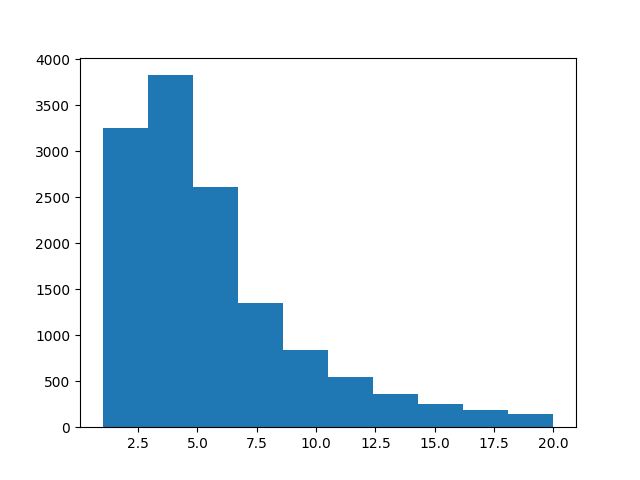
After removing audio files that were longer than 20 seconds (about 130 out of about 12000) and resampling all audio files to 22050 Hz I was able to train the model with a batch size of 16. This made the model take up about 7795MiB / 7951MiB on my one GPU. Here's a histogram of my audio file lengths after removing the longer than 20 second clips: (P.S. I don't have the histogram before removing >20 second files anymore
)
aaronlex
on 5 Jun 2019
Try segmenting files that are larger than 10 seconds in chunks that are smaller than 10 seconds.
With this you should be able to run batch size 64.
rafaelvalle
on 5 Jun 2019
I'm also training it on 8g memory GPU with 16 per batch.
There is a way that train only a few frames instead of training all frames after passed through decoder.This might lose some accuracy but is worth trying.
 andylida
on 19 Jun 2020
andylida
on 19 Jun 2020
Related issues
 Mr-DDDAlKilanny
·
3Comments
Mr-DDDAlKilanny
·
3Comments
 shoegazerstella
·
8Comments
shoegazerstella
·
8Comments
 hadaev8
·
4Comments
hadaev8
·
4Comments
 mahdeto
·
4Comments
mahdeto
·
4Comments
 MXGray
·
5Comments
MXGray
·
5Comments
Most helpful comment
Hi, currently you can do 2 things for this.
Acually batch size of 2 is very small.
I was able to train a batch size of 32 with sampling rate of 22050 on 11GB.