Tacotron2: noise on the specific frequency band when do synthesis
Hi,
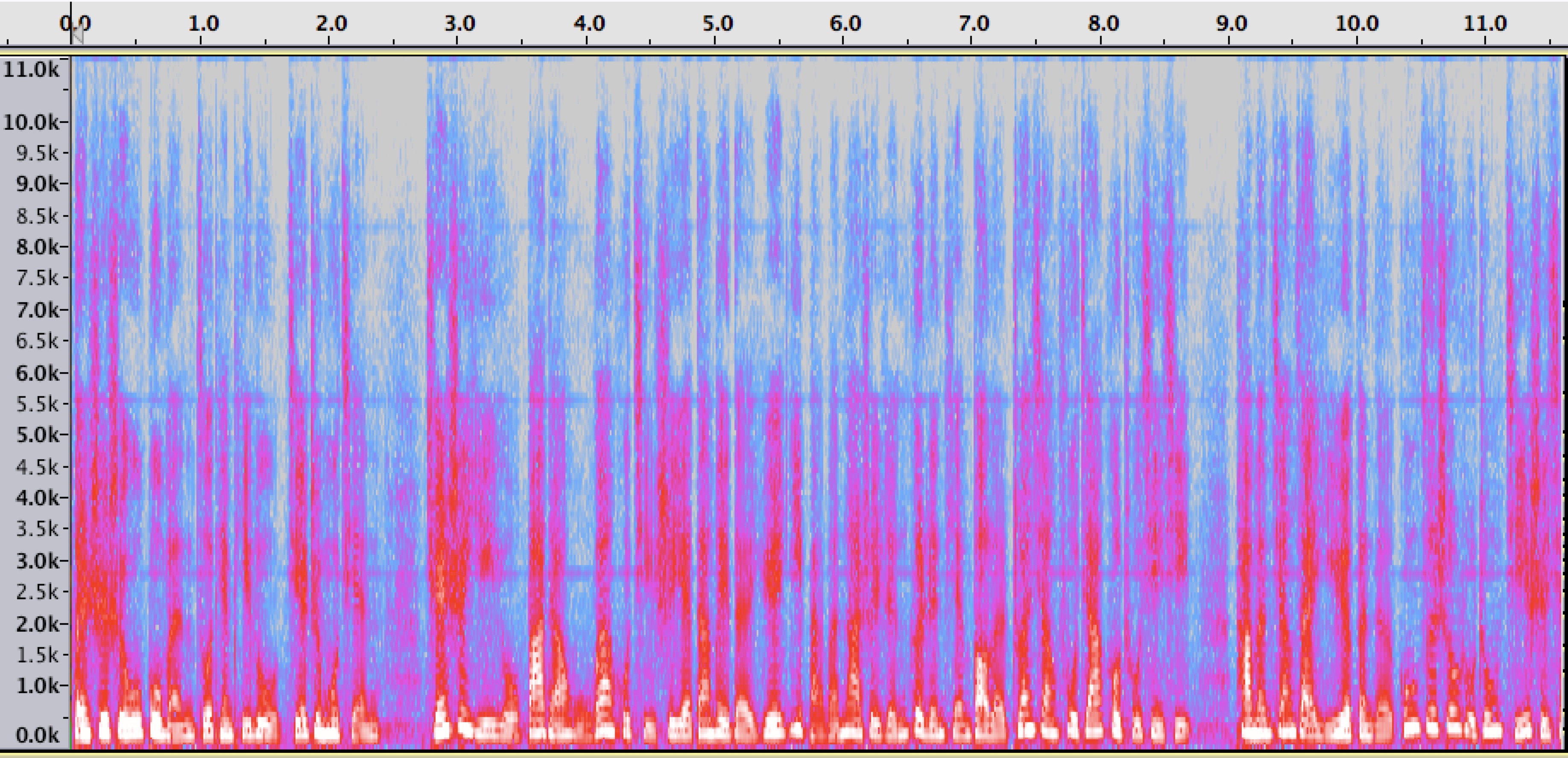
I have trained the model on a Mandarin dataset. Currently it achieved the coverage and get a linear alignment. But I found there are noises on the specific frequency band, such as 5.5khz, 2.75khz, 8.5khz. The following is the synthesis spectrogram. When listen the generated audio samples, the sound is not clean enough. Could anyone share your opinion about the problem? Why my spectrogram looks like that?
Thanks a lot!
 hubeibei007
All 11 comments
How did you produce this audio file?
Did you train waveglow on your Mandarin dataset?
 rafaelvalle
on 22 Feb 2019
rafaelvalle
on 22 Feb 2019
Hi Rafael,
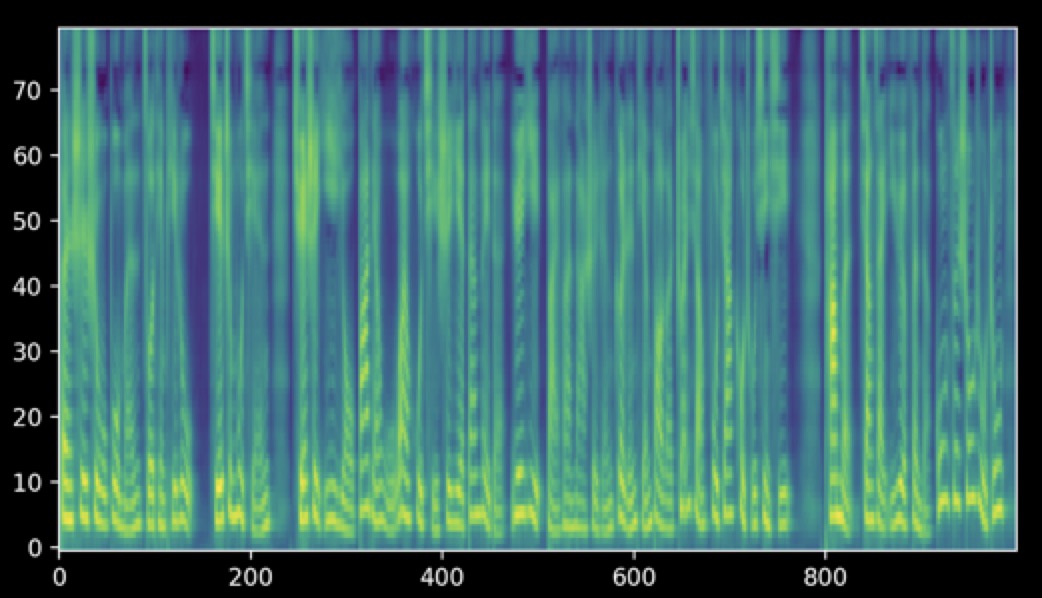
Thanks a lot for your reply. I trained the tacotron2 on my Mandarin dataset, and finetuning the waveglow model on the same Mandarin dataset. During the synthesis procedure, the mel spectrograms of each step are the followings:
The inferenced melspec of tacotron2:
Then the audio was generated by my waveglow model. The following is the melspec of the generated audio. It seems that there are horizontal lines in this melspec. And the voice is not clean.
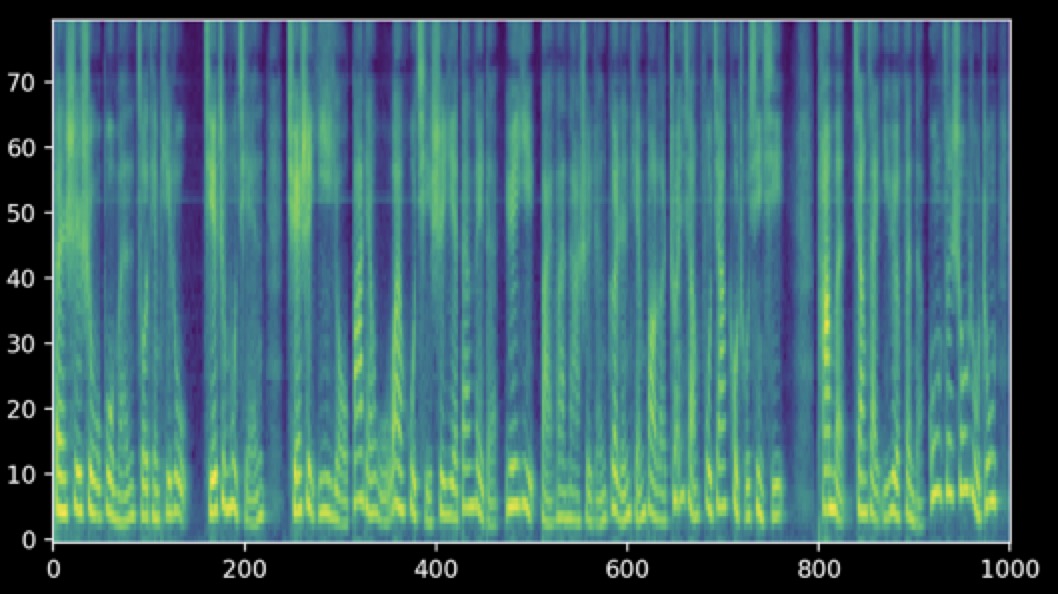
The audio parameters of tacotron2 and waveglow are same. The figures were ploted by the code of this project. The loss of waveglow is about -5.4 and the loss of tacotron2 is 0.26.
Could you please share your views on my problem? Are the herizontal lines in the final melspec normal? Should I continue to train the waveglow to get a better convergence? What should I do to improve the audio quality based on my dataset?
Thanks a lot!
hubeibei007
on 22 Feb 2019
The horizontal lines are waveglow's bias. They should go away as the likelihood improves.
A quick hack is to subtract the noise bias from the noisy audio on the frequency domain.
Here's an example, where noise.wav is a slice of audio with waveglow bias noise only and noisy_audio.wav is some other audio generated with waveglow.
Play with the scale parameter to control how much of the noise bias will be removed.
import torch
import librosa
from layers import STFT

filter_length = 1024
hop_length = int(filter_length / 4)
win_length = filter_length
stft = STFT(filter_length=filter_length, hop_length=hop_length, win_length=win_length)

noise, sr_noise = librosa.load("noise.wav", sr=None)
audio, sr_audio = librosa.load("noisy_audio.wav", sr=None)

noise_spec, noise_angles = stft.transform(torch.autograd.Variable(torch.from_numpy(noise))[None, :])
audio_spec, audio_angles = stft.transform(torch.autograd.Variable(torch.from_numpy(audio))[None, :])

strength = 16
sub_frames = noise_spec[:, :, 0][:, :, None] * strength
audio_spec_denoised = torch.clamp(audio_spec - sub_frames, 0.0)
audio_denoised = stft.inverse(audio_spec_denoised, audio_angles)
You can improve Tacotron2 validation loss by annealing the learning rate and training longer.
rafaelvalle
on 22 Feb 2019
The method of subtraction the noise bias from my generated audio improves my audio quality.
I will try to improve Tacotron2 validation.
Thank you very much.
hubeibei007
on 25 Feb 2019
stft = STFT(filter_length=filter_length, hop_length=hop_length, win_length=win_length)
noise, sr_noise = librosa.load("noise.wav", sr=None)
audio, sr_audio = librosa.load("noisy_audio.wav", sr=None)noise_spec, noise_angles = stft.transform(torch.autograd.Variable(torch.from_numpy(noise))[None, :])
audio_spec, audio_angles = stft.transform(torch.autograd.Variable(torch.from_numpy(audio))[None, :])strength = 16
sub_frames = noise_spec[:, :, 0][:, :, None] * strength
audio_spec_denoised = torch.clamp(audio_spec - sub_frames, 0.0)
audio_denoised = stft.inverse(audio_spec_denoised, audio_angles)
@rafaelvalle Is there a better way to get rid of the horizontal lines during training rather than doing post processing like this?
 yxt132
on 28 Feb 2019
yxt132
on 28 Feb 2019
Hi @hubeibei007
As mentioned below in your response, how did you generate the noise.wav file?
The method of subtraction the noise bias from my generated audio improves my audio quality.
I will try to improve Tacotron2 validation.
Thank you very much.
 anupam456
on 5 Mar 2019
anupam456
on 5 Mar 2019
Hi @anupam456
I chose some non voice segments from the generated audio as the noise input.
hubeibei007
on 8 Mar 2019
The code to remove the model bias, aka line noise, has been added here:
https://github.com/NVIDIA/tacotron2/blob/master/inference.ipynb
It only requires the waveglow model: not need to save an audio file with the model bias/noise
rafaelvalle
on 16 Mar 2019
The code to remove the model bias, aka line noise, has been added here:
https://github.com/NVIDIA/tacotron2/blob/master/inference.ipynb
It only requires the waveglow model: not need to save an audio file with the model bias/noise
I just tried but could not find the denoiser module.
yxt132
on 16 Mar 2019
Try updating the submodule:
git submodule update --remote --merge
rafaelvalle
on 16 Mar 2019
Related issues
 MXGray
·
5Comments
MXGray
·
5Comments
 yliess86
·
6Comments
yliess86
·
6Comments
 hadaev8
·
4Comments
hadaev8
·
4Comments
 Jiff-Zhang
·
7Comments
Jiff-Zhang
·
7Comments
 kannadaraj
·
6Comments
kannadaraj
·
6Comments
Most helpful comment
The horizontal lines are waveglow's bias. They should go away as the likelihood improves.
A quick hack is to subtract the noise bias from the noisy audio on the frequency domain.
Here's an example, where
noise.wavis a slice of audio with waveglow bias noise only andnoisy_audio.wavis some other audio generated with waveglow.Play with the scale parameter to control how much of the noise bias will be removed.