Tacotron2: Problem training with multi GPU scenario.
I have 8 GPUs. I want to train 2 different variations of Tacotron. First variation in GPUs 1-4 and second in 5-8.
- I was able to start training using first 4 GPUs by limiting the gpus in multiproc.py.
- My i am not able to start train using 5-8 GPUs only. I did the following modifications in the code.
```
- I set the num_gpus = 4
- i assigned an array [4,5,6,7] while initializing in the multiproc.py.
- Also, changed num_gpus in train.py to 4.
- CUDA_VISIBLE_DEVICES=4,5,6,7 python -m multiproc train.py --output_directory=outdir --log_directory=logdir --hparams=distributed_run=True,fp16_run=True
the training program starts and hangs after distributed initialization. I am not sure what more i need to change in the code. this is the logs i see..
['train.py', '--output_directory=outdir', '--log_directory=logdir', '--hparams=distributed_run=True,fp16_run=True', '--n_gpus=4', '--group_name=group_2020_04_19-003226', '--rank=4]
['train.py', '--output_directory=outdir', '--log_directory=logdir', '--hparams=distributed_run=True,fp16_run=True', '--n_gpus=4', '--group_name=group_2020_04_19-003226', '--rank=5']
['train.py', '--output_directory=outdir', '--log_directory=logdir', '--hparams=distributed_run=True,fp16_run=True', '--n_gpus=4', '--group_name=group_2020_04_19-003226', '--rank=6']
['train.py', '--output_directory=outdir', '--log_directory=logdir', '--hparams=distributed_run=True,fp16_run=True', '--n_gpus=4', '--group_name=group_2020_04_19-003226', '--rank=7']
...
...
FP16 Run: True
Dynamic Loss Scaling: True
Distributed Run: True
cuDNN Enabled: True
cuDNN Benchmark: False
Initializing Distributed
Done initializing distributed
W0419 00:32:32.122517 140183680481088 module_wrapper.py:139] From /workspace/tacotrongst/hparams.py:122: The name tf.logging.info is deprecated. Please use tf.compat.v1.logging.info instead.
```
I just struck here for ever.. It doesn't start training.
Please can someone help..
Thanks
Kannadaraj.
 kannadaraj
All 6 comments
@kannadaraj
Change
https://github.com/NVIDIA/tacotron2/blob/master/hparams.py#L19
tcp://localhost:54321
to another port to initialize multiple distributed sessions.
e.g
tcp://localhost:54321 -> tcp://localhost:54322
First group should be
dist_url="tcp://localhost:54321",
n_gpus = 4
GPU_0: rank=0
GPU_1: rank=1
GPU_2: rank=2
GPU_3: rank=3
with CUDA_VISIBLE_DEVICES=0,1,2,3 python -m multiproc train.py --output_directory=outdir --log_directory=logdir --hparams=distributed_run=True,fp16_run=True
Second group should be
dist_url="tcp://localhost:54322",
n_gpus = 4
GPU_4: rank=0
GPU_5: rank=1
GPU_6: rank=2
GPU_7: rank=3
with CUDA_VISIBLE_DEVICES=4,5,6,7 python -m multiproc train.py --output_directory=outdir --log_directory=logdir --hparams=distributed_run=True,fp16_run=True
 CookiePPP
on 19 Apr 2020
CookiePPP
on 19 Apr 2020
@CookiePPP .. Thanks a lot for the reply. I tried your solution as you said. i definitely moved to next step but throwing an error.. I searched over but couldn't find any right solution. This may be due to the setting we have done in the dist_url.. Do you have any idea why? Thanks a lot for your help
It starts to initialize the python process when i keep monitoring the GPUS.. But suddenly throws this error.
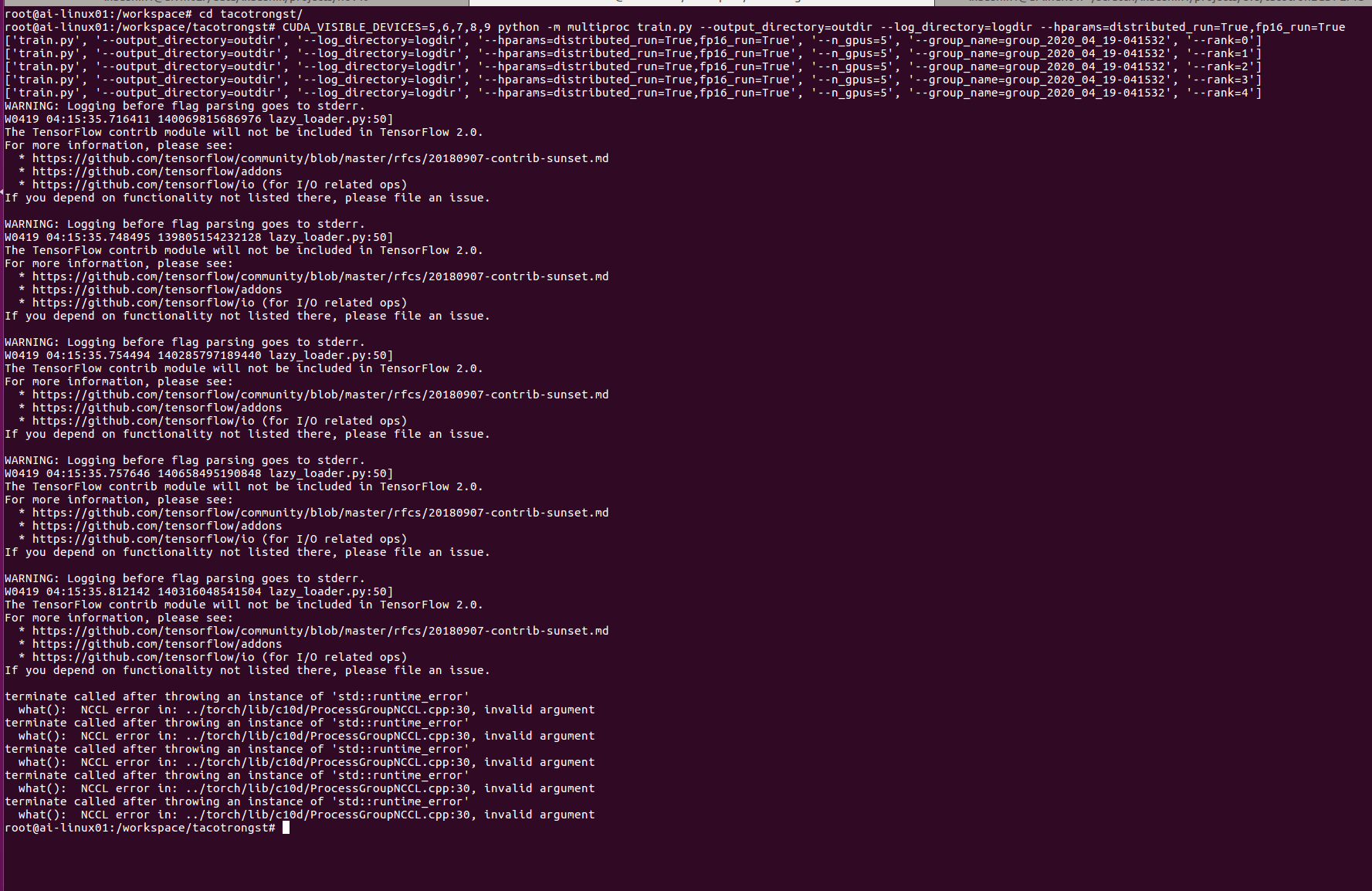
terminate called after throwing an instance of 'std::runtime_error'
  what():  NCCL error in: ../torch/lib/c10d/ProcessGroupNCCL.cpp:30, invalid argument
@kannadaraj
It seems to work for me.
I don't know what that error means.
Could you give some more detail of your error? (maybe a screenshot)
Also what pytorch version are you using?

CookiePPP
on 19 Apr 2020
@CookiePPP
Thanks a lot for trying out. I am using pytorch 1.2 and nvidia cuda container 19.10..
Here is the error
kannadaraj
on 19 Apr 2020
@CookiePPP these nvidia cuda containers a finicky. I was able to make it run when i downgraded to pytorch cuda container version 19.06. I dont understand why it works in some and it doenst in others..
kannadaraj
on 20 Apr 2020
@kannadaraj
它似乎为我工作。
我不知道该错误是什么意思。您能否提供更多有关错误的详细信息?(也许是屏幕截图)
您还使用的是什么pytorch版本?
hello, i want to do the same work, but when i run it like you, i got the bug, like:
NCCL error in: /pytorch/torch/lib/c10d/ProcessGroupNCCL.cpp:784, unhandled system error, NCCL version 2.7.8
i think it about rank, please tell me rank how to modify?
 evelynyhc
on 3 Mar 2021
evelynyhc
on 3 Mar 2021
Related issues
 shaun95
·
9Comments
shaun95
·
9Comments
 hadaev8
·
6Comments
hadaev8
·
6Comments
 NewEricWang
·
5Comments
NewEricWang
·
5Comments
 shoegazerstella
·
8Comments
shoegazerstella
·
8Comments
 yliess86
·
6Comments
yliess86
·
6Comments
Most helpful comment
@CookiePPP these nvidia cuda containers a finicky. I was able to make it run when i downgraded to pytorch cuda container version 19.06. I dont understand why it works in some and it doenst in others..