Tabulator: getColumns() not returning array of column strings.
Describe the bug
Unless I'm misunderstanding something. I believe getColumns() should return an array of strings of data columns,
I'm getting what seems to be a Tabulator object of some sort.
Tabulator Info
- Which version of Tabulator are you using?
4.6.3
Working Example
[https://codepen.io/yendormc/pen/yLYQRKB]
Observe console log.
To Reproduce
A step by step guide to recreate the issue in your JS Fiddle or Codepen:
- Execute Codepen
- Observe Console Log for variable cols after execution.
Expected behavior
Expected to get array of actual data columns, per documentation. Not array of Tabulator objects
Screenshots
If applicable, add screenshots to help explain your problem.
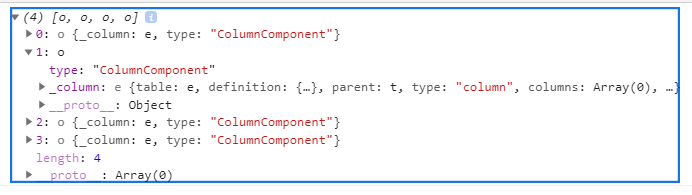
Desktop (please complete the following information):
- OS: Windows 10
- Browser: Chrome
- Version: 81.0.4044.138 (Official Build) (64-bit)
 YendorMc
All 5 comments
The documentation (in several places) says getColumns returns an array of column components. You can use these to get all sorts of data though. What exactly are you looking to do?
 takuy
on 19 May 2020
takuy
on 19 May 2020
Thanks for the feedback!
Referencing this link:
[http://tabulator.info/docs/4.6/columns#get-component]
It mentions "This will only return actual data columns not column groups."
I'm cool with that, but wasn't expecting to access the _column object, like:
cols[0]._column.field
cols[1]._column.field
If that's design intent, I'm good to go. I was just expecting an array of column names, but I can create with stepping through the array elements.
Thanks!
YendorMc
on 19 May 2020
You don't need to access it like that. Each Column component object has a set of functions defined for it.
For your case: cols[0].getField() would be the proper way.
See column component info here: http://tabulator.info/docs/4.6/components#component-column
takuy
on 20 May 2020
Hey @YendorMc
You should never access an underscore property, the JavaScript convention is that these are to be treated as private.
As @takuy says, it returns an array of column components, Components are JavaScript objects that represent parts of the tables such as cells, columns and rows, and have a wide selection of functions you can call to access all the relevant data or change settings on the component.
For full details on how to use a column component checkout the Documentation
I would strongly recommend reading through the component documentation, they are the powerhouse behind Tabulator, are returned from most functions and passed into callbacks and are the primary way to access table data.
Cheers
Oli :)
 olifolkerd
on 20 May 2020
olifolkerd
on 20 May 2020
Ahh! I get it now! I didn't quite understand the concept. Thank you @takuy and @olifolkerd !!!
YendorMc
on 20 May 2020
Related issues
 jiaqianliCn
·
3Comments
jiaqianliCn
·
3Comments
 mconnelley
·
3Comments
mconnelley
·
3Comments
 iBek23
·
3Comments
iBek23
·
3Comments
 tomheaps
·
3Comments
tomheaps
·
3Comments
 cemmons
·
3Comments
cemmons
·
3Comments