How can i make the group row with rowspan like this:

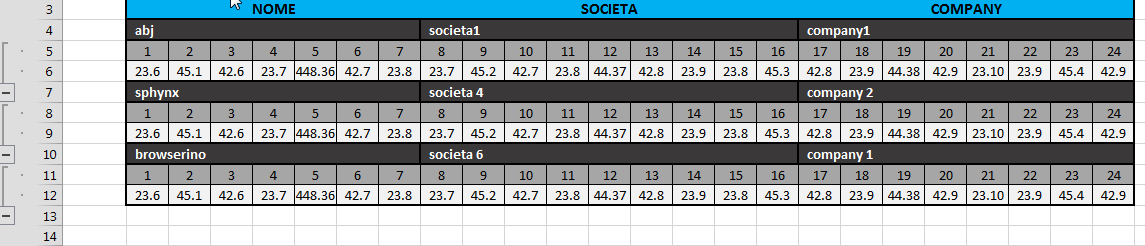
Thanks
 sphynx79
All 3 comments
Im afraid that isnt possible in the rows themselves.
If you would be happy with the groups in the column headers then you can have a look at the Column Grouping Documentation
Cheers
Oli :)
 olifolkerd
on 12 Nov 2018
olifolkerd
on 12 Nov 2018
nothing is impossible :)
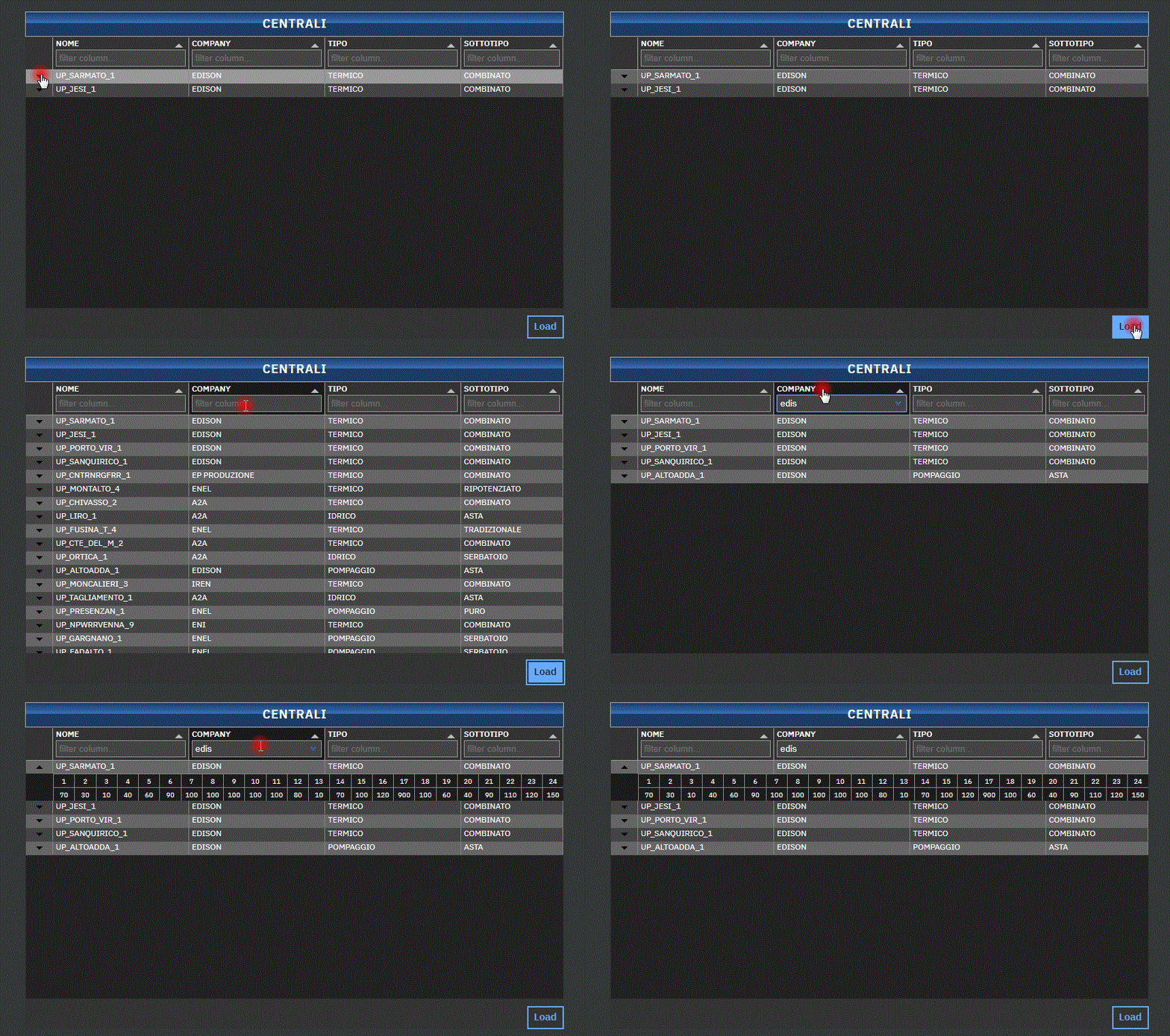
    oncreate(vnode) {
        var el = vnode.dom.children[1]

        vnode.state.tabulator = new Tabulator(el, {
            height: "400px",
            layout: "fitColumns",
            data: vnode.state.tableData,
            placeholder: "No Data Set",
            columns: [
                {
                    field: "fold",
                    visible: true,
                    // editor: true,
                    headerSort: false,
                    align: "center",
                    width: 10,
                    cellClick: (e, cell) => {
                        var cellValue = cell.getValue()
                        var cellEl = cell.getElement()
                        if (cell.getValue() == false) {
                            cell.getRow().getElement().lastElementChild.style.display = "none"
                        } else {
                            cell.getRow().getElement().lastElementChild.style.display = ""
                        }
                        cell.setValue(!cellValue, true)
                    },
                    formatter: (cell, formatterParams, onRendered) => {
                        if (cell.getValue() == true) {
                            return "<svg width='10' height='5' viewBox='0 0 10 5'><path d='M0 0l5 4.998L10 0z'></path></svg>"
                        } else {
                            return "<svg width='10' height='5' viewBox='0 0 10 5'><path d='M0 5L5 .002 10 5z'></path></svg>"
                        }
                    },
                },
                {
                    title: "NOME",
                    headerFilter: true,
                    field: "nome",
                    width: 200,
                    responsive: 0,
                },
                {
                    title: "COMPANY",
                    field: "company",
                    headerFilter: true,
                    width: 200,
                },
                {
                    title: "TIPO",
                    field: "tipo",
                    headerFilter: true,
                    width: 200,
                    responsive: 2,
                },
                {
                    title: "SOTTOTIPO",
                    headerFilter: true,
                    field: "sottotipo",
                    width: 150,
                },
            ],

            rowFormatter: row => {
                let element = row.getElement()
                let width = element.offsetWidth - 40
                let data = row.getData()
                let { _children, ...field } = data
                let hours

                // prettier-ignore
                var table =  m(".table" , { style: { "display": "none", "cursor": "auto" } } ,
                  m(".hours-row.bx--type-legal", { style: { "padding-left": "40px" } }, Object.keys(_children[0]).map((key) => {
                      return m(".tabulator-cell", {style: {"width": `${width / 24}px`, "height": "20px", "text-align": "center"}},
                          [ `${key}`,
                          ]
                        )
                  })),
                  m(".hours-row.bx--type-legal", { style: { "padding-left": "40px" , "cursor": "auto" } }, Object.values(_children[0]).map((value) => {
                      return m(".tabulator-cell", {style: {"width": `${width / 24}px`, "height": "20px", "text-align": "center"}},
                          [ `${value}`,
                          ]
                        )
                  } ))
                )

                hours = document.createElement("div")
                m.render(hours, [table])

                element.append(hours.firstChild)
            },

        })
🎉2
👍1
Nice use of a row formatter!
olifolkerd
on 15 Nov 2018
Was this page helpful?
0 / 5 - 0 ratings
Related issues
 yaxino
·
3Comments
yaxino
·
3Comments
 cemmons
·
3Comments
cemmons
·
3Comments
cancelEdit throws Uncaught ReferenceError: force is not defined at c.cancelEdit (tabulator.min.js:3)
 mindcreations
·
3Comments
mindcreations
·
3Comments
 tomvanlier
·
3Comments
tomvanlier
·
3Comments
 AndrewHutcheson
·
3Comments
AndrewHutcheson
·
3Comments
Most helpful comment
nothing is impossible :)