Tabulator: Can not move cursor to previous line
Describe the bug
I want to move cursor one line up, but it is moved to different row when I press arrow up at the textarea editor
Bofore I press arrow up
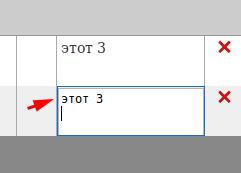
After I press arrow up
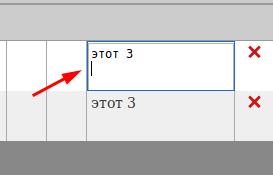
Tabulator Info
- Which version of Tabulator are you using? 4.2.2
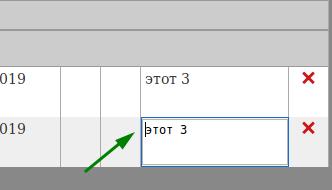
Expected behavior
Desktop (please complete the following information):
- OS: Linux Mint 19.1
- Browser FF
- Version 66
 KES777
All 5 comments
That is the default key binding for the up arrow. For more information and how to modify see:
http://tabulator.info/docs/4.3/keybindings#default
 aklaver
on 1 Aug 2019
aklaver
on 1 Aug 2019
yeah, to my mind that is not the case for multi line editor. because arrowup at that editor means something different.
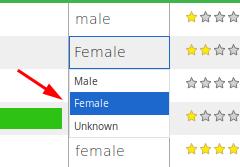
For example, If I tries to list over lookup editor I press arrow up - cursor is moved to next item in the select list and not to different table row
KES777
on 1 Aug 2019
Alright. In edit.js 'select' the up arrow key is caught and:
case 38: //up arrow
e.stopImmediatePropagation();
e.stopPropagation();
e.preventDefault();
This is repeated for the other arrow keys
There is no such code in 'textarea'.
@olifolkerd will need to explain if there is a purpose for this or not?
aklaver
on 1 Aug 2019
Hey @KES777
You are correct, that should certainly navigate the text area better.
As it happens i have already written that functionality for another project i was working on so i can pull it back into the formatter for the 4.5 release
Cheers
Oli :)
 olifolkerd
on 11 Aug 2019
olifolkerd
on 11 Aug 2019
Hey
I have just pushed an update to the 4.5 branch that adds a new verticalNavigation editorParam to a lot of editors to make it easier to customise the navigation experience.
This should be released in the next few weeks.
Cheers
Oli :)
olifolkerd
on 10 Nov 2019
Related issues
 soo1025
·
3Comments
soo1025
·
3Comments
 tomvanlier
·
3Comments
tomvanlier
·
3Comments
 aballeras01
·
3Comments
aballeras01
·
3Comments
 tomheaps
·
3Comments
tomheaps
·
3Comments
 sphynx79
·
3Comments
sphynx79
·
3Comments