Tabulator: Checkbox Column checked state not working when virtual dom is enabled
Description of the Bug
I Implemented checkbox column following the issue #1938 and fixed the bugs in that implementation. I have virtual dom enabled in my Tabulator table and now if I click on checkbox column header to select all rows in the table, Tabulator changes the checked state of checkboxes only in the rows visible in the screen. If I scroll down new rows will get replaced in the grid and the checkboxes in that row are not checked.
Tabulator Info
- version 4.2.7
- Below is the code for checkbox column setup:
{
                            title: 'Select <br/> All <br/> <input type="checkbox" class="select-all-row" aria-label="select all rows" />',
                            field: 'IsSelected',
                            formatter: function (cell, formatterParams, onRendered) {
                                return '<input type="checkbox" class="select-row" aria-label="select this row" />';
                            },
                            width: 50,
                            headerSort: false,
                            headerFilter: false,
                            cssClass: 'text-center',
                            frozen: true,
                            tooltips: false,
                            resizable: false,
                            cellClick: function (e, cell) {
                                var element = cell.getElement();
                                var chkbox = element.querySelector('.select-row');
                                if (cell.getData().IsSelected) {
                                    cell.getRow().deselect();
                                    document.querySelector('.select-all-row').checked = false;
                                } else {
                                    cell.getRow().select();
                                    if (cell.getColumn().getTable().getSelectedRows().length === cell.getColumn().getTable().getDataCount()) {
                                        document.querySelector('.select-all-row').checked = true;
                                    }
                                }
                                chkbox.checked = !cell.getData().IsSelected;
                                cell.getData().IsSelected = !cell.getData().IsSelected;
                            },
                            headerClick: function (e, column) {
                                if (column.getTable().getSelectedRows().length !== column.getTable().getDataCount()) {
                                    document.querySelectorAll('.select-row,.select-all-row').forEach(cb => cb.checked = true);
                                    column.getTable().selectRow();
                                } else {
                                    document.querySelectorAll('.select-row,.select-all-row').forEach(cb => cb.checked = false);
                                    column.getTable().deselectRow();
                                }
                                column.getCells().forEach(cell => cell.getData().IsSelected = !cell.getData().IsSelected);
                            }
                        }
Working Example
Js Fiddle Demo
To Reproduce
Steps to reproduce the behavior:
- Go to above link.
- Click on select all checkbox in the checkbox column header.
- Scroll down to see the check boxes not getting checked.
Expected behavior
All the checkbox needs to be checked when I click header checkbox irrespective of virtual dom
Desktop
- OS: Windows10
- Browser : Chrome
- Version 72.0.3626.121 (Official Build) (64-bit)
 fingers10
All 27 comments
Your issue is that you're manipulating the dom, not the underlying data, so the selections evaporate when the virtual dom is scrolled.
take a look at this variation: https://jsfiddle.net/m3jpghb8/
I've turned on reactiveData, so the original array can be updated and also affect the tabulator data, and then made the formatter look at the data when rendering the checkbox, and then finally tweaked the headerClick logic to update the original array and force a redraw after the update.
 tentus
on 16 Jul 2019
tentus
on 16 Jul 2019
Thanks for the clarification and teaching. Redrawing the table will have any performance issues with large datasets?
fingers10
on 16 Jul 2019
I'm following your fiddle changes in my code but I keep getting undefined for cell.getValue() inside formatter function and checkbox is also not getting checked. So after analyzing and going through docs I found that reactiveData:true will not work for ajax sourced data.
Local Data Only
Reactive data functionality is only available with local data arrays set on the data property or the setData function. It is not available on ajax data sources.
Also redrawing the table every time has performance issues when it comes to large data sets; i can see some very minor but noticeable lag and also I'm losing the scroll state while redrawing. After redraw table resets the scroll to top.
So to overcome above issues I used row.update() and here is how I have done my implementation with ajax sourced data.
{
                            title: 'Select <br/> All <br/> <input type="checkbox" class="select-all-row" aria-label="select all rows" />',
                            field: 'IsSelected',
                            formatter: function (cell, formatterParams, onRendered) {
                                return `<input type="checkbox" class="select-row" aria-label="select this row" ${cell.getValue() ? 'checked' : ''} />`;
                            },
                            width: 50,
                            headerSort: false,
                            headerFilter: false,
                            cssClass: 'text-center',
                            frozen: true,
                            tooltips: false,
                            resizable: false,
                            cellClick: function (e, cell) {
                                const element = cell.getElement();
                                const chkbox = element.querySelector('.select-row');

                                if (cell.getData().IsSelected) {
                                    cell.getRow().deselect();
                                } else {
                                    cell.getRow().select();
                                }

                                document.querySelector('.select-all-row').checked = userGrid.getSelectedRows().length === userGrid.getDataCount();
                                chkbox.checked = !cell.getData().IsSelected;
                                cell.getData().IsSelected = !cell.getData().IsSelected;
                            },
                            headerClick: function (e, column) {
                                var allNotSelected = userGrid.getSelectedRows().length !== userGrid.getDataCount();
                                if (allNotSelected) {
                                    userGrid.selectRow();
                                } else {
                                    userGrid.deselectRow();
                                }

                                document.querySelector('.select-all-row').checked = allNotSelected;
                                userGrid.getRows().forEach(row => row.update({ "IsSelected": allNotSelected }));
                            }
                        }
Hope this is helpful for someone. Let me know if this can be further improved. If this is good then we can close this issue.
Also please provide update on the next release. Thanks for the support and help. Kudos
fingers10
on 16 Jul 2019
Hey @fingers10
please read #2213 for update on the release.
Cheers
Oli :)
 olifolkerd
on 17 Jul 2019
olifolkerd
on 17 Jul 2019
Hey @olifolkerd ,
Thanks for the update.
Coming back to this issue, I'm still facing an issue with the above solution. I'll post the sample code/gif in this weekend and explain further.
Thanks,
Abdul
fingers10
on 19 Jul 2019
Dear @olifolkerd ,
Here is the final implementation of table with checkbox column,
var userGrid = new window.Tabulator("#tableUserResults",
                {
                    placeholder: "No Data Available",
                    layout: "fitColumns",
                    height: height + 27,
                    selectable: false,
                    ajaxURL: window.userUrls.getAll,
                    ajaxConfig: {
                        global: false,
                        async: true
                    },
                    ajaxSorting: true,
                    ajaxFiltering: true,
                    tooltipsHeader: true,
                    tooltips: true,
                    virtualDomBuffer: height + 27,
                    columns: [
                        {
                            title: 'Select <br/> All <br/> <input type="checkbox" class="select-all-row" aria-label="select all rows" />',
                            field: 'IsSelected',
                            formatter: function (cell, formatterParams, onRendered) {
                                return `<input type="checkbox" class="select-row" aria-label="select this row" ${cell.getValue() ? 'checked' : ''} />`;
                            },
                            width: 50,
                            headerSort: false,
                            headerFilter: false,
                            cssClass: 'text-center',
                            frozen: true,
                            tooltips: false,
                            resizable: false,
                            cellClick: function (e, cell) {
                                const element = cell.getElement();
                                const checkbox = element.querySelector('.select-row');

                                if (cell.getData().IsSelected) {
                                    cell.getRow().deselect();
                                } else {
                                    cell.getRow().select();
                                }

                                document.querySelector('.select-all-row').checked = userGrid.getSelectedRows().length === userGrid.getDataCount();
                                checkbox.checked = !cell.getData().IsSelected;
                                cell.getData().IsSelected = !cell.getData().IsSelected;
                            },
                            headerClick: function (e, column) {
                                var allNotSelected = userGrid.getSelectedRows().length !== userGrid.getDataCount();
                                if (allNotSelected) {
                                    userGrid.selectRow();
                                } else {
                                    userGrid.deselectRow();
                                }

                                document.querySelector('.select-all-row').checked = allNotSelected;
                                userGrid.getRows().forEach(row => row.update({ "IsSelected": allNotSelected }));
                            }
                        },
                        {
                            title: 'First Name',
                            field: 'FirstName',
                            headerFilter: 'input',
                            headerFilterLiveFilter: false,
                            headerFilterPlaceholder: 'Search First Name',
                            formatter: function (cell, formatterParams, onRendered) {
                                return '<a href="#" class="text-underline" aria-haspopup="true">' + cell.getValue() + '</a>';
                            }
                        },
                        {
                            title: 'Last Name',
                            field: 'LastName',
                            headerFilter: 'input',
                            headerFilterLiveFilter: false,
                            headerFilterPlaceholder: 'Search Last Name'
                        }
                    ]
                });
Here is the link of the gif demonstrating the issue:
Tabulator-CheckBox Column Issue
I have the below queries,
- As shown in the gif, this works if I click header checkbox and selects all rows. - Correct Behavior
- If I individually click row checkbox and like this if I click all check box in all rows header checkbox gets checked. - Correct Behavior
- If I click on header checkbox, all rows checkbox are checked. Now If I uncheck any one row checkbox, header checkbox gets unchecked. Now again If I click header checkbox to select all rows the rows are getting highlighted but checkbox in row is not getting checked. Now if I uncheck header checkbox and click header checkbox again now all rows checkbox are selected correctly. This is buggy or my code is wrong please assist.
- And If I click header check box and navigate to next page/ajax-scroll in table with ajax sourced data, the rows in next page/scroll set will be selected? or I need to pass the header checkbox checked state to server to make the rows selected or achieve this using pagination/ajax-response callback.
Please assist.
Thanks,
Abdul
fingers10
on 20 Jul 2019
No sure if this is the right way or will have any performance issues with large data sets. I resolved by replacing the below line in headerClick as I'm using ajax sourced data
from,
document.querySelector('.select-all-row').checked = allNotSelected;
to,
document.querySelectorAll('.select-all-row,.select-row').forEach(checkBox => checkBox.checked = allNotSelected);
@olifolkerd , @tentus - Correct me if I'm wrong.
Thanks,
Abdul
fingers10
on 21 Jul 2019
Hey @fingers10
The reason this dosnt work is because you are trying to access DOM elements directly. ANY attempt to do this will result in unstable behaviour. the use of the virtual DOM means that only the rows currently visible to you actually exists, therefor any attempt to select elements will only work for the visible rows.
the correct approach would be to use a formatter/editor that updated a value on the rows.
Cheers
Oli :)
olifolkerd
on 21 Jul 2019
@olifolkerd Yes I have issue happening with the row visible in the DOM. As you see in the demo gif, I have single row and that is in the virtual DOM and currently visible. But still it's not working correctly.
fingers10
on 21 Jul 2019
Hey @fingers10
Yes that is exactly what i am saying, you CANNOT use your current approach, it is incompatable with the way a virtual DOM works. you should never be using a query selector, it is NOT SAFE to directly select DOM elements in Tabulator from outside the table.
Cheers
Oli :)
olifolkerd
on 21 Jul 2019
@olifolkerd I understood. I resolved by doing the below changes.
Added rowUpdated function .
rowUpdated: function (row) {
                        //row - row component
                        const checkbox = row.getElement().querySelector('.select-row');
                        checkbox.checked = row.getData().IsSelected;
                    },
changed headerClick as shown below,
column.getElement().querySelector('.select-all-row').checked = allNotSelected;
I hope I'm correct now. Please share your views.
Thanks,
Abdul
fingers10
on 21 Jul 2019
Hey @fingers10
you are still using a query selector!!!! as i keep on saying, this is a virtual DOM, the rows in the table do not exist if they are not visible.
Therefor any selected row that are scrolled off the edge of the table do not exist in the DOM, so the query selector will not find them!
I dont understand why you arnt using the built in Row Selection System
The Row Component provides access to the isSelected function which you can use in the formatter to determine if the row is selected or not. it also provides the select , deselect and toggleselect functions tochange the state of the rows selection
you can call the getSelectedRows function to get an array of all of the selected rows, this method is safe and will return the row components for all selected rows.
as a general rule if you are ever using a query selector with a virtual DOM it is the wrong approach and will not work.
Cheers
Oli :)
olifolkerd
on 21 Jul 2019
@olifolkerd ,
I agree to your feedback. But If you have a look at my cellClick and headerClick functions, I'm using Tabulators in built functions to select and deselect rows.
cellClick: function (e, cell) {
                                if (cell.getData().IsSelected) {
                                    cell.getRow().deselect();
                                } else {
                                    cell.getRow().select();
                                }

                               cell.getData().IsSelected = !cell.getData().IsSelected;
                            },
                            headerClick: function (e, column) {
                                var allNotSelected = userGrid.getSelectedRows().length !== userGrid.getDataCount();
                                if (allNotSelected) {
                                    userGrid.selectRow();
                                } else {
                                    userGrid.deselectRow();
                                }

                                userGrid.getRows().forEach(row => row.update({ "IsSelected": allNotSelected }));
                            }
I removed the rowUpdate function and here is my formatter
formatter: function (cell, formatterParams, onRendered) {
                                return `<input type="checkbox" class="select-row" aria-label="select this row" ${cell.getValue() ? 'checked' : ''} />`;
                            }
But the real challenge comes when I want to show the row selection feedback via checkbox to the end user.
with the above code, If I click on Header CheckBox all rows will be selected and all rows checkbox will be checked. Now If I uncheck any one row checkbox then header checkbox needs to be unchecked programatically. How to do this without using query selector?
And lets say we have 5 rows in table and If I click all the five rows checkbox one by one then header checkbox needs to be checked automatically. How to achieve this without using query selector?
Above all; this works only If I exactly click on checkbox in the cell. If I click on empty space inside the cell then still row will be selected but checkbox will not be checked. To fix this I added query selector. But how to get this done without query selector?
The only way I find is to redraw the table but I'm afraid that will be expensive.
I cannot use reactive data as I'm using ajax sourced data. Please assist.
Also as per my previous querySelector code, inside cellClick or inside headerClick only header checkbox(which will be available always) and visible rows checkbox which are available at that moment will be changed and that will give a valid feedback to user right? the remaining rows which will be added when I'm at the edge of virtual DOM/scroll will be taken care by formatter to set checkbox state properly
Also query selector will only select the visible rows right? can you get my point? so this will not break at any moment right?
I'm using Tabulator inbuilt functions to select/deselect rows properly. using query selector only to show valid feedback to user. Please share your feedback.
P.S. I'm not JavaScript expert.
Thanks,
Abdul
fingers10
on 21 Jul 2019
Dear @olifolkerd ,
It would better if this functionality can be made to work together with range selection.
Thanks,
Abdul
fingers10
on 7 Aug 2019
Hi,
I don't know if it helps but I did this:
https://plnkr.co/edit/ZZ7HDcqTcBzsVQwrNfE2
I made a cell with a checkbox created with javascript, with a validation that if the row is selected, then the checkbox have to be selected.
Then I use rowSelectionChanged to listen every time that the rows where selected, and then trigger reformat() for each row so de cell (with the checkbox) was created again.
:)
 RaquelAM
on 8 Aug 2019
RaquelAM
on 8 Aug 2019
Dear @olifolkerd ,
Thanks for adding rowSelection formatter in 4.4.0. I tried that and I keep getting a console log for every row selection/deselection.
column setup:
                        {
                            formatter: "rowSelection",
                            titleFormatter: "rowSelection",
                            align: "center",
                            headerSort: false,
                            width: 50,
                            headerSort: false,
                            headerFilter: false,
                            cssClass: 'text-center',
                            frozen: true,
                            headerTooltip: false,
                            tooltip: false,
                            resizable: false,
                            cellClick: function (e, cell) {
                                cell.getRow().toggleSelect();
                            }
                        },
console log:
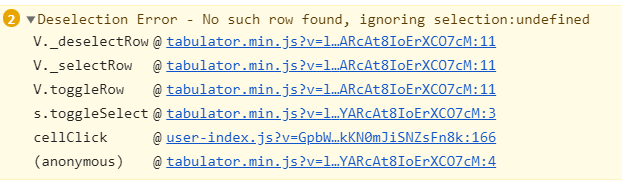
Thanks,
Abdul
fingers10
on 11 Aug 2019
Hey.
I tested it extensively with the virtual dom so it is more likely something
else to do with the table setup.
Could you post your constructor or a fiddle. It is hard to diagnose from
just a column definition
Cheers
Oli
On Sun, 11 Aug 2019, 19:49 Abdul Rahman, notifications@github.com wrote:
Dear @olifolkerd https://github.com/olifolkerd ,
Thanks for adding rowSelection formatter in 4.4.0. I tried that and I
keep getting a console log for every row selection/deselection.{ formatter: "rowSelection", titleFormatter: "rowSelection", align: "center", headerSort: false, width: 50, headerSort: false, headerFilter: false, cssClass: 'text-center', frozen: true, headerTooltip: false, tooltip: false, resizable: false, cellClick: function (e, cell) { cell.getRow().toggleSelect(); } },console log:
[image: image]
https://user-images.githubusercontent.com/43729469/62838207-a8864980-bc96-11e9-9808-5b1973a25f16.png—
You are receiving this because you were mentioned.
Reply to this email directly, view it on GitHub
https://github.com/olifolkerd/tabulator/issues/2208?email_source=notifications&email_token=ABUGBTDD6ZZUUDQZY4ZGTDDQEBNJ5A5CNFSM4IEAQ3O2YY3PNVWWK3TUL52HS4DFVREXG43VMVBW63LNMVXHJKTDN5WW2ZLOORPWSZGOD4BGOGQ#issuecomment-520251162,
or mute the thread
https://github.com/notifications/unsubscribe-auth/ABUGBTCU25OK2BWTRPG5UDLQEBNJ5ANCNFSM4IEAQ3OQ
.
olifolkerd
on 11 Aug 2019
Here is my table setup,
var userGrid = new window.Tabulator("#tableUserResults",
{
placeholder: "No Data Available",
layout: "fitColumns",
height: height + 27,
selectable: false,
ajaxURL: window.userUrls.getAll,
ajaxConfig: {
global: false,
async: true
},
ajaxSorting: true,
ajaxFiltering: true,
ajaxURLGenerator: function (url, config, params) {
const sorters = params.sorters || [];
delete params.sorters;
sortUrl = sorters.map(sort => `orderby=${sort.field.toLowerCase()} ${sort.dir}`).join('&');
const filters = params.filters || [];
delete params.filters;
const operators = {
'=': 'eq',
'>': 'gt',
'>=': 'gte',
'<': 'lt',
'<=': 'lte',
'!=': 'neq',
like: 'co'
};
(filters || []).forEach((filter) => {
filter.type = operators[filter.type] || filter.type;
});
searchUrl = filters.map(filter => `search=${filter.field.toLowerCase()} ${filter.type} ${filter.value}`).join('&');
return `${url}?${sortUrl}&${searchUrl}`;
},
ajaxResponse: function (url, params, response) {
return response.Items;
},
renderComplete: function () {
const count = userGrid.getDataCount();
$('#btnSearchResultsExportToExcel').prop('disabled', !(count > 0));
$('#spanResultsCount').text(count);
$('section.card').height(height + 27);
},
tooltipsHeader: true,
tooltips: true,
virtualDomBuffer: height + 27,
initialSort: [
{
column: 'FirstName',
dir: 'asc'
}
],
columns: [
                    {
                        formatter: "rowSelection",
                        titleFormatter: "rowSelection",
                        align: "center",
                        headerSort: false,
                        width: 50,
                        headerSort: false,
                        headerFilter: false,
                        cssClass: 'text-center',
                        frozen: true,
                        headerTooltip: false,
                        tooltip: false,
                        resizable: false,
                        cellClick: function (e, cell) {
                            cell.getRow().toggleSelect();
                        }
                    },
{
title: 'First Name',
field: 'FirstName',
headerFilter: 'input',
headerFilterLiveFilter: false,
headerFilterPlaceholder: 'Search First Name',
formatter: function (cell, formatterParams, onRendered) {
return '<a href="#" class="text-underline" aria-haspopup="true">' + cell.getValue() + '</a>';
},
cellClick: function (e, cell) {
$.when(ajaxGetAsync(window.userUrls.getById, { id: cell.getData().Id }, true, window.htmlDataType)).done((response) => {
document.querySelector('#userEntryPartial').innerHTML = response;
$('#userEditModal').modal('show');
userEditForm = $('#formUserEdit').serialize();
});
}
},
{
title: 'Last Name',
field: 'LastName',
headerFilter: 'input',
headerFilterLiveFilter: false,
headerFilterPlaceholder: 'Search Last Name'
},
{
title: 'Designation',
field: 'Designation',
headerFilter: 'input',
headerFilterLiveFilter: false,
headerFilterPlaceholder: 'Search Designation'
},
{
title: 'Identity Number',
field: 'IdentityNumber',
headerFilter: 'input',
headerFilterLiveFilter: false,
headerFilterPlaceholder: 'Search Identity Number'
},
{
title: 'Brand Name',
field: 'Profile.BrandName',
headerFilter: 'input',
headerFilterLiveFilter: false,
headerFilterPlaceholder: 'Search Brand Name'
},
{
title: 'Client Name',
field: 'Profile.Client.Name',
headerFilter: 'input',
headerFilterLiveFilter: false,
headerFilterPlaceholder: 'Search Client Name'
},
{
title: 'Contact Email',
field: 'Profile.ProfileContact.Email',
headerFilter: 'input',
headerFilterLiveFilter: false,
headerFilterPlaceholder: 'Search Contact Email'
},
{
title: 'Business Name',
field: 'Profile.Client.Business.Name',
headerFilter: 'input',
headerFilterLiveFilter: false,
headerFilterPlaceholder: 'Search Business Name'
},
{
title: 'User ID',
field: 'Id',
visible: false,
headerFilter: false,
headerSort: false,
tooltip: false,
resizable: false
}
]
});
Hey @fingers10
Your setup, the selectable option is false. The formatter need the option be true.
You can try change that?
 angeliski
on 3 Sep 2019
angeliski
on 3 Sep 2019
Hey @angeliski ,
I changed selectable to true and now the Deselection Error is not logged.
Thanks,
Abdul
fingers10
on 3 Sep 2019
Dear @olifolkerd , @angeliski ,
Is there any way to make rangeSelection work with above table configuration? I tried adding selectableRangeMode: "click" to above table configuration. But its not working in checkbox column. If I select first row checkbox and hold shift key and click on third row checkbox. It fails to select three rows. Instead it selects only first and third row. Please assist.
Thanks,
Abdul
fingers10
on 24 Sep 2019
Hey @fingers10 Please, provide a jsfiddle to reproduce.
I make some test here: https://jsfiddle.net/angeliski/1vuqz42f/3/
And don't' get error:
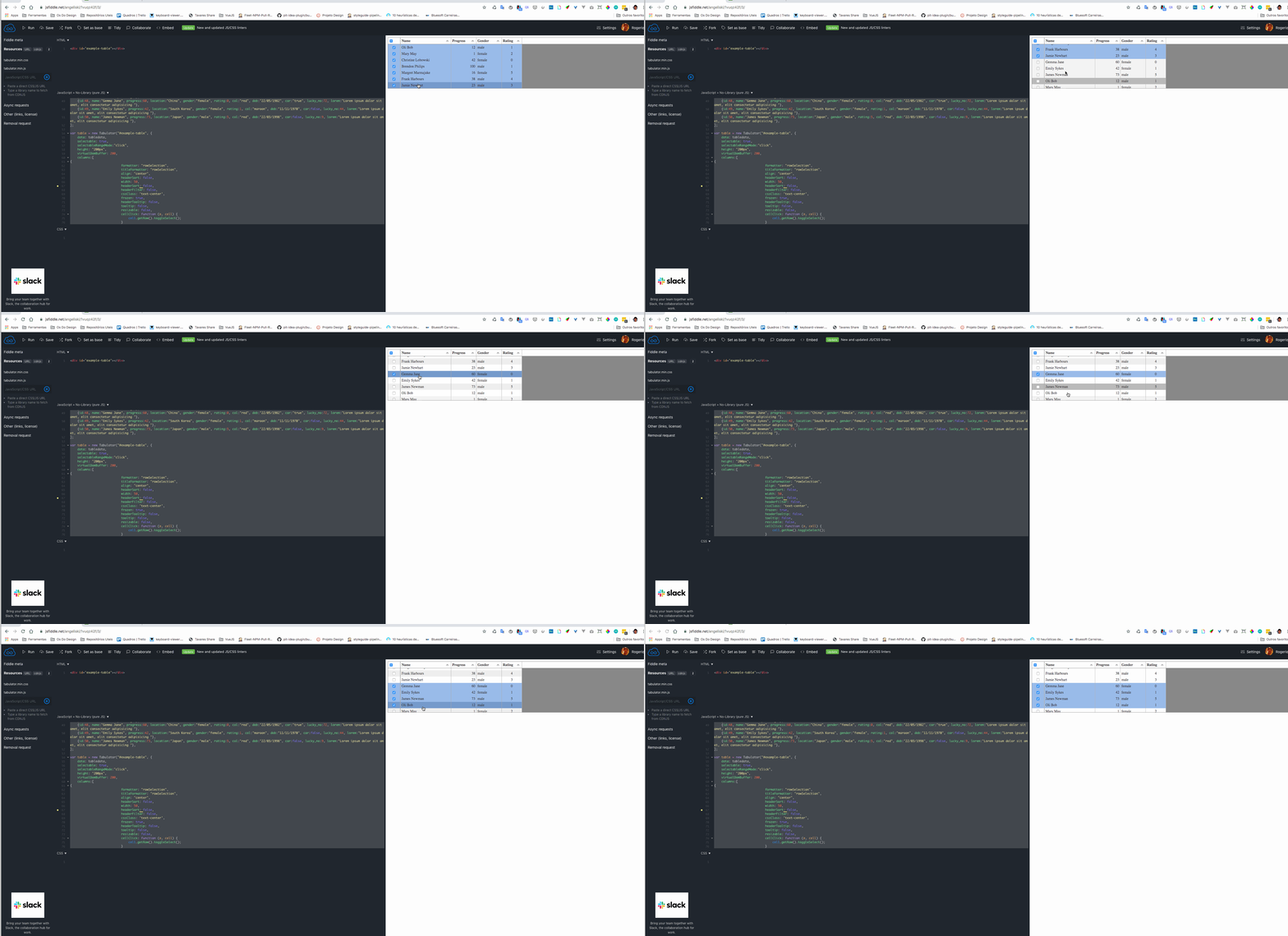
You can provide a sample, please?
See you
angeliski
on 24 Sep 2019
@angeliski , I tried with your fiddle example. If you take a close look, click on first row checkbox and hold shift key and click on fourth row checkbox. range selection will fail. But if you click on either first row checkbox or anywhere within first row checkbox cell and hold shift key and click on anywhere in fourth row check box cell; range selection works.
fingers10
on 25 Sep 2019
@fingers10 I don't understand what you meaning. Your click is in the checkbox input?
When you click in the input element the event not will propagate: https://github.com/olifolkerd/tabulator/blob/master/src/js/modules/format.js#L582
angeliski
on 25 Sep 2019
@angeliski Thanks for the explanation. I finally convinced my end user and made them understand.
fingers10
on 26 Sep 2019
Nice @fingers10
You can open a feature request to rangeSelection works in checkbox click, would be nice receive that PR.
See you
Angeliski
angeliski
on 26 Sep 2019
@angeliski , I have noticed another issue. when tabulator is configured with selectable: true and now if we click and drag a text in a cell to copy it; the row will be selected. Any ways to avoid this?
Example, in the fiddle you given above try to copy Bob from the first row name column and you can see the row getting selected. Any suggestions on this? right now I have done a work around like adding a cellClick as shown below,
cellClick: function (e, cell) {
    e.stopPropagation();
}
I have also noticed another issue. In the checkbox column, we have configured cellClick function as follows:
cellClick: function (e, cell) {
    cell.getRow().toggleSelect();
}
cell.getRow().toggleSelect(); should toggle the row selection state on every click. But this is not happening. If you click on the cell(not on the input) row will get selected but if you again click on the cell(not on the input) row should get deselected as per cellClick function correct? but row is not getting deselected.
fingers10
on 27 Sep 2019
Related issues
 KES777
·
3Comments
KES777
·
3Comments
 Manbec
·
3Comments
Manbec
·
3Comments
 aballeras01
·
3Comments
aballeras01
·
3Comments
 yaxino
·
3Comments
yaxino
·
3Comments
 c3pos-brother
·
3Comments
c3pos-brother
·
3Comments
Most helpful comment
Hey @angeliski ,
I changed
selectabletotrueand now the Deselection Error is not logged.Thanks,
Abdul