Tabulator: row.update() doesn't seem to update child/sub values
I think I have found a small(ish) bug to do with how row.update(JSON) doesn't update children/sub values.
I'm grabbing (quite happily via AJAX) a JSON in the style of:
[{"ID":1,
  "clientID":89,
  "client":  {
     "ID":89,
    "clientName":"ABC (Test Client)",
    "clientAddress":null
  },
  "jobName":"Test Joby",
  "jobAddress":"Example\r\ny",
  "jobDetails":"etc etc etc"
},
{"ID":2,
  "clientID":89,
  "client":  {
     "ID":89,
    "clientName":"ABC (Test Client)",
    "clientAddress":null
  },
  "jobName":"This is test",
  "jobAddress":"123 Fake Street",
  "jobDetails":"etc etc etc"
},
{"ID":3,
  "clientID":89,
  "client":  {
     "ID":89,
    "clientName":"ABC (Test Client)",
    "clientAddress":null
  },
  "jobName":"Is ABC (89) but to change",
  "jobAddress":"Please Enter Job Address..",
  "jobDetails":"etc etc etc"
}]
Which is JSON serialized from two objects classes in PHP without any issues. Initial load is perfect (and any manual refresh with table.replaceData('AJAX.php') calls etc).
But when I use row.update(myXMLHttpRequest.responseText) only the top level (ID, jobName, jobAddress, & jobDetails) update in the grid leaving the child ones unchanged (client.ID, client.clientName, & client.clientAddress) displaying the old values.
myXMLHttpRequest.responseText being something akin to:
{"ID":3,
  "clientID":81,
  "client":  {
     "ID":81,
    "clientName":"Test Client",
    "clientAddress":null
  },
  "jobName":"Was ABC (89) now another",
  "jobAddress":"Please Enter Job Address..",
  "jobDetails":"etc etc etc"
}
I know the underlying row object has replaced the values with the new one (I've console logged the row and shows correctly updated JSON including client sub JSON) but not updated the cells that display that data. If I resort the columns (any column) it does update.
Using Tabulator v4.2.7 (latest)
Table columns (abridged for clarity)
            {title:"ID", field:"ID", visible:false},
            {title:"Job Name", field:"jobName", editor:"input", validator:["required", "maxLength:32"]},
            {title:"Client", field:"client.clientName"},
            {title:"ClientID", field:"clientID", visible:true},
            {title:"Client.ID", field:"client.ID", visible:true},
            {title:"Job Address", field:"jobAddress", editor:"textarea", validator:"required", formatter:"textarea"},
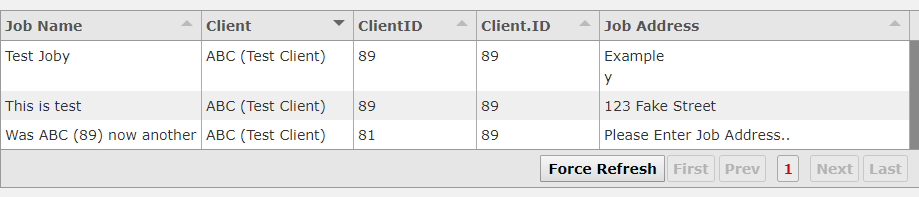
In screenshot the third entry's client has been changed from "ABC (Test Cient)" to "Test Client". While the clientID cell has updated the client.clientName and client.ID cells haven't - despite the JSON having changed.
Tested on
- OS: Win 10
- Browser: Chrome
- Version: 74
 jlschaper
All 8 comments
What happens if you do a table.redraw() or table.redraw(true) after the row.update()?
 aklaver
on 14 May 2019
aklaver
on 14 May 2019
Thanks, redraw does force the update to display as expected (as does anything that triggers redraw like column sorts etc).
I can live with throwing an extra line in my handlers etc (actually makes one other little annoyance disappear), but might be worth considering a minor code update to force the redraw or something similar?
Thoughts?
jlschaper
on 14 May 2019
Sounds like a good idea to me. That would be an Oli answer though.
aklaver
on 14 May 2019
I think I see what is happening. From row.js ~line 537:
//update affected cells only
for (var attrname in data) {
let cell = this.getCell(attrname);
                    if(cell){
                            if(cell.getValue() != data[attrname]){
                                    cell.setValueProcessData(data[attrname]);

                                    if(visible){
                                            cell.cellRendered();
                                    }
                            }
                    }
            }
Running the above on your update data gets:
for (var attrname in data) {console.log(attrname)}
ID debugger eval code:1:29
clientID debugger eval code:1:29
client debugger eval code:1:29
jobName debugger eval code:1:29
jobAddress debugger eval code:1:29
jobDetails debugger eval code:1:29
and
r3.getCell("client")
false
So the update code is not descending into the object that is the value for 'client'. This means:
cell.cellRendered();
is not done for those values.
aklaver
on 15 May 2019
Good spot @aklaver
I would be happy to accept a pull request for the fix, otherwise i will schedule it for the next update.
Cheers
Oli :)
 olifolkerd
on 20 May 2019
olifolkerd
on 20 May 2019
Alright I will give it a shot. I'm going to have to create a dev setup first, so you may beat me to it.
aklaver
on 21 May 2019
Just created a PR:
https://github.com/olifolkerd/tabulator/pull/2089
Some questions about the process:
Is there documentation on best practices/style guide for this project?
How do you build the JS and CSS files into dist/?
aklaver
on 22 May 2019
Hey All,
I have just pushed a fix for this to the master branch and will include it in a patch release later today.
Cheers
Oli :)
olifolkerd
on 29 Sep 2019
Related issues
 YendorMc
·
21Comments
YendorMc
·
21Comments
 TheCherry
·
37Comments
TheCherry
·
37Comments
 sean-magin
·
19Comments
olifolkerd
·
20Comments
sean-magin
·
19Comments
olifolkerd
·
20Comments
 fingers10
·
27Comments
fingers10
·
27Comments