Tabulator: Data not showing(It is receiving it just not displaying) in Firefox/Edge until I reorder then it appears
This is most likely not a bug but an issue I am not sure how to solve as it is browser specific.
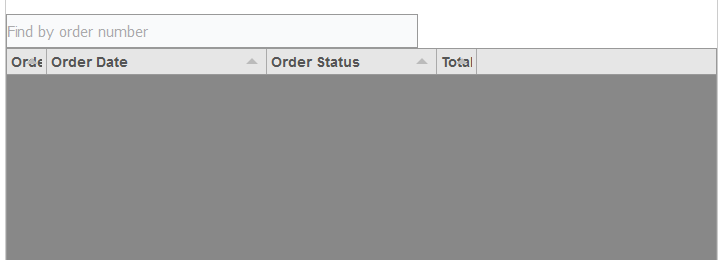
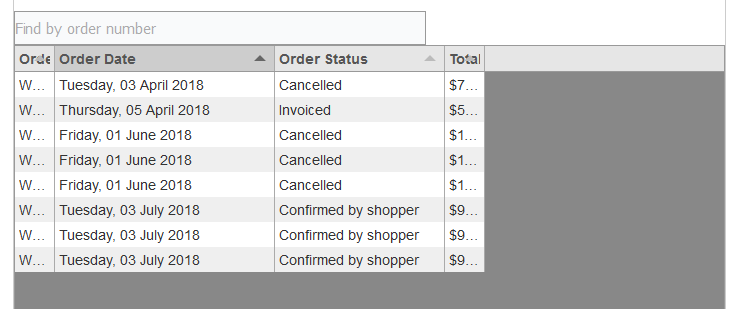
In both edge and firefox when I refresh/initially load the page the table appears as empty and also even though layout:"fitColumns" is set the columns are not spread out. Then if I click on one of the column headers as if to reorder the data then all of the rows of data magically appear.
This only happens in firefox and edge it works perfectly in chrome.
There are no errors being logged to the console.
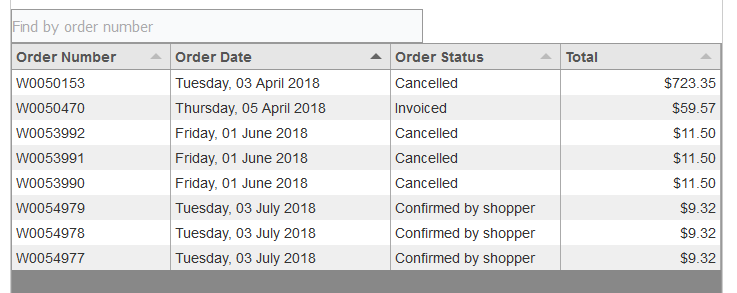
I have noticed if the data is not there and I open the firefox console using right click inspect it will make the data appear and be stretched out nicely like it should.
I have tried both loading the data and setting it using "data:tabledata," when creating the table and setting it after using "$("#example-table").tabulator("setData", tabledata);" but both don't work in Firefox/Edge and both work in chrome.
CHROME

FIREFOX AFTER REFRESH/PAGE LOAD
FIREFOX REORDERING USING COLUNM HEADER
FIREFOX AFTER OPENING THE DEVELOPER CONSOLE
$(document).ready(function() {
    //define some sample data
    var tabledata = [];
    <?php
        $k = 0;
        foreach ($this->orderlist as $i => $row) {
            $editlink = JRoute::_('index.php?option=com_virtuemart&view=orders&layout=details&order_number=' . $row->order_number);

            ?>
            tabledata.push(
            {
                id:<?php echo ($k); ?>,
                orderNum:"<?php echo 'W'.substr('0000000'.$row->virtuemart_order_id, -7, 7); ?>",
                orderDate:"<?php echo JHtml::_('date', $row->created_on); ?>",
                orderStatus:"<?php echo ShopFunctionsF::getOrderStatusName($row->order_status); ?>",
                total:"<?php echo $this->currency->priceDisplay($row->order_total); ?>"
            });

    <?php
            $k = 1 - $k;
        }
    ?>
    // This console log returns all the correct data showing that it has loaded the data properly
    console.log(tabledata);


    $("#example-table").tabulator({
        data:tabledata,
        height:400, // set height of table (in CSS or here), this enables the Virtual DOM and improves render speed dramatically (can be any valid css height value)
        resizableRows:false,
        layout:"fitColumns", //fit columns to width of table (optional)
        columns:[ //Define Table Columns
            {title:"<?php echo JText::_('COM_VIRTUEMART_ORDER_LIST_ORDER_NUMBER'); ?>", field:"orderNum"},
            {title:"<?php echo JText::_('COM_VIRTUEMART_ORDER_LIST_CDATE'); ?>", field:"orderDate", sorter:"date", width:220, sorterParams:{format:"dddd, Do MMMM YYYY"}},
            {title:"<?php echo JText::_('COM_VIRTUEMART_ORDER_LIST_STATUS'); ?>", field:"orderStatus", width:170},
            {title:"<?php echo JText::_('COM_VIRTUEMART_ORDER_LIST_TOTAL'); ?>", field:"total", align:"right", sorter:function(a, b, aRow, bRow, column, dir, sorterParams){
                return Number(a.replace(/[^0-9\.-]+/g,"")) - Number(b.replace(/[^0-9\.-]+/g,"")); //you must return the difference between the two values
            },},
        ],
        rowClick:function(e, row){ //trigger an alert message when the row is clicked
            window.location.href = "index.php?option=com_virtuemart&view=orders&layout=details&order_number=" + row.getData().orderNum;
        }
    });


    //Trigger setFilter function with correct parameters
    function updateFilter(){

        var filter = $("#filter-field").val() == "function" ? customFilter : $("#filter-field").val();

        if($("#filter-field").val() == "function" ){
            $("#filter-type").prop("disabled", true);
            $("#filter-value").prop("disabled", true);
        }else{
            $("#filter-type").prop("disabled", false);
            $("#filter-value").prop("disabled", false);
        }

        $("#example-table").tabulator("setFilter", "orderNum", "like", $("#filter-value").val());
    }

    //Update filters on value change
    $("#filter-field, #filter-type").change(updateFilter);
    $("#filter-value").keyup(updateFilter);
});
 1seanr
All 6 comments
Hey @1seanr
Thanks for getting in touch, sorry to hear you are having issues
Is the table element hidden when the data is first loaded into the table?
Cheers
Oli :)
 olifolkerd
on 4 Jul 2018
olifolkerd
on 4 Jul 2018
Hey there @olifolkerd
Thanks for the fast reply
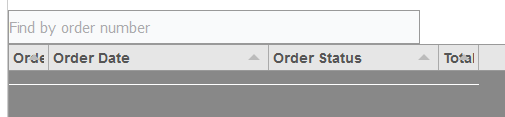
On load the tabulator-table class div is visibility: hidden; but if I change it to visible then it just makes a small white bar and doesn't show any data. And if I do any of the things above to make the data display then the visibility hidden property disappears. and the tabulator-table just doesn't have anything in it either until I do one of the actions above.


1seanr
on 4 Jul 2018
Hey @1seanr
Directly editing any of the internal visibility of the elements of the table will likely result in malfunction and i would strongly advise against it.
The reason i ask is that if the main table element (in your case #example-table) is not visible when data is loaded in, then it will not be able to draw the rows in the table correclty, because Tabulator Uses a Virtual DOM the table must be visible to correctly calculate the row sizing/positioning.
Cheers
Oli :)
olifolkerd
on 4 Jul 2018
@olifolkerd
Is there a way to tell just tabular to force refresh while keeping the same data in it if possible
And i know its getting the data at the very start of it creating the table not only after cause i am using and it works on chrome so its not a syntaxy error thing
$("#example-table").tabulator({
data:tabledata,
1seanr
on 4 Jul 2018
Hey @1seanr
you can use the redraw function to acheive that,
$("#example-table").tabulator("redraw")
I hope that helps,
Cheers
Oli :)
olifolkerd
on 4 Jul 2018
Hey there
Just thought I would update you as I have managed to find the cause and a solution so you know whats up if this happens to anyone else.
So the problem I am pretty sure is that when I originally load the page I have 2 tabs. One is the user's info and the other tab is their orders. The user's tab is the one that displays first and so the orders tab has a display of none (orders tab is the great-grandparent of the tabulator table). So I think what is happening is the table thinks that there is no room to display any rows of data, and that in firefox and edge it doesn't realise when I change the tab that it needs to redraw the table as not there is room. whereas in chrome it must realise that the display is no longer none and so it must redraw the table.
The solution i found was to create a Jquery listener for the tab click and to redraw the table then so that Firefox and edge realise they need to reload it.
$('#ui-tabs').click(function() {
            $("#example-table").tabulator("redraw");
            $("#example-table").tabulator("redraw");
        });
what I do however have to do is redraw the table twice as the first time it redraws it some of the table is hidden behid the scroll bar. I think this is because i have the layout:"fitColumns" property but its all working in all main browsers now.
So feel free to close the issue
1seanr
on 6 Jul 2018
Related issues
 aballeras01
·
3Comments
aballeras01
·
3Comments
 AndrewHutcheson
·
3Comments
AndrewHutcheson
·
3Comments
 mindcreations
·
3Comments
mindcreations
·
3Comments
 c3pos-brother
·
3Comments
c3pos-brother
·
3Comments
 yaxino
·
3Comments
yaxino
·
3Comments
Most helpful comment
Hey there
Just thought I would update you as I have managed to find the cause and a solution so you know whats up if this happens to anyone else.
So the problem I am pretty sure is that when I originally load the page I have 2 tabs. One is the user's info and the other tab is their orders. The user's tab is the one that displays first and so the orders tab has a display of none (orders tab is the great-grandparent of the tabulator table). So I think what is happening is the table thinks that there is no room to display any rows of data, and that in firefox and edge it doesn't realise when I change the tab that it needs to redraw the table as not there is room. whereas in chrome it must realise that the display is no longer none and so it must redraw the table.
The solution i found was to create a Jquery listener for the tab click and to redraw the table then so that Firefox and edge realise they need to reload it.
$('#ui-tabs').click(function() {
            $("#example-table").tabulator("redraw");
            $("#example-table").tabulator("redraw");
        });
what I do however have to do is redraw the table twice as the first time it redraws it some of the table is hidden behid the scroll bar. I think this is because i have the layout:"fitColumns" property but its all working in all main browsers now.
So feel free to close the issue