Tabulator: Column headers misaligned after page change
Hi Oli,
first of all thank you for all the great work you've put into this project!
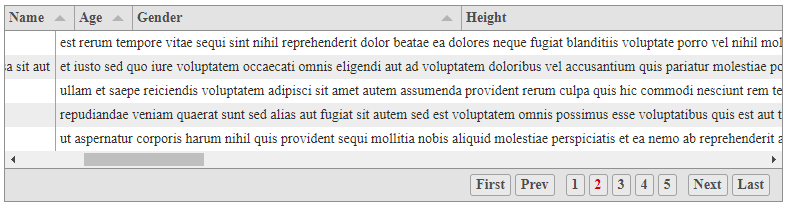
I have an issue with column header alignment on page change when using remote pagination.
This happens if a table has many columns and horizontal scroll bar is displayed. When I scroll to the right and then change the page, the headers become misaligned. I think I saw others mention the same issue.
I recreated the issue using jsonplaceholder as a data source:
 jstale
All 10 comments
Forgot to add, as soon as I touch the scroll the headers become aligned again.
jstale
on 31 May 2018
Hey @jstale
sorry to hear you are having trouble,
Could i ask which version of Tabulator you are using? and would you be able to post a copy of your table constructor so i have something to test against?
Cheers
Oli :)
 olifolkerd
on 1 Jun 2018
olifolkerd
on 1 Jun 2018
Hi,
in the project I used 3.5.1 but it's also happening on 3.5.2
You can see an example fiddle here https://jsfiddle.net/jstale/zh6t8vvv/
And here's the constructor:
$("#example-table").tabulator({
height:"calc( 100% - 50px)",
layout:"fitData",
pagination:"remote",
paginationSize:5,
movableColumns:true,
ajaxURL:"https://jsonplaceholder.typicode.com/posts", //ajax URL
ajaxParams:{ _start: 1, _limit:5}, //ajax parameters
ajaxConfig:"GET", //ajax HTTP request type
ajaxResponse:function(url, params, response){
var res = {
"last_page":15,
"data":response
}
return res;
},
columns:[
{title:"Name", field:"userId"},
{title:"Age", field:"id"},
{title:"Gender", field:"title"},
{title:"Height", field:"body"},
{title:"Name", field:"userId"},
{title:"Age", field:"id"},
{title:"Gender", field:"title"},
{title:"Height", field:"body"},
{title:"Name", field:"userId"},
{title:"Age", field:"id"},
{title:"Gender", field:"title"},
{title:"Height", field:"body"}
]
});
$("#example-table").tabulator("setData");
Hi Oli,
I am facing the same issue as @jstale jstale. My columns get misaligned after sort operation on any column if horizontal scroll bar is present.
After some debugging of tabulator.js, which is a great table, inside our application I came to the next conclusions:
Header element that contains class with name "tabulator-header" is outside of table body that contains row data. Table body is element with class name "tabulator-tableHolder". Table body is the one that has horizontal scroll.
Table body(tabulator-tableHolder) is listening on scroll event, on each scroll it notifies other components that scroll is in progress and allows them to update their position. One of those components is columnManager that is responsible for updating header element(tabulator-header) to a new scroll position, as far as I understand. This part works fine and on each scroll headers move as same as table row data.
But when we do sort, one of the first things that occur is resetScroll, which sets values to 0. This happens in RowManager in function setData, after which both scrollLeft for header and body have 0 value. Reset scroll to zero:
// tabulator.js line 2583
this.resetScroll();

this._setDataActual(data);
After this all rows are deleted and recreated and I'm sure that you know better what this part of code does then me. :D
At the end function _parseRemoteData inside Page instance is called and here you restore scroll value to the rowManager by calling next lines:
// tabulator.js line 17020
left = this.table.rowManager.scrollLeft;

this.table.rowManager.setData(data[this.paginationDataReceivedNames.data]);

this.table.rowManager.scrollHorizontal(left); // here value of the scroll is restored to table body

this.table.options.pageLoaded(this.getPage());
My fix for this issue is adding one more call to the columnManager to "tell" him to set new scroll postion on headers too:
// tabulator.js line 17020
left = this.table.rowManager.scrollLeft;

this.table.rowManager.setData(data[this.paginationDataReceivedNames.data]);

this.table.rowManager.scrollHorizontal(left);

this.table.columnManager.scrollHorizontal(left); // new line to restore header scroll position

this.table.options.pageLoaded(this.getPage());
I'm not sure if this is the right solution, but for our application this is currently hot fix to prevent clients from experiencing this bug in production.
I will leave you git patch so you can preview my changes.
Once again tabulator is great library that was very easy to integrate into our project. Keep up the great work. :)
Best regards,
 maklja
on 6 Jun 2018
maklja
on 6 Jun 2018
Thanks for figuring that out maklja. I can confirm his proposed solution has fixed the issue on my end as well.
 jguitarz
on 7 Jun 2018
jguitarz
on 7 Jun 2018
Hey @maklja
Thankyou for your detailed explanation and proposed fix. It looks good to me.
I will run some tests over the weekend and get a patch release out.
Cheers
Oli :)
olifolkerd
on 7 Jun 2018
Hey @maklja
I have just pushed your fix to the master branch and will include it in this evenings update.
Thanks for the help.
Cheers
Oli :)
olifolkerd
on 24 Jun 2018
Hi @olifolkerd,
That's great news. I am glad I was able to help. :)
My team and me will update tabulator to new version today in our application.
Best regards from me and my team at Schneider Electric :)
maklja
on 25 Jun 2018
Hi Oli,
Thank you for all the great work you've put into this project!
I have an issue with column header horizontal row misaligned on page change when using button ascending and descending .
This happens if a table has many columns and horizontal scroll bar is displayed. When I scroll to the right and then click header button ascending and descending, the headers horizontal row become misaligned.
And here's my code
   {
        $timeout(function(){

            var layoutPlan = "fitData";
            if(columns_arr.length >= 10){
                layoutPlan = "fitDataFill";
            }else{
                layoutPlan = "fitColumns";
            }
            $("#example").tabulator({
                pagination:"local",
                paginationSize:30,
                layout:layoutPlan,
                resizableColumns:true,
                tooltips:true,
                selectable: true,
                tooltipsHeader:true,
                groupToggleElement:"header",
                groupBy : grp_by_field,
                initialSort : sort_arr,
                groupClosedShowCalcs:true,
                columns : columns_arr
            });

            if(angular.isDefined($scope.selected_rep_obj.filters)){
                $("#example").tabulator("setFilter", $scope.customFilter, filters_arr);
            };
            $("#example").tabulator("setData", reformatData_matters(report_results, report_sub_categories));

        });
    };

 RyhillSibaprasad
on 14 Nov 2018
RyhillSibaprasad
on 14 Nov 2018
Hey @RyhillSibaprasad
Would you mind createing a new issue using the bug template, it will include all the info need to help you out there.
Cheers
Oli :)
olifolkerd
on 14 Nov 2018
Related issues
 KES777
·
3Comments
KES777
·
3Comments
KES777
·
3Comments
KES777
·
3Comments
 mindcreations
·
3Comments
mindcreations
·
3Comments
 tomheaps
·
3Comments
tomheaps
·
3Comments
 cemmons
·
3Comments
cemmons
·
3Comments
Most helpful comment
Hi Oli,
I am facing the same issue as @jstale jstale. My columns get misaligned after sort operation on any column if horizontal scroll bar is present.
After some debugging of tabulator.js, which is a great table, inside our application I came to the next conclusions:
Header element that contains class with name "tabulator-header" is outside of table body that contains row data. Table body is element with class name "tabulator-tableHolder". Table body is the one that has horizontal scroll.
Table body(tabulator-tableHolder) is listening on scroll event, on each scroll it notifies other components that scroll is in progress and allows them to update their position. One of those components is columnManager that is responsible for updating header element(tabulator-header) to a new scroll position, as far as I understand. This part works fine and on each scroll headers move as same as table row data.
But when we do sort, one of the first things that occur is resetScroll, which sets values to 0. This happens in RowManager in function setData, after which both scrollLeft for header and body have 0 value. Reset scroll to zero:
After this all rows are deleted and recreated and I'm sure that you know better what this part of code does then me. :D
At the end function _parseRemoteData inside Page instance is called and here you restore scroll value to the rowManager by calling next lines:
My fix for this issue is adding one more call to the columnManager to "tell" him to set new scroll postion on headers too:
I'm not sure if this is the right solution, but for our application this is currently hot fix to prevent clients from experiencing this bug in production.
I will leave you git patch so you can preview my changes.
Once again tabulator is great library that was very easy to integrate into our project. Keep up the great work. :)
Best regards,
Issue_1169.zip