Tabulator: GroupBy for a table created from Html Table
Hi,
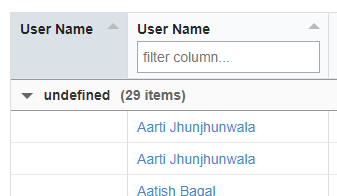
I created a Tabulator table for an existing Html Table. I want to group by the rows by one of the columns of existing Html Table. It groups the column with group title as "undefined" and all rows are added to that group. Also the grouping doesn't happen on actual valued under that column.
I tried...
- tabulator-groupBy:"columnName" on
node
- tabulator-groupBy:"true" on
node - In javascript start function, added groupBy:"column header text"
Please guide me on how to use groupBy for Html table.
Thanks,
Amitamit-ix
All 9 comments
Hey,
Thanks for getting in touch,
Could you post a copy of your current tabulator constructor object so i can give you an example of what to do, relevant to your scenario
Cheers
Oli
olifolkerd on 13 Jul 2017
Hey Oli,
You are simply awesome! I have become big fan of Tabulator control...Here I am giving few code snippets which I tried...
1.<script type="text/javascript"> $(document).ready(function () { $('#testTable').tabulator({ groupBy: "userName", columns: [ {title:"User Name", field:"userName"} ] }); }); </script>-
2.
<script type="text/javascript"> $(document).ready(function () { $('#testTable').tabulator({ groupBy: "User Name" }); }); </script>-
3.
<table id="testTable" class="very compact" tabulator-groupBy="User Name">
    <thead>
        <tr>
            <th tabulator-formatter="html" tabulator-headerFilter="true">
                User Name
            </th>
I am seeing the UI like below image
Hey,
Thanks for the kind words :) it is great to hear that Tabulator is appreciated :D :D :D
So there are a couple of issues there, the first is your header text is on a different line to the tags which is causing tabulator to try and parse the carriage returns into the field name (this is definitely a Tabulator bug, that i will fix for version 3.2) in the mean time this can be fixed by making sure your header text is in the same line as the tags:
<th>User Name</th>The second is that you want to be using user_name as the field name for the group by:
groupBy:"user_name",Let me know if that helps.
Cheers
Oli
Just to let you know i have made a commit to the 3.2 branch to remove caridge returns in header titles when imported from a table.
The will be officially released in a few weeks time.
🎉1Great!
Saw your other reply about fixes for newline issue. Appreciate your quivk turn around!Just a small question, is it yoyr default handling to treat space in header text as '_'? Also are these field names are always expected to be in small cases?
For example: "User Name" as user_name, "Total Amount" as total_amount?
Thanks,
Amit---- On Fri, 14 Jul 2017 01:26:04 +0530 [email protected] wrote ----
Hey,
Thanks for the kind words :) it is great to hear that Tabulator is appreciated :D :D :D
So there are a couple of issues there, the first is your header text is on a different line to the tags which is causing tabulator to try and parse the carriage returns into the field name (this is definitely a Tabulator bug, that i will fix for version 3.2) in the mean time this can be fixed by making sure your header text is in the same line as the tags:
User Name
The second is that you want to be using user_name as the field name for the group by:groupBy:"user_name",
Let me know if that helps.Cheers
Oli
—
You are receiving this because you authored the thread.
Reply to this email directly, view it on GitHub, or mute the thread.In general you can name your fields whatever you like in whatever case you like,
It is only when Tabulator is importing HTML tables that it converts names to camel case if no column definition has been set. The reason for doing this is most people will use camel case as the naming convention for database keys and if these are direct transformed into a json object then that is how they will appear in the table data. and based on the assumption that 99% or people will not have database keys with spaces in.
I can see your point that this is not always the case, and some flexibility in this reguard may be useful, so i will add an enhancement to the 3.2 branch to allow for specifying a tabulator-field attribute in the column header tag to allow you to force the field name in the HTML.
👍1I have just added this functionality to the 3.2 branch,
You will now be able to force the column field to a specific value but setting the tabulator-field attribute in the column header element:
<th tabulator-field="userName">User Name</th>Superb!
I will be waiting for upgrade to 3.2, Thanks much again!You are welcome,
If you want to start using the tweaks now feel free to download the 3.2 branch yourself:
https://github.com/olifolkerd/tabulator/tree/3.2Cheers
Oli
Was this page helpful?0 / 5 - 0 ratingsRelated issues
sean-magin · 19Comments
YendorMc · 21Comments
niddu85 · 20Comments
- tabulator-groupBy:"true" on