Synfig: Inconsistent Synfig UI on GNOME desktop
Synfig version & platform:
Building from master branch
Debian sid
Issue description:
On GNOME desktop Synfig UI and native UI looks quite inconsistent. Below is an example screenshot taken for About program's window:
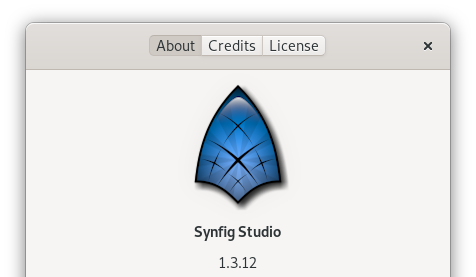
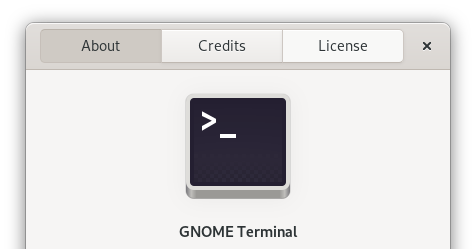
Notice how the sizes of header buttons About | Credits | Licence for Synfig Studio doesn't match with the GNOME Terminal one
BTW the second screenshot is how all GTK apps look normally on GNOME desktop
Same is observed for file open dialog box:


Want to back this issue? Post a bounty on it! We accept bounties via Bountysource.
 Keyikedalube
All 4 comments
Reason is here:
App::apply_gtk_settings() (in synfig-studio/src/gui/app.cpp https://github.com/synfig/synfig/blob/87e7ffa55e48d43323df3751576a685cc19010fb/synfig-studio/src/gui/app.cpp#L2317)
 rodolforg
on 20 Jan 2020
rodolforg
on 20 Jan 2020
You mean the custom CSS that fixed the below issue?
https://github.com/synfig/synfig/blob/87e7ffa55e48d43323df3751576a685cc19010fb/synfig-studio/src/gui/app.cpp#L2337
Keyikedalube
on 20 Jan 2020
yes.
but I commented out this part of code and... voilà.
I didn't see those toolbars and rulers that thick.
Anyway, maybe those toolbars should have specific CSS styles, and Synfig should not change the general ones
rodolforg
on 20 Jan 2020
I'm working on this issue :)
Keyikedalube
on 19 Oct 2020
Related issues
 morevnaproject
·
3Comments
morevnaproject
·
3Comments
 doradoro
·
3Comments
Keyikedalube
·
3Comments
doradoro
·
3Comments
Keyikedalube
·
3Comments
 FirasH
·
5Comments
morevnaproject
·
5Comments
FirasH
·
5Comments
morevnaproject
·
5Comments