Synfig: "Add" blend method doesn't rendered properly
Synfig version & platform:
1.2.2 and latest baster (commit 70e71983e72ebff09a26a796b93ff9db35a15513).
Issue description:
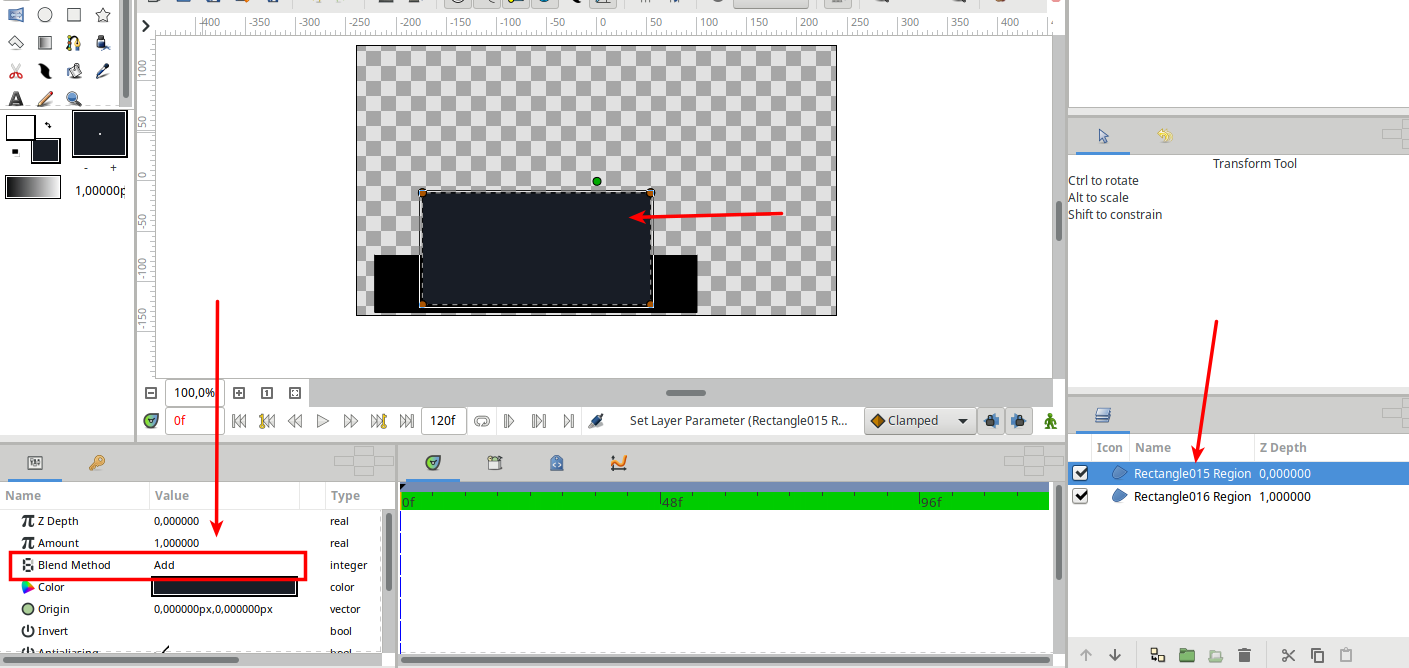
"Add" blend method should crop alpha of top layer according to alpha of bottom layer. See https://wiki.synfig.org/Blend_Method_Parameter#Add
This doesn't happens, see sample file -
bug.sifz.zip
 morevnaproject
All 5 comments
@morevnaproject @blackwarthog
I could take over this.
I've already rewritten some parts of the function in colorblendingfunctions.h.
This is my current state (To compare: Here is the current state in master):
template <class C>
C blendfunc_ADD(C &a,C &b,float amount)
{
    // Color b = background color
    // Color a = color to blend on b

    float ba(b.get_a()); // Alpha from color b
    float aa(a.get_a()*amount); // Alpha from color a (multiplied with the current amount)

    // Calc alpha of the result color
    float alpha_result = ba; // Alpha value is the background pixel alpha value (this crops the outer part of the foreground object)

    // Calc the resulting rgb colors and set alpha
    C result;
    result.set_r(a.get_r() * aa + b.get_r() * ba);
    result.set_g(a.get_g() * aa + b.get_g() * ba);
    result.set_b(a.get_b() * aa + b.get_b() * ba);
    result.set_a(alpha_result);

    return result;
}
Description of my current state:
In my state the add blending works already with simple rects. i tested it with a red and a green rect. The overlapping part becomes yellow and the other part of the green rect becomes invisible.
And if I reduce the amount of the green rect to 0.5, the overlapping part becomes orange.
Also the result, when blending Tux and Gradient looks exactly as the example here (see the attached test files).
But I'm not a mathematician, so I don't know If this algorithm is correct.
Edit:
Subtract and Difference have the same bug.
Here are my test files:
Synfig-BlendTests.zip
 ThaFireDragonOfDeath
on 20 Jun 2019
ThaFireDragonOfDeath
on 20 Jun 2019
@ThaFireDragonOfDeath Thank you very much for the fix!
I have tested the changes and found that they breaking functionality of Motion Blur Layer (it renders nothing). See test file -
motion-blur-test.zip
Looks like implementation of Motion Blur Layer is related with behavior of Add blend method.
@blackwarthog Should we think on how to fix Motion Blur Layer?
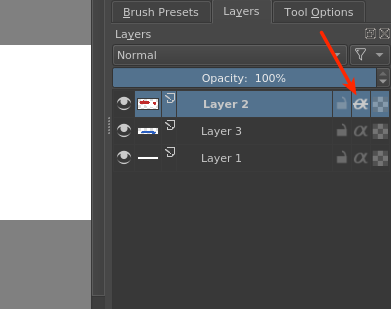
Or, actually, I would think about introducing an additional parameter, which will define if alpha of bottom layer is used for cropping (masking) top layer. So, "Onto" blend method will become a separate parameter, which can be applied to any blend method. This is actually a feature used in Krita for blending layers:
https://docs.krita.org/en/tutorials/clipping_masks_and_alpha_inheritance.html
morevnaproject
on 1 Jul 2019
@morevnaproject
I maybe have an idea (I still need to test it, if I have time):
The easiest method to fix motion blur, while keeping ADD blend working as it is in my pull request is adding another blend method (BLEND_ADD_NOCROP), which contains the implementation of the BLEND_ADD before my pull request.
And then use this new blend method here.
That should fix the problem.
ThaFireDragonOfDeath
on 3 Jul 2019
@morevnaproject
Ok, I just tested my method to fix the motion blur. Works for me. I will clean the code an add it to my pull request today.
ThaFireDragonOfDeath
on 4 Jul 2019
@ThaFireDragonOfDeath I have added your tests from https://github.com/synfig/synfig/issues/821#issuecomment-504050958 to https://github.com/synfig/synfig-tests-regressions
morevnaproject
on 5 Jul 2019
Related issues
 ebarranco
·
5Comments
ebarranco
·
5Comments
 mysliwy112
·
4Comments
mysliwy112
·
4Comments
 libreartist
·
4Comments
libreartist
·
4Comments
 doradoro
·
3Comments
doradoro
·
3Comments
 egladil
·
5Comments
egladil
·
5Comments