Synfig: Allow to set default canvas background
Synfig version & platform:
Synfig 1.2.2 - Windows 10 x64 Pro
Issue description:
It would be great to let us set a default background in the Canvas Properties.
Now you see by default a transparent checker background, and when previewing/rendering it is set to gray.
allow us to set a default "world" or "scene" background as in Blender.
 wstaelens
All 5 comments
You can simply drag-n-drop any image file to Synfig workarea from file manager and then place it below all layers.
 morevnaproject
on 3 Oct 2018
morevnaproject
on 3 Oct 2018
Yes I know, but this feels like a "hack" and clutters up the workspace layers.
Just setting a default background color for the canvas in the properties would be great. If you still want to use a background image or rectangle you would just set it as transparent...
wstaelens
on 3 Oct 2018
Hi,
I added some options for backgrounds:
Selection of Preview Background Color (Render page)
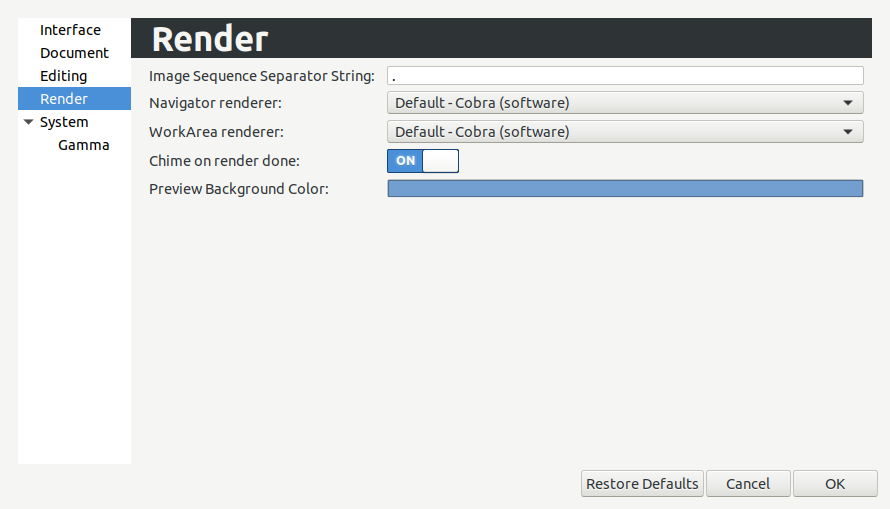

Add automatically a default background layer on new animation (Document page)
- None
- Solid Color
- Image - Scale to fit canvas depend on the option in Editing page
These layers will be named "Background"

Cheers :)
 BobSynfig
on 26 Dec 2018
BobSynfig
on 26 Dec 2018
@BobSynfig Hey that's awesome! Every contribution counts. I wish I knew how to properly develop software with C++ to help as well, but it's great to see more people adding more "quality-of-life" options :slightly_smiling_face:
 Jose-Moreno
on 26 Dec 2018
Jose-Moreno
on 26 Dec 2018
@BobSynfig Thank you very much for this improvement, I really like the solution!
690 is merged now.
morevnaproject
on 2 Jan 2019
Related issues
 Keyikedalube
·
3Comments
Jose-Moreno
·
4Comments
Keyikedalube
·
3Comments
Jose-Moreno
·
4Comments
 libreartist
·
4Comments
libreartist
·
4Comments
morevnaproject
·
5Comments
libreartist
·
4Comments
libreartist
·
4Comments
morevnaproject
·
5Comments
Most helpful comment
Hi,


I added some options for backgrounds:
Selection of Preview Background Color (Render page)
Add automatically a default background layer on new animation (Document page)
These layers will be named "Background"

Cheers :)