Synergy-core: Memory leak in GUI on Windows caused by logging
Issue seen in Synergy 1.7.1 running on a windows 7 enterprise 64bit synergy server connected to an 10.10.3 iMac synergy client.
The synergy service continues to allocate physical memory (private) but doesn't appear to free the memory resource. Resource monitor can track the usage:

The allocation appears related to switching from server to client and back. The problem appears worse when the switching back and forth is quick. (10 quick back and forth will consume more memory than slowly moving back and forth 10 times.)
 speaker
All 14 comments
@speaker I can get to 100MB of memory usage on Linux in a not too much time as well. It only affects the synergy executable, not synergys. It is related to the logging. If you change the logging level to note, the memory usage decreases significanlty. See #4363 and #4341.

 legonigel
on 25 Apr 2015
legonigel
on 25 Apr 2015
It could also be related to #3335.
legonigel
on 25 Apr 2015
I've had memory usage issues with synergy for the past few years. Only thing I can do is completely uninstall it when I don't need it. Closing synergy itself does not clear the leaks, and the more uptime I have, the more they build up.
The leaks are extremely hidden, they don't even show up in taskmgr. I can only see them in RamMap, with thousands of synergys.exe and syntool.exe processes running and taking 20K each.

Note that this screenshot above was taken on a PC that hasn't even used synergy at all since boot, it was simply running in the background - with an uptime of 12 days.
 andreialecu
on 28 Apr 2015
andreialecu
on 28 Apr 2015
Duplicates #4341
 nbolton
on 15 May 2015
nbolton
on 15 May 2015
I have experienced this exact issue on Windows 10 running Synergy 1.10.1-stable-8941241e
RampMap is showing me thousands of syntool.exe and synergys.exe instances all sitting at 28k
the synergy log just keeps repeating the following lines:
synergys.exe: no configuration available
[2019-02-13T00:17:13] ERROR: failed to launch, error: process immediately stopped
[2019-02-13T00:17:13] INFO: backing off, wait=10s, failures=9432
[2019-02-13T00:17:23] INFO: starting new process
[2019-02-13T00:17:24] INFO: activeDesktop:Default
[2019-02-13T00:17:24] INFO: starting new process
[2019-02-13T00:17:24] INFO: drag and drop enabled
synergys.exe: no configuration available
[2019-02-13T00:17:25] ERROR: failed to launch, error: process immediately stopped
[2019-02-13T00:17:25] INFO: backing off, wait=10s, failures=9433
[2019-02-13T00:17:35] INFO: starting new process
[2019-02-13T00:17:35] INFO: activeDesktop:Default
[2019-02-13T00:17:35] INFO: starting new process
[2019-02-13T00:17:35] INFO: drag and drop enabled
 sccovey
on 13 Feb 2019
sccovey
on 13 Feb 2019
I have experienced this exact issue on Windows 10 running Synergy 1.10.3-stable-ca35737a

In addition I'm suffering from High cpu usage of System and WMI Provider Host processes with memory leakage.
I'm suspecting synergy program now.
The issue continuously happens after turning on computer for about 2~3 days even though I didn't run the synergy program.
Anyways I downloaded the latest synergy v. 1.11.1-stable-55ec3105.
I will check what would happen.
 mazend
on 15 Jul 2020
mazend
on 15 Jul 2020
I'm running into the old handle leak on 1.11.1-stable-55ec3105 running on Windows 10.0.18362, synergyd hit 280k handles in just under 10 hours.
 charles-peter-nystrom
on 31 Jul 2020
charles-peter-nystrom
on 31 Jul 2020
Debugging Windows 10 memory issues with 32GB RAM and traced it back to synergys also via rammap.
 digitalsanity
on 14 Dec 2020
digitalsanity
on 14 Dec 2020
@digitalsanity we have fixed a number of memory leaks is 1.13.0, could you please test if the release candidate solves your problem?
https://rc.symless.com/synergy-1.13.0-rc2/synergy-1.13.0-rc2-windows-x64.msi
 andreacndn
on 14 Dec 2020
andreacndn
on 14 Dec 2020
Hi All,
Here is my story.
The old version synergy v. 1.11.1-stable-55ec3105 didn't solve the problem.
I updated my ram from 16GB to 32GB but the issue still happened.
So.. I had deleted synergy long long ago.
I've just installed the latest version, 1.13.0.
I think I can know the result in 2~3 days.
I will test it in synergy idle status because the issue happened even in idle status.
I attached pictures when I started test.
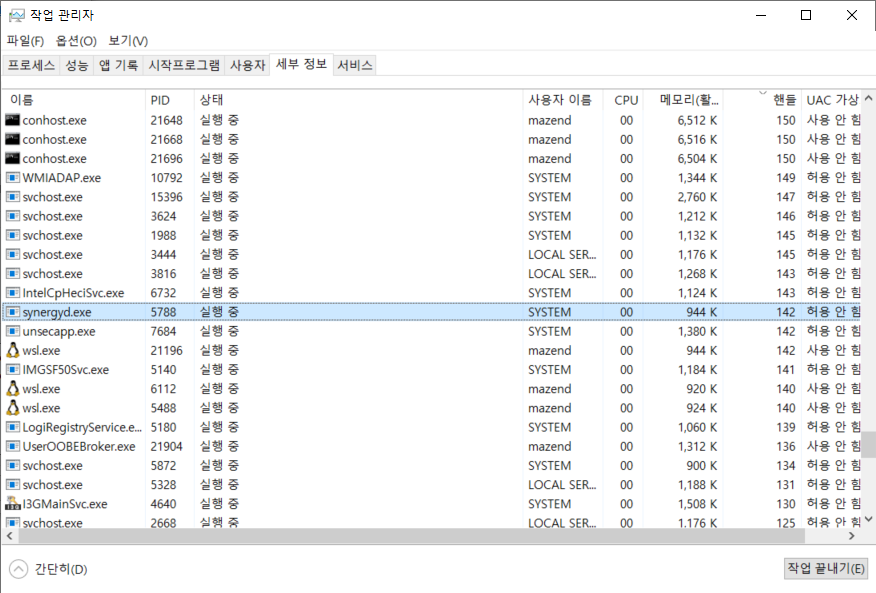

mazend
on 15 Dec 2020
I'm back.
I didn't turn off my laptop for two days and used the laptop during my waking hours.
It seems the issue was resolved.
The numbers of handles in synergy.exe and synergyd.exe are within the normal range.
I attacked related picitures.
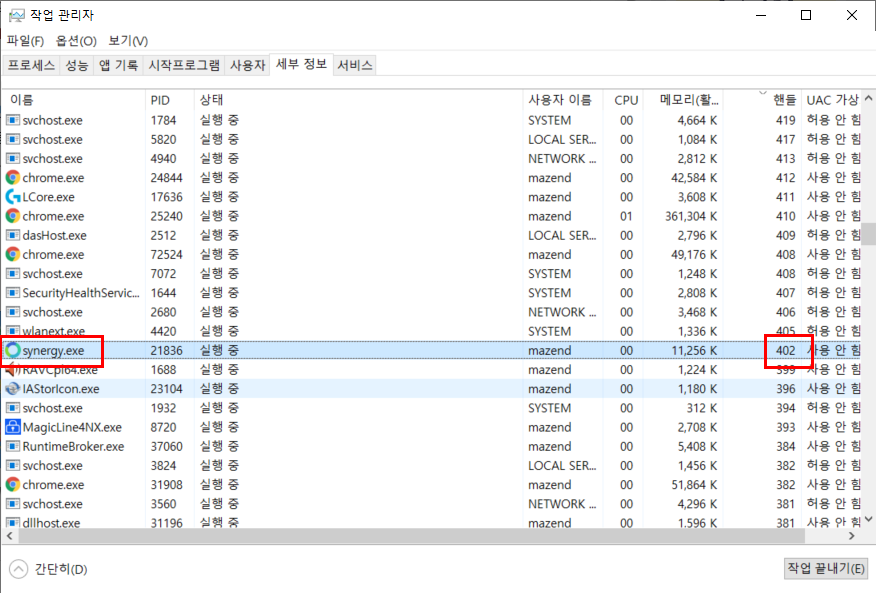
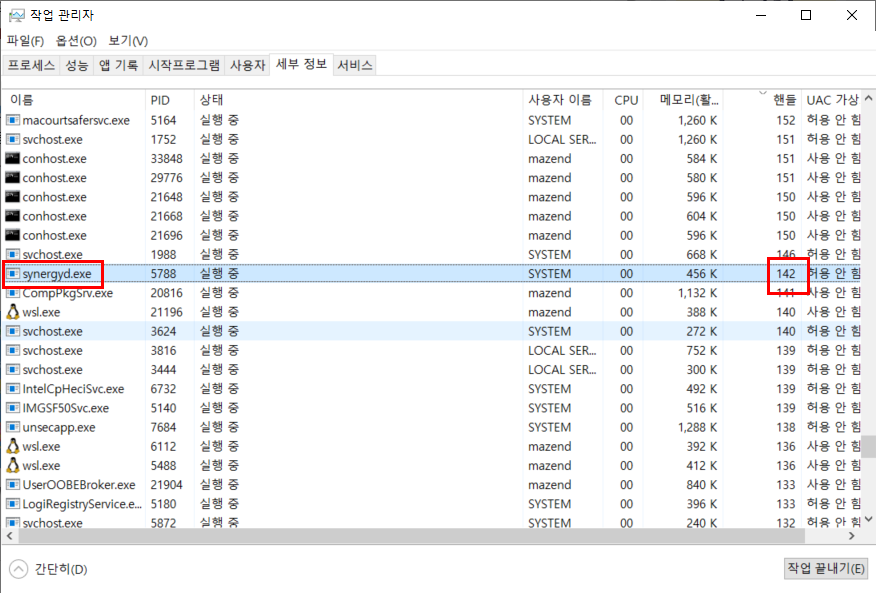
mazend
on 17 Dec 2020
@mazend thanks for the update!
Looks great, will keep this issue open for few more days to be 100% sure it's all fixed.
andreacndn
on 17 Dec 2020
Here is another test result.
I was going to keep my laptop turned on but.. unexpected windows update reboot my laptop.
so.. It's synergy idle test for 3 days.
It seems it's good.
I would confirm the memory issue I had experienced before was resolved.
(I'm not sure whether other memory leak issue is exist or not)
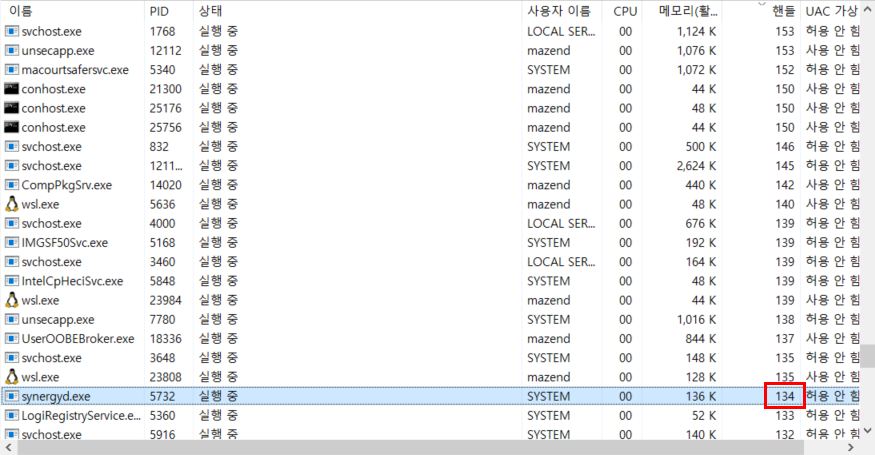

mazend
on 23 Dec 2020
Thanks for the update!
I'll close the issue for now.
andreacndn
on 23 Dec 2020
Related issues
 pamikola
·
178Comments
nbolton
·
111Comments
nbolton
·
90Comments
pamikola
·
178Comments
nbolton
·
111Comments
nbolton
·
90Comments
 grigorovich
·
80Comments
grigorovich
·
80Comments
 dragomireckijj
·
100Comments
dragomireckijj
·
100Comments
Most helpful comment
I've had memory usage issues with synergy for the past few years. Only thing I can do is completely uninstall it when I don't need it. Closing synergy itself does not clear the leaks, and the more uptime I have, the more they build up.
The leaks are extremely hidden, they don't even show up in taskmgr. I can only see them in RamMap, with thousands of synergys.exe and syntool.exe processes running and taking 20K each.
Note that this screenshot above was taken on a PC that hasn't even used synergy at all since boot, it was simply running in the background - with an uptime of 12 days.