Synergy-core: Share audio from one computer to another
Problem: Users want to use one set of speakers to play all audio.
Solution: Capture audio from all machines, and redirect audio to a single computer.
 nbolton
All 61 comments
It should! I was just coming here to log this very request :)
 TurkeyMan
on 8 Nov 2014
TurkeyMan
on 8 Nov 2014
Just in case it helps: from sideways experience working on other software projects (but never directly involved with this particular area), I believe capturing and mixing output audio on Windows is quite straightforward (particularly since Vista), but on Mac probably necessitates a kernel extension -- perhaps you could take advantage of Soundflower: https://github.com/RogueAmoeba/Soundflower
 thwacked
on 24 Nov 2014
thwacked
on 24 Nov 2014
I don't think so, I'm pretty sure it's just a virtual sound output driver (this is how it's done on mac)
 jakesyl
on 30 Jan 2015
jakesyl
on 30 Jan 2015
+1 This would be very handy :)
 skylord123
on 19 Oct 2015
skylord123
on 19 Oct 2015
+1 This would work pretty well for me.
 gurumaia
on 28 Oct 2015
gurumaia
on 28 Oct 2015
+1 it will be very good plus
 douglascorrea
on 29 Dec 2015
douglascorrea
on 29 Dec 2015
+1 gamechanger :sound: :loudspeaker:
 ph03
on 19 Jan 2016
ph03
on 19 Jan 2016
+1 would be great!
 uda
on 21 Jan 2016
uda
on 21 Jan 2016
upvote!
 t1ngj13
on 2 Jun 2016
t1ngj13
on 2 Jun 2016
+1 would be really nice with my setup
 trideout
on 13 Oct 2016
trideout
on 13 Oct 2016
It's been 2 years now. Any updates?
skylord123
on 3 Nov 2016
+1 would be very nice
 darrenswhite
on 22 Dec 2016
darrenswhite
on 22 Dec 2016
+1
I would gladly pay for this update!
 Vaxter
on 27 Dec 2016
Vaxter
on 27 Dec 2016
+1
This would be really awesome
 K0HAX
on 20 Jan 2017
K0HAX
on 20 Jan 2017
+1
I'm using synergy with linux as a host and I'd like to set my windows audio to be streaming out of synergy.
this way it remains something that's controllable in levels
 tatsujb
on 16 Feb 2017
tatsujb
on 16 Feb 2017
I'd vote for low-latency, lossless, 32-bit/384KHz, multiple-driver support as this would be a first since I'm literally paying for 128Kbps MP3 quality right now.
 moltendorf
on 17 Feb 2017
moltendorf
on 17 Feb 2017
Wow, this issue has had a lot of upvotes. Didn't realize how popular it was. I'll prioritize this one.
nbolton
on 23 Feb 2017
Just came here to make this same feature request. This would solve my problems! :)
 Mercerudy
on 5 Mar 2017
Mercerudy
on 5 Mar 2017
Upvote
 alexshrewsbury
on 27 Mar 2017
alexshrewsbury
on 27 Mar 2017
Would love to see this feature.
 digitalcoyote
on 27 Mar 2017
digitalcoyote
on 27 Mar 2017
+1 this would be great
 kire101
on 27 Mar 2017
kire101
on 27 Mar 2017
Just some more rambling thoughts:
I'd also like to ask for it to be bi-directional as I regularly have a source computer (generally Windows or Linux) that then needs to pipe its audio over to a Mac in its source form which then needs to pipe its audio over to a Linux box for the final encode and storage of a raw version; to top it off, it would be nice to also pipe that raw audio back to the source computer to monitor it. The amount of money I'd have to spend to do this without introducing any hiss, whine, or audio quality loss anywhere in the chain would cost me a literal fortune.
moltendorf
on 28 Mar 2017
Definitely add this. I'm currently having unbearable buzzing with line inputs despite quality sound cards. The issue appears to be unfixable without software streaming, as the house doesn't have Schuko sockets with protective earth grounding.
 maqp
on 29 Mar 2017
maqp
on 29 Mar 2017
+1. Top priority feature.
 abyx01
on 2 Apr 2017
abyx01
on 2 Apr 2017
Meanwhile, there are workarounds: (from Windows to Linux, other cases may be easier)
- Install a loopback sound driver, like VB-Audio.
You would get a virtual playback device and a virtual recording device. Set the virtual playback device as default. - Install and setup Icecast server.
- Install an Icecast source application. I'm using butt (https://danielnoethen.de/).
Go to butt's settings, and configure the server and stream info. Then go to the Audio tab and set the input to be the virtual recording device, also, increase the audio quality. - Listen to the stream on the host machine.
Now you're done! You can listen to notifications and music from another machine!
 HenryHu
on 9 Apr 2017
HenryHu
on 9 Apr 2017
@maqp You can possibly fix the hum by using a ground loop isolator (something like this: https://www.amazon.ca/PAC-Ground-Isolator-3-5-Applications/dp/B001EAQTRI)
Another solution is to take a micro-fiber cloth (or even any piece of clean cloth) and clean off the male ends of the audio cables. Finger grease and dust will get on these connections over time and cause issues. Simply wiping it off and plugging it in without touching it with your fingers can sometimes fix it.
Anyways, like @moltendorf said it would be nice to set which machines are inputs and which are outputs (with an easy way to switch each device to either receive, transmit, or off).
skylord123
on 27 Apr 2017
Since I already use Synergy I would like to use this as well so I can redirect everything to headphones on my DAC. +1
 co60ca
on 3 May 2017
co60ca
on 3 May 2017
please add this!
 phototrain
on 10 May 2017
phototrain
on 10 May 2017
If this were added, and worked smoothly, I might consider upgrading from the free version to a paid one.
 jimcullenaus
on 11 Jun 2017
jimcullenaus
on 11 Jun 2017
This would definitely be handy. Even if it's a separate app, as long as it is as easy to setup and use that the kvm, I'd be happy with it. The biggest factor would be the ease of setup and use, since there are already alternatives that require a bit more elbow grease.
 depadiernos
on 12 Jun 2017
depadiernos
on 12 Jun 2017
AdamO from forums:
06/14/17 22:30
being able stream audio output from clients to the server's speakers would be a nice addition. I know you can do this with other programs, but having one program to do it all would be brilliant.
Cheers, and well done on the program!
 paul-suarez
on 15 Jun 2017
paul-suarez
on 15 Jun 2017
Here to talk about how much I want this feature...All seriousness, currently with only using two desktops I can hook a 3.5mm Audio cable from the client headphone out into the server mic in and enable listening on the mic. Pretty janky solution but it works well enough for two systems. Getting rid of the cable would be a nice plus and I wouldn't mind less static. Excited to see where this project goes!
 dmwolfpack
on 23 Jun 2017
dmwolfpack
on 23 Jun 2017
+1 This would make a very useful feature if introduced in Synergy!
 suryaprakaz
on 24 Jun 2017
suryaprakaz
on 24 Jun 2017
+1 this would be helpful 👍
 ohrly
on 30 Jun 2017
ohrly
on 30 Jun 2017
I'd very much like this feature.
 HunterGraubard
on 9 Jul 2017
HunterGraubard
on 9 Jul 2017
Oh god yes, upvoted, would kill for this
 bachrc
on 28 Jul 2017
bachrc
on 28 Jul 2017
Adding my two cents, would be a great feature to have.
 Mithraw
on 1 Aug 2017
Mithraw
on 1 Aug 2017
I am a paid customer, and wrote Synergy several times making this request.
Multiplicity is been sharing audio (multichannel, uncompressed, DTS, etc) for years.
Due Synergy runs in MAC and the other doesn't, need a proper way to share audio across MAC<>WIN.
This feature lack is killing me every day.
 Verlaire
on 11 Aug 2017
Verlaire
on 11 Aug 2017
+1 upvote for convenience and simplicity factor. Paying customer
 asseti6
on 18 Aug 2017
asseti6
on 18 Aug 2017
I'm a paying customer too, and this feature would changef my world. Is there a way to develop it ? I'm ready to give it a shot.
bachrc
on 19 Aug 2017
+1 Would love to see this feature.
 Shad0wGeneral
on 11 Sep 2017
Shad0wGeneral
on 11 Sep 2017
+1 This would be really epic!
 primalfear
on 13 Sep 2017
primalfear
on 13 Sep 2017
For now, I'm using Voicemeeter Banana's VBAN (http://www.vb-audio.com/Voicemeeter/banana.htm) to transmit audio, and VBAN Receptor (http://www.vb-audio.com/Voicemeeter/vban.htm) to receive/play the audio.
This only works if the computer(s) you want to transmit audio from (Synergy clients) are Windows-based. The computer you want to play the audio on (Synergy server) can be Windows, Linux, or MacOS (because you can run VBAN Recepter using Wine on MacOS or Linux).
This is all free software. There are other "solutions" in this thread (i.e. using Icecast).
Note: If you're using VBAN Receptor through Wine, select the MME device as the output, because WDM won't work.
Also, here's a Voicemeeter Banana user manual if you're confused by the interface: http://www.vb-audio.com/Voicemeeter/VoicemeeterBanana_UserManual.pdf
 SystemDisc
on 17 Sep 2017
SystemDisc
on 17 Sep 2017
Also, Multiplicity (a competing product to Synergy that only works on Windows) has audio sharing.
SystemDisc
on 17 Sep 2017
So, this feature will not be added then?
Mercerudy
on 22 Jun 2018
We do plan to add audio support, but not in the short term.
nbolton
on 23 Jun 2018
I just want to say I support this idea.
 ncdaol
on 27 Oct 2018
ncdaol
on 27 Oct 2018
@nbolton I hope to know the current progress regarding audio support.
I'm thinking that I'm going to implement this feature.
 skysign
on 4 Jun 2019
skysign
on 4 Jun 2019
@nbolton As an already-paying user, I would pay even more for this feature.
 clenchedteeth
on 3 Jul 2019
clenchedteeth
on 3 Jul 2019
Please consider implementing the VBAN protocol in your software. It would not be terribly difficult to implement in a cross-platform way.
Here's the protocol spec: https://www.vb-audio.com/Voicemeeter/VBANProtocol_Specifications.pdf
Here's a rushed and not-so-good implementation of that protocol, that I put together into a cross-platform software: https://github.com/SystemDisc/vban-universal
SystemDisc
on 3 Jul 2019
In macOS, where it's kind of a pain to get the audio output, you can have users install something like Sound Flower, and on all systems you can capture audio and route it via the VBAN protocol to the computer being used directly.
@nbolton
SystemDisc
on 3 Jul 2019
@SystemDisc Thanks for sharing VBAN, It looks good to me.
I hope to listen Synergy developer's opinion. how they think regarding VBAN.
@nbolton How do you think regarding using VBAN?
skysign
on 4 Jul 2019
I'm checking the feasibility in two cases below.
Ubuntu : Sending audio
Windows : Receiving/Playing audio
I hope to know anyone can capture/dump audio on Ubuntu(linux),
Or if you have any idea dump/capture audio from Ubuntu(linux)
Please let me know.
I just found Dummy ALSA driver 'snd-dummy'.
It seems that 'snd-dummy' might be utilized.
skysign
on 7 Jul 2019
I commented on this 4 years ago. It is pretty surprising that it still hasn't been implemented (or even started on). It it the primary and only reason I do not use Synergy anymore. I don't even have a great alternative, I just switched to using VMs instead.
It sort of sucks that Synergy development is so slow. Synergy 2 can't seem to get out of beta and I get that they need to focus on that instead of these little add-ons like this one. At this rate it's going to be a verrrrry long time before we see anything on this ticket though (and probably a long time till Synergy 2 is released).
It's weird to me that they spent money advertising on LinusTechTips instead of spending money on development. I've seen reports of how much was made. They aren't putting money back into the software (at least not enough of it). Glad I only paid $1 several years ago. I still wouldn't pay more. They need to figure out their development.
skylord123
on 8 Jul 2019
@SystemDisc As I don't know much regarding macOS, could you help to know how/why audio capturing is hard on macOS?
skysign
on 9 Jul 2019
Hi @skylord123
I hope to know which OS you are using. Your desktop is Windows or Linux? What is your VM OS?
Please comment regarding that audio sharing should be supported for which OS in your use-case.
I will be happy, if I add one more user to synergy, after I implemented audio sharing.
skysign
on 9 Jul 2019
@skysign thanks for the response.
I use a mix between Windows and Linux (primarily Debian based). I tried Multiplicity because it has audio sharing but then found it was Windows only so that is why I went with Synergy back in the day (and commented on this ticket in hopes it would be added).
Here is some more information:
- My main home desktop is Windows 10 and I run some various Linux VMs on it (mostly debian based).
- I run two VMs on my home server using Zorin Core OS and CentOS.
- My work laptop is Windows 10 and I run Zorin Core OS in a VM.
- My personal laptop is running Ubuntu 18.10
I would like to be able to use either my work or personal laptop with my home desktop. I also have a couple other computers that I would like to install Linux on and use from my home desktop. So cross-compatibility between Windows and Linux is key for me.
Thanks
skylord123
on 10 Jul 2019
@skylord123 thanks for sharing your desktop/laptop.
Let me start to work for below, and I'm going to work on v1-dev branch.
Ubuntu : Sending audio
Windows : Receiving/Playing audio
skysign
on 10 Jul 2019
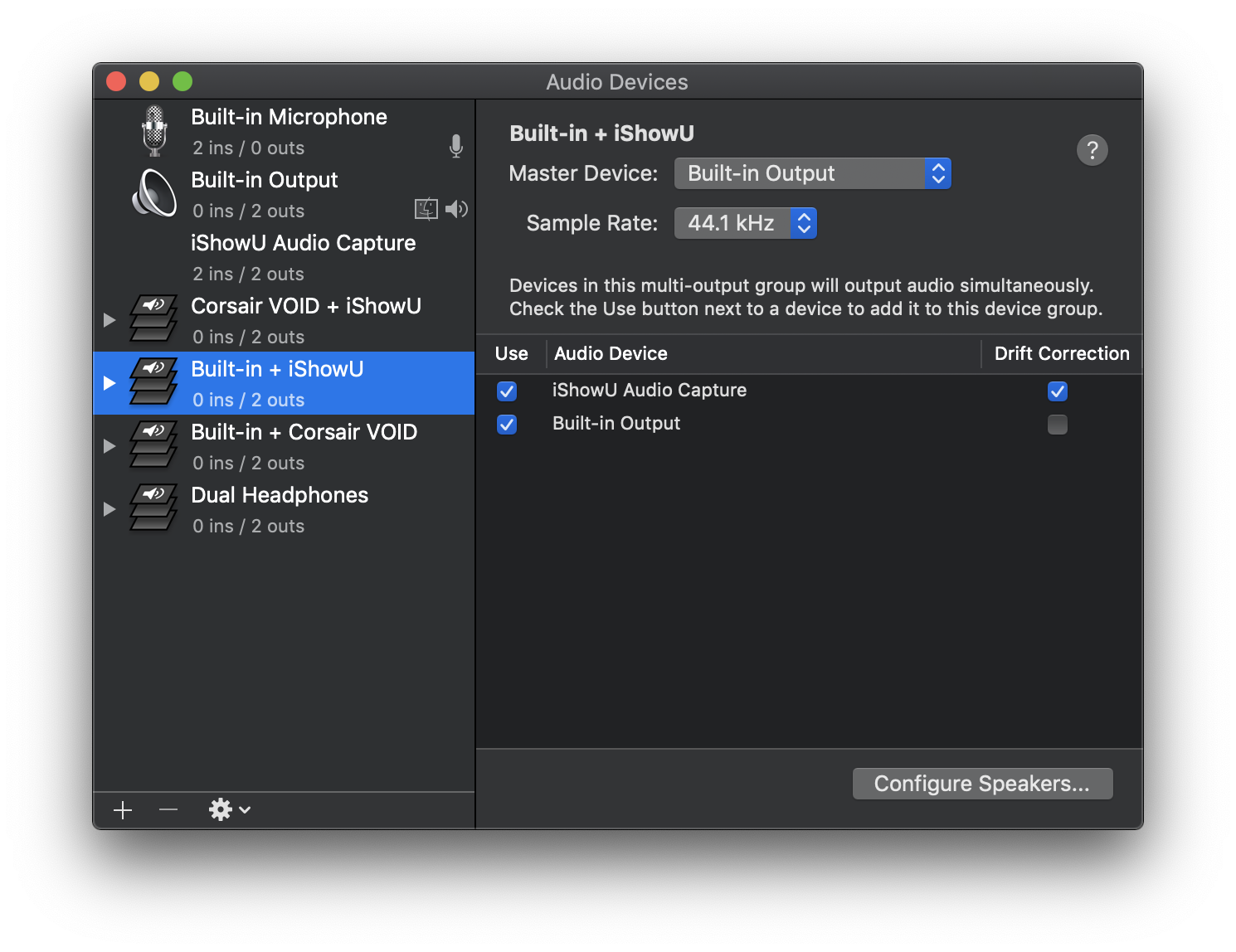
@SystemDisc As I don't know much regarding macOS, could you help to know how/why audio capturing is hard on macOS?
@skysign
I use iShowU Audio Capture and the built-in Audio MIDI Setup software in macOS to capture audio. If you want to capture desktop audio in macOS, you pretty much have to use a virtual audio output driver/kernel extension - I have not found a way to capture audio that is output to a real device. There's also SoundFlower.
SystemDisc
on 10 Jul 2019
@SystemDisc Thanks for your post, and capture image.
Let me focus on windows/ubuntu, firstly.
I hope that you join slack open-source-core channel, and keep discuss more.
Although I just start build setup on windows :)
skysign
on 11 Jul 2019
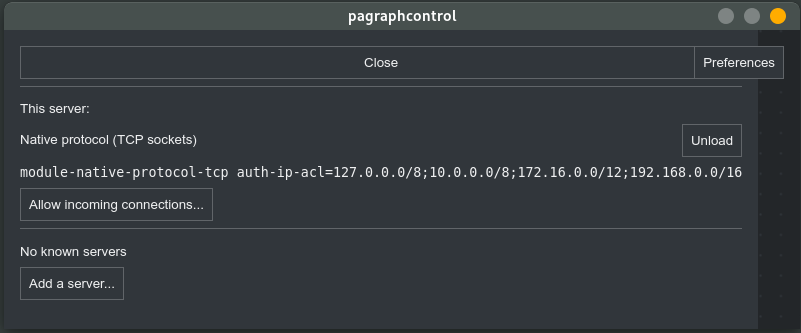
For those interested, I am currently using pulseaudio (Linux) as a workaround for this feature.
https://github.com/futpib/pagraphcontrol offers a great ui to set up everything quickly.
First you have to allow incoming connections on the server
Then connect from your client
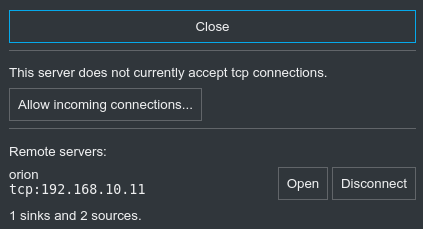
After the connection is established, you can use the audio sinks/sources of your server on your client as if they were part of the client.
 padok
on 17 Mar 2020
padok
on 17 Mar 2020
Related issues
 nbeazy
·
4Comments
nbeazy
·
4Comments
 bigbear3001
·
4Comments
bigbear3001
·
4Comments
 jenelcohen
·
4Comments
jenelcohen
·
4Comments
 Celant
·
4Comments
Celant
·
4Comments
 martindale
·
5Comments
martindale
·
5Comments
Most helpful comment
Wow, this issue has had a lot of upvotes. Didn't realize how popular it was. I'll prioritize this one.