Synergy-core: Individual screen resolution and arrangement
Problem: Some users have multiple monitors for a Synergy client. Currently the 2nd client monitor must be physically adjacent to the 1st, which is not always practical for the user.
Solution: Allow the user to specify the position of any monitor on the grid so that the two client screens need not be adjacent.
 nbolton
All 19 comments
This feature would make complex monitor setups much better! But I'd like to add that the proposed solution (allowing placement of monitors, rather than computers, in the grid) does not handle many cases - see for example this comment on one of the tickets closed as "duplicating" this one (https://github.com/synergy/synergy/issues/2716#issuecomment-58847897). If you have monitors that don't line up in a grid to one another, as I do at the office and at home, nbolton's solution will not help!
If the solution were something more along the lines of how arandr works (http://screenshots.debian.net/package/arandr), it could make synergy much more flexible. Even if this were an option only available by manually modifying the config file, it would make my life so much easier.
(Somewhat unrelated: did you guys remove the ability to donate $$ for votes on tickets? :)
 mrculler
on 30 Jan 2015
mrculler
on 30 Jan 2015
any news on this or #3744?
 pvinis
on 14 Jun 2016
pvinis
on 14 Jun 2016
It might not have been previously clear, but I wanted to give a more common, clear example of why this would be an important feature. Suppose that we have 4 monitors in a 2x2 grid configuration. We have 2 machines, a server and client. Let's give the server 3 screens, and lets give the client one screen, like so:
[Server 3] [Server 2]
[Client 1 ] [Server 1]
As it is now, this straightforward monitor configuration will not work in any sane fashion with current synergy capabilities. Synergy assumes that each screen will be an even rectangle and it cannot handle the edges on the server's "L-Shaped" desktop. The bottom left panel (that does not exist on the server) is still assumed by synergy to be a part of the server's super-screen. Even a hand-craft configuration file specifying edge percentages would yield some interesting and unexpected behavior.
 coreyo
on 4 Jul 2016
coreyo
on 4 Jul 2016
@coreyo Digging through the code I came across this, which is actually a bit more advanced than your example (same setup, adds a laptop):
https://github.com/symless/synergy/blob/master/doc/synergy.conf.example-advanced
At first I misread the layout, but this config should be how we handle wonky monitor setups.
That said, implementing this capability into the GUI would greatly simplify things.
@nbolton Your thoughts? I'm still wrapping my head around this config example.
 amckee
on 7 Jul 2016
amckee
on 7 Jul 2016
@amckee If this is actually working for you, I'd like to know what version you are using. See my two posts here that attempt an even more complex configuration: http://symless.com/forum/viewtopic.php?f=9&t=1515#p4968.
Basically, synergy see's the left edge of desktkop2's screen as the left edge of the top-left monitor only. In order to go left from desktop2 to desktop1, you would have to do it from the top-left monitor. Likewise, synergy see's the bottom edge of desktop2's screen as the bottom edge of the bottom-right monitor only. Similarly, going left from the bottom-right monitor or down from the top-left monitor will not allow the mouse cursor to pass across the edge of the screen.
In the same fashion, if you try to go up from desktop1, you end up on desktop2's bottom-right monitor.
It might also be mentioned that I was using version 1.7.2 with an Ubuntu client and server. Anything beyond version 1.7.2 and I suffer from the long-standing random "server dead" bug here: https://github.com/symless/synergy/issues/4768
coreyo
on 7 Jul 2016
We really need this ASAP.
At the very least, provide an update to the text config file to allow specifying x/Z bounding boxes to trigger screen changes similar to ranges, and worry about GUI later.
 aikar
on 16 Feb 2017
aikar
on 16 Feb 2017
What would it take to get this going?
 e-s-a-i
on 9 Jun 2017
e-s-a-i
on 9 Jun 2017
second that request.... I rarely use 2 of my monitors as much as I would be due to this problem.
aikar
on 18 Jul 2017
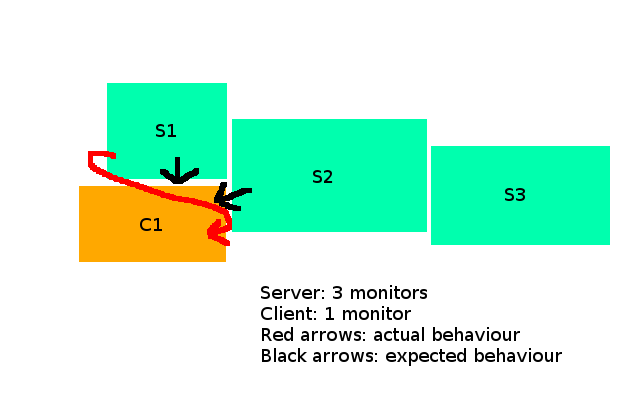
This is exactly what i want to achieve, is this supported? I have tried many iterations.
http://blog.tsunanet.net/2008/03/getting-synergy-to-work-with-non.html
The current ploblem is that if the bottom doesn't line up the lowest screen is able to go down but the other doesn't. The current setup S1> C1 doesn't work but S2 -> C1 works. However if S1 and S2 bottom are lined up both S1, S2 > C1 works.
```
| S1 | | |
| | | S2 |
| ============ | | |
| | | __________ |
| C1 |
```
 yfeleke
on 23 Aug 2017
yfeleke
on 23 Aug 2017
I need this, too. My desired arrangement:
|----------||------|
|    S1    ||      |
|----------||      |
 |--------| |  C2  |
 |   C1   | |      |
 |--------| |------|
S1 (1920x1080) is an iMac running Sierra, while C1 (1920x1080) is a Windows 7 laptop with secondary monitor C2 (1080x1920), displays extended. The problem seems to be that Synergy thinks that the client has a single monitor that is 3000x1920 - for example, when I enter e.g. C1 from S1, I have to traverse 840 "ghost" pixels before the mouse moves in C1. In other words, Synergy doesn't understand non-rectangular displays. If I had some way of telling Synergy (in the "links" section) to skip over these pixels (like an optional 3rd number in down/up/right/left), I could work around it.
Synergy can be hand-configured in the synergy.conf to handle multiple monitors on a client or server, but not if a client or server has an "L-shaped" or other non-rectangular monitor arrangement. It would be great if it could - until it does, I have to use C2 in landscape position, which hogs physical desk space. Perhaps (as discussed above) it makes more sense to configure things at the physical monitor level of granularity.
 GriffithLea
on 7 Sep 2017
GriffithLea
on 7 Sep 2017
Will this feature be available in Synergy v2?
I need it really much.
My setup consists of one computer with 3 monitors and a notebook.
It looks like this:
The problem ist that I cannot move the mouse from the monitor in the middle to the client down left.
Dear developers: Please fix this issue!
It's 3 years old now.
And this issue is releated to #3744 (Screen edge scaling) too.
Described in detail here: https://github.com/symless/synergy-core/issues/3744#issuecomment-271980767
 prikril
on 3 Oct 2017
prikril
on 3 Oct 2017
@nbolton is anything improved here for Synergy2?
aikar
on 3 Jun 2018
@aikar That'll be something we'll be doing in Synergy 2, but maybe not for a while.
nbolton
on 4 Jun 2018
@nbolton Is this being tracked elsewhere? Seems like this is still the canonical issue
 MadLittleMods
on 21 Jun 2018
MadLittleMods
on 21 Jun 2018
I'd like this as well!
 ghost
on 2 May 2019
ghost
on 2 May 2019
I have a setup somewhat like this:
   ----- -----
  |  A  |  B  |
 ------- -------
|   A   |   A   |
 ------- -------
From what I gather it's not possible currently to have this kind of setup with synergy. Does anyone have a work around for this? Best I came up with was the bottom of A goes to top of B. Its very unintunity though.
 zaucy
on 2 May 2019
zaucy
on 2 May 2019
This is something we plan to support in the next major version, as it's a very popular request.
nbolton
on 3 May 2019
@nbolton why next version.... I bought v2 hoping it would of solved this problem, and haven't even bothered moving to it since it hasn't fixed it (still using 1).
So you're saying I'm going to have to buy it yet again and lose out the money on v2?
Please just add it to v2.
aikar
on 3 May 2019
If you purchased Early Access, Synergy Lifetime (pre-November 2017), or Synergy 2 (pre-June 2018) then you'll receive a free upgrade to the next major version (an early alpha will be available in a few months). We have discontinued development of Synergy 2. If you have any questions, please contact our customer service team: https://symless.com/contact/customer-service
nbolton
on 3 May 2019
Related issues
 the-wes
·
126Comments
nbolton
·
136Comments
the-wes
·
126Comments
nbolton
·
136Comments
 dragomireckijj
·
100Comments
dragomireckijj
·
100Comments
 davidstosik
·
142Comments
davidstosik
·
142Comments
 pamikola
·
178Comments
pamikola
·
178Comments
Most helpful comment
@aikar That'll be something we'll be doing in Synergy 2, but maybe not for a while.