Synergy-core: Multiple monitor support on layout screen
Server: Windows 10
Client: Windows 10, OSX 10.13.3, *nix coming soon™
2.0.5 - Stable On all devices
Not a bug but a much needed enhancement for end users running multiple monitors, it would be nice to have the extra monitors represented on the layout screen so it would be possible to tie a specific machine to the top/bottom of the extra monitor(s).
 thaiceman
All 10 comments
As a paying customer: Oh please $deity, yes.
 dwmc15873
on 14 Feb 2018
dwmc15873
on 14 Feb 2018
That'd be a great addition to the product.
 fuzzzerd
on 16 Feb 2018
fuzzzerd
on 16 Feb 2018
Would be a great feature, just purchased the Pro version and it was the first issue I found after such a simple setup. Coming back to the main computer from the secondary is flawless but going to the secondary computer puts the cursor on the 3rd monitor.
 jonathan0104
on 20 Feb 2018
jonathan0104
on 20 Feb 2018
I've had issues with this as well - my physical screen layout is like this
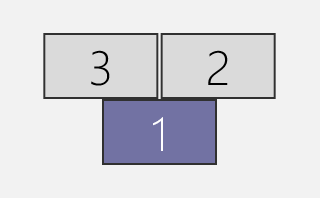
(a laptop and two monitors sitting on a shelf above it)
Occasionally I connect screen 3 to a Mac for iOS development.
Since the layout is a grid, this is a problem - if I put the Mac on the left, it's treated like this
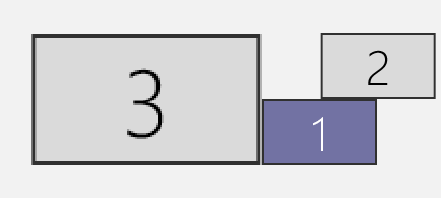
(top left corner of screen 1 transitions to middle right side of Mac's screen)
If I put it on the top (and move screen 2 to be in line with screen 1 on Windows), it's treated like this
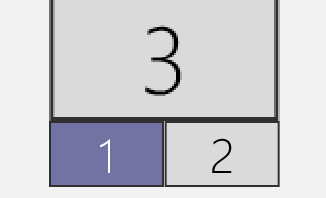
Placing all of them horizontally works as expected,
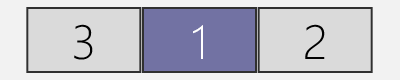
but isn't too comfortable to use because that's 5760 pixels from the one side to another.
Keyboard shortcut is only partial help for this, given the asymmetry.
Ideally should have a screen group positioning UI like OS themselves do.
 YellowAfterlife
on 19 Mar 2018
YellowAfterlife
on 19 Mar 2018
This is truly a critical option. I have 9 monitors across 3 workstations. Interestingly this encompasses a request I've made for better or fine tuned control of monitor placement. I've found that it's nigh impossible to get monitors to where they need to go positionally and I'm still having to use Teleport.app between two of my macOS workstations and then Synergy on my middle (bridge) macOS client (set to host) to a Windows client.

Having the ability to control all of this graphically could resolve a LOT of requests and issues that folks have been having.
_PLEASE NOTE_: _It is important to be able to assign order to displays so that you can do abnormal things (only abnormal for Synergy; this is perfectly normal for macOS, for example) such as making the cursor from one display appear be linked to the top of another display. In the example above I move the cursor down from Group 2::Display 1 and it goes to the top of Group 2::Display 2. This is necessary since Group 1::Display 1 MUST be the primary display and as a user, you do NOT want to have the cursor constantly accidentally going past the Menubar on macOS (the white long rectangle on Group 2::Display 1 & Group 1::Display 1) - when using macOS you need to quickly be able to bump-stop / hit the wall at the top of the primary display in order to get access to Menubar items and applets. In the end, I'm not entirely certain that this information matters to Synergy since perhaps the OS itself will handle this, BUT if it does have some bearing, I wanted to at least detail it._
So, for example, the issue about rollover could be resolved via the above layout control in that you can define which edge border move throughs will go to which Group::Display edge.
I'm also finding that my cursor keeps getting locked in the middle of the screen, which is causing terrible problems with some of my monitoring apps that are critical for work and so I've had to disable Synergy for the time being on one of my workstations since having the cursor default to center position, it wrecks havoc on the app's output. I've been told by support that this is a known issue and is being resolved presently.
 ylluminate
on 27 Mar 2018
ylluminate
on 27 Mar 2018
I am a paying customer as well and would love this feature. If Synergy2 gets this enhancement it will become critical infrastructure for me.
 KayoticSully
on 20 Jun 2018
KayoticSully
on 20 Jun 2018
@nbolton can we share roadmap progress?
 elasim
on 17 Sep 2018
elasim
on 17 Sep 2018
Throwing in my weight against this feature request, Synergy wasn't usable for me due to my multiple monitor set-up at home and work and have had a refund processed because of it. When resolved, I'll get back on Synergy and repurchase. I'll monitor this issue and hope it's picked up soon.
 JDTAY
on 14 May 2019
JDTAY
on 14 May 2019
The v2.x label was removed, does it means this feature is being dropped? I believe it is a must for synergy.
 LukeSkyw
on 6 Nov 2019
LukeSkyw
on 6 Nov 2019
Actually it's Synergy 2 that was dropped. We're working on the next major version, and we do plan on implementing this feature.
Once the next major version is ready for public use (we anticipate around 2022/2023), it will be released to general sale. All Synergy 2 customers will be upgraded for free, all lifetime customers (anyone who purchased before November 2017) will also benefit from the free upgrade, and of course, anyone who purchased early access will get it. This free upgrade covers over 85% of our current customer base.
Synergy 2 is no longer in development, but we are still developing Synergy 1 and we will be adding only new features to the next major version. After we release the next major version, we intend on maintaining Synergy 1 for a further two years to provide critical fixes and security updates.
Read more: https://symless.com/blog/putting-ux-first
 nbolton
on 6 Nov 2019
nbolton
on 6 Nov 2019
Related issues
 ColinCreamer
·
5Comments
ColinCreamer
·
5Comments
 jenelcohen
·
4Comments
jenelcohen
·
4Comments
 LeTink
·
4Comments
LeTink
·
4Comments
 laur89
·
5Comments
jenelcohen
·
3Comments
laur89
·
5Comments
jenelcohen
·
3Comments
Most helpful comment
As a paying customer: Oh please $deity, yes.