Synergy-core: Clicks stop working on clients with Windows server
We do plan to fix this, but the issue is very rare. We are investigating the cause. It happens rarely, is very intermittent (random) and is difficult to reproduce. If you think you're experiencing this issue, please contact the support team: https://symless.com/contact/customer-support
Steps to reproduce:
- Run Synergy as normal, on Windows 8 or 10
- ?
- Move mouse to client
- Click either mouse button
Expected: Mouse click works
Actual: Click does not register at all
Demo video: https://www.youtube.com/watch?v=dVFImpW3b7w
Related: https://github.com/symless/synergy-core/issues/5513, https://github.com/symless/synergy-core/issues/5542
Workaround: For Synergy 1, click Apply on the server (to restart the core process). For Synergy 2, press shift+f5 or shift+fn+f5 on the server to restart background service (and core process). The bug occurs on the server, so it's important the workaround is done on the server (not the client).
 the-wes
All 126 comments
please please please FIX!! It happens all the time.
Restarting the service fixes this for a short time (hour to a day?)
windows server, mac client (both of the latest versions)
 jacob925
on 1 Mar 2016
jacob925
on 1 Mar 2016
Was this specific to the 1.7.6 release recently? Since I upgraded yesterday I haven't been able to click on my Synergy clients yet mouse movement and keyboard support works fine. I'm running Windows 10 64bit on the server and running Synergy 1.7.6 server 64bit version. My clients are one OSX running El Capitan 10.11 with Synergy 1.7.6 and my other client is running Synergy 1.7.6 64bit and is also running Windows 10 64bit. Any other information you require that could assist you solving this issue please let me know, if this is a separate issue I'll log a different ticket for it.
 DavidST44
on 18 Mar 2016
DavidST44
on 18 Mar 2016
I can't recreate this with your specific steps on mine, but I can confirm I'm regularly experiencing this behavior where I lose mouse clicking on my Mac client.
OS X 10.11 client with Windows 10 host. I end up needing to stop/start Synergy on the host a few times a day now. I have a Logitech mouse with custom key commands mapped to different buttons. During the time I experience these issues, I lose some of those button actions. Synergy (in debug mode) still registers them, but Windows apps won't. I have to stop/start Synergy to get it to start working again.
 botsmack
on 18 Mar 2016
botsmack
on 18 Mar 2016
Ditto with a Windows 8 server and a Linux client. v1.7.6. The mouse always move between the two, but the clicks do not. If I go back to the Windows machine and click a few times, then swing to the Linux, it works again.
 jmccanta
on 1 Apr 2016
jmccanta
on 1 Apr 2016
I've noticed that rebooting usually solves the problem, but this is obviously not a fix. Maybe one in three boots I found that the mouse click would not register, and maybe one in five that did register the click it would stop working all of a sudden. (2 x Window 10 machine, Laptop on Wifi > Media Server Wired, same router). Hope that helps.
 JonnyTooze
on 9 Apr 2016
JonnyTooze
on 9 Apr 2016
The problem can be worked around by moving the synergy window to it's own desktop
A workaround from @Boomkop3
 XinyuHou
on 11 Apr 2016
XinyuHou
on 11 Apr 2016
Having same problem. Server is Windows 10. Client is OSX 10.11.4. Mouse movement and scrolling with wheel keeps working on client, but I lose mouse clicks and keyboard. Started when I upgraded to 1.7.6. Sometimes, I can click on the server background or press the ESC key and mouse clicks and keyboard start again on the client. Sometimes I need to restart the server. I will try keeping the synergy window on its own desktop.
 jkimmelman
on 12 Apr 2016
jkimmelman
on 12 Apr 2016
Have a similar problem.
- Mouse moves between PCs,
- scroll wheel is ok.
- keyboard is ok
- but mouse clicks don't work!
Configuration:
- Win10-pro server <-> ubuntu 14.04 client
- Ethernet cable connection
- synergy version: 1.7.6 (server and client)
- server is configured to be above the client.
Workaround
- If I change the "Server configuration"
- .. and Apply the new settings it starts working.
 pmario
on 13 Apr 2016
pmario
on 13 Apr 2016
I've this same issue on the same setup- Windows 10 server over wired ethernet to OSX El Capitan 10.11.4
Everything works fine except for mouse clicks- tried quitting and restarting but to no avail. Tried moving the Synergy window to desktop 2, same issue :(
 Shawson
on 17 Apr 2016
Shawson
on 17 Apr 2016
I have this same problem on Synergy 1.7.6, I'm running windows 10 with 1.7.6 on windows and linux.
I have resolved the problem by downgrading my windows client, could not find a link to 1.7.5 but did find a 1.7.4 and so now I have a working system with Linux 1.7.6 and Windows 1.7.4
 hello-workible
on 20 Apr 2016
hello-workible
on 20 Apr 2016
Could someone give us some logging?
Please use Debug2 level for logging and try to make the log as short as possible. Here is some suggestions
- Make sure this issue happens reliably on your machines.
- Stop Synergy and close GUI
- Reopen GUI and change logging level to Debug2
- Click apply
- Do the same thing on both server and client
- Reproduce this issue
- After it's reproduced, stop both server and client.
- Copy logs within the GUI window and paste it into a comment
- Add your OS info, Synergy version and which mouse button you pressed
XinyuHou
on 20 Apr 2016
Please understand that the problem is intermittent and I haven’t identified a particular sequence of actions that reliably causes it. In particular, once I restart the GUI, the problem is fixed for a while. So, when I start it up in Debug2 mode, a lot of logging happens before I get the problem again (e.g., 13Mbytes on the server side). Also, if I go into debug2 on the client, it causes very poor performance. So, I’ve included only the last few seconds from server log with this. I'm pretty sure the problem happened after 14:28:04, after the cursor moved into the client (laptop4). Let me know if you need something else. I’m running Windows 10 Home on the server and OSX 10.11.5 on the client.
https://gist.github.com/XinyuHou/9b396d9accf5083ec680f2f3b156da93
jkimmelman
on 20 Apr 2016
Do you still need information to troubleshoot this? I am also experiencing this issue with Win 10 Server and Mac OSX 10.11.4. Changing the server config workaround works for me. I can provide more information if needed. Synergy 1.7.6
 jon3laze
on 12 May 2016
jon3laze
on 12 May 2016
I've noticed that if this happens the best way to resolve it is to run the application on the client PC and then click the "start" button. This then enables the click.
JonnyTooze
on 13 May 2016
Yes- likewise I found I can fix it by stop/ starting the server on the pc- then the mac's mouse clicks work again.
Shawson
on 13 May 2016
I am experiencing this issue as well. I have 2 Windows 10 machines and just installed Synergy 1.7.6. After rebooting the mouse clicks wouldn't work but everything else would. Stopping/starting synergy on the machine sharing the mouse/keyboard allowed it to work when the problem occurs. But it's not a permanent solution.
 Lockmuh
on 25 May 2016
Lockmuh
on 25 May 2016
After a morning of testing, we have been unable to reproduce this issue with Synergy 1.7.6 between a Windows 10 server and El Capitan client.
If anyone is affected by this bug and doing a clean OS install anytime soon, it would be interesting to see if this could be reproduced before installing anything else.
 nlyan
on 7 Jun 2016
nlyan
on 7 Jun 2016
Arch client, running latest build from AUR, and Windows 10 Host.
Works for a while, and I am unable to find a specific case when it stops working. Just stops working without warning.
 zakisaad
on 7 Jun 2016
zakisaad
on 7 Jun 2016
Attached are debug logs from synergy 1.76 where the mouse fails to click on the remote site.
Server - Windows 8.1
Client – Linux (Ubuntu)
Windows has an RDP session, a Lync session an synergy. That seems to be able to trigger it more.
jmccanta
on 7 Jun 2016
One more example of mouse not doing its thing. Same config as below.
jmccanta
on 7 Jun 2016
Plus one for the problem on 1.7.6. It is the mouse click which doesn't work on some programs. I think I have cured with a reboot. 64bit Windows 10 server. Restating synergy command window cured problem.
 drummonds
on 9 Jun 2016
drummonds
on 9 Jun 2016
Synergy-mouse.zip
Ok, Attaching a log file with the problem. As soon as the clicks stopped working, I stopped synergy and zip'd the log.
jmccanta
on 10 Jun 2016
Synergy.zip
Encountered another episode. WIndows 8.1 server, Linux Client, syergy 1.76. Mouse clicks fail to be sent to the client.
jmccanta
on 11 Jun 2016
still happening. tons and tons.. very disconcerting.
jacob925
on 16 Jun 2016
I can replicate this a couple times a day. I don't mind uploading logs if they are helpful.
jmccanta
on 16 Jun 2016
@jacob925 @DavidST44 @botsmack @jmccanta
Do you guys use high DPI feature on Windows 10?
@the-wes
I can't reproduce it on my side, even with high DPI settings.
Here is my test steps
- Change Windows server DPI to 150%
- Start server
- Connect a Mac 10.11 to server
- Move cursor to client and test click
- Move back to server
- Open Windows Explore and minimise it
- Move to client and test click
All works fine. Do I miss something here?
XinyuHou
on 17 Jun 2016
no, I don't care about high DPI settings.
This will not reproduce with a simple test. My system will run for an hour - IN USE sometimes before it will happen. but it happens all the time on my system. It will suddenly stop receiving clicks on my client box in the middle of actions. I am a cross-platform architect so I use both a PC and a MAC all day long. Unless you are using your product the way it is supposed to be used, I doubt you will see an issue.
jacob925
on 17 Jun 2016
Not using Windows 10 at all. The problem has a higher incidence of happening when my windows box (server) has an RDP session and a Lync window open. Then the Linux client fails to get the mouse clicks.
I've sent a couple of sets of logs with Debug2 set. If there's anything else that could be helpful, I'll give it a try.
Hitting the Escape key when the server has focus helps about 85% of the time. Otherwise, I just have to restart the server by using the Apply button in the Synergy configure app.
jmccanta
on 17 Jun 2016
Interesting data point,
I too see this on a WIn10 Server Ubuntu Client occasionally
However, I dug up an old 1.7.6 rc1 installer and that appears to have solved the problem.
Working version:
v1.7.6-rc1-abba638
 shiyangcao
on 20 Jun 2016
shiyangcao
on 20 Jun 2016
This problem continues to happen for me several times a day. To fix, I just go to the server and click the "Apply" button on the Synergy Pro window. Lately, my client actually provides a notification sound for each mouse click rather than silently ignoring them, which makes it easy to know that this is the problem.
I wonder if there might be a buffer that fills up (or overflows) with old click events that aren't purged. It takes a while, but once it does, new mouse clicks are ignored. This could explain why it's difficult to replicate. The buffer fills up at a quasi-random rate depending on what's being done. So, nobody has been able to provide a definitive way to cause the problem.
jkimmelman
on 23 Jun 2016
Having this problem on 2 Windows 10 machines. It happen's all the time.
Thanks to @jkimmelman i know how to make it work again!
 DanielHani
on 26 Jun 2016
DanielHani
on 26 Jun 2016
@jkimmelman fix by clicking "Apply" works for me too. It's quicker than what I was originally doing, which was disconnecting and reconnecting. On mine, the mouse clicks break after I lock or sleep my Windows 10 Synergy server.
botsmack
on 27 Jun 2016
this is still happening, literally just happened to me on a windows 10 machine (server) couldn't click on the windows 7 (client)
 EasyAsABC123
on 19 Jul 2016
EasyAsABC123
on 19 Jul 2016
Updated today to version 1.8.2-rc1-12e0120 and issue still persists.
 adriano85
on 22 Jul 2016
adriano85
on 22 Jul 2016
Hello. I'm using this application at work as a software test analyst, and have this same issue between a Win10 server and MacOS client. Can we provide any logging or additional info to assist in the investigation?
This is a 5/5 reproduction case.
 ashkashlitwin
on 25 Jul 2016
ashkashlitwin
on 25 Jul 2016
I have this issue as well on 3 computers running windows 10. I can fix it by clicking apply on the server. It happens consistently throughout the day. The mouse will show on all machines, but on every client machine you can't click the mouse on certain gui elements. Sometimes I can scroll, sometimes I can minimize a window. Usually buttons I can't click at all. Just my experience with the issue. I do minimize the server, or click the x on top right after I re apply. I will leave it open on second monitor to see if I have any more issues. I am running 1.8.1 stable
 EssyTech
on 3 Aug 2016
EssyTech
on 3 Aug 2016
I still have this same issue- likewise, clicking apply on the server fixes it.
Shawson
on 4 Aug 2016
I'm having this same problem also. I cannot confirm what causes it, but I can confirm that restarting synergy services "fixes" it. I'm so tired of being a paying beta tester for software that is perpetually broken. How is it that every release is consistently broken in some fashion that makes the software unusable? How difficult can it be?
 apocalysque
on 8 Aug 2016
apocalysque
on 8 Aug 2016
Confirmed this bug still happens with Synergy 1.8.2-stable-36cd521. (Win10 Server, Win8 Client)
Restarting the service on the server seems to resolve it for a period of time.
 davidarcher
on 11 Aug 2016
davidarcher
on 11 Aug 2016
Just confirming observation of @davidarcher. This is still happening for me with a Win10 Server and a Mac OS X El Capitan client. I see it roughly once an hour, though it's still random. Also, clicking "Apply" on the server configuration window still works to gets things going again.
jkimmelman
on 12 Aug 2016
This is still happening in 1.8.2 stable with a Win10 server and OS X EI Captian client.
 lheric
on 13 Aug 2016
lheric
on 13 Aug 2016
i was having same issue in windows 10 and mouse couldnt click on anything. i disabled avast and all worked and i could turn back on avast and it was still ok.so now searching for where it is in avast to fix,
 ADG777
on 14 Aug 2016
ADG777
on 14 Aug 2016
this issue appears to be mostly resolved in 1.8.2
Server - Windows 10 x64
Client - Windows 7 x64
EasyAsABC123
on 17 Aug 2016
no problem still there on my 1.8.2 server and client windows 10x64
ADG777
on 17 Aug 2016
NVM, this issue seems to happen all the time again...not sure how to replicate it yet
EasyAsABC123
on 19 Aug 2016
I am having this problem with 1.8.2 stable between two windows 10 machines. It occurs quite regularly when I am plugging away happily between the server and client, and then suddenly mouse clicks are no longer registering on the client. While trying to catch it in the act, I used debug1 mode on both server and client. When I mouse over to the client and click, NO INDICATION that the mouse was clicked appears in the debug log window on server or guest. Keystrokes DO however register in the log(KEYSTROKES). I suspect that it might happen when I have selected something, or clicked somewhere that is expecting keyboard entry, and then I left the server screen to the client and cannot click because the mouse is "busy"...
Conditions: (since I really started watching)
Synergy version, 1.8.2 stable 36cd521 (both client and server)
OS version, windows 10 (both client and server)
Server has two monitors, client has one. (_probably_ not related)
RDP client session IS OPEN on server machine. (could very well be related)
No indication in debug1 log of mouse click event when on client screen
SSL enabled, or disabled doesnt matter. (tested, no difference)
Elevate mode enabled, or disabled doesnt matter. (tested, no difference)
Steps to recover:
simply clicking "apply" on the synergy window fixes it every time. (but its annoying)
so far, if all I do is click on synergy in my taskbar (if I left it open.) it recovers.
!! using Alt+tab on the server to bring up the synergy task, did NOT recover (this is how I caught it in the act, will test further)
clicking all over the place on the server screens, desktop, windows, close apps, etc often fixes it eventually. (which is why I think I've left my mouse in some field some where)
Some things I will test:
I will check to see if it happens when I am NOT RDP'ing.
I will check to see if pressing Ctrl+Alt+Del will recover it.
I will check to see if scrollwheel is logged.
I will check to see if selecting Apply on the CLIENT will recover (Alt+Tab to synergy, ALT+A to apply)
I have changed my logging to Debug2, and will monitor those the next time it happens.
Notes: I use RDP all the time, so the suggestion that RDP may be a factor is not a far reach. I'll try
working without RDP today and report back.
 JonnyPhenomenon
on 31 Aug 2016
JonnyPhenomenon
on 31 Aug 2016
I'm having the same problem. I have 2 completely separate multi-environments setups. And it consistently happens on both.
Same exact issue:
- Server Apply temporarily fixes it
- Mouse cursor and scroll work, Clicks do not
- Switch between machines couple of times, allow a short term fix (few seconds)
Environment
Set up 1: At work, Windows 10 Pro <-> Windows 8.
Set up 2: At home, Windows 10 Pro <-> Windows 10 Home <-> Mac
It happens A LOT, and I'm surprised how this is not fixed yet.
I've enabled Debug2 logging. When it happens again, I'll post logs.
 alirezava
on 14 Sep 2016
alirezava
on 14 Sep 2016
What is likely the same bug is being reported in #5513 and #5542
We attempted to fix this in 1.8.2 but it seems nailing this might require a substantial rework of how hook in to keyboard and mouse events on Windows.
nlyan
on 14 Sep 2016
Is there anybody experiencing this bug who is using a Windows 7 server?
Also we'd appreciate it if you could all make sure you're using 1.8.2 and try enabling 'Elevate mode' on the server.
nlyan
on 14 Sep 2016
So far every comment that mention server's Windows version have Windows 10 as server's OS, except for @jmccanta who didn't specify which version exactly they are using, which could be W8 for all we know.
The issue is definitely not related to minimizing windows on server (issue title needs fixing).
And as per #5542 I can't confirm it's due to inactivity period either.
The work around suggested in #5513 (right clicking or scrolling on server) doesn't work for me, however focusing on non-privileged window (such as a browser), then click on task bar itself (repeat if "browser" was already in focus) works 100% for me, no Synergy restart needed. I believe this work around requires UAC enabled on server side though.
And since #5513 was closed I'll quote this comment by nlyan
This could be related to the fix we introduced in v1.8.2 for #3044 . Can any of you folks reconfirm that this issue occured with v1.8.1 and prior?
Try this build, which is just 1.8.2 with the fix for #3044 reverted:
http://symless.com/files/nightly/synergy-issue5513-clicking-stable-fa407a5-Windows-x64.msi
So far only one person confirmed that version fixed the issue.
Server: W10 x64 UAC enabled
Client: W7 x64 UAC disabled
Synergy: 1.8.3-rc1-b55f649 (testing fix for #5502)
 vanowm
on 14 Sep 2016
vanowm
on 14 Sep 2016
I had this issue in the past. No update and work around fixed it for me.
This solved it for me: I synchronized the screen names of the server in "edit/settings" and "configure server" on the server side (they didn't match). I haven't experienced any missing mouse click on the client since.
 MarketingImpact
on 14 Sep 2016
MarketingImpact
on 14 Sep 2016
@MarketingImpact the screen names have to match between the Settings dialog and the screen configuration dialog for the server to even start successfully, so I fear this was just a fluke. Restarting the server itself is probably what fixed it temporarily.
@vanowm I've noticed you've posted a number of helpful comments. It's really appreciated. You seem to have a good handle on this bug. What kind of privileged windows trigger it for you?
nlyan
on 15 Sep 2016
@nlyan Sorry, I don't understand the question. What triggers for me? the bug? If so I'm unable reproduce this issue at will, in fact for the last 2 days I've been running server with "Elevate mode" enabled as you suggested (still on 1.8.3-rc1-b55f649) and so far I have no be able reproduce this issue at all, although I haven't been using computer as much.
As of not-privileged window I'm using to temporary "fix" the issue, it's usually either Firefox or UEStudio. I'm 99% certain that window's explorer window doesn't work for this, since it's the same process as task bar (?)
P.S. "non-privileged" probably should be called as "non-elevated", aka not running with administrative privileges.
vanowm
on 15 Sep 2016
see the same problem with my setup as described in the forum post by several people below — Windows 10 Synergy (server) talking with Mac OS X El Capitan (client) — intermmitently mouse clicks will stop working on Mac. Would sending you a log of both sides be helpful? If so, what should the log level be set to?
http://symless.com/forum/viewtopic.php?f=19&t=1713&sid=f7f7e3a9c151b833d253614abc2f56e5
XinyuHou
on 20 Sep 2016
Experienced issue this morning when I got into my office.
Client computer remained on - and was logged out overnight.
Server computer was taken home, used, turned off brought into office and turned on.Mouse moves to client computer, key-board is capable of logging in to computer but after initial login I am unable to use mouse features. Key-board continues to work.
Log from logs are attached.
Jenel,
Thank you, I have followed your steps to enable the Debug1 feature and will attempt to replicate the issue. It might take a day or so to reproduce the problem, I will send it to you as soon as I experience it.
Thank you,
Kevin Lisk
XinyuHou
on 20 Sep 2016
Sorry for the deply in reply, I've been on holiday. Yes, the issue I have is still occuring. I have attached both server and client logs which I hope will shows the issues occuring several time this morning at about 08:47 (08/09/2016)
client_synergy.log.txt
server_synergy.log.txt
client_synergy.log.1.txt
server_synergy.log.1.txt
XinyuHou
on 20 Sep 2016
Solution for Mouseclick-Bug
- Open the Settings-Dialog on the Server
- Change the Field "Elevate" to "Never" an click ok.
- Restart with new settings
Mouseclicks works fine!
 gordon-doe
on 29 Sep 2016
gordon-doe
on 29 Sep 2016
@gordon-doe If you read through the comments the elevate setting has no effect on solving this issue. Your solution is simply temporary restores click functionality by restarting synegy.
Recently I had start fresh by reinstalling W10 and now my work around by focusing on non-privileged window, then on task bar no longer works, unless I focus on Firefox browser.
In fact in my recent tests it seems that moving cursor back to server and simply clicking on Firefox window restores fixes clicking on client, I no longer need click on taskbar... Unfortunately I can't enable debug logging, because Synergy become almost unusable, in fact it works really bad on W10 server to W7 client even with default logging, cursor is so laggy and feels like it's on a rubber band
vanowm
on 29 Sep 2016
Can people experiencing this issue please try out 1.8.4 RC3?
nlyan
on 7 Oct 2016
Installing now...
JonnyPhenomenon
on 7 Oct 2016
installed 1.8.4 RC3 and it didnt fix the issue on windows 10 for me :( .
is there a way to revert back to 1.8.0 version or even 1.7.9, before this issue started?
thank you
ADG777
on 8 Oct 2016
how many having this problem are using AVAST Premier? I notice when I disable it synergy works fine.
ADG777
on 8 Oct 2016
when I 1st boot up computer i get this error......failed to get desktop path, no drop target available, error=2
then I press apply on synergy and everything works fine.
any thoughts? thank you
ADG777
on 8 Oct 2016
@ADG777 Not using AVAST. However, I just had it happen to me again a few minutes ago. I shut down Lync / Skype for Business on the server (it was just running in the tray, no windows open) and then the clicks started registering fine on the client. I'm running 1.8.4-stable on both client (Win 8 Pro) and server (Win 10).
davidarcher
on 17 Oct 2016
Happens every time. Very annoying bug.
lheric
on 18 Oct 2016
ok i found my fix finally for synergy clicks not working on startup.
i just delayed startup of synergy on computer bootup and it works fine now,hope this helps someone else.:)
ADG777
on 29 Oct 2016
Unfortunately this wouldn't help for those who put computer to sleep instead of shut down. (the best way reproduce this issue after restart/wake computer)
And besides the issue can occur several times after computer has been running for a while.
vanowm
on 29 Oct 2016
yes mine never occured except for startup.
ADG777
on 29 Oct 2016
Encountering the same issue on 1.8.5. two window 10 machines developer preview fast schedule.
Numerous restarts would not fix the problem (usually does), fixed my issue by elevating my server synergy install to always as opposed to as needed. Seems to be working fine now.
If the problem reoccurs I shall post again to update.
 borganstein
on 3 Nov 2016
borganstein
on 3 Nov 2016
synergy_no_click_log.txt
EDIT: added log file, starts at the point when the cursor switched away from the server and mouse clicking stopped working on the client.
Do the devs need a fresh set of logs? I'm seeing the same issue between two Windows 10 machines after boot-up during normal use. I can get clicking to work on the client machine by moving the cursor to the server machine and clicking, right-clicking, and clicking some more before moving the cursor back to the client machine. But the issue returns some time later. Frustrating issue. I'll turn off Synergy again until the next release.
 andrewperis
on 8 Nov 2016
andrewperis
on 8 Nov 2016
Windows 10 version 1511 as the server, OS X 10.11 as the client.
I've tried setting the "Elevate" value to "As Needed" and "Always" as suggested somewhere in this thread
but still need to re-connect the client multiple times per day.
Also, a bit unrelated, but can you please choose a better name than "Elevate," or at least add a bit of help text for it? What the heck does that even mean? What about "Interface?" I realize you're a developer tool, but the text you've chosen for your GUI is just crummy and doesn't give me an idea what it's trying to do.
synergy-server.txt
For whatever reason, Synergy isn't logging to /var/log on my client machine, even though it's set to log there in the settings, so I don't have those logs.
 atraver
on 11 Nov 2016
atraver
on 11 Nov 2016
I have the same issue using both Winddows 7 and Windows 10 as a server. Now using Synergy version 1.8.5-stable-a18eba7 64-bit. Has been a problem for me the last 2-3 stable versions. All clicks stop working on all clients. Restarting the service sometimes help, but lately I've now move the cursor back to the server and do a click or two and then og back to the client. But it will only work for a short time.
 frodemag
on 16 Nov 2016
frodemag
on 16 Nov 2016
I've been experiencing this issue for months with a win10 server plus win10 and ubuntu 16 clients. It does get annoying, especially in a paid product.
A simple workaround is hitting ctrl-alt-del then esc.
 sp00ky
on 23 Nov 2016
sp00ky
on 23 Nov 2016
For what it's worth, I have resolved this on my setup. Unfortunately I've resolved it by no-longer using the program that was causing the issue (entirely coincidentally; I switched to using a different program and it doesn't have the issue).
Although this does make me suspect that the problem was with the way that the other program was hooking in to and handling the mouse click events. If Synergy is started after the program is already running then everything works fine; if Synergy was already running when the program is launched, then the mouse click events no-longer register.
 hikariuk
on 24 Nov 2016
hikariuk
on 24 Nov 2016
I am experiencing the same issue. I have server running on Windows 10 and Mac 10.12.1 is using the client. I lose the clicks on the Mac machine. I click anywhere on my windows and it starts working on Mac but only for a few minutes. It is quite frustrating.
 AMassani
on 27 Nov 2016
AMassani
on 27 Nov 2016
Can confirm, still happening with 1.8.5.
Windows 10 Clients and Server.
 Gavin-Tremlor
on 27 Nov 2016
Gavin-Tremlor
on 27 Nov 2016
Experiencing on 1.8.5 with Windows 10 on both PCs.
Please fix. Love Synergy!
 shaunlev4
on 1 Dec 2016
shaunlev4
on 1 Dec 2016
Am having same issue where the client clicks are not responding. (Server: Win10, Client: WinServ2008) Will wait with patience as I understand these kinds of things can take time to track down.
 tadachi
on 1 Dec 2016
tadachi
on 1 Dec 2016
Same thing for me today. was able to make it work a couple of minute but now it's back at unresponsive
 ThierryBegin
on 2 Dec 2016
ThierryBegin
on 2 Dec 2016
I'm having what I assume is the same issue. Both server and client are Windows 10. Synergy 1.8.5 (and previous versions). I've noticed that the issue only occurs when Visual Studio is running on the server machine. I'm using VS2013, but I don't know if other versions cause the issue or not. VS2013 on the client machine does not appear to cause the problem.
It's usually temporarily resolved for me by moving my mouse to the server screen and back to the client, or closing Visual Studio on the server.
 fiserwy
on 5 Dec 2016
fiserwy
on 5 Dec 2016
Windows 10 LTSB to Windows 10 LTSB and still having click issues.
I've has to install a wireless mouse to do my clicking because of this, everything else works.
 martin0641
on 17 Dec 2016
martin0641
on 17 Dec 2016
@martin0641
Windows 10 LTSB to Windows 10 LTSB and still having click issues.
I've has to install a wireless mouse to do my clicking because of this, everything else works.
The workaround described here: https://github.com/symless/synergy/issues/5226#issuecomment-209129735 doesn't work for you?
The funny thing for me is: I always have to do the workaround only once. Then it works for the rest of the session.
pmario
on 17 Dec 2016
The workaround described here: #5226 (comment) doesn't work for you?
The work around doesn't require any changes, just hit the apply button on server which automatically restarts the server.
The funny thing for me is: I always have to do the workaround only once. Then it works for the rest of the session.
Same here. So this kind of narrows it down.
ok i found my fix finally for synergy clicks not working on startup.
i just delayed startup of synergy on computer bootup and it works fine now,hope this helps someone else.:)
so far it permanently fixed the issue for me too, no more work around required.

vanowm
on 18 Dec 2016
I experience this problem just about 99% of the time when my Windows 10 server starts up. I can move the mouse and use the keyboard on my Mac ElCapitan client, but cannot click. Hitting 'Apply' again on the server temporarily fixes the problem, but when the Mac goes to sleep for a long time, or my Windows 10 server reboots, the same problem occurs again.
The second workaround regarding Delayed Start of the server did not help - my server services on Windows 10 has always been set to Startup Type: Automatic (Delayed Start).
 amaisano
on 4 Jan 2017
amaisano
on 4 Jan 2017
I believe this issue is happening when Windows has some sort of notification or window event where it tries to bring a window to the foreground. That MAY narrow it down.
I have been experiencing this and do the "Apply" (restart the service) workaround and have great results with that. I have no logs yet of it, but may try to capture some.
 XXtreem11
on 4 Jan 2017
XXtreem11
on 4 Jan 2017
Same damn problem! This has happen to me on multiple previous versions as well, and with multiple different computers and operating systems. I notice though that it happens most when my client computer's IP changes slightly (from ...0.7 to ...0.16). Not sure why this IP change happens, but whenever the mouse clicks stop working, I notice that the client IP has changed slightly. So i tried to fix by inputting both IP address in the server configure grid (with one IP address as an alias). This doesn't fix the problem. Only by stoping synergy and restarting will fix it and like everyone else has said, this is only a temporary fix.
 aairman23
on 5 Jan 2017
aairman23
on 5 Jan 2017
I see some people can get the client to respond again after clicking somewhere on the server but that rarely works for me. I've found opening the Synergy Console window makes the client respond to clicks again. It also happens more frequently when I am pushing the server harder (Adobe Premiere video editing, large Lightroom exports, etc). Is it possible it has something to do with CPU priority?
 prophoto
on 6 Jan 2017
prophoto
on 6 Jan 2017
CTRL-ALT-DEL then hitting ESC works every time for me. It's still annoying.
sp00ky
on 8 Jan 2017
Opening Synergy on the server and clicking apply (resetting the connections) also works for me.
 sirKitKat
on 19 Jan 2017
sirKitKat
on 19 Jan 2017
I believe i have discovered how you can replicate this mouse click issue
every time. Have server and client machine with Windows 10 on them, and set
up a scheduled task to run periodically(on the server) that will open a dos
window for just a second, (ie, ping localhost every 60 servings) and if
your mouse is on the client screen you will lose the ability to click.
It might not matter of the mouse is on the client screen when it runs, so
long as that first "click attempt" is on the client.
Since I have discovered that my cmd update job would flash just before my
mouse would quit, I changed the schedule for the job to happen less
frequently, and my mouse failures have reduced proportionally.
I also determined that I can just click around feverishly on the server
machine to restore functionality, but it is still annoying..
JonnyPhenomenon
on 21 Feb 2017
I am now just delaying startup of synergy in advanced systemcare tools/startup/services.
it delays it from about 1-1.6 minutes,works fine then.
wish i could delay for 10-15 seconds after computer starts.
will maybe try to find a program that can adjust the delay of synergy start,but until then this works good.
ADG777
on 25 Feb 2017
back to advanced systemcare delay for synergy ,i tried another shorter delay program but clciks stopped workin after a few seconds
ADG777
on 25 Feb 2017
1.8.8 still has the issue. Please fix :(. I gib cookie.
 ONEoo7
on 14 Mar 2017
ONEoo7
on 14 Mar 2017
I'm seeing this as well in 1.8.8 as well. Windows 10 server, OSX 10.12.4 Beta (16E189a) client
For me it seems to happen most often when I'm using VMWare Player (in a Windows 2012 server instance.) If VMWare Player has focus (i.e. I last used the mouse in a VM,) I'm never able to move directly to my Symless client (OSX) screen and click successfully. Typically what fixes it temporarily is moving the cursor out of the VMWare Player window, clicking on something in the Windows 10 host (a window, the taskbar, etc.) After that I can successfully click in my OSX client.
 GiorgioG
on 14 Mar 2017
GiorgioG
on 14 Mar 2017
I'm having this issue with a Ubuntu server and only [i]one[/i] of my Windows 7 clients; the other one is newly reformatted and does not seem to have this issue.
I've been using Synergy for about ten years or more; it's been great for the past year or so until this started occurring all of a sudden. I can't seem to replicate the issue, and as mentioned by other users, it occurs intermittently.
I've also noticed that on mouseover events stop working as well.
Nothing works except rebooting. I've tried a number of things from restarting the Synergy service on the client, restarting the server, reconfiguring, etc.
edit: I forgot to mention that I was actually running an older Synergy version on the client. I've changed client versions a couple of times to no avail.
 loljoho
on 15 Mar 2017
loljoho
on 15 Mar 2017
The trick that works for me is ctrl-alt-del (which gets automatically
executed on the server regardless of where the mouse is). Then I press
esc. Not sure why, but it works for me every time. I use a win10 server
and ubuntu and win10 clients.
On Tue, Mar 14, 2017 at 10:25 PM, Joho notifications@github.com wrote:
I'm having this issue with a Ubuntu server and only [i]one[/i] of my
Windows 7 clients; the other one is newly reformatted and does not seem to
have this issue.I've been using Synergy for about ten years or more; it's been great for
the past year or so until this started occurring all of a sudden. I can't
seem to replicate the issue, and as mentioned by other users, it occurs
intermittently.I've also noticed that on mouseover events stop working as well.
Nothing works except rebooting. I've tried a number of things from
restarting the Synergy service on the client, restarting the server,
reconfiguring, etc.—
You are receiving this because you commented.
Reply to this email directly, view it on GitHub
https://github.com/symless/synergy/issues/5226#issuecomment-286621980,
or mute the thread
https://github.com/notifications/unsubscribe-auth/AE9qbMDC8mKaz1mVHeP3WL-7V6o8f3Mpks5rl0wpgaJpZM4HmzGg
.
sp00ky
on 18 Mar 2017
windows key + L also fixes this. I would check what happens to frame buffers when the screen is locked and unlocked.
 ghost
on 23 Mar 2017
ghost
on 23 Mar 2017
i stopped using synergy after 3 weeks because this bug is just frustrating, its like after a random period of time the mouse clicks just stop working and you have to click around on the server window to get things working again.
 robert-yates
on 27 Mar 2017
robert-yates
on 27 Mar 2017
Happens to me too (Win10 host + Ubuntu16 client). Ctrl+Alt+Del fixes it.
 the-spyke
on 27 Mar 2017
the-spyke
on 27 Mar 2017
I see this quite often between two Win10 machines. I don't know if anyone has mentioned this yet but when clicks stop working on the client, going back to the server and doing a left click drag on the desktop fixes it temporarily.
 luni1
on 28 Mar 2017
luni1
on 28 Mar 2017
+1
Also happens on:
Server: Windows 10 Pro 64bit 1607 14393.693
Client: Windows 7 Pro 64bit SP1
 zrajnai
on 28 Mar 2017
zrajnai
on 28 Mar 2017
The workaround is to click on the server. The clicking will work as long as you continue to click on the client. If you don't click for a while on the client, clicking will stop working and you have to do the workaround again. I'm guessing my brain is getting a workout remembering that _no_ the app on the client isn't dead, it's just Synergy messing up again. So, for all the additional mental exercise, I guess I should be thankful ;-) - BTW - Windows 10 64bit server and 10.12.3 Mac client.
 markgiese
on 28 Mar 2017
markgiese
on 28 Mar 2017
I experience the same behaviour (Server: Windows 10 Pro | Client: Windows
Vista Business) every time I boot my Server. the solution posted here
(Ctrl+Alt+Del) works for a limited time but If I open Synergy on the server
and click Apply (basically restarting the service on the server),
everything works as expected until I reboot the server.
On Tue, 28 Mar 2017 at 14:55 markgiese notifications@github.com wrote:
The workaround is to click on the server. The clicking will work as long
as you continue to click on the client. If you don't click for a while on
the client, clicking will stop working and you have to do the workaround
again. I'm guessing my brain is getting a workout remembering that no
the app on the client isn't dead, it's just Synergy messing up again. So,
for all the additional mental exercise, I guess I should be thankful ;-) -
BTW - Windows 10 64bit server and 10.12.3 Mac client.—
You are receiving this because you commented.
Reply to this email directly, view it on GitHub
https://github.com/symless/synergy/issues/5226#issuecomment-289760334,
or mute the thread
https://github.com/notifications/unsubscribe-auth/ABxGSsUmDDjC9L6RzPSXN8xPBJLIEY7Yks5rqQMngaJpZM4HmzGg
.
sirKitKat
on 28 Mar 2017
I have having problems with the exact issues mentioned above. Server: Windows 1- Pro | 2 Clients on Windows 10 Home Edition.
 GreatAndRandom
on 31 Mar 2017
GreatAndRandom
on 31 Mar 2017
I have a similar issue, Windows 10 as server and MacOS Sierra as the client. I've tried to recreate this but it really just seems to be at the most inconvenient times...
Enjoy using this software but this is getting irritating.
 Romaunt
on 31 Mar 2017
Romaunt
on 31 Mar 2017
Same. Win 10 as server with Ubu14.04 as client. Client allows mouse movement, but will randomly not register clicks. Have to stop and restart server and client app to get back to good.
Also apparently last time, rather than going kaput, the left button now maps to a middle click.
Help. Me.
 apolarus
on 21 Apr 2017
apolarus
on 21 Apr 2017
Just as a note, no screensavers enabled on any of my machines. Win10 host, OS X (latest beta) client
GiorgioG
on 29 Apr 2017
If you have the Synergy service installed with a Windows server, a workaround might be to use Task Scheduler to:
NET STOP "Synergy"
NET START "Synergy"
I created a scheduled task to restart synergy every 10 minutes, but only if the computer has been idle for 10 minutes. Will play with this and report back .. if looks like you can also trigger a task on workstation unlock, which should work if there is a screensaver-related problem.
http://stackoverflow.com/questions/36309449/how-to-restart-a-windows-service-using-task-scheduler
 digitalsanity
on 10 May 2017
digitalsanity
on 10 May 2017
I'm new to commenting here (both GitHub issues things, and symless/synergy/issues).
I think I want people to know I have been having this problem too.
When: January 2017 to 15 May 2017, the time of writing this comment.
What: Synergy 1.8.8-stable-25a8cb2 modulo any typing errors (why can't I copy and paste the Version string from the About Synergy box, BTW) - Server on Windows 10 Toshiba Satellite, Client on macOS Sierra MacBook Pro
Who: dvincent - see comment metadata?
Where: Workplace LAN, Ethernet between client and server, Wi-Fi disabled. Perhaps important is that my client is mobile - a notebook that I take with me and use with Synergy both at home and at work. It is only at work that I have to connect the client MBP to a Windows server. At home the server is a MacBook.
Over the time I've observed it, it sometimes goes away when I log out and/or restart client and/or server. Today (15 may 2017) it has been unusually bad, since I have this time:
- switched users on the client (MacBook)
- logged out and logged in again on client
- restarted client
all to no avail.
Finally, at time of posting this comment am just about to try restarting server (Toshiba Satellite).
Edited to add information about carrying notebook between work and home servers.
2 June 2017 - Observed the issue again, on taking my notebook from home to work. This time the problem went away after I quit the server and restarted it. I didn't do anything on the client.
 dvincent
on 15 May 2017
dvincent
on 15 May 2017
This happens to me very often too; since I use hotkeys to switch between screens (instead of moving mouse from one monitor to the other), switching screen there and back seems to make the mouse button work. But it is VERY annoying. Please do something with it!
 Natris
on 19 May 2017
Natris
on 19 May 2017
The setup I tried above did work for keeping everything 'live' but there is an occasional reconnect where the mouse resets back to the master. Still preferable to manual restarts in my case.
digitalsanity
on 19 May 2017
I'm still experiencing this- still on the same Windows 10 & Mac OS El Capitan setup I had when I first posted last April.
Shawson
on 21 May 2017
Same problem, but only need to move mouse to server screen and back to fix it.
Server: Win 10 (1607 build 14393.1198)
Client: Win 7 (6.1 Build 7601: SP1) - To the left.
Client: Win 7 (6.1 Build 7601: SP1) - Configured to the right but OFF.
Client: Linux Mint Debian Edition - Configured to the far right but OFF.
Synergy version 1.8.7-stable-9799e96
What I did to produce the log files (attached):
Set both client and server to Debug2-logging.
Move mouse to client
Click any application in client - works
Leave system alone for 2-3 minutes
Click again in client- doesn't work.
Hover mouse over task bar - works (application previews shows)
Move mouse to server
Move mouse to client
Clicking works again.
Leaving the Synergy.exe open on both server and client I can't reproduce.
With Synergy.exe closed on both server and client, reproduces every time after a few minutes.
Hope these description and logs will help solve this annoying issue.
(and YES! I have "reacted" for this issue!)
 Alagazam
on 24 May 2017
Alagazam
on 24 May 2017
I see the same issue randomly on a pair of Win10 systems.
CTRL+ALT+DEL to bring up the lock/user screen then escaping usually restores the click ability for a random period of time.
You can see the loss of connection on the client by the mouse cursor returning to the center o the screen, then once re-connected the cursor will vanish as it is tagged to the synergy client.
I'm running 1.8.8 stable on both systems.
Ethernet connected.
 toplitzin
on 26 May 2017
toplitzin
on 26 May 2017
Server: macOS Sierra 10.12.5 with wired mouse "A" and wireless touch pad "T"
Client: Windows 7 Ultimate SP1 with wired mouse "B"
Both with 1.8.8-stable-25a8cb2, A and B have same mouse model.
A enter Client with no issues until click(left or right click) somewhere, then A lost response on Client.
T enter Client with no issues until click somewhere, then T lost response on Client.
After A or T lost response, move B(just move, no clicks) on Client, see the snapshot http://imgur.com/tq0SU9t
Seems like when mouse A pressed down something went wrong and mouse status stayed as press down not up
If reverse Server and Client, B enter Client(macOS) move click drag etc with no issues at all.
 I-II-I
on 6 Jul 2017
I-II-I
on 6 Jul 2017
In my case with a Win server and mac client when the ability to click stops I simply move the mouse to the Windows machine and tap ESC twice .. then move down to my mac and I can click again. I had thought it would be some sort of windows process that was capturing the clicks - because mouse movement is maintained - but I havn't been able to find what that might be.
 Elijha
on 26 Jul 2017
Elijha
on 26 Jul 2017
Elijha, I've reported another easy recovery trick that works for me between Windows 10 server and Windows 10 client as well as Ubuntu client. When clicks stop working on the client, I move the mouse back to the server screen and left drag on the desk top. Then go back to the client and clicks work again. For me this works every time. (Currently I need to do this every hour or two)
luni1
on 26 Jul 2017
This is my 5 cents on this issue. I was suffering from this issue for 1year or so. Click stopped working on the client. Workaround was to press 'Apply' on the server.
Server: Windows 10 (corporate image)
Client: RHEL7.2/7.3
Some months ago I formatted the windows pc and installed a newer corporate image e.g. windows updates, laptop drivers etc ...
Issue stopped. I have never had this issue again. So, in my case it was the windows server causing this issue.
 cchalkiopoulos
on 26 Jul 2017
cchalkiopoulos
on 26 Jul 2017
I can confirm the issue. I am using a windows server and i have to do the solution @luni1 mentioned every 5 minutes. I am using the most recent (paid) version.
 bumbummen99
on 26 Jul 2017
bumbummen99
on 26 Jul 2017
@cchalkiopoulos good information for the devs but not really viable for most of us
EasyAsABC123
on 26 Jul 2017
@luni1
When clicks stop working on the client, I move the mouse back to the server screen and left drag on the desk top.
If you meant left click dragging as marquee select, then this method doesn't work for me.
In the past I had 100% success restoring click moving cursor to server then clicking on taskbar, then on a non-privileged windows (Firefox), then back on taskbar, This method is no always successful anymore.
The quickest work around with 100% success rate on Windows server is simply hit CTRL+ALT+DEL key and hit escape button.
With this method I don't need to move cursor to the server.
P.S. Don't forget to vote (thumb up) on this and any other issues you are having problems with, devs prioritize issues by votes, not by number of comments.
vanowm
on 30 Jul 2017
The mouse buttons stop working every few minutes for me; windows 10 server, windows 10 VM (VMWare Player) running on windows 10 client machine. Move mouse pointer back to server and then back to client and continues working for a few more minutes.
 Andycharalambous
on 25 Aug 2017
Andycharalambous
on 25 Aug 2017
Configuration:
Server: Windows 10 x64
Client: macOS 10.12.2
Synergy: 1.8.8
Client is on the left
Steps to reproduce:
- Run both server and client
- On server, press Win+L
- Login back
- Click at least once on server
- Click at least once on client
- Click at least once on server again
- Clicks on client doesn't work now. Mouse movement, scroll and keyboard still works
Debug2 level server log of this actions: synergy.txt
Workaround:
- Click
Applybutton on server helps - Clicking on server, pressing escape, etc. doesn't help
 samogot
on 31 Aug 2017
samogot
on 31 Aug 2017
FWIW
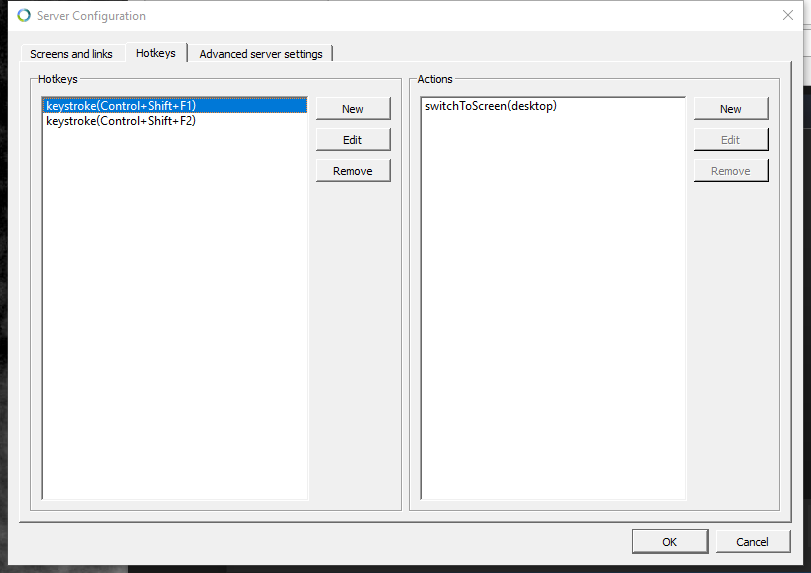
I configure some hotkeys to switch between my windows server / linux desktop client. When I have issues with mouse or keys on the client I enter the hotkey sequence to switch back to the server, then back to the client, and this resolves the issue. I have seen occasionally that I need to do this a couple of times instead of just once.
Screenshot of my hotkey config as an example
ghost
on 1 Sep 2017
I have a Windows 10 Server, with two monitors. Primary @150% secondary at 100% DPI.
I have a Windows 10 Client with single monitor @200%
Screen layout (if it matters) is:
| Server-Secondary | Server-Primary | Client-Primary |
Mouse movement always works, but actual click functionality stops working at seemingly random times.
Opening the Synergy app on the Server clears things up for a short time.
Reconnecting client to server (from the client's input devices) works for a short time.
Would really love to see this fixed, as it makes relying on the product difficult.
 fuzzzerd
on 12 Sep 2017
fuzzzerd
on 12 Sep 2017
We do plan to fix this, but the issue is very rare. We are investigating the cause. It happens rarely, is very intermittent (random) and is difficult to reproduce. If you think you're experiencing this issue, please contact the support team: https://symless.com/contact/customer-support
Workaround: For Synergy 1, click Apply on the server (to restart the core process). For Synergy 2, press shift+f5 or shift+fn+f5 on the server to restart background service (and core process). The bug occurs on the server, so it's important the workaround is done on the server (not the client).
 nbolton
on 26 Sep 2017
nbolton
on 26 Sep 2017
Related issues
 bigbear3001
·
4Comments
bigbear3001
·
4Comments
 LeTink
·
4Comments
LeTink
·
4Comments
 ColinCreamer
·
5Comments
ColinCreamer
·
5Comments
 legonigel
·
4Comments
legonigel
·
4Comments
 jenelcohen
·
4Comments
jenelcohen
·
4Comments
Most helpful comment
I have a similar issue, Windows 10 as server and MacOS Sierra as the client. I've tried to recreate this but it really just seems to be at the most inconvenient times...
Enjoy using this software but this is getting irritating.