Syndesis: Data tab needs a Tech Preview label
See also https://issues.jboss.org/browse/ENTESB-11445
This is a...
[ ] Feature request
[ ] Regression (a behavior that used to work and stopped working in a new release)
[x] Bug report
[ ] Documentation issue or request
Description
The Data Virtualization part of Syndesis is Tech Preview in this release, but this is not reflected anywhere in the UI. I suggest a Tech Preview badge on the menu item itself, or in the Data Virtualization page header:

 asmigala
All 16 comments
@amysueg @dongniwang Can we get a UX suggestion for this? We need need it quickly ...
 heiko-braun
on 3 Jul 2019
heiko-braun
on 3 Jul 2019
Design: https://docs.google.com/presentation/d/1Khs8lJV9X3Hm80rOjcMBuytxYGpMFTMNB9huMLjSdOQ/edit#slide=id.g5ba6289e41_0_244
@lboehling @dongniwang @seanforyou23 Thoughts?
 amysueg
on 5 Jul 2019
amysueg
on 5 Jul 2019
I think the second option with the box around it sticks out more which is kinda what we want. With just the text I find it kinda blends in with the page title and I don't really "see" it as readily.
 gashcrumb
on 5 Jul 2019
gashcrumb
on 5 Jul 2019
I agree @gashcrumb
Let's go ahead with this approach @mcoker
We can always tweak if necessary but at least we'll have a way to call out that the feature is Tech Preview.
amysueg
on 5 Jul 2019
@gashcrumb I'm not sure how to add it to i18nTitle on <SimplePageHeader>, or if that is the best approach?
The markup I used for that was below, where the BEM block name virtualizations-page in .virtualizations-page__tech-preview should just represent the component this is added to. This could go inside of the page header <h1 class="pf-c-title pf-m-2xl">...</h1>
<span class="virtualizations-page__tech-preview" style="
    font-size: 14px;
    margin-left: 16px;
    border: 1px solid black;
    padding: 3px 4px;
">Technical Preview <i class="pficon pficon-info"></i></span>
Also the screenshot in the deck and the code above aligns the TP text with the heading text, which means the bottom border of the TP text extends below the heading text.
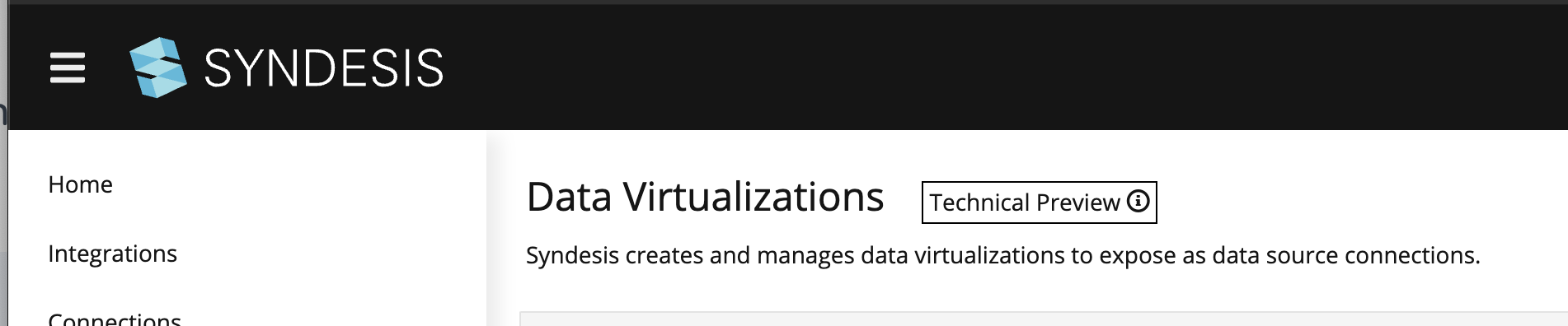
Here's what it would look like if we applied display: flex; align-items: center; to the <h1> that wraps the heading and TP text, to vertically align the TP box/text centered relative to the heading text.

Do you want to make this update, or could you give me a pointer on how to make this update? FWIW, my local server doesn't have any data either. I get the "Something is wrong" empty state display with error Error: Failed to fetch for integrations, connections, etc.
@amysueg do you have a preference in how that displays?
 mcoker
on 5 Jul 2019
mcoker
on 5 Jul 2019
@mcoker Great work. I prefer the second screenshot, looks better aligned to my eye. Thank you!
amysueg
on 5 Jul 2019
@mcoker Can you get this into master today?
heiko-braun
on 8 Jul 2019
@mcoker I think one option would be to add a flag isTechPreview to the SimpleHeader and change its JSX so to render what you need to be rendered when set.
 riccardo-forina
on 8 Jul 2019
riccardo-forina
on 8 Jul 2019
@riccardo-forina thanks! I'll give that a shot.
mcoker
on 8 Jul 2019
@mcoker any update on this?
heiko-braun
on 9 Jul 2019
@heiko-braun I submitted a PR yesterday but the build was failing. Looks like there was a fix pushed to fix the build, so I rebased and it's rebuilding now. Hopefully we can merge this when the build finishes. https://github.com/syndesisio/syndesis/pull/6091
mcoker
on 9 Jul 2019
thanks, I didn't notice that.
heiko-braun
on 9 Jul 2019
@heiko-braun the build passed, just needs to be merged https://github.com/syndesisio/syndesis/pull/6091
mcoker
on 9 Jul 2019
The Technology Preview badge only shows up when Data Virtualization is enabled in the syndesis-ui-config config map:

It does not show up when Data Virtualization is disabled (which is the default on a newly installed syndesis):
 asmigala
on 16 Jul 2019
asmigala
on 16 Jul 2019
It does not show up when Data Virtualization is disabled
This does no harm. I am lowering the prio on this one.
heiko-braun
on 16 Jul 2019
Migrated to https://issues.jboss.org/browse/ENTESB-11445
heiko-braun
on 7 Sep 2019
Related issues
 mcada
·
6Comments
mcada
·
6Comments
 zregvart
·
3Comments
gashcrumb
·
4Comments
mcoker
·
5Comments
mcoker
·
5Comments
zregvart
·
3Comments
gashcrumb
·
4Comments
mcoker
·
5Comments
mcoker
·
5Comments