Syndesis: Atlas Map step fails to load in some cases
This is a...
[ ] Feature request
[x] Regression (a behavior that used to work and stopped working in a new release)
[ ] Bug report
[ ] Documentation issue or request
Description
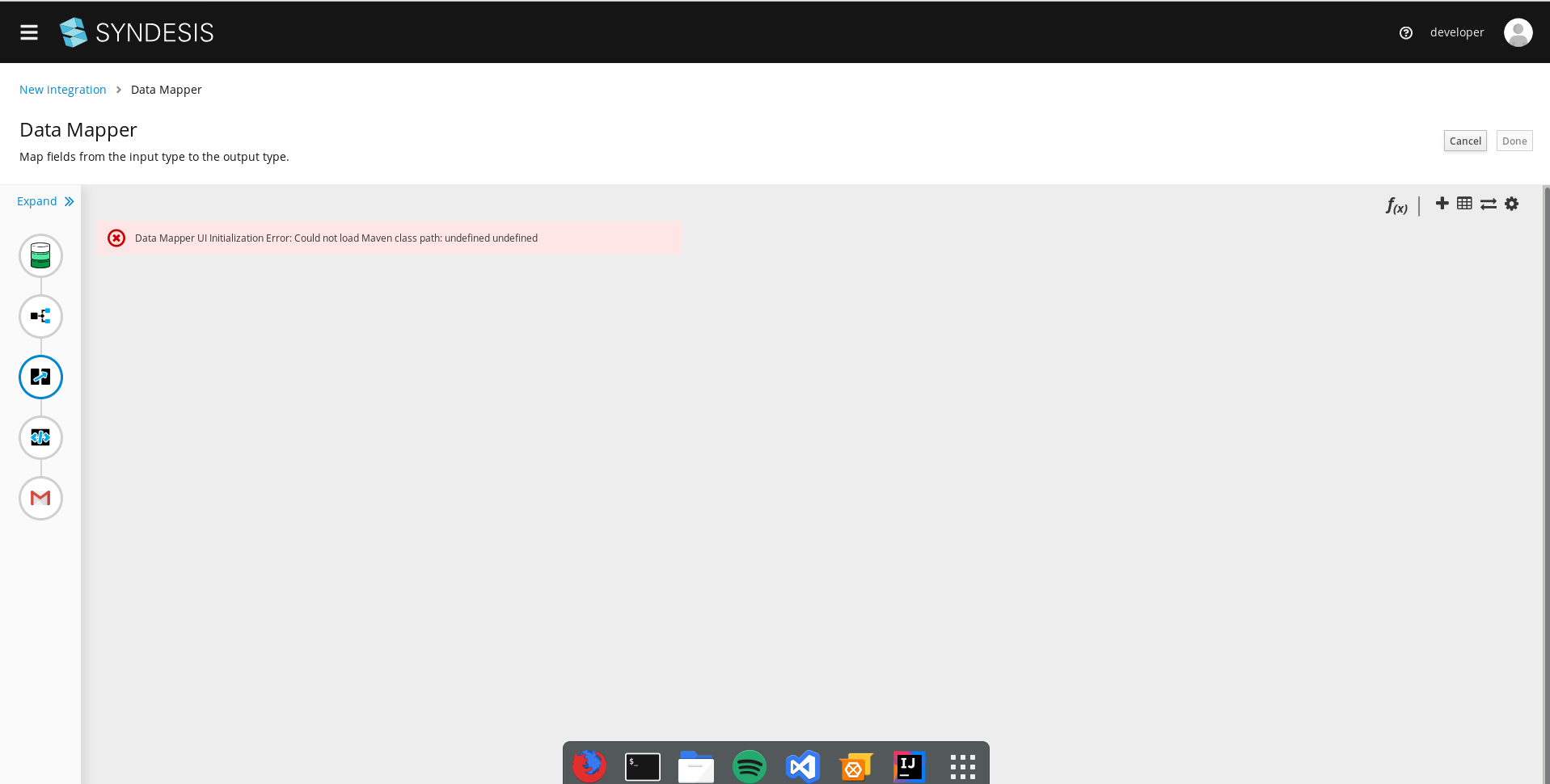
Trying to add a data mapper step between a Get a specific Event and Create Event, an error message is shown instead of the data mapper ui:
Data Mapper UI Initialization Error: Could not load Maven class path: undefined undefined

Steps to reproduce:
- Start step: timer
- Finish step: Create Event
- Add a Get a specific Event in between
- Try to add a data mapper step between the two google calendar steps
 asmigala
All 47 comments
Happened to me as well with this integration:
- Db select * from contact
- split
- datamapper
- Gmail
 mmuzikar
on 6 Jun 2019
mmuzikar
on 6 Jun 2019
What's the content of the config.json? It sounds like some misconfiguration of the atlasmap paths there.
 riccardo-forina
on 6 Jun 2019
riccardo-forina
on 6 Jun 2019
@riccardo-forina where do I find the config.json?
asmigala
on 6 Jun 2019
{
  "apiBase": "https://syndesis.my-minishift.syndesis.io",
  "apiEndpoint": "/api/v1",
  "title": "Syndesis",
  "consoleUrl": "",
  "project": "syndesis",
  "datamapper": {
    "baseMappingServiceUrl": "https://syndesis.my-minishift.syndesis.io/api/v1/atlas/",
    "baseJavaInspectionServiceUrl": "https://syndesis.my-minishift.syndesis.io/api/v1/atlas/java/",
    "baseXMLInspectionServiceUrl": "https://syndesis.my-minishift.syndesis.io/api/v1/atlas/xml/",
    "baseJSONInspectionServiceUrl": "https://syndesis.my-minishift.syndesis.io/api/v1/atlas/json/",
    "disableMappingPreviewMode": false
  },
  "datavirt": {
    "dvUrl": "/vdb-builder/v1/"
  },
  "features" : {
    "logging": false
  },
  "branding": {
    "appName": "Syndesis",
    "favicon32": "/favicon-32x32.png",
    "favicon16": "/favicon-16x16.png",
    "touchIcon": "/apple-touch-icon.png",
    "productBuild": false
 }
}
Hi, I have the same problem when slack is involved.
 mmelko
on 6 Jun 2019
mmelko
on 6 Jun 2019
https://syndesis.my-minishift.syndesis.io/api/v1/atlas/mapping/GZ/adm-catalog-files.gz
Is that URL working? It should return a 204 response.
riccardo-forina
on 6 Jun 2019
Anyway the errors you all are seeing have nothing to do with the mapping you're trying to setup, but with the support API not working as they should. There could be a bug in how we embedded Atlasmap in Syndesis, mind.
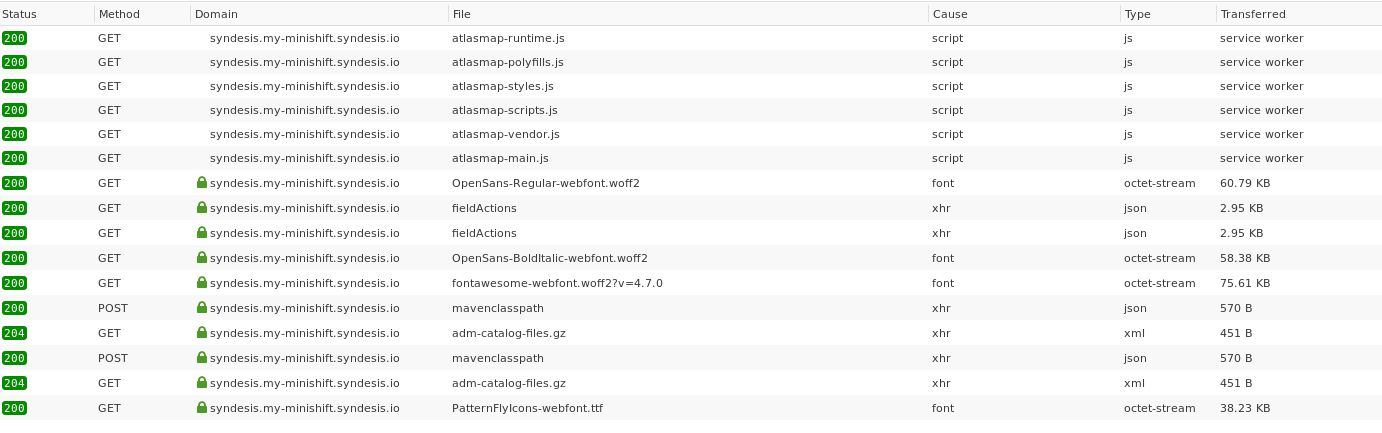
Can you check the network panel for calls to /api/v1/atlas and see how they do?
riccardo-forina
on 6 Jun 2019
Yup, returns 204, but when I went there through the browser, I got that login issue (#5602)m not sure if that's significant
asmigala
on 6 Jun 2019
I think it is, it looks like the session is somehow not "right", for the lack of a better way to say it.
riccardo-forina
on 6 Jun 2019
asmigala
on 6 Jun 2019
Yeah I don't know in details how this works... @igarashitm any idea?
riccardo-forina
on 6 Jun 2019
Weird thing is that it fails only in some cases (a different test that maps google calendar -> sql works ok)
asmigala
on 6 Jun 2019
Anyway the errors you all are seeing have nothing to do with the mapping you're trying to setup
I guess I was wrong. I did a few tests on my end here and it looks like support APIs are called depending on the shape you're dealing with. I'm sorry I don't think I can help any further, Tomo would be your best bet here.
riccardo-forina
on 6 Jun 2019
@igarashitm please see above
asmigala
on 6 Jun 2019
Hmm weird, is there any errors in syndesis-server pod log? and is there any existing integration so I can see it reproduced? Otherwise I have to setup my own credentials for testing GMail account and etc
 igarashitm
on 6 Jun 2019
igarashitm
on 6 Jun 2019
So this shows mavenclasspath request returned with 200 OK https://github.com/syndesisio/syndesis/issues/5622#issuecomment-499471520
which conflicts with what error message says. Currently I can't see what's going on...
igarashitm
on 6 Jun 2019
It should be coming from one of these two
https://github.com/atlasmap/atlasmap/blob/698563b1948226b411ccad04a4e384e95bb4052f/ui/src/app/lib/atlasmap-data-mapper/services/initialization.service.ts#L523
https://github.com/atlasmap/atlasmap/blob/698563b1948226b411ccad04a4e384e95bb4052f/ui/src/app/lib/atlasmap-data-mapper/services/initialization.service.ts#L648
igarashitm
on 6 Jun 2019
This behavior happens when a connector such as GMail or others probably because of authentication. This issue does not happen from GMail to DB, but from DB to GMail... if that helps you somehow
mmuzikar
on 6 Jun 2019
Connector authentication thing shouldn't affect Data Mapper UI to come up. And if it's authentication related, I would expect we can see HTTP 401 or something is returned in network tab.
More weird thing is that, mavenclasspath REST endpoint is overridden in Syndesis here
https://github.com/syndesisio/syndesis/blob/master/app/server/endpoint/src/main/java/io/syndesis/server/endpoint/v1/handler/atlas/SyndesisJavaService.java
This is empty and always returns 200 OK. Something wrong with other than network...
igarashitm
on 6 Jun 2019
@mmuzikar is it possible for you to setup this integration on staging site?
igarashitm
on 6 Jun 2019
@igarashitm I created "slack_qe" connection on staging2. You can try create integration from DB (select * from todo) to slack (channel = general for example). And after adding datamapper you will see the error. I also noticed that this occurs when some of the components are on target side.
mmelko
on 7 Jun 2019
OK, I got what this error message means in this case. There is/are Java DataShapes which doesn't have pre-computed inspection attached. In that case AtlasMap tries to resolve Java class from Maven classpath instead, and it of course fails as well (since Syndesis disables mavenclasspath resolution).
https://github.com/atlasmap/atlasmap/blob/698563b1948226b411ccad04a4e384e95bb4052f/ui/src/app/lib/atlasmap-data-mapper/services/initialization.service.ts#L638-L648
https://github.com/atlasmap/atlasmap/blob/698563b1948226b411ccad04a4e384e95bb4052f/ui/src/app/lib/atlasmap-data-mapper/models/config.model.ts#L265-L266
So somehow slack inputDataShape fails to attach pre-computed inspection result for its Java class. I guess it's connector metadata specific problem.
igarashitm
on 7 Jun 2019
We'll also investigate if we can improve error message in AtlasMap - https://github.com/atlasmap/atlasmap/issues/971
igarashitm
on 7 Jun 2019
@igarashitm I just encountered problem with atlasmap which happens whenever I try to create datamapper to template which causes white screen and these errors in the console:
Error: "output document shape kind not supported"
    m utils.ts:184
    pr utils.ts:160
    render utils.js:753
    React 8

    render

    La

    qi

    Yi

    jc

    zc

    Ac

    En
react-dom.production.min.js:4408
Error: "output document shape kind not supported"
    m utils.ts:184
    pr utils.ts:160
    render utils.js:753
    React 8
react-dom.production.min.js:4408
Error: output document shape kind not supported utils.ts:184:10
    m utils.ts:184
    pr utils.ts:160
    render utils.js:753
    React 8
    En (index):1019
Do you think it's related or should I open another issue for that?
mmuzikar
on 10 Jun 2019
I this is on us, it's an error that happens when we don't recognize the output shape, aka the data type required by the step following the position where the mapper is being added.
Can you share the steps to reproduce this?
riccardo-forina
on 10 Jun 2019
Try to create this integration:
Start: timer
End: log
Add Template between those two with any text "{{test}}" will suffice
And then try to place datamapper in front of template
mmuzikar
on 10 Jun 2019
Checking this against the Angular app I'd say the problem is allowing the Template step to be selected. It looks like we are missing a requiresOutputDataShape decorator around it. Can you open an issue about that? I'll submit a PR to fix it.
riccardo-forina
on 10 Jun 2019
Ok resuming conversation in #5652
mmuzikar
on 10 Jun 2019
@mmuzikar are there any outstanding issues on this or can we close it?
 paoloantinori
on 10 Jun 2019
paoloantinori
on 10 Jun 2019
@paoloantinori With the integration I reported (DB -> split -> datamapper -> GMail)
It now displays the SQL Result datashape, but MailMessage is empty. (Had to leave out template step because of #5652 )
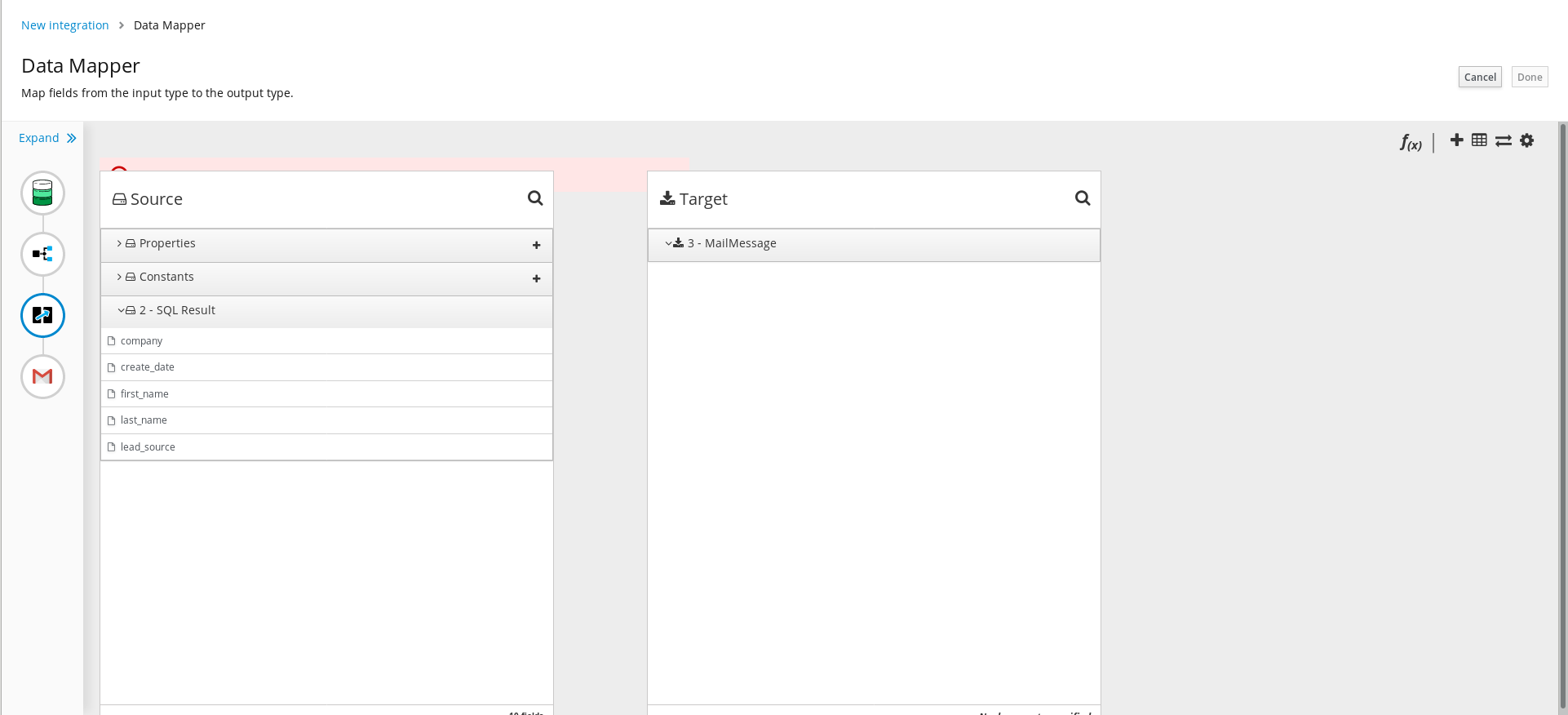
The error message behind the atlas mapper states: Could not load JAVA document. Document is not found: -Lh4JlAAqNyq4epf7yq2
mmuzikar
on 11 Jun 2019
which means GMail inputDataShape didn't provide pre-computed inspection result into Data Mapper UI.
igarashitm
on 11 Jun 2019
I found this same error message when doing a simple integration google-calendar -> twitter-direct-message.
Click on the link to open
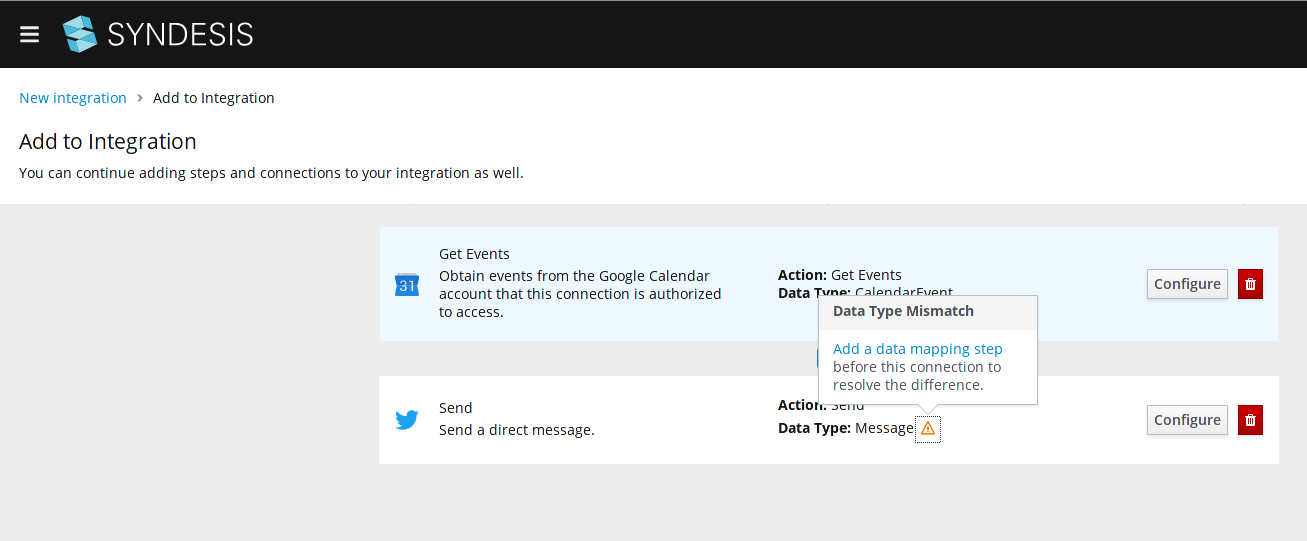
There are no errors on syndesis-server, syndesis-meta.
Browser console shows: Unhandled Navigation Error: only
It works on legacy-ui
 claudio4j
on 13 Jun 2019
claudio4j
on 13 Jun 2019
Latest master(29e5091c37a53da3fb1b8f8fcd8b259eb28fa6c9)
Can create the following integration
- DB (Select * from CONFIG)
- Split
- Data Mapper
- GMail
However, when published it produces the following error message:
Message History
---------------------------------------------------------------------------------------------------------------------------------------
RouteId              ProcessorId          Processor                                                                        Elapsed (ms)
[-Lhu5fS5TAUD0ukiXN] [-Lhu5fS5TAUD0ukiXN] [timer://integration?period=60000                                              ] [       952]
[-Lhu5fS5TAUD0ukiXN] [setHeader3        ] [setHeader[Syndesis.STEP_ID]                                                   ] [         0]
[-Lhu5fS5TAUD0ukiXN] [capture-out:-Lhu5m] [Processor@0x7ec6577                                                           ] [         0]
[-Lhu5fS5TAUD0ukiXN] [step:-Lhu5mzXTAUD0] [pipeline                                                                      ] [         2]
[-Lhu5fS5TAUD0ukiXN] [setHeader4        ] [setHeader[Syndesis.STEP_ID]                                                   ] [         0]
[-Lhu5fS5TAUD0ukiXN] [process1          ] [Processor@0x11b2217a                                                          ] [         0]
[-Lhu5fS5TAUD0ukiXN] [to2               ] [atlas:mapping-flow-0-step-2.json?encoding=UTF-8&sourceMapName=Syndesis.CAPTURE] [         1]
[-Lhu5fS5TAUD0ukiXN] [capture-out:-Lhu5m] [Processor@0x7ec6577                                                           ] [         0]
[-Lhu5fS5TAUD0ukiXN] [step:-Lhu5iuuTAUD0] [pipeline                                                                      ] [         0]
[-Lhu5fS5TAUD0ukiXN] [setHeader5        ] [setHeader[Syndesis.STEP_ID]                                                   ] [         0]
[-Lhu5fS5TAUD0ukiXN] [to3               ] [google-mail-0-3                                                               ] [         0]

Stacktrace
---------------------------------------------------------------------------------------------------------------------------------------

java.lang.NullPointerException: null
        at com.google.common.base.Preconditions.checkNotNull(Preconditions.java:877) ~[guava-27.0.1-jre.jar!/:na]
        at com.google.common.base.Splitter.splitToList(Splitter.java:409) ~[guava-27.0.1-jre.jar!/:na]
        at io.syndesis.connector.gmail.GmailSendEmailCustomizer.getAddressesList(GmailSendEmailCustomizer.java:125) ~[connector-gmail-1.7-SNAPSHOT.jar!/:1.7-SNAPSHOT]
        at io.syndesis.connector.gmail.GmailSendEmailCustomizer.createMessage(GmailSendEmailCustomizer.java:105) ~[connector-gmail-1.7-SNAPSHOT.jar!/:1.7-SNAPSHOT]
        at io.syndesis.connector.gmail.GmailSendEmailCustomizer.beforeProducer(GmailSendEmailCustomizer.java:91) ~[connector-gmail-1.7-SNAPSHOT.jar!/:1.7-SNAPSHOT]
        at org.apache.camel.util.AsyncProcessorConverterHelper$ProcessorToAsyncProcessorBridge.process(AsyncProcessorConverterHelper.java:61) ~[camel-core-2.21.0.fuse-740028.jar!/:2.21.0.fuse-740028]
        at org.apache.camel.processor.Pipeline.process(Pipeline.java:138) [camel-core-2.21.0.fuse-740028.jar!/:2.21.0.fuse-740028]
        at org.apache.camel.processor.Pipeline.process(Pipeline.java:101) [camel-core-2.21.0.fuse-740028.jar!/:2.21.0.fuse-740028]
        at io.syndesis.integration.component.proxy.ComponentProxyProducer.process(ComponentProxyProducer.java:44) ~[integration-component-proxy-1.7-SNAPSHOT.jar!/:1.7-SNAPSHOT]
        at org.apache.camel.processor.SendProcessor.process(SendProcessor.java:148) ~[camel-core-2.21.0.fuse-740028.jar!/:2.21.0.fuse-740028]
        at org.apache.camel.processor.DelegateAsyncProcessor.process(DelegateAsyncProcessor.java:110) [camel-core-2.21.0.fuse-740028.jar!/:2.21.0.fuse-740028]
        at org.apache.camel.processor.RedeliveryErrorHandler.process(RedeliveryErrorHandler.java:548) [camel-core-2.21.0.fuse-740028.jar!/:2.21.0.fuse-740028]
        at org.apache.camel.processor.CamelInternalProcessor.process(CamelInternalProcessor.java:201) [camel-core-2.21.0.fuse-740028.jar!/:2.21.0.fuse-740028]
        at org.apache.camel.processor.Pipeline.process(Pipeline.java:138) [camel-core-2.21.0.fuse-740028.jar!/:2.21.0.fuse-740028]
        at org.apache.camel.processor.Pipeline.process(Pipeline.java:101) [camel-core-2.21.0.fuse-740028.jar!/:2.21.0.fuse-740028]
        at org.apache.camel.processor.DelegateAsyncProcessor.process(DelegateAsyncProcessor.java:110) [camel-core-2.21.0.fuse-740028.jar!/:2.21.0.fuse-740028]
        at io.syndesis.integration.runtime.logging.ActivityTrackingInterceptStrategy$TrackDoneEventProcessor.process(ActivityTrackingInterceptStrategy.java:121) [integration-runtime-1.7-SNAPSHOT.jar!/:1.7-SNAPSHOT]
        at org.apache.camel.processor.DelegateAsyncProcessor.process(DelegateAsyncProcessor.java:110) [camel-core-2.21.0.fuse-740028.jar!/:2.21.0.fuse-740028]
        at org.apache.camel.processor.RedeliveryErrorHandler.process(RedeliveryErrorHandler.java:548) [camel-core-2.21.0.fuse-740028.jar!/:2.21.0.fuse-740028]
        at org.apache.camel.processor.CamelInternalProcessor.process(CamelInternalProcessor.java:201) [camel-core-2.21.0.fuse-740028.jar!/:2.21.0.fuse-740028]
        at org.apache.camel.processor.Pipeline.process(Pipeline.java:138) [camel-core-2.21.0.fuse-740028.jar!/:2.21.0.fuse-740028]
        at org.apache.camel.processor.Pipeline.process(Pipeline.java:101) [camel-core-2.21.0.fuse-740028.jar!/:2.21.0.fuse-740028]
        at org.apache.camel.processor.RedeliveryErrorHandler.process(RedeliveryErrorHandler.java:548) [camel-core-2.21.0.fuse-740028.jar!/:2.21.0.fuse-740028]
        at org.apache.camel.processor.CamelInternalProcessor.process(CamelInternalProcessor.java:201) [camel-core-2.21.0.fuse-740028.jar!/:2.21.0.fuse-740028]
        at org.apache.camel.processor.MulticastProcessor.doProcessSequential(MulticastProcessor.java:715) [camel-core-2.21.0.fuse-740028.jar!/:2.21.0.fuse-740028]
        at org.apache.camel.processor.MulticastProcessor.doProcessSequential(MulticastProcessor.java:638) [camel-core-2.21.0.fuse-740028.jar!/:2.21.0.fuse-740028]
        at org.apache.camel.processor.MulticastProcessor.process(MulticastProcessor.java:248) [camel-core-2.21.0.fuse-740028.jar!/:2.21.0.fuse-740028]
        at org.apache.camel.processor.Splitter.process(Splitter.java:122) [camel-core-2.21.0.fuse-740028.jar!/:2.21.0.fuse-740028]
        at org.apache.camel.processor.DelegateAsyncProcessor.process(DelegateAsyncProcessor.java:110) [camel-core-2.21.0.fuse-740028.jar!/:2.21.0.fuse-740028]
        at org.apache.camel.processor.RedeliveryErrorHandler.process(RedeliveryErrorHandler.java:548) [camel-core-2.21.0.fuse-740028.jar!/:2.21.0.fuse-740028]
        at org.apache.camel.processor.CamelInternalProcessor.process(CamelInternalProcessor.java:201) [camel-core-2.21.0.fuse-740028.jar!/:2.21.0.fuse-740028]
        at org.apache.camel.processor.Pipeline.process(Pipeline.java:138) [camel-core-2.21.0.fuse-740028.jar!/:2.21.0.fuse-740028]
        at org.apache.camel.processor.Pipeline.process(Pipeline.java:101) [camel-core-2.21.0.fuse-740028.jar!/:2.21.0.fuse-740028]
        at org.apache.camel.processor.CamelInternalProcessor.process(CamelInternalProcessor.java:201) [camel-core-2.21.0.fuse-740028.jar!/:2.21.0.fuse-740028]
        at org.apache.camel.component.timer.TimerConsumer.sendTimerExchange(TimerConsumer.java:197) [camel-core-2.21.0.fuse-740028.jar!/:2.21.0.fuse-740028]
        at org.apache.camel.component.timer.TimerConsumer$1.run(TimerConsumer.java:79) [camel-core-2.21.0.fuse-740028.jar!/:2.21.0.fuse-740028]
        at java.util.TimerThread.mainLoop(Timer.java:555) [na:1.8.0_191]
        at java.util.TimerThread.run(Timer.java:505) [na:1.8.0_191]
Will fix this first then, since this is currently using angular-ui, will see if this or other highlighted problems surface in react-ui.
 phantomjinx
on 21 Jun 2019
phantomjinx
on 21 Jun 2019
Ummm .... hmmm .... would help if I'd added a 'to' address in my haste. Have added some checks in _GmailSendEmailCustomizer_ for this but otherwise adding a 'to' address, everything worked ok and I have emails being sent alright.
Will repeat process in react-ui.
phantomjinx
on 21 Jun 2019
react-ui fails to load the DataMapper UI of existing integration. Error message:
Could not load JAVA document. Document is not found: -LhuN1_NDj811hNuO9qn
Console messages:
index.js:42 Unknown parameter :flowId in pattern /integrations/:integrationId/edit/editor/
atlasmap-vendor.js:11603 Unhandled Navigation Error:
phantomjinx
on 21 Jun 2019
That is interesting - react-ui fails to feed pre-computed inspection result for Java DataShape into Data Mapper step for some connectors. I have no idea how could it happen...
Specifically this line:
https://github.com/syndesisio/syndesis/blob/master/app/ui-react/packages/atlasmap-assembly/src/app/data-mapper-host.component.ts#L139
@riccardo-forina any guess?
igarashitm
on 21 Jun 2019
ahhhh actually here
https://github.com/syndesisio/syndesis/blob/master/app/ui-react/packages/atlasmap-assembly/src/app/data-mapper-host.component.ts#L151
host component is not literally passing inspectionResult to the outputDoc - which corresponds to a inputDataShape of following DataShape aware step.
igarashitm
on 21 Jun 2019
Thanks @phantomjinx , you revealed it's a react-ui only problem and it brought me to the answer. I believe #5867 will fix this.
igarashitm
on 21 Jun 2019
The issue is still present. My integration is: Twitter (Mention) -> mapper -> Salesforce (create or update record)
Console error: Unhandled Navigation Error
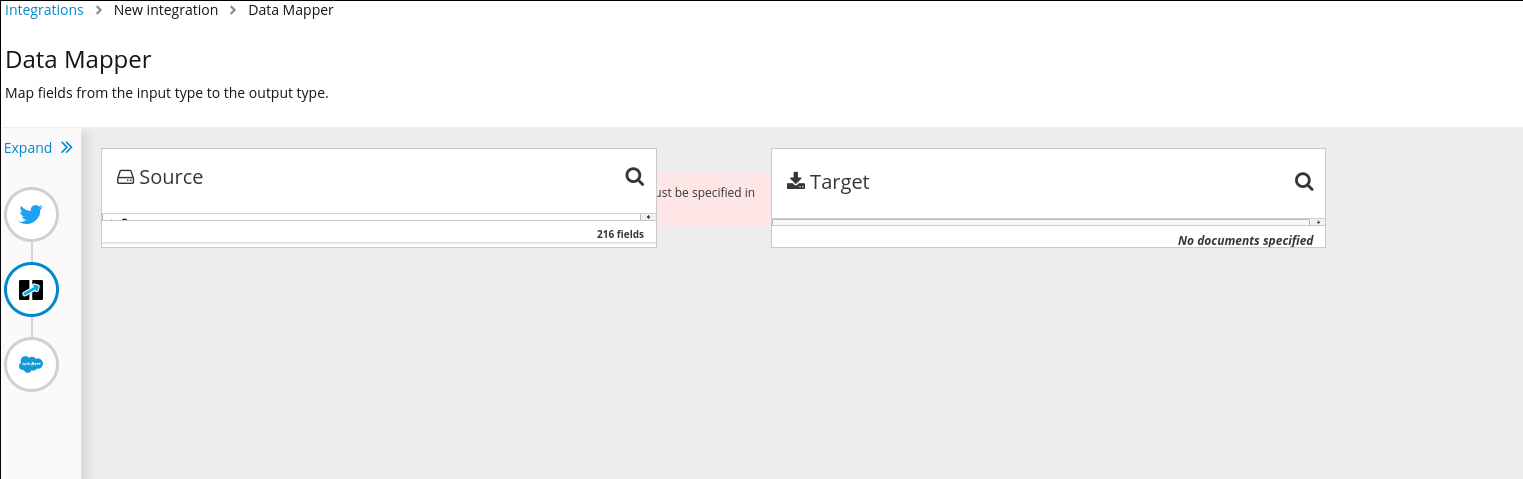
This issue blocks most of the QE tests.
 mcada
on 27 Jun 2019
mcada
on 27 Jun 2019
Lemme take a peek, think this is actually a second issue showing up alongside the one that Tomo fixed.
 gashcrumb
on 27 Jun 2019
gashcrumb
on 27 Jun 2019
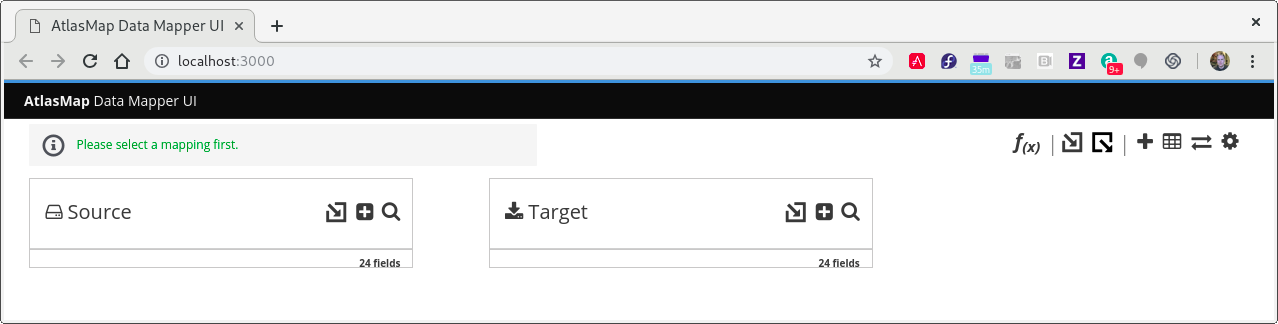
If I squeeze the stand-alone DM the error window still appears in the correct position. Must be a style-sheet conflict that's affecting the Spurce/Target panels.
 pleacu
on 27 Jun 2019
pleacu
on 27 Jun 2019
as it turns out, the data shape configuration for the salesforce step wasn't right, I've tracked it down to the action configuration and it doesn't look like we've been building up the configured properties object as expected. Think I have it fixed, just validating it a bit more.
gashcrumb
on 27 Jun 2019
The layout conflict issue on error area & Sources pane Paul mentioned above is tracked on #5579
igarashitm
on 27 Jun 2019
BTW when verifying this you'll need to delete and re-add that salesforce connection at the very least, the issue was actually being caused by the way the UI was building the configured properties object, leading to the wrong descriptor being applied to the salesforce step.
gashcrumb
on 28 Jun 2019
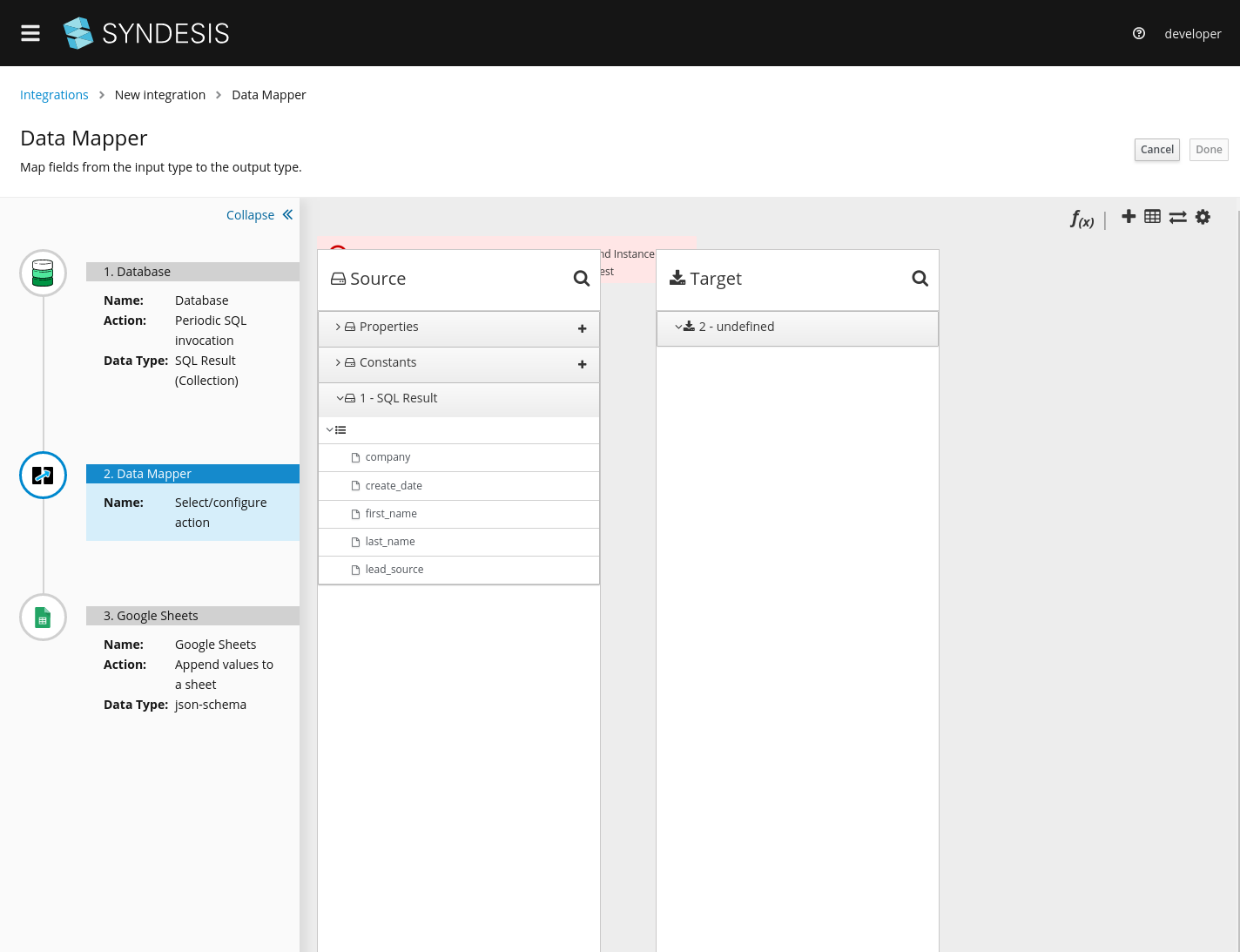
fyi I hit this too with DB->Datamapper->Spreadsheet integration.
mmelko
on 28 Jun 2019
yeah, I think it's a similar situation, look at the "Data Type" there in the screenshot. I think it's supposed to be showing a more specific type, for example with salesforce it should actually be showing something like "Salesforce Contact Object" or something along those lines, the json-schema text is a fallback if the data shape doesn't have a name set for it. And again, you'd have to re-do either the whole integration or at least delete and re-do the finish connection in the integration, as the problem is the stored configuration isn't correct. Actually probably just going through the connection configuration a second time might do it, but to be safe I'd recommend deleting the finish step and then re-configuring.
gashcrumb
on 28 Jun 2019
Can no longer reproduce with 1.7.8, closing
asmigala
on 2 Jul 2019
Related issues
 tplevko
·
4Comments
mmelko
·
5Comments
mcada
·
5Comments
tplevko
·
4Comments
mmelko
·
5Comments
mcada
·
5Comments
 honghuac
·
4Comments
mcada
·
6Comments
honghuac
·
4Comments
mcada
·
6Comments