Syndesis: Visual Distinction between Preview Connector types
This is a...
[ X] Feature request
[ ] Regression (a behavior that used to work and stopped working in a new release)
[ ] Bug report
[ ] Documentation issue or request
The problem
There are essentially two types of connectors:
Full Support connectors
- have user stories
- are tested
- are documented
- are fully supported by Red Hat
Preview connectors
- do not require user stories
- may or may not be tested
- have upstream documentation at best
- are not supported by Red Hat, but we do take feedback from customers and plan to include in product at some point
Need to visually differentiate the two groups. Preview connectors would be labeled "Preview"
Expected behavior
Preview connectors would be indicated as being a "Preview". Determine best visual indicator.
Screenshot
Request and Response Data
API Endpoints and Schemas
Tasks involved / Steps to Reproduce
- Determine visual Design
- Review
- Implement
 sjcox-rh
All 16 comments
Wanted to find out if the indicator would show up only for connector cards or for both connector and connection cards?
cc: @heiko-braun @zregvart @avano @kcbabo
 dongniwang
on 26 Jul 2018
dongniwang
on 26 Jul 2018
@dongniwang and I discussed the best approach for this as well as asked for suggestions from another visual designer.
We ultimately decided on the visual treatment below:
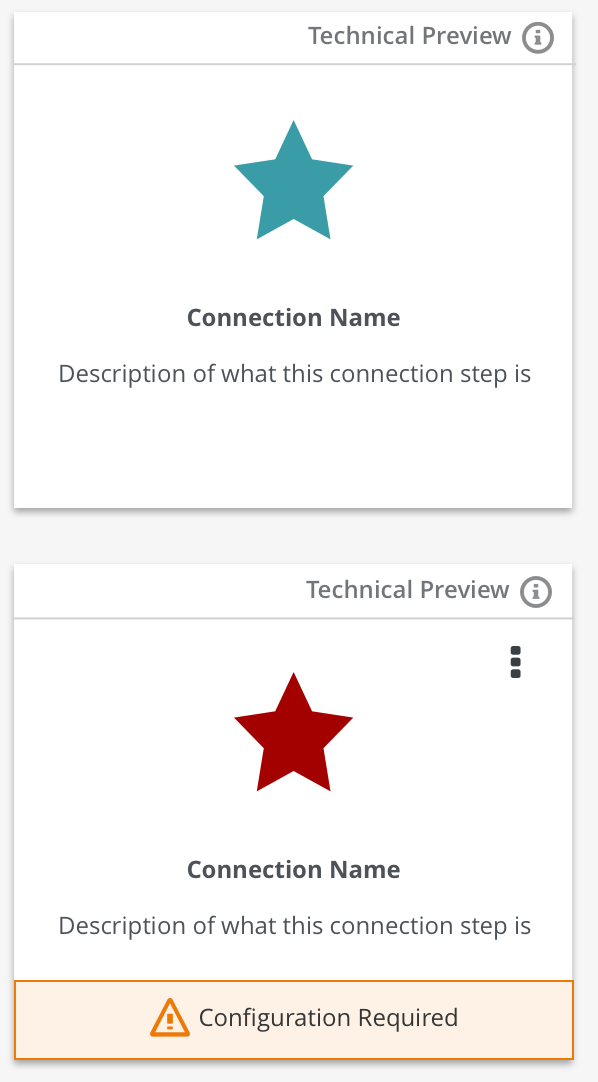
The top image is an example of how the connector card would appear in the connection creation workflow.
The bottom card shows an example of a connection card (connection list view). Please note that not every connection card view will show a kabob menu or the config required notice. We just wanted to provide an example of what it would look like with all variations.
This approach is subtle enough to not distract the user from their flow, but informs the user that it's a preview connector.
The info icon would trigger a popover that would briefly explain what a preview connector is and how it's different from the rest. @TovaCohen Is this something you can help with?
@kcbabo @gashcrumb @paoloantinori @zregvart @heiko-braun @valdar @avano Please review and let us know if you have any feedback!
FYI: @amysueg @michael-coker @seanforyou23
sjcox-rh
on 26 Jul 2018
SHIP. IT.
 kcbabo
on 26 Jul 2018
kcbabo
on 26 Jul 2018
+1
 gashcrumb
on 26 Jul 2018
gashcrumb
on 26 Jul 2018
+1
 avano
on 27 Jul 2018
avano
on 27 Jul 2018
@gashcrumb Can you pair with @zregvart for the implementation?
 heiko-braun
on 27 Jul 2018
heiko-braun
on 27 Jul 2018
Of course! @zregvart maybe we can just add a metatdata item to the connector if it supports metadata. If not maybe we should sort that :-)
gashcrumb
on 27 Jul 2018
Customer Content Services has boilerplate text for describing Technology Preview features. Based on that:
Replace "Technical Preview" with "Technology Preview". This is the standard Red Hat term.
For the popover, depending on whether you want to be more cautious or more encouraging:
Cautious Option 1:
Technology Preview features are not supported with Red Hat production service-level agreements and might not be functionally complete. Red Hat does not recommend them for production.
Encouraging Option 2:
Technology Preview features provide early access to features that are not supported.
Whichever option you choose, the first two words, "Technology Preview" should be a link to more information here:
 TovaCohen
on 27 Jul 2018
TovaCohen
on 27 Jul 2018
Here's the PF popover pattern https://www.patternfly.org/pattern-library/widgets/#popover
If we can link to more information via "Technology Preview", then my vote is the encouraging option 2.
dongniwang
on 27 Jul 2018
@TovaCohen currently we have: Technology preview (lowercase p) and We're happy to provide you with this early access preview feature, we encourage to provide feedback but limit our support to best effort..
I can change to what you suggest. I was thinking of something that would encourage feedback. What do you think?
@dongniwang I opted to work with the tooltips we already have, it looks like this:
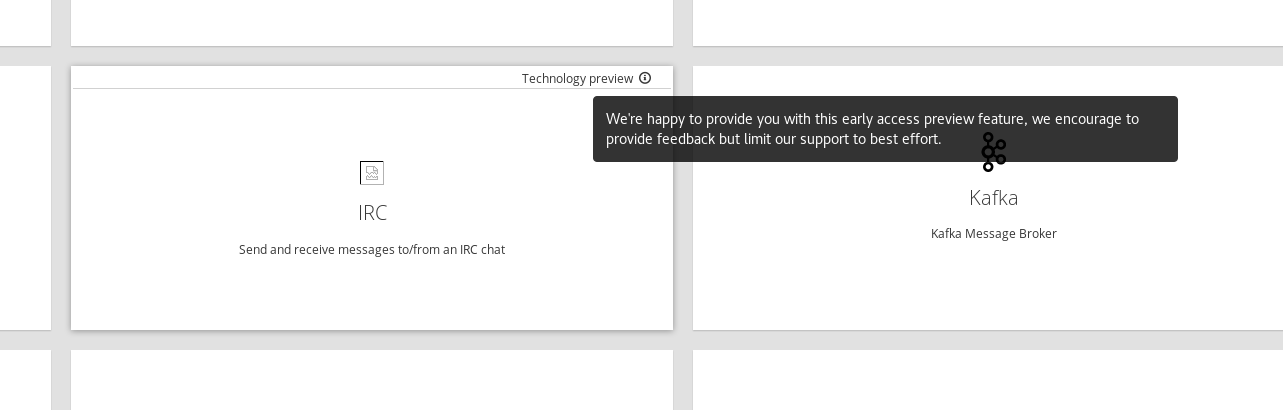
Does that work?
 zregvart
on 27 Jul 2018
zregvart
on 27 Jul 2018
@zregvart - The issue with using tooltip is that we can't have links in tooltips and tooltips only appear on hover. I agreed with Tova that having the link to that page is a good idea since it provides a comprehensive explanation.
In terms of wording, I would recommend following suggestions provided by @TovaCohen. Also, is there a reason why we're using lowercase p?
I can't tell what color we're using for the word and the icon, but please make sure they're using pf-black-600 #72767b (see https://www.patternfly.org/styles/color-palette/) since we want that line to be less intrusive to the users. Maybe @michael-coker could help with this?
dongniwang
on 27 Jul 2018
I think that the link to the details is a requirement. The user needs to be able to easily learn that Technology Preview features do not have support, are not recommended for production, could change in the future, and might not be completely documented.
Please make sure that both Technology and Preview always have an initial cap.
How do you want users to provide the feedback? Open a support request? Click Help > Contact Us? Send an email to [email protected]?
Assuming that the first two words in the text is a link to the URL in my previous comment, for the text in the UI popover, how about:
Technology Previews provide early access to features that are not yet supported. Feedback about these features is welcome. Send a message to [email protected].
TovaCohen
on 27 Jul 2018
@TovaCohen not sure about it being a link I think if you interact with the tooltip as it is now it will dismiss the tooltip, let me try.
zregvart
on 27 Jul 2018
@zregvart - can we change tooltip to popover? I believe you can have links in popover. https://www.patternfly.org/pattern-library/widgets/#popover
cc: @michael-coker
dongniwang
on 27 Jul 2018
@dongniwang that popover impl isn't applicable here, it uses jquery.
@zregvart we'd want to use the ngx-bootstrap implementation -> https://valor-software.com/ngx-bootstrap/#/popover
should be a matter of replacing [title] with popover in the template.
gashcrumb
on 27 Jul 2018
I was checking the implementation on staging site and noticed we didn't link the first two words to https://access.redhat.com/support/offerings/techpreview.
Please link the two words to the above link.
cc: @michael-coker

dongniwang
on 31 Jul 2018
Related issues
 mcoker
·
5Comments
mcoker
·
5Comments
 mcada
·
6Comments
mcada
·
5Comments
mcoker
·
4Comments
mcada
·
6Comments
mcada
·
5Comments
mcoker
·
4Comments
 mmelko
·
5Comments
mmelko
·
5Comments