Syndesis: Should it be possible to delete an extension that is in use
This is a...
[ ] Feature request
[ ] Regression (a behavior that used to work and stopped working in a new release)
[ ] Bug report
[ ] Documentation issue or request
[*] Question
The problem
I think we might allow the user to delete an extension that's in use by integrations. If so this will cause problems when viewing that integration in the editor if it's a step or connector extension, as the editor can't fetch the metadata, causing a horrifying user experience. Should we allow deleting an extension that is in use by the integration, or should we figure out how to deal with this scenario.
Expected behavior
If the user is allowed to delete an extension but there's an integration that's using stuff from that exception, it should still be possible to view that integration in the editor without problems.
Or we should remove/disable the delete button for that extension until there's no references in any integrations or connections that use that extension.
 gashcrumb
All 29 comments
I would not allow deleting anything that's used by an integration, seems the easiest option.
In general if we wish to allow deleting connections/connectors/extensions that are used from integration we should inform the user of that while trying to edit an integration whose piece is missing.
 zregvart
on 25 Jun 2018
zregvart
on 25 Jun 2018
@elvisisking to create extensions you can build this repo -> https://github.com/syndesisio/syndesis-extensions and then you can drag/drop jars from the target directory of pretty much any of those maven projects (with extension in the name) into the Customizations -> Extensions -> Import page.
Several of those are step extensions which will show up on the "choose a step" page when you add a new step to an integration. Others are connector extensions, those show up as a connector when you go and create a new connection.
So two use cases that I can see:
- create a connection using the create connection flow, then create an integration using that connection. You can currently delete the connection even while there's an integration referencing it, that should be prevented.
- Add a step extension of some kind, then create an integration using that extension. It shouldn't be possible then to delete that extension from the extension list/detail page while it's being referenced by an integration.
- Add a connector extension, and then create a connection using that connector. While that connector is referenced by a connection it shouldn't be possible to then delete that extension.
gashcrumb
on 13 Sep 2018
Starting to feel a bit open ended, so if you feel it necessary to break this issue out into more than one feel free :-)
gashcrumb
on 13 Sep 2018
For step extensions that are being used in an integration, we could disable the Delete button and, when the user hovers over the button, show a tooltip explaining why. It would look like this:
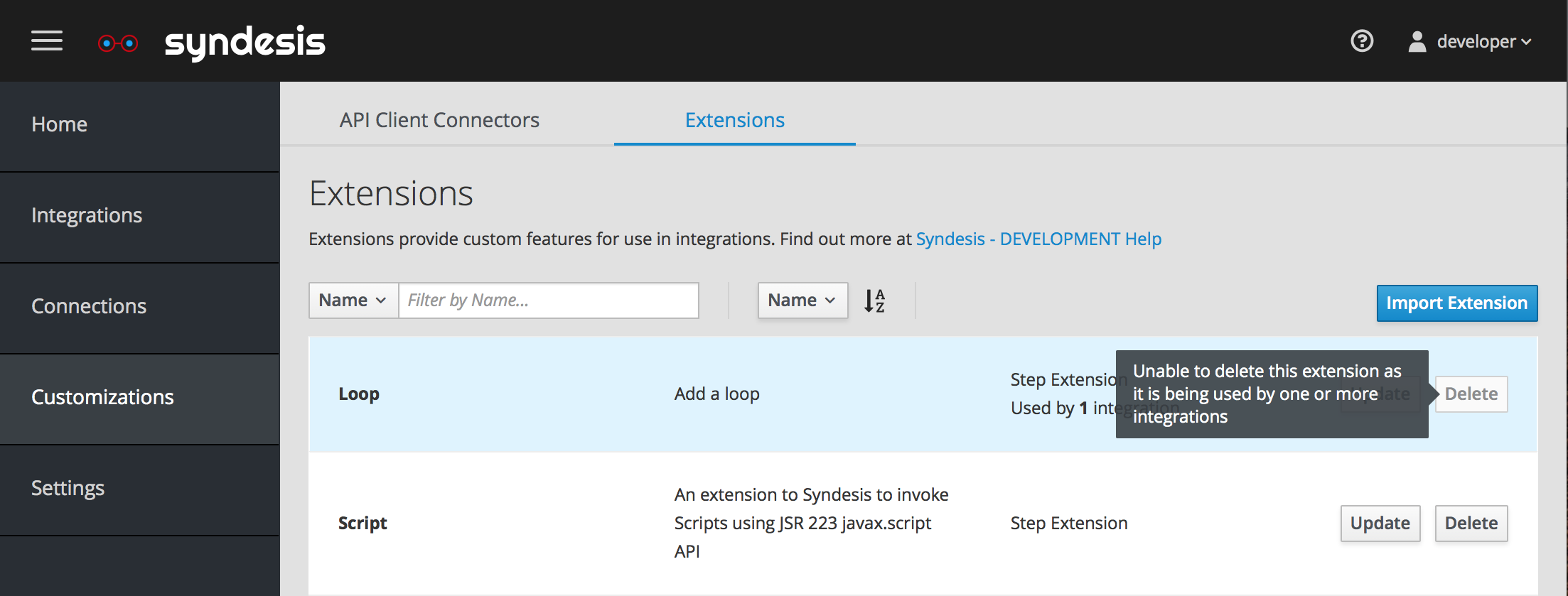
Another idea, would be to hide the Delete button for those extensions. Wdyt @gashcrumb, @dongniwang , and others? Same question on the extension detail page which has the Delete button alongside the Update button.
 elvisisking
on 17 Sep 2018
elvisisking
on 17 Sep 2018
For connections I propose to add a badge to the card that indicates how many integrations the connection is used in. The badge would have a tooltip and would look something like this:
- Not being used by any integrations:
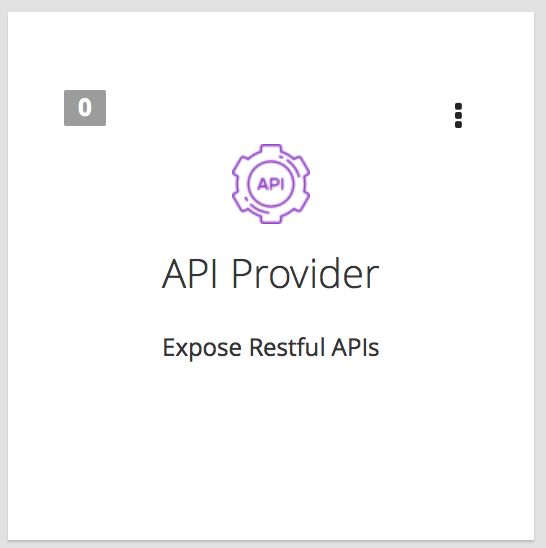
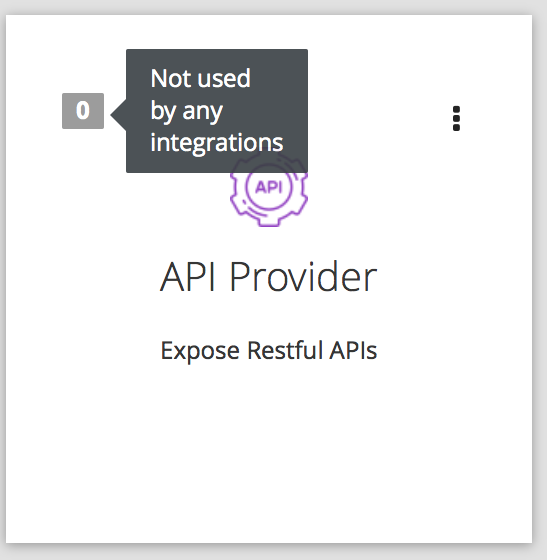
- Used by one or more integrations:
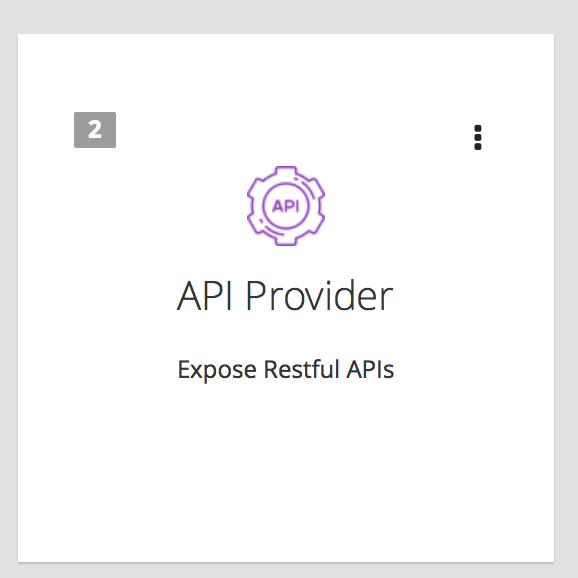
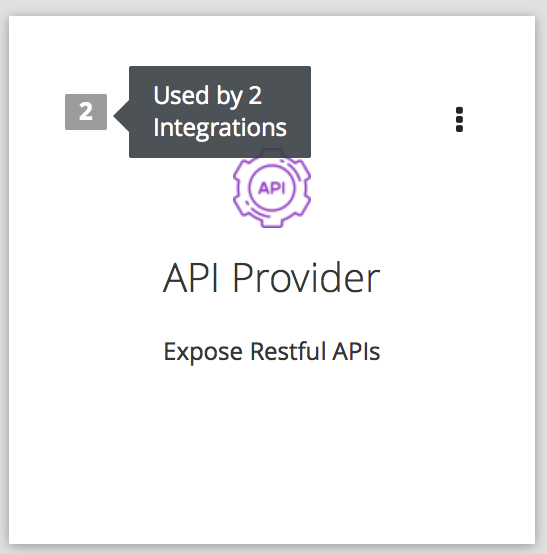
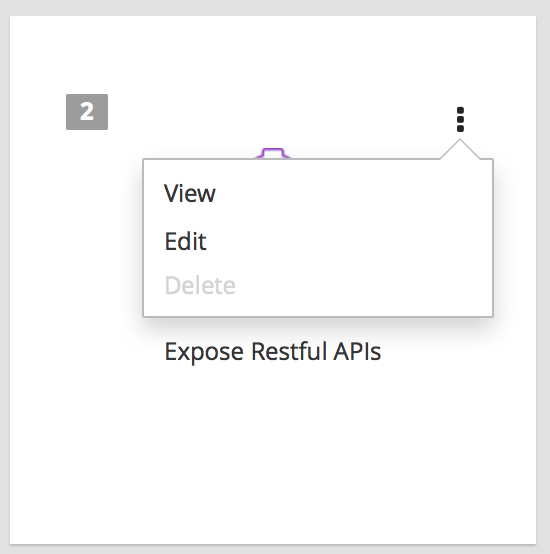
For the card kebab menu, I propose disabling the Delete menu item. It could look like this:
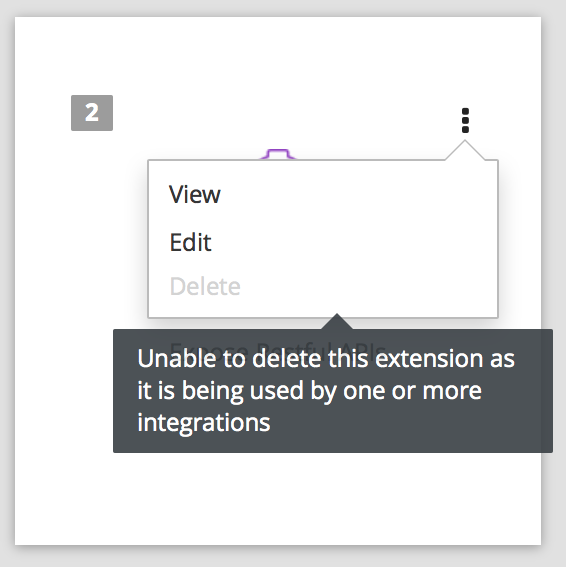
We could also add a tooltip to the Delete menu item similar to what I propose for extensions above. It would look like this:
Wdyt @gashcrumb, @dongniwang , and others? Thanks!
elvisisking
on 18 Sep 2018
I think it's a good idea, either on the card page or incorporate the information on the detail page.
I can't decide if the tooltip would be enough though. Probably a better question for @dongniwang :-)
gashcrumb
on 18 Sep 2018
or step extensions that are being used in an integration, we could disable the Delete button and, when the user hovers over the button, show a tooltip explaining why. It would look like this:
If we disabled or hide the Delete button without specifying to users which integrations are using this extension, it could be quite painful if users do want to delete the extension since the workflow would be like
need to delete an extension > go to extension list page > open kebab menu > find out Delete is disabled because the extension is in use by one or more integrations > go to integration list page > trying to find out which integrations are using the extension > go to edit each of these integrations > go back to the extension list > delete extension
When we say an extension is being used by one or more integrations, are we saying that it's being used by an active integration? If I have an integration that's not active, can I delete the extension in use?
 dongniwang
on 18 Sep 2018
dongniwang
on 18 Sep 2018
When we say an extension is being used by one or more integrations, are we saying that it's being used by an active integration? If I have an integration that's not active, can I delete the extension in use?
A step extension is needed by the editor regardless of the state of an integration. And I think it's a similar situation for a connector extension, it's not tied to the state of an integration, as there's various spots in the UI where we need data from that extension to display, for example if you've a stopped integration that uses a connector that was provided by an extension, if you go and edit that integration the editor won't have any of the action metadata available, so it can't actually show those steps in the flow properly.
gashcrumb
on 18 Sep 2018
@gashcrumb - I see, and that makes sense.
I'm fine with disabling the button but would suggest making it clear to users in terms of which integrations are using these extension, connections, or connectors.
@michael-coker actually suggested that we could list this kind of information in the details view of extension, connections and connectors. But I don't think we have a details view for connectors, right?
Re the badge on the connection cards, I'm hesitant to put new elements on the connection card because it's already kind of busy with "Technology Preview" and "Configuration Requried". Maybe give @syndesisio/uxd some time to explore an updated layout for the connection card?
dongniwang
on 19 Sep 2018
On Wed, Sep 19, 2018, 4:58 PM Dongni (Iris) Wang notifications@github.com
wrote:
@gashcrumb https://github.com/gashcrumb - I see, and that makes sense.
I'm fine with disabling the button but would suggest making it clear to
users that which integrations are using these extension, connections, or
connectors.
@michael-coker https://github.com/michael-coker actually suggested that
we could list this kind of information in the details view of extension,
connections and connectors. But I don't think we have a details view for
connectors, right?Yeah, that'd be the place to have that info, the details page, ideally the
way the extension detail page has it laid out, but we don't have the data
currently for the connection detail page.
I guess another option is to use a dialog to convey the information vs the
detail page. But instead of a delete confirmation, it'll be an
informational message that shows/links to the related integrations, then we
wouldn't need to disable delete controls.
Re the badge on the connection cards, I'm hesitant to put new elements on
the connection card because it's already kind of busy with "Technology
Preview" and "Configuration Requried". Maybe give @syndesisio/uxd
https://github.com/orgs/syndesisio/teams/uxd some time to explore an
updated layout for the connection card?—
You are receiving this because you were mentioned.
Reply to this email directly, view it on GitHub
https://github.com/syndesisio/syndesis/issues/2871#issuecomment-422956082,
or mute the thread
https://github.com/notifications/unsubscribe-auth/AAVdrCD25Deh8oh2Ug8IX1pk04PSlKZIks5ucq_hgaJpZM4UyQk7
.
gashcrumb
on 20 Sep 2018
Here's a screenshot with the badge on the connection card, as well as technology preview and configuration required. I think it does look very busy with all the elements.
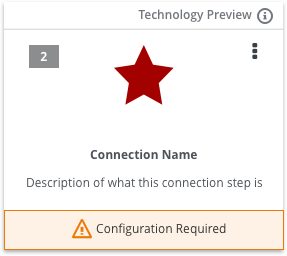
Yeah, that'd be the place to have that info, the details page, ideally the
way the extension detail page has it laid out, but we don't have the data
currently for the connection detail page.
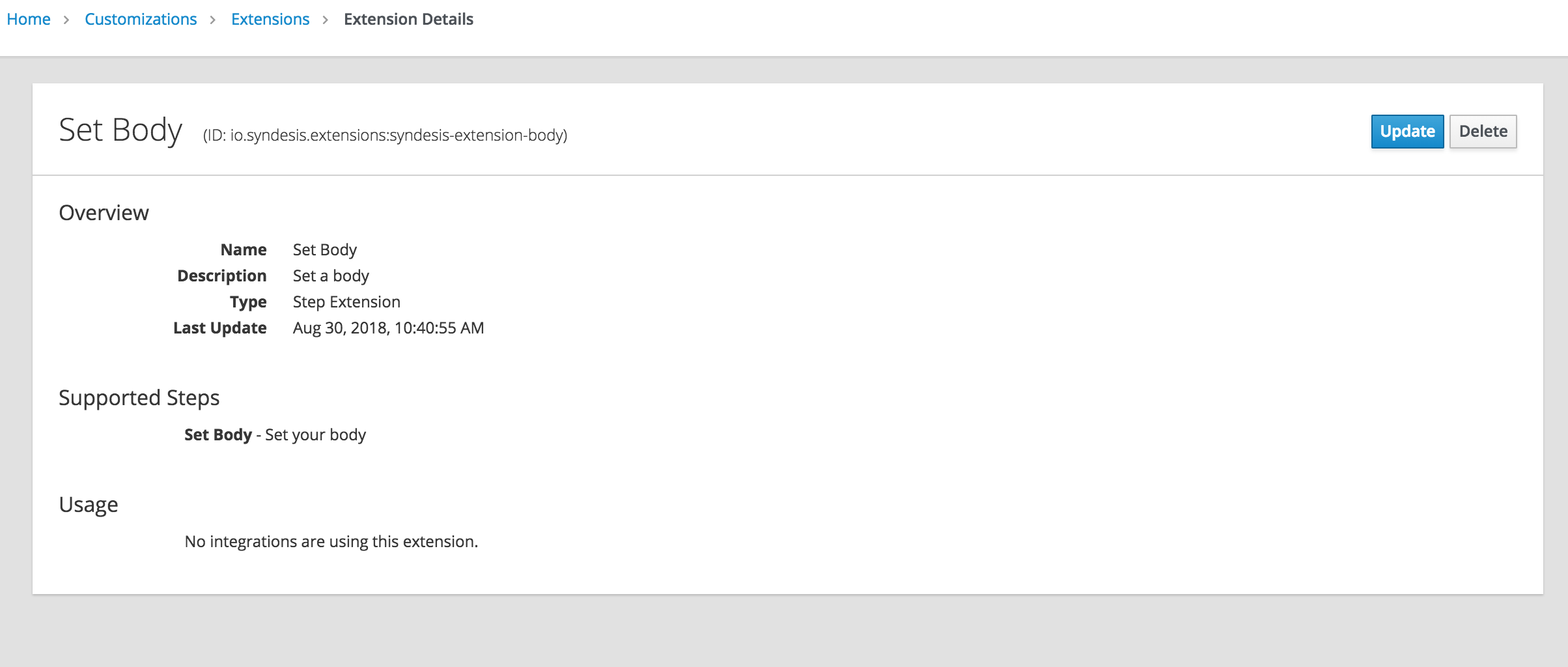
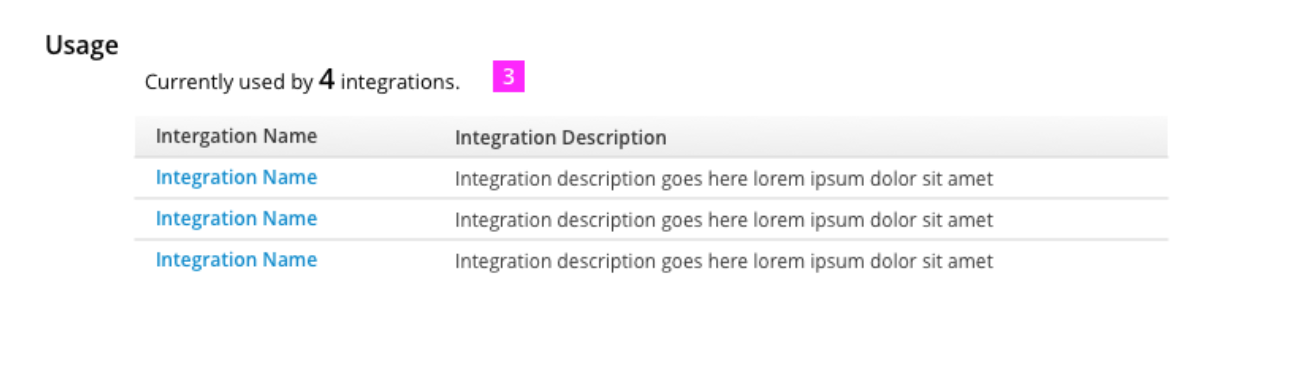
Agreed. ^^ That would be ideal. Something similar to the screenshot below where it shows the Usage.
Or this from the Extension UX design.
dongniwang
on 20 Sep 2018
Agree @dongniwang that using the "Usage" list design from the Extension UX design is the way to go here.
 amysueg
on 20 Sep 2018
amysueg
on 20 Sep 2018
Cool, so we will definitely as part of this need to enhance the backend response for connections or fetching a connection by ID to include the same data structure as the response returned from the extension endpoint.
gashcrumb
on 20 Sep 2018
Agree with the usage list on the extension and connection details page, but kind of like the badge on the card. What's nice about having the usage number on the card is that users can tell at a glance, in the list view, all the connections/extensions being used (also most used, least used) by integrations without having to go to each individual detail page. It seems like the PatternFly aggregate cards contain that type of information also. But I will remove the badge from the card if that is the consensus @gashcrumb and @dongniwang.
elvisisking
on 20 Sep 2018
Maybe for the short term for connections we could show the usage count as an item under the connection description as a simple description list for now, i.e. like "Integration Reference Count: 2" but you know with a less technical title :-) We don't have the detailed reference information available like we do with extensions so we can't do as much if we want this to get into 7.2
gashcrumb
on 24 Sep 2018
Agreed that for short term we could show usage count on connection details page. Is this something we desire for 7.2?
For long term, I'd like to open an issue to explore the possible layouts for the connection cards as we are displaying more and more information on the cards. I think it's a good start to experiment with the badge count idea and the intention here is definitely good, but I also feel like the more actionable information is to provide which integrations are using these connections. Plus, we don't offer a list view of the connection cards right now.
From my understanding, the PatternFly aggregate cards are generally used on a dashboard and are used to display metrics type of information.
dongniwang
on 24 Sep 2018
Agreed that for short term we could show usage count on connection details page. Is this something we desire for 7.2?
For 7.2 I'm most interested in deactivating the delete functionality if a connection has references to it, as that leads to data integrity issues in the app and I think showing that there's integrations that reference a connection would be good.
For long term, I'd like to open an issue to explore the possible layouts for the connection cards as we are displaying more and more information on the cards
Agreed!
gashcrumb
on 24 Sep 2018
I removed the badge from the connection card @dongniwang. I also implemented the short term solution @gashcrumb mentions above for connections. The connection detail page looks like this now:
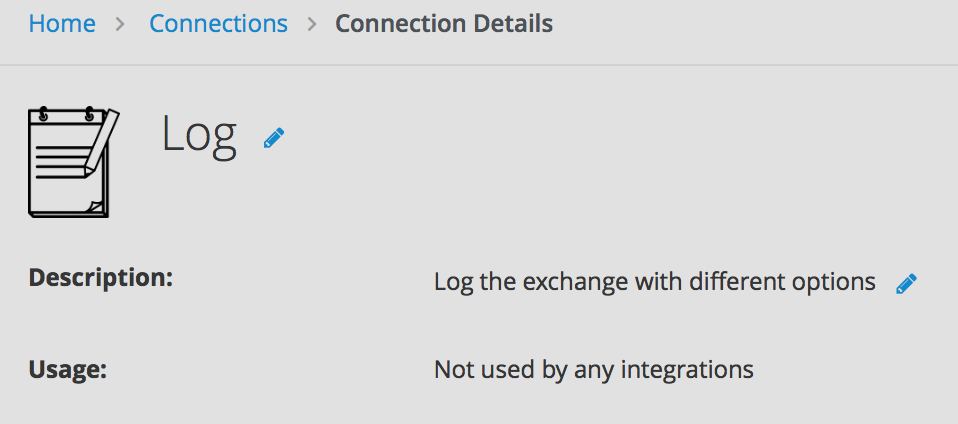
Other usage messages: Used by 1 integration and Used by X integrations.
The rest of the implementation I talk about above (disabling extension delete button, disabling connection delete menu item, and showing tooltips) are still in the solution.
@gashcrumb can you verify connection.uses is working? I am using a connection in an integration but the value is always zero.
elvisisking
on 25 Sep 2018
Awesome!
@gashcrumb can you verify connection.uses is working? I am using a connection in an integration but the value is always zero.
Erm, am not 100% sure wonder have you tried publishing it? I hope it doesn't only count when an integration is running. @phantomjinx any ideas?
gashcrumb
on 25 Sep 2018
@zregvart - Could you please check to see that the uses property that is returned in the connection details endpoint actually returns the correct usage number? I think when integrations get deployed they don't update connections with the proper number of times used, but could you verify this?
EDIT: Just to confirm I'm able to reproduce @elvisisking 's issue and it's not counted whether or not integrations are running.
 kahboom
on 2 Oct 2018
kahboom
on 2 Oct 2018
@zregvart - Could you please check to see that the
usesproperty that is returned in the connection details endpoint actual returns the correct usage number? I think when integrations get deployed they don't update connections with the proper number of times used, but could you verify this?
There is a quaint idiosyncrasy in how we measure the use of Connections vs Extensions: with Connections we count the use by counting all non-deleted Integrations that reference a Connection either directly, in one of the flows, or in one the steps/actions of the flow; with Extensions we count the use by counting all non-deleted deployed Integrations, i.e. those that have the integration deployment's target state set to Published.
zregvart
on 8 Oct 2018
Looks like the connection's uses property is working @zregvart, thanks. However, if I delete the integration that the connection/extension is being used in, the uses property is not being updated in the client-side store cache. I think this might be because there wasn't a change event fired on the connection/extension when the integration was deleted since the uses property changed. Because there was no event, I think the store did not update. Could that be the case Zoran and @gashcrumb?
elvisisking
on 18 Oct 2018
That's very likely, I suspect the uses property is a calculated attribute.
gashcrumb
on 18 Oct 2018
Yeah, very likely.
zregvart
on 18 Oct 2018
So @gashcrumb and @zregvart the code I have seems to do what we want: disable the delete action on connections and extensions if they are used in at least one integration. However, the dynamic changing of the enablement of the delete action is not happening when a change to an associated integration occurs. I believe this is due to not having a connection/extension change event generated when an integration is created or deleted. A workaround is for the user to refresh the connection/extension list page which causes the stores (cache) to be refreshed. Should I PR my changes and create a new server issue? Here is a link to my topic branch if you would want to verify what I am saying: 2871 branch.
elvisisking
on 19 Oct 2018
Should I PR my changes and create a new server issue?
yup :+1:
zregvart
on 22 Oct 2018
A workaround is for the user to refresh the connection/extension list page which causes the stores
Yep, and that's fine. At some point if the server could trigger a change event for the affected object then it'll just work as expected, as the UI will automatically update itself.
gashcrumb
on 22 Oct 2018
Created #3931 to address this @zregvart. Thanks.
elvisisking
on 22 Oct 2018
This issue has been automatically marked as stale because it has not had any activity since 90 days. It will be closed if no further activity occurs within 7 days. Thank you for your contributions!
![stale[bot] picture](https://avatars.githubusercontent.com/in/1724?v=4&s=40) stale[bot]
on 28 Jan 2019
stale[bot]
on 28 Jan 2019
Related issues
 mcoker
·
5Comments
mcoker
·
5Comments
 blaggacao
·
5Comments
blaggacao
·
5Comments
 syndesis-bot
·
6Comments
syndesis-bot
·
6Comments
 tplevko
·
5Comments
tplevko
·
5Comments
 sjavurek
·
5Comments
sjavurek
·
5Comments