Syndesis: Inconsistent input data of database connector
This is a...
[ ] Feature request
[x] Regression (a behavior that used to work and stopped working in a new release)
[x] Bug report
[ ] Documentation issue or request
The problem
Inconsistent input data of database connector. Also I have no idea why new data mapper step still thought that there is old SQL statement.
Expected behavior
I would expect that one step cannot have 2 different input data types and data mapper has updated information about surrounding connections
Tasks involved / Steps to Reproduce
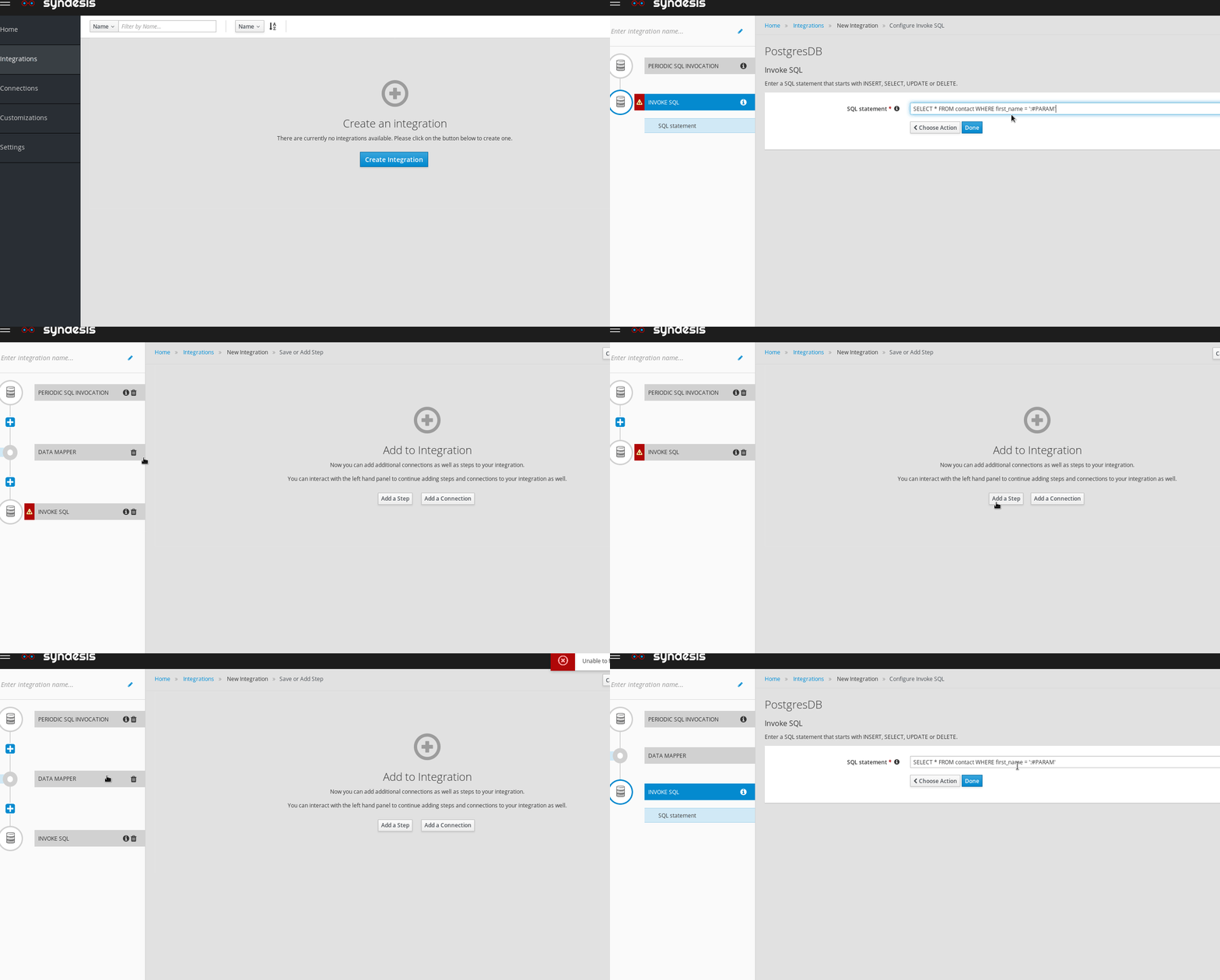
- Create integration
- Start step: Database connection with periodic SQL statement "SELECT * FROM contact WHERE first_name = 'Joe'"
- Finish step: Database connection with Invoke SQL statement "SELECT * FROM contact WHERE first_name = ':#PARAM'"
status:
Input Data Type : json-schema
Cannot create data mapper step even if you want to use parameter in the SQL query.
- change finish SQL statement to "UPDATE TODO SET completed=1 WHERE TASK = :#TASK"
status:
Input Data Type : SQL Parameter
You can now create data mapper step.
- change finish SQL statement back to "SELECT * FROM contact WHERE first_name = ':#PARAM'"
status:
Input Data Type : SQL Parameter
You can now create data mapper - but it still thinks that you want parameter TASK.
 mcada
mcada
All 14 comments
@mcada is this one or two issues?
 KurtStam
on 13 Mar 2018
KurtStam
on 13 Mar 2018
At first I was only investigating database connection issue but it looks like those steps to reproduce also reproduce some initialisation problems of data mapper, I do not know how that works.
@KurtStam can you please mention someone who understands it more than I do? Or should I just copy-paste this issue as data mapper bug?
mcada
on 13 Mar 2018
@gashcrumb, @igarashitm any comments? @mcada no need to duplicate this issue.
KurtStam
on 13 Mar 2018
It seems like the data type indicator is not catching up with latest data shape. When action configuration is changed, UI needs to invoke fetchMetadata() and update data shape info.
 igarashitm
on 13 Mar 2018
igarashitm
on 13 Mar 2018
We do, at least in theory, when you click next or done we do that and set the returned descriptor.
However if the descriptor is missing the specification field in one or both of it's data shapes the UI currently keeps the old data shape object(s) to avoid https://github.com/syndesisio/syndesis/issues/1895
What would be good is to see the sequence of API responses here (in the browser dev tools network tab) to ensure that the action descriptor is coming back the way we think it should be.
 gashcrumb
on 13 Mar 2018
gashcrumb
on 13 Mar 2018
@gashcrumb oops, not yet sure if it's related to this specific issue, but if parameter is dropped from SQL, then SQL connector will change its input data shape to kind=none and then it no longer has specification. Does that still work?
igarashitm
on 13 Mar 2018
oh good grief :-)
Not currently but I can put that in.
gashcrumb
on 13 Mar 2018
I think the attached PR should attach the correct data shape object if the returned data shape is none for the input or output. It feels though like the fetchMetadata API has a lot of really weird and inconsistent semantics that honestly are hard to deal with in the UI properly.
gashcrumb
on 13 Mar 2018
I think the confusing part is that the incomplete data shape is returned for dynamic ones if action is not yet configured, like kind=json-schema while specification is not defined. It's just returning pre-defined data shape in deployment.json, which doesn't make sense for dynamic action. I think we should clarify that behavior at some point.
igarashitm
on 13 Mar 2018
@mcada So the reason why you couldn't create datamapper after #3 is that the parameter :#PARAM is single quoted where it shouldn't be. Also I needed to change table name contact to upper case CONTACT to avoid error message. Once I made those change, I got PARAM as a target field correctly.
1964 fixed not to show data type mismatch indicator if kind=none, so if you have :#PARAM single quoted, which means you don't have any parameter in SQL (i.e. kind=none), then you no longer see that indicator.
igarashitm
on 13 Mar 2018
Oh, now I understand. Thanks!
mcada
on 14 Mar 2018
So is this all set then?
gashcrumb
on 14 Mar 2018
@mcada can you close this once you verified it works?
BTW, I'm not sure why table name should be upper case, IIRC traditional RDBMS are not case sensitive on reserved words and table/column names. @KurtStam WDYT?
igarashitm
on 14 Mar 2018
I just tried it with master branch and it works even with lower case, closing as finished. Thanks everyone!
mcada
on 14 Mar 2018
Related issues
mcada
·
5Comments
 mcoker
·
5Comments
mcoker
·
5Comments
 zregvart
·
4Comments
zregvart
·
4Comments
 tplevko
·
4Comments
mcoker
·
4Comments
tplevko
·
4Comments
mcoker
·
4Comments