Sylius: Can not create a product attribute fixture of type 'select'
In the config.yml I have my fixutres. I want to create an product attribute fixture of type 'select'.
I can not find the right definition of it.
I tried like this:
sylius_fixtures:
    suites:
        app:
            listeners:
                logger: ~
            fixtures:
                product_attribute:
                    options:
                        custom:
                            canvas_type:
                                name: "type"
                                code: "type"
                                type: "select"
                                configuration:
                                    choices:
                                        - "Type 2"
                                        - "Type 2"
when I try to load the fixutres it says:
[Symfony\Component\Config\Definition\Exception\InvalidConfigurationException]
  Unrecognized option "configuration" under "product_attribute.custom.canvas_type"
 Keloo
Keloo
All 8 comments
@pamil Is it possible? :)
 pjedrzejewski
on 11 Jul 2017
pjedrzejewski
on 11 Jul 2017
@Keloo which version of Sylius are you using? configuration node has been added after beta.2, so you will need to update to newest master in order to use it.
 lchrusciel
on 11 Jul 2017
lchrusciel
on 11 Jul 2017
@lchrusciel I'm using beta 1. Thx for the info regarding beta 2 version. :+1:
Keloo
on 11 Jul 2017
Closing then. :)
lchrusciel
on 11 Jul 2017
Just for the record: in version 1.1.2 (and probably up) working fixture look like this:
sylius_fixtures:
suites:
app:
listeners:
logger: ~
fixtures:
product_attribute:
options:
custom:
custom_attribute_name:
name: real name here # attribute name (for default locale)
code: code_name_here
type: select
configuration:
choices:
-
# localeCode: translated name
en_US: "name 1"
pl: "nazwa 1"
-
en_US: "name 2"
pl: "nazwa 2"
multiple: false # optional
min: 1 # optional
max: 1 # optional
 broiniac
on 23 Mar 2018
broiniac
on 23 Mar 2018
Hm not sure this is correct. I tried to define them like it's described here but when trying to add the attribute to a product with one or more values, I get an error This value should be of type string. on the multiselect input.
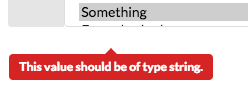
Looking at how the attribute configuration was inserted, it looks different than a select attribute that was created via the shop backend:
The comment above produces:
a:2:{s:7:"choices";a:14:{i:0;a:1:{s:5:"en_US";s:9:"Something";}
Creating one in the backend produces:
a:4:{s:7:"choices";a:2:{s:36:"ced63470-3bf9-11e8-9568-38c9860c388b";a:1:{s:5:"en_US";s:9:"Something";}
So the difference is the array index for each choice (which explains the form error message on the input) which needs to be a string code. Creating them like the following works:
something:
  name: Name 1
  code: name1
  type: select
  configuration:
    choices:
      some-code1:
        en_US: "Something"
      some-code2:
        en_US: "Something 2"
That was at least my experience, maybe I'm missing something here. The fixture doesn't seem to throw any errors, no matter how you enter the configuration. Any thoughts on this @pamil @lchrusciel since you "👍" the comment?
 venyii
on 9 Apr 2018
venyii
on 9 Apr 2018
I also used the trick some-code1 etc... to make my fixture works
FYI I had to add also
multiple: false
min: null
max: null
In order to avoid this error :
Argument 1 passed to Sylius\Component\Attribute\Model\AttributeValue::setJson() must be of the type array or null, string given, called in /var/www/apps/sylius/vendor/sylius/sylius/src/Sylius/Component/Attribute/Model/AttributeValue.php on line 156
 maximehuran
on 2 Aug 2018
maximehuran
on 2 Aug 2018
@venyii I've just return to the project based on Sylius. After update to 1.2.5 "mine" method was not working any more, but yours is (with addition of suggested by @maximehuran constrains).
Thank you for your response and sorry for long time to reply on this one. I've been unable to confirm your discovery in any way until now.
My first guess was that it has something to do with strict types, but quick glance at code history reveals, that strict type checking and php7.1+ was introduced few months earlier. So honestly, I don't know what have changed since 1.1.2.
Anyway, thank you both. Without your comments I would probably burn few hours looking for solution on my own.
EDIT: Import and usage is fine, but I it seems that I can't edit AttributeValue created via fixture. Hmm. There's no rest for the wicked I guess :)
EDIT2: I guess this one is strongly related to our problem: https://github.com/Sylius/Sylius/issues/9387
broiniac
on 21 Aug 2018
Related issues
 Chrysweel
·
3Comments
Chrysweel
·
3Comments
 tchapi
·
3Comments
tchapi
·
3Comments
 mezoni
·
3Comments
mezoni
·
3Comments
 stefandoorn
·
3Comments
stefandoorn
·
3Comments
 inssein
·
3Comments
inssein
·
3Comments
Most helpful comment
Hm not sure this is correct. I tried to define them like it's described here but when trying to add the attribute to a product with one or more values, I get an error
This value should be of type string.on the multiselect input.Looking at how the attribute configuration was inserted, it looks different than a select attribute that was created via the shop backend:
The comment above produces:
Creating one in the backend produces:
So the difference is the array index for each choice (which explains the form error message on the input) which needs to be a string code. Creating them like the following works:
That was at least my experience, maybe I'm missing something here. The fixture doesn't seem to throw any errors, no matter how you enter the configuration. Any thoughts on this @pamil @lchrusciel since you "👍" the comment?