SwiftGen doesn't re-generate if files changed (Xcode new build system with input files)
Preface
I am finding it strange that this problem hasn’t been reported yet (at least I didn’t find any issues related), and since we have a big and complex project, the problem might be something with our configuration, but this only started happening once we updated to version 6, so it isn’t like it never worked.
But please tell me if you know what could be the real source of our problem
_Also I and citing brew because it’s the version we are using, I use the pod version in another project without problems (although the files are committed on that one), but it probably happens with other versions too_
Issue
- SwiftGen version - SwiftGen v6.0.2 (Stencil v0.13.1, StencilSwiftKit v2.7.1, SwiftGenKit v6.0.2)
- Xcode version - Version 10.1 (10B61) (it’s related to the Xcode new build system, so should happen from version 10 onwards)
- Targets deployment target - iOS Version 10.3
Basically I’m facing the issue related on the R.swift repository for their new version
https://github.com/mac-cain13/R.swift/issues/456
The generated files aren’t updated on a incremental build and (actually my original problem) the file isn’t identified as created before the first build (we don’t commit our generated files, so the CI doesn’t work)
My solution
The only solution that worked for me is an adapted version of what they came up with

Adding the generated files to the output list makes sure Xcode waits for the files to be generated before trying to compile. (fixing the first build problem)
Touching a input file forces the script to be run every build
The main problem I see with this solution is having to remember to add new generated files to the output list, a problem that probably only appears once the CI tries to build.
So if anyone knows a better solution, please let me know.
My suggestion
If this is a common problem (and there is no better solution), the homebrew usage section should be updated with these extra steps (probably some of the others integration methods need it too)
If this is a really specific edge case, this issue might be reference enough to other people facing it
 Robuske
All 21 comments
I'm having the same problem here
 txaiwieser
on 23 Nov 2018
txaiwieser
on 23 Nov 2018
Isn't that issue related to #441 ? Implementing the solution for #441 would probably solve the problem I think (just haven't had time to implement it yet, but should be a nice and not too complicated first issue to tackle if anyone is willing to contribute)
 AliSoftware
on 23 Nov 2018
AliSoftware
on 23 Nov 2018
Yes, definitely related.
But maybe the description should make it clearer that it won't work properly without that for some cases. It isn't just a optimization
Robuske
on 23 Nov 2018
Indeed
What I'm not sure to understand about you'd issue description here is how is it related to brew version in any way? We should also update the description of this current issue to better explain that it's related to the new Xcode build system and has nothing to do with brew?
AliSoftware
on 23 Nov 2018
I have another project where I use the pod version and I haven't faced any problems yet (although we commit the files there)
Robuske
on 23 Nov 2018
Mmmh feels like a mystery to me how using the brew version vs the pod version would affect that in any way. IMHO that's just a coincidence and the fact that it works in one project and not the other is probably due to something else (maybe committing the generated files or not)
AliSoftware
on 23 Nov 2018
Probably, like I said, it might be some edge case of our configuration.
Committing the files obviously solves the creation issue, but I don’t see how it, or being a pod, helps with the file update problem.
Anyway, I updated the description as you recommended
Robuske
on 23 Nov 2018
This is definitely unrelated to the installation method, and has everything to do with the new build system. I had the exact same issue in a few of my projects, and I always use SwiftGen via CocoaPods.
The new build system will show as if it's running the build phase, even when it's not (using the cached output from a previous build), because of the input/output files you specify. This can be extremely confusing as a developer.
The solution I've found so far is to remove the input and output definitions. This will cause SwiftGen to run each time, but SwiftGen will only touch files if there are effective changes, so things will remain efficient. Your "input files" list is definitely missing some entries, it should contain each resource being parsed by SwiftGen, for the new build system to correctly do it's "thing". I've found that only specifying the output doesn't work for me either, I had to remove both the input and output entries.
 djbe
on 23 Nov 2018
djbe
on 23 Nov 2018
@djbe my input list is more of a "hack" found by the R.swift guys, I didn't like having to remember to add inputs AND outputs, so I only have the yml as an input, but if you pay attention to the script I touch it every time, making Xcode think it needs the build the next time.
Yes, is less optimised, but I doubt it makes much difference, and I am considering this a temporary solution anyway.
Anyway, by removing the entries you mean opening the pbxproj as text and deleting it? Doesn't Xcode add it back every time you interact with the project settings? If it works that well I definitely prefer your solution
Robuske
on 23 Nov 2018
By removing the entries, @djbe means not having anything in the "input files" NOR the "output files" section of your Script Build Phase. So removing the swiftgen.yml from the input files and removing the Assets.generated.swift & Fonts.generated.swift output files.
If Xcode sees that you have at least one input file OR one output file set on your Script Build Phase, then it will apply the policy of only running the Script Build Phase if the input files have changed or if the output files don't exist yet. (If you only set input files but not output files, it will not take it as "I don't care what input files are modified" but rather as "If that empty list of input files (so "if no input file") is modified…") so probably not exactly what you want.
That's why you should either set both all the proper input files and output files, not omitting any, and let Xcode conditionally run your Script Build Phase according to the status of those input/output files… or don't set neither of them and keep both lists empty, so that Xcode considers it as "don't apply any condition on running this build phase" and will then (at least theoretically?) run the Script Build Phase every time, without any condition. If you set at least one file in at least either the "input files" or "output files" section, it will apply a condition, and then you better set up those lists completely or not at all, but not partially.
AliSoftware
on 23 Nov 2018
That's the way it was originally, nothing in input nor output. But that had the problem of the first build not working because Xcode couldn't find the file and didn't know it was being created
Robuske
on 23 Nov 2018
Hmmm, yeah, that's why I usually commit the generated files. It's always useful to have a history for these, especially when you modify your assets.
djbe
on 23 Nov 2018
Yes, but at the same time you already have that because of the input files. Anyway, I'm kind of neutral about committing or not.
Robuske
on 23 Nov 2018
Right, but as we mentioned before, if you want to specify input/output files, you should specify all of them, not just the config (and touching it). That won't work, as your resources may change at other timestamps, and we don't know how the build system works (it's a black box).
So:
- Specify no input/output paths, and commit your generated files (or run SwiftGen once on checkout).
- Specify all input and output paths, and (hopefully) that'll work.
Anyway, as @AliSoftware mentioned, there's a separate issue about generating the paths based on the config. The rest of this issue is due to the Xcode build system, and there's not much we can do about that.
djbe
on 23 Nov 2018
@djbe only thing we might wanna do is maybe add a small paragraph in the documentation about this behavior (which we'd then update once #441 is implemented)
AliSoftware
on 23 Nov 2018
So, I was changing to add all the input files, we have a folder for Fonts, adding the entire folder didn't seem to work correctly (I realize the property is named Input FILES, but I wanted to try), I had to build 2 times if I removed a font, although seemed like I only needed 1 build if I added it back.
Do I need to add each Font used as an input files for it to work correctly? Or I just did it wrong?
Robuske
on 29 Nov 2018
Yeah, the input files need to be actual files, the build system doesn't check the contents of folders for changes 🤷♂️ It's really annoying, and forces you to update your build step each time you add/remove a resource. Which is why I just define no input files in my projects (for now).
djbe
on 30 Jan 2019
Note that in recent Xcode versions, when using file lists, you can enable a new Xcode setting to search in directories:
USE_RECURSIVE_SCRIPT_INPUTS_IN_SCRIPT_PHASES = YES
So in summary:
- Add your
swiftgen.ymlfile as input. - Add your resources folder as input.
- Set the build setting mentioned above.
djbe
on 18 May 2020
Note that there's a separate feature request for generating these input/output file lists: #441
djbe
on 18 May 2020
For anyone running into this issue on Xcode 12, it seems there is a new option related to each Run Script phase:
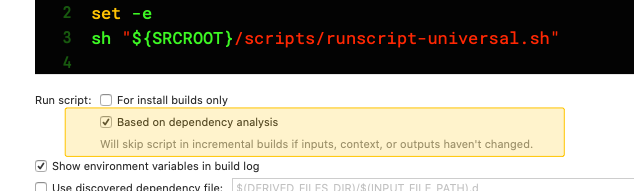
By turning that checkbox off, Xcode will "force script to run in all incremental builds" - it seems to have solved the issue for me!
 maxchuquimia
on 24 Nov 2020
maxchuquimia
on 24 Nov 2020
As clearly mentioned in that warning (screenshot), this simply disables any analysis and always runs that build step.
We recommend not doing that, and properly configuring input/outputs of (all) your build steps, so that the build system can correctly execute the right steps, and still have performance wins.
djbe
on 24 Nov 2020
Related issues
 drjasonharrison
·
5Comments
drjasonharrison
·
5Comments
 SummerHF
·
3Comments
SummerHF
·
3Comments
 gorbat-o
·
5Comments
gorbat-o
·
5Comments
 kacper1703
·
3Comments
kacper1703
·
3Comments
 gereons
·
5Comments
gereons
·
5Comments
Most helpful comment
@djbe only thing we might wanna do is maybe add a small paragraph in the documentation about this behavior (which we'd then update once #441 is implemented)