Swiftgen: SwiftLint Violation: Should have 5 parameters or less
Hi,
I have this issue with my generated file.
SwiftLint doesn't like it 😂
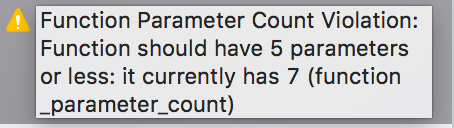
It is one of my key for localization which takes 7 parameters (it is huge I know 😅).
I thought about adding Strings.swift to my excluded files, but I remember you prefer manage SwiftLint properly instead of ignoring it.
- SwiftGen (5.3.0)
- Xcode (9.3)
 gorbat-o
All 5 comments
Hello
Thanks for the issue report!
We actually do suggest people to put any code-generated files in their SwiftLint exclusion list (that goes both for SwiftGen and Sourcery and other codegen tools) so you should indeed do that.
We do have swiftlint:disable magic comments in the generated files, but it's more both for people who didn't think about excluding code generated files from SwiftLint, and for us to ensure the templates we write and bundle with SwiftGen respect some coding convention anyway (we run SwiftLint on our unit test fixtures).
What would be awesome is if you could make a PR adding that missing // swiftlint: disable function_parameter_count in the bundled templates so that next version of SwiftGen would ship with it. In the meantime you can either add generated code to your SwiftLint ignore list or make a custom template 😉
 AliSoftware
on 9 May 2018
AliSoftware
on 9 May 2018
Cool, I never took a look yet on what is under the hood 🤭
I guess it's time to 😂
gorbat-o
on 9 May 2018
Cool!
What I'd suggest you to do:
- Start by creating a custom template, which doesn't require you to modify SwiftGen itself. It will help you maybe understand how templates work. For adding a SwiftLint comment it should be quite straightforward but this could be a nice starting point to learn about the mechanics of how templates work. You can find documentation about creating custom templates from existing ones here
- Once you got it working you could start forking SwiftGen to apply your modifications to the templates bundled with SwiftGen in the templates/ directory
- You can then run the unit tests in the SwiftGen workspace to see that your changes should make the tests now fail because the generated code using your modified templates will of course not match the test expected outputs anymore. From there you thus have 2 solutions to fix the tests: either modify each test fixtures manually to fit the new generated code, or to use the "Generate Outputs" schemes to do it automatically for you and then check that the changes (git diff) looks Ok
Don't hesitate to reach out if you have questions 😉
AliSoftware
on 9 May 2018
I just made the changes in templates/strings/*.stencil
I ran the tests through "Templates - Generate Output" target, and it passed.
I also updated the CHANGELOG.md.
So from there, I can create my PR right ?
Updated: I did all the tests and they all passed.
Updated 2: Do I have to push the new Tests/Fixtures/Generated files ?
gorbat-o
on 9 May 2018
You should indeed be good to go and ready to create a PR from there 👍
Indeed you need to push the Tests/Fixtures/Generated files to git.
In fact they are part of the test suite: among other things, our test suite checks that when ran against a particular input and using the various bundled templates, we ensure that it generate what we expect, by comparing the produced output with these files in Tests/Fixtures/Generated. Additionally our tests also check that those generated files compile and pass SwiftLint.
The trick with the "Generate Outputs" scheme is a bit of cheat, because what that scheme does is run SwiftGen to generate the output and write that generated output into Tests/Fixtures/Generated. So if you run this scheme then the tests will always succeed, because it will then compare what SwiftGen generate with those files… which would have just been generated by SwiftGen via that scheme.
That's why when you use "Generate Output" you have to be careful to check manually your git diff that the changes your see, created by that scheme, look ok. Because basically what you do is run tests to check that a == b (generated code = fixture files) just after having done b = a (Generate Outputs scheme) so yeah in that case check always succeed. But that scheme is still useful To avoid updating each fixture by hand one by one when you know that the only thing you changed are the templates (like in the case of your PR) and not the Swift code of the parsers inside SwiftGen core.
AliSoftware
on 9 May 2018
Related issues
 danielsaidi
·
7Comments
danielsaidi
·
7Comments
 BastiaanAndriessen
·
4Comments
BastiaanAndriessen
·
4Comments
 taykay08
·
3Comments
taykay08
·
3Comments
 gereons
·
5Comments
gereons
·
5Comments
 bengilroy
·
3Comments
bengilroy
·
3Comments