Swagger: [Regression] Swagger generates empty schemas
I'm submitting a...
- [x] Regression
- [ ] Bug report
- [ ] Feature request
- [ ] Documentation issue or request
- [ ] Support request => Please do not submit support request here, instead post your question on Stack Overflow.
Current behavior
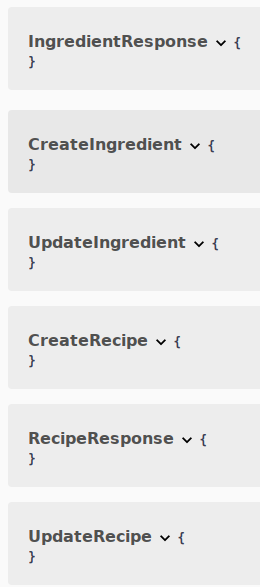
All swagger schemas are empty and contain no information at all.

Expected behavior
Documentation detailing the property types on schemas should be inferred from the typescript definitions as described here and here. Like so:

Minimal reproduction of the problem with instructions
Reproduction: https://github.com/robertmain/meal-plan/tree/update-swagger
Instructions:
- Download the app from the link above (the branch is important!)
1 Install the dependencies and navigate tolocalhost:3000/api(yeah, I know it's a crappy URL scheme...I'm working on it)
What is the motivation / use case for changing the behavior?
Empty API documentation isn't very useful...? :thinking:
Environment
Nest version: 6.6.4
For Tooling issues:
- Node version: 10.16.3
- Platform: Debian Linux 9
Others:
Contents of nest-cli.json
{
  "language": "ts",
  "collection": "@nestjs/schematics",
  "sourceRoot": "src",
  "compilerOptions": {
    "plugins": ["@nestjs/swagger/plugin"]
  }
}
 robertmain
All 37 comments
I have that problem too and to overcome this I had to put @ApiProperty() on any of them and then I get the desired output, and after that, I can remove the @ApiProperty() and it still works. I'm not sure why it works this way but you can try that
 ghiscoding
on 28 Dec 2019
ghiscoding
on 28 Dec 2019
@ghiscoding Weird. In your case it sounds like the compiler is caching something...
In any case, I had to put @ApiProperty on them. It's kind of a shame that you can't specify example values anymore...
robertmain
on 28 Dec 2019
Note that I wrote
to overcome this I had to put
@ApiProperty()on any of them
which means that just adding 1 property with the @ApiProperty() is enough to get the full definition. Have you tried that or did you add it to each field?
ghiscoding
on 28 Dec 2019
Oh....weird. I added it to each field. Regardless, I notice that the documentation tells you to add
  "compilerOptions": {
    "plugins": ["@nestjs/swagger/plugin"]
  }
to your nest-cli.json
I've been wondering how on each the CLI is supposed to "automatically" decorate your models for you....then I realized that you probably need to add this to tsconfig.json also. So I'm trying that right now...
robertmain
on 28 Dec 2019
Yes, you do need to add that plugins config (it's in the swagger doc), which I have already. That new plugin is supposed to indeed decorate by itself but in my case, it doesn't work unless I add the @ApiProperty() to at least 1 of the fields, like it's mentioned
This plugin is opt-in. If you prefer, you can declare all decorators manually, or only specific decorators where you need them.
ghiscoding
on 28 Dec 2019
The swagger docs tell you to add that to nest-cli.json. They do not (iirc) tell you to add that to tsconfig.json. Either way, it didn't help my situation...
robertmain
on 28 Dec 2019
oh I read your comment to fast then, you need to modify the nest-cli.json file as written in the doc. I didn't change anything in the tsconfig file
In order to enable the plugin, simply open
nest-cli.json(if you use Nest CLI) and add the following plugins configuration:
{
  "collection": "@nestjs/schematics",
  "sourceRoot": "src",
  "compilerOptions": {
    "plugins": ["@nestjs/swagger/plugin"]
  }
}
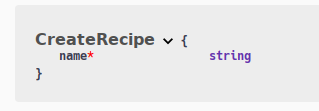
So, having done what you suggest and added @ApiProperty to just one of my fields....only that field appears in the API schema..
import { ApiProperty } from '@nestjs/swagger';
import { IsDefined, Allow } from 'class-validator';
import { Ingredient } from '../../ingredient/ingredient.entity';

export abstract class CreateRecipe {
  @IsDefined()
  @ApiProperty()
  public name: string;

  @Allow()
  public description?: string = '';

  @Allow()
  public ingredients?: Ingredient[] = [];
}
robertmain
on 28 Dec 2019
oh I read your comment to fast then, you need to modify the nest-cli.json file as written in the doc. I didn't change anything in the tsconfig file
I think you need to do both(potentially)...
I'm running nest from within a docker container, not straight from the nest CLI - so nest-cli.json doesn't really do much for me.
robertmain
on 28 Dec 2019
hmm weird, mine shows but I'm also using the class-validator, it might be why they show.
import { IsString, IsEmail, MinLength } from 'class-validator';

export class UserSignupDto {
  @IsEmail()
  readonly email: { type: string, lowercase: true };

  @IsString()
  @MinLength(5)
  @ApiProperty({ description: 'User\s Password (only applies when using username/password)', type: () => String })
  readonly password: string;

// ...

ghiscoding
on 28 Dec 2019
I'm also using class-validator.
I wonder if I need to update that also?
robertmain
on 28 Dec 2019
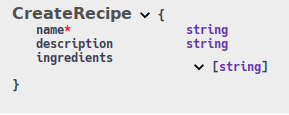
So, I updated class-validator and it made no difference. If I add @ApiProperty to them it makes them show up in the docs...except that my ingredients property which should be of type Ingredient shows up as being of type string.
Also, @ghiscoding how did you manage to add a description to your ApiProperty decorators like that? I get a type error if I do that...
robertmain
on 28 Dec 2019
I'm not sure about that, but anyhow in my case I followed what was written in this blog post on Trilon.io
Also, @ghiscoding how did you manage to add a description to your ApiProperty decorators like that?
I get an error too with latest 4.1.2 (not with previous version 4.0.9), you need to provide the type as well to not have any errors (not sure why I just found that out an hour ago, was thinking to open an issue for that as well). Also note, this new way of using Swagger is kind of still in Beta from what I understood.
@ApiProperty({ description: 'User\'s Display Name to use in the UI', type: () => String })
I updated my typescript version and that seems to have fixed the type errors for the decorators...
Why are you sing a lazy function for a builtin type like string? I thought that was only for circular dependencies?
robertmain
on 28 Dec 2019
Why are you sing a lazy function for a builtin type like string? I thought that was only for circular dependencies?
Well, that is a good question, I'm getting a circular dependency error when I use the @ApiProperty and I have no clue why. I'm kinda new to NestJS and I don't understand the Swagger circular dependency (I know what Circular Dependency is, like in Angular, but I don't understand it in Swagger itself).. and again if I don't add the type, I get a console error when trying to load the Swagger UI like this
I tried changing to type: String but I still get the error, I don't get the error when I do type: () => String

ghiscoding
on 28 Dec 2019
Yeah, I think you're supposed to use the lazy function (like you were doing) to get round the circular dependency error. Also, you probably want 'string' not String for the type :)
robertmain
on 29 Dec 2019
ah thanks, the String is confusing in my case since I also use Mongoose and it's String for the Mongoose Schema (and for GraphQL as well that I use I think) but not for Swagger. Good catch.
So you still have the original problem or did you get further?
ghiscoding
on 29 Dec 2019
Yeah, String in typescript refers to the String.prototype object....not an actual string ;)
I didn't get any further yet, no. I've kinda set that problem to one side until one of the framework developers chips in here with some insight. Right now I'm trying to get serve-static working with webpack hot reloading.
robertmain
on 29 Dec 2019
I'm encountering the same issue. If I don't add @ApiProperty() the prop will not show up in the schema.
Using version 4.1.2
I've downgraded back to 4.0.9, which seems to work as described in the docs for now.
 askanymark
on 30 Dec 2019
askanymark
on 30 Dec 2019
@askanymark does 4.0.9 work without @ApiProperty _anywhere_ in the DTO?
If so, I might update this to be a regression
robertmain
on 31 Dec 2019
does 4.0.9 work without
@ApiProperty_anywhere_ in the DTO?
Unfortunately not anymore for me. I'm sure something's wrong with my project at this point, but due to strict deadlines I've decided to just put the decorators everywhere.
askanymark
on 2 Jan 2020
I think I may end up doing the same until this gets fixed.
robertmain
on 2 Jan 2020
This should be fixed in 4.1.4. Please, let me know if you face any issues.
 kamilmysliwiec
on 7 Jan 2020
kamilmysliwiec
on 7 Jan 2020
@kamilmysliwiec This is still broken for me on 4.1.5
 rmainseas
on 8 Jan 2020
rmainseas
on 8 Jan 2020
I just pulled your repo and everything works fine:

Also, if you don't want to explicitly decorate each property with @ApiProperty() you have to build the app with nest build. Currently, your build script is tsc -p tsconfig.build.json + for start, you're using ts-node. Hence, we can't really load any plugin.
kamilmysliwiec
on 8 Jan 2020
I just pulled your repo and everything works fine:
@kamilmysliwiec Which branch did you pull? That looks like master. Also, I don't know if I pushed my test code up to GitHub yet. I've updated that now...
Also, if you don't want to explicitly decorate each property with @ApiProperty() you have to build the app with nest build.
So, how is this supposed to work for people who use webpack, or people who want to run this in production? Are we supposed to just use nest-cli to run the app in production?
Currently, your build script is tsc -p tsconfig.build.json + for start, you're using ts-node. Hence, we can't really load any plugin.
I added the plugin to tsconfig.json (which ts-node uses). So, this _should_ work.
robertmain
on 8 Jan 2020
So, how is this supposed to work for people who use webpack
Webpack is supported by CLI. Please, read the docs https://docs.nestjs.com/cli/overview
or people who want to run this in production
Nobody said that nest start is required. I've only mentioned nest build. nest build should be used in production.
I added the plugin to tsconfig.json (which ts-node uses). So, this should work.
I don't think that TS plugins are supported by ts-node. Regardless, you should either use CLI or (if you use webpack + ts-loader without Nest CLI) follow this https://docs.nestjs.com/recipes/swagger#plugin
kamilmysliwiec
on 8 Jan 2020
Interesting, thanks.
...would I be correct in saying that nest-cli.json is just a superset of tsconfig.json?
robertmain
on 8 Jan 2020
would I be correct in saying that nest-cli.json is just a superset of tsconfig.json?
Not exactly. Here you can find a breakdown of all the available CLI properties:
https://docs.nestjs.com/cli/monorepo#cli-properties. Both files serve a slightly different purpose. To better understand what nest build is doing, you can read this short explanation https://docs.nestjs.com/cli/scripts#build
kamilmysliwiec
on 8 Jan 2020
@robertmain Did you solved after build through webpack?
My project already using nest build but I have same issue as you
Entire project has latest nest modules but it dosen't work...
My global version of nest/cli and typescript are same as follows' devDependencies
Here's my package.json
{
  "name": "serving",
  "version": "0.0.3",
  "nginx_version": "0.0.1",
  "description": "",
  "author": "",
  "license": "MIT",
  "scripts": {
    "prebuild": "rimraf dist",
    "build": "nest build --watch --webpack",
    "build:prod": "nest build",
    "format": "prettier --write \"src/**/*.ts\" \"test/**/*.ts\"",
    "start": "node dist/main",
    "loc": "START /B npm run build && npm start",
    "doc": "cross-env NODE_ENV=local npm run build",
    "start:dev": "nest start --watch",
    "start:debug": "nest start --debug --watch",
    "start:prod": "node dist/main",
    "lint": "tslint -p tsconfig.json -c tslint.json",
    "test": "jest",
    "test:watch": "jest --watch",
    "test:cov": "jest --coverage",
    "test:debug": "node --inspect-brk -r tsconfig-paths/register -r ts-node/register node_modules/.bin/jest --runInBand",
    "test:e2e": "jest --config ./test/jest-e2e.json",
    "dkr:build": "docker build -t node . & cd docker.nginx && docker build -t nginx .",
    "dkr:node": "docker rm -f node && docker run -it --name node --net nginx-node node",
    "dkr:nginx": "docker rm -f nginx && docker run -it --name nginx -p 80:80 --net nginx-node nginx"
  },
  "dependencies": {
    "@hapi/joi": "^16.1.8",
    "@nestjs/common": "^6.10.14",
    "@nestjs/core": "^6.10.14",
    "@nestjs/jwt": "^6.1.1",
    "@nestjs/passport": "^6.1.1",
    "@nestjs/platform-express": "^6.10.14",
    "@nestjs/swagger": "^4.1.7",
    "bcrypt": "^3.0.7",
    "class-transformer": "^0.2.3",
    "class-validator": "^0.11.0",
    "csurf": "^1.10.0",
    "deep-equal": "^2.0.1",
    "dotenv": "^8.2.0",
    "helmet": "^3.21.2",
    "mysql2": "^2.1.0",
    "nodemailer": "^6.4.2",
    "passport": "^0.4.1",
    "passport-jwt": "^4.0.0",
    "passport-local": "^1.0.0",
    "qs": "^6.9.1",
    "reflect-metadata": "^0.1.13",
    "rimraf": "^3.0.0",
    "rxjs": "^6.5.3",
    "sequelize": "^5.21.3",
    "sequelize-typescript": "^1.1.0",
    "shortid": "^2.2.15",
    "swagger-ui-express": "^4.1.2"
  },
  "devDependencies": {
    "@nestjs/cli": "^6.13.2",
    "@nestjs/schematics": "^6.7.0",
    "@nestjs/testing": "^6.7.1",
    "@types/express": "^4.17.1",
    "@types/jest": "^24.0.18",
    "@types/node": "^12.7.5",
    "@types/passport-local": "^1.0.33",
    "@types/sequelize": "^4.28.8",
    "@types/supertest": "^2.0.8",
    "cross-env": "^6.0.3",
    "jest": "^24.9.0",
    "prettier": "^1.18.2",
    "supertest": "^4.0.2",
    "ts-jest": "^24.1.0",
    "ts-loader": "^6.1.1",
    "ts-node": "^8.4.1",
    "tsconfig-paths": "^3.9.0",
    "tslint": "^5.20.0",
    "typescript": "^3.7.4",
    "webpack-node-externals": "^1.7.2",
    "webpack-shell-plugin": "^0.5.0"
  },
  "jest": {
    "moduleFileExtensions": [
      "js",
      "json",
      "ts"
    ],
    "rootDir": "src",
    "testRegex": ".spec.ts$",
    "transform": {
      "^.+\\.(t|j)s$": "ts-jest"
    },
    "coverageDirectory": "../coverage",
    "testEnvironment": "node"
  }
}
I'm sorry about not being able to provide reproduction repo, it's a company project.
 Hwan-seok
on 8 Jan 2020
Hwan-seok
on 8 Jan 2020
@Hwan-seok I haven't had chance to test it yet, sorry.
robertmain
on 8 Jan 2020
@robertmain No problem, could you tell me the result after test?
Hwan-seok
on 9 Jan 2020
When I get to it, sure. I'll post it in here
On Thu, Jan 9, 2020, 10:10 Hwan-seok notifications@github.com wrote:
@robertmain https://github.com/robertmain No problem, could you tell me
the result after test?—
You are receiving this because you were mentioned.
Reply to this email directly, view it on GitHub
https://github.com/nestjs/swagger/issues/459?email_source=notifications&email_token=AAEDIVHYQCS4HCPCQLBGDQLQ4446TA5CNFSM4KAQRPM2YY3PNVWWK3TUL52HS4DFVREXG43VMVBW63LNMVXHJKTDN5WW2ZLOORPWSZGOEIQT4JQ#issuecomment-572603942,
or unsubscribe
https://github.com/notifications/unsubscribe-auth/AAEDIVHS4ZBZNXQ45WKHWKDQ4446TANCNFSM4KAQRPMQ
.
robertmain
on 9 Jan 2020
@robertmain Did you solved after build through webpack?
My project already using
nest buildbut I have same issue as youEntire project has latest nest modules but it dosen't work...
My global version of nest/cli and typescript are same as follows' devDependenciesHere's my package.json
I'm sorry about not being able to provide reproduction repo, it's a company project.
Same for me. Newest Nest Version using newest cli with nest new, added the plugin to nest-cli.json and it produces empty models. I'm using docker, but I'm also copying the nest-cli.json into that container
UPDATE:
Please bury me alive, I did'nt use .dto.ts files (yet) but .type.ts files. I had to adjust the "dtoFileNameSuffix" therefore. Now it's working for me!
 jeanfortheweb
on 30 Jan 2020
jeanfortheweb
on 30 Jan 2020
Please bury me alive, I did'nt use .dto.ts files (yet) but .type.ts files. I had to adjust the "dtoFileNameSuffix" therefore. Now it's working for me!
Thank you for your comment. You saved my time. With my file naming 'Model.DTO.ts' works this way:
{
  "collection": "@nestjs/schematics",
  "sourceRoot": "src",
  "compilerOptions": {
    "plugins": [
      {
        "name": "@nestjs/swagger/plugin",
        "options": {
          "classValidatorShim": false,
          "dtoFileNameSuffix": "DTO"
        }
      }
    ]
  }
}
 ishpartko
on 9 Apr 2020
ishpartko
on 9 Apr 2020
I'm facing this issue in a newly generated project.
/src/auth/dto/auth-credentials.dto.ts
import { IsString, MinLength } from "class-validator"

export class AuthCredentialsDto {
  @IsString()
  @MinLength(1)
  username: string

  @IsString()
  @MinLength(1)
  password: string
}
After adding swagger plugin to nest-cli.json as in the docs, I expected it to generate my schemas. However, in Swagger UI the schema is there but empty. I ran nest build, nest start, node dist/main.
Only if I provide @ApiProperty() anywhere it works. Even if I then remove it.
I'm not sure if I'm doing something wrong or this is intended behavior. Appreciate if someone can help me out!
 boy51
on 12 Aug 2020
boy51
on 12 Aug 2020
Please, create a separate issue with a minimum reproduction repository.
kamilmysliwiec
on 12 Aug 2020
Related issues
 taipoxin
·
4Comments
taipoxin
·
4Comments
 Diluka
·
4Comments
Diluka
·
4Comments
 malbertSC
·
5Comments
malbertSC
·
5Comments
 kalaivanan-muthusamy
·
4Comments
kalaivanan-muthusamy
·
4Comments
 otroboe
·
3Comments
otroboe
·
3Comments
Most helpful comment
Same for me. Newest Nest Version using newest cli with
nest new, added the plugin to nest-cli.json and it produces empty models. I'm using docker, but I'm also copying the nest-cli.json into that containerUPDATE:
Please bury me alive, I did'nt use .dto.ts files (yet) but .type.ts files. I had to adjust the "dtoFileNameSuffix" therefore. Now it's working for me!