Survey-library: There is some sort of media break causing the questions (those on same line) to wrap at window browser width < 1556px.
created from the https://github.com/surveyjs/survey-library/issues/2649#issuecomment-773778925
Tested page URL: https://plnkr.co/edit/7xNd7W1vNeuvg80s
Ex.
Questions - City, State, Zip. Same line
Panels A/B - Widths set 80/20 %. Same line
Open the plunker preview in full screen to see difference.
Happy to open a separate Issue
 dmitrykurmanov
All 5 comments
@mikekidder we have "min-width: 300px". So I think that it is "by design".
Could you describe your scenario in greater details? It will help us understand you issue better.
dmitrykurmanov
on 5 Feb 2021
@dmitrykurmanov Yes! It was the default setting of "min-width:300px" that I was observing on Questions.
Seems to be a bit wide as putting more than two questions on a row, they will wrap.
Now that I know the behavior, I can work around that.
Survey Creator does show the 300px in "Layout | Min width" value as placeholder if not set.
However, there is not an option to set minWidth on Panel
Verified its getting the same "min-width:300px".
My workaround for that ---
.sv_p_container {
    min-width: unset !important;
}
 mikekidder
on 5 Feb 2021
mikekidder
on 5 Feb 2021
Even with workaround above, the "min-width:300px" is also set at the Panel's child row(s).
When Width % is set, this would allow the child Question to bleed outside Panel container
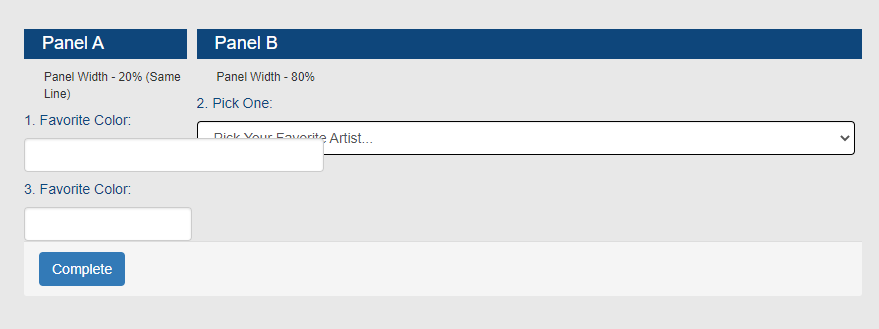
Here is a plunker with all workarounds -- https://plnkr.co/edit/0fmoFelrPovqGvgE
See comments in CSS.
mikekidder
on 5 Feb 2021
@mikekidder the last plunker example you've provided looks ok for me. Do you still have any other issues with it? Or you just shared the working example?
dmitrykurmanov
on 11 Feb 2021
Dmitry, yes sorry. The CSS had all my workarounds.
Using now the latest SurveyJS 1.8.31.
Here is a better example https://plnkr.co/edit/qtcxNiVvHJRzoQib
Panels will display side-by-side, but only if your browser width > 1550px range.
Disable CSS min-width for .sv_p_container
- panels will be on same row at smaller browser widths (or in Plunker preview window)
- questions can still overlap (like my screenshot)
Disable CSS min-width for .sv_row
- questions don't overlap
After testing a few times, if the min-width were set to 100px
- browser width can go down ~570px before questions re-align top down (mobile)
Again, I have workarounds especially where SurveyJS forms display in a smaller viewport, such as in an iframe.
mikekidder
on 19 Feb 2021
Related issues
 madceb
·
4Comments
madceb
·
4Comments
 nadialo
·
4Comments
nadialo
·
4Comments
 testweird123
·
4Comments
testweird123
·
4Comments
 ian-emsens-sb
·
3Comments
ian-emsens-sb
·
3Comments
 halexiev-hedgeserv
·
4Comments
halexiev-hedgeserv
·
4Comments