Survey-library: Issue with options.cssClasses.panel.title @ onUpdatePanelCssClasses
Are you requesting a feature, reporting a bug or ask a question?
Bug
What is the current behavior?
We have root panels (parent is the page) and child/nested panels (parent is another panel).
Root panels' are styled differently than child panels. The issue is with child panels' title css classes - they seem to be global and take the css classes from the root panels.
The code below shows that we give different styles to root panels and child panels.
The line options.cssClasses.panel.title = pnlTitleClass + ' sv-child-pnl-title'; does not seem to be applied and the child panel's title has whatever previous css style assigned to options.cssClasses.panel.title.
What is the expected behavior?
options.cssClasses.panel.title = pnlTitleClass + ' sv-child-pnl-title'; should work as expected, i.e. applied to particular panel's title.
Provide the test code and the tested page URL (if applicable)
Test code
  private updatePanelCssClasses(survey: Survey.SurveyModel, options: any) {
    const pnlCtrClass = 'sv-pnl-ctr';
    const pnlTitleClass = 'sv-pnl-title';
    const pnlRowClass = 'sv-pnl-row';

    const panel = options.panel;
    const pageParent = panel.isPanel && panel.parent && !panel.parent.isPanel;
    const hasParent = panel.isPanel && panel.parent;

    if (pageParent) {
      options.cssClasses.panel.container = pnlCtrClass + ' sv-root-pnl-ctr';
      options.cssClasses.panel.title = pnlTitleClass + ' sv-root-pnl-title';
      options.cssClasses.row = pnlRowClass + ' sv-root-pnl-row';
    } else if (hasParent) {
      options.cssClasses.panel.container = pnlCtrClass + ' sv-child-pnl-ctr';
      options.cssClasses.panel.title = pnlTitleClass + ' sv-child-pnl-title';
      options.cssClasses.row = pnlRowClass + ' sv-child-pnl-row';
    }
  }
 halexiev-hedgeserv
All 4 comments
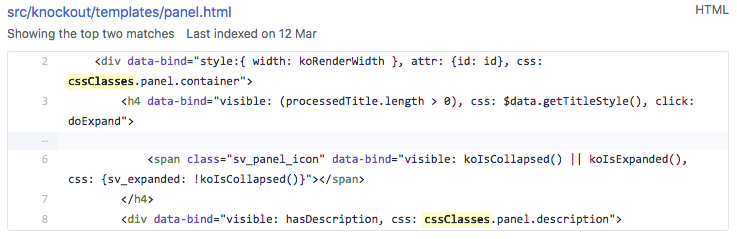
Looking at the panel template - not sure but it seems title css is not taken from the cssClasses object, but from $data.getTitleStyle():
halexiev-hedgeserv
on 10 May 2018
Hello! We've created an example with cssClasses and panels and it looks ok. Could you please check it? https://plnkr.co/edit/ZaQPIs6ItTcsIhdMV20Q?p=preview
 dmitrykurmanov
on 10 May 2018
dmitrykurmanov
on 10 May 2018
@dmitrykurmanov Ok, maybe I did not explain it correctly, but the issue is with the root panels' titles actually and the missing ingredient in order to reproduce the issue was state: "collapsed", i.e. our root panels initial state is collapsed.
I modified your plunk and the issue is reproducible now - as soon as you expand the root panel it's title changes from "root..." to "child...":
halexiev-hedgeserv
on 10 May 2018
@halexiev-hedgeserv Thank you for the clarification and sample. I've fixed the issue.
 tsv2013
on 11 May 2018
tsv2013
on 11 May 2018
Related issues
 spertusatti
·
3Comments
dmitrykurmanov
·
3Comments
spertusatti
·
3Comments
dmitrykurmanov
·
3Comments
 enricribas
·
3Comments
enricribas
·
3Comments
 xiuzhen1103
·
4Comments
xiuzhen1103
·
4Comments
 nadialo
·
4Comments
nadialo
·
4Comments