Super-productivity: [Android] Login with google not working
Your Environment
- Version used: Android App version 6.0 (latest from play store)
- Operating System and version: Android 10
- ~Desktop Environment:~
- ~Browser Name and version:~
Current Behavior
When using the "Sync via Google Drive" - Login Button in the Settings the typical google dialog option appears to select the google account with which you desire to login. If any account is selected the box closes again and the login button is still there and nothing really changed.
Expected Behavior
You should be able to login with google to sync your super-productivity related things.
Steps to Reproduce (for bugs)
- Press Settings in the main menu of the android app.
- Open the drawer labeled "Sync via Google Drive"
- Press "Login"
- Select any account
Console Output
I think there isn't any console on android. I can add logcat values if useful later.
~Error Log (Desktop only)~
 tooxo
tooxo
All 33 comments
Opened an issue: @AlanOrtega91 @johannesjo (As noticed here: https://github.com/johannesjo/super-productivity/issues/309)
tooxo
on 5 Jul 2020
@tooxo thank you very much! I'll investigate.
 johannesjo
on 6 Jul 2020
johannesjo
on 6 Jul 2020
hey there! sorry for the very late reply. I unsuccessfully tried to reproduce this. :/ Not really sure what could cause this.
Meanwhile I'd recommend syncing via dropbox which should work just fine!
johannesjo
on 23 Aug 2020
I still can reproduce on my side. Maybe this is connected with two factor auth? Had problems with that and google login in the past. Are you using a development build or the Google PlayStore version? This may also be an issue.
tooxo
on 23 Aug 2020
@tooxo this might very well be the case. I am using the development build. Good point! I probably should check the PlayStore version!!
johannesjo
on 24 Aug 2020
Just a quick update: I am able to reproduce the issue. I will try to search for a fix tomorrow if I can find the time.
johannesjo
on 14 Sep 2020
Another quick update: I can reproduce the issue with the store version, but I can't with any APK I generate locally. I will take another look on Thursday.
johannesjo
on 15 Sep 2020
Another update: I am currently re-registering the Googl Api Usage. This might take some time unfortunately.
johannesjo
on 23 Sep 2020
The app has been greenlit again and after testing this with the store version it seems to work. @tooxo could you please confirm this?
johannesjo
on 30 Sep 2020
Tried with the version from the play store, the issue still persists. Could it be that I am using an outdated version? The footer of the settings menu shows 5.9.0.
tooxo
on 30 Sep 2020
Thanks for your reply. Just checked again and now it doesn't work for me anymore neither... Pfffffff :D
Would be super cool to know what actual error response is thrown and on which request. I'll try to spend some more time to debug this, this Friday.
johannesjo
on 30 Sep 2020
I have the exact same issue, if I can help in debugging this do let me know.
 gpant
on 1 Oct 2020
gpant
on 1 Oct 2020
@gpant that's great I would appreciate some help. As I said before, it would be good to know what request to the google API is failing and with what error message if so at all.
johannesjo
on 1 Oct 2020
So I spent quite some time with this. What you might want to try is to go to https://myaccount.google.com/permissions?pli=1 revoke all permissions you have given to the app and then to try again.
Apart from that it now seems to be working fine. Even for the store version.
johannesjo
on 27 Oct 2020
Just installed fresh. Managed to capture a screenshot:
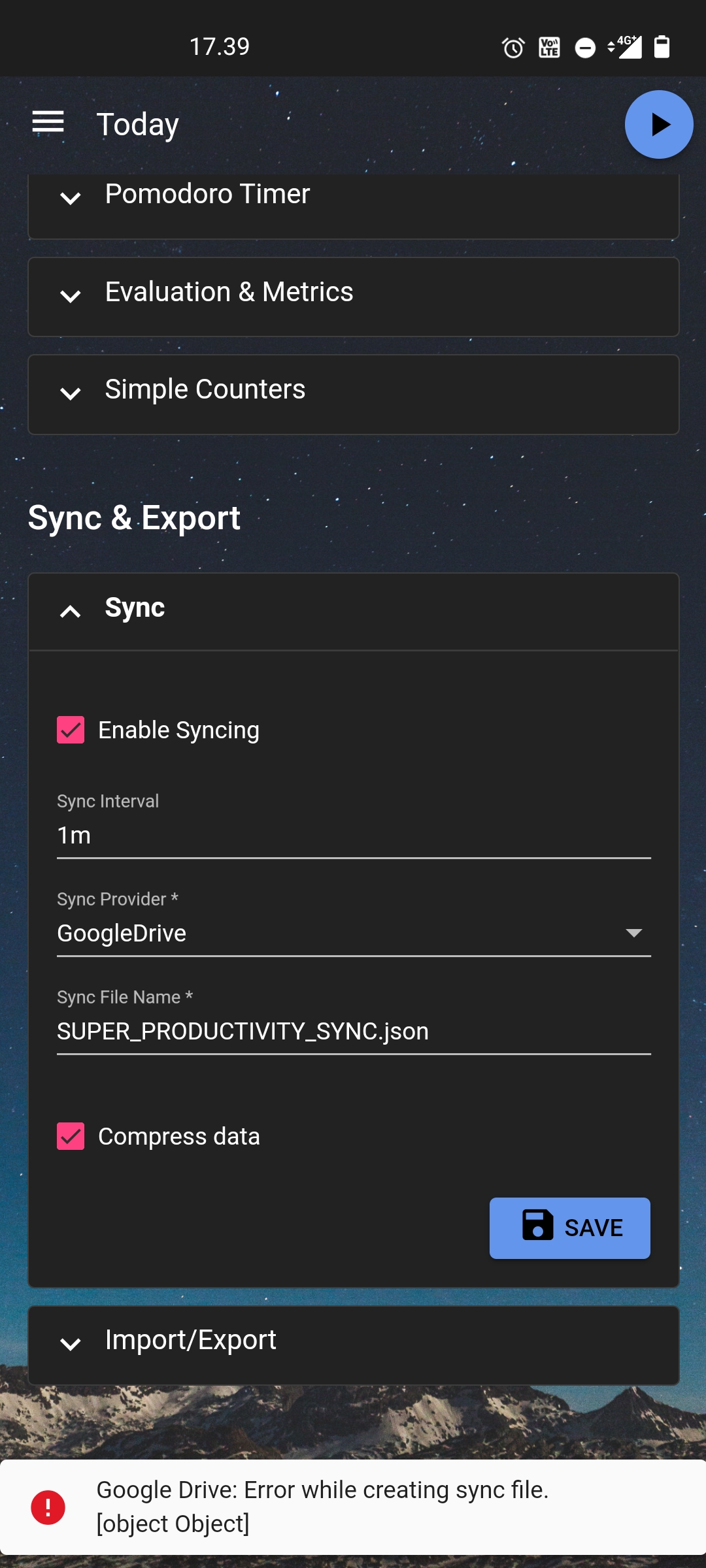
I'm using 2FA.
 ronilaukkarinen
on 28 Oct 2020
ronilaukkarinen
on 28 Oct 2020
Thank you @ronilaukkarinen. I am unable to reproduce this still. Would somebody maybe be willing to try a custom release with debugging capabilities enabled? I'd really like to know the actual error message. This would require a little bit of tech-savviness, a chrome browser, and a USB-cable to connect your phone to your computer.
johannesjo
on 28 Oct 2020
Hey @johannesjo, i'll think i can support you with this issue. I've run in the same issue and i'll use a yubikey for 2FA. I have already build an android debug build for further invesitgating. Although in the debug build "GoogleDrive" is missing as a Sync Provider. I suspect i will need different google api keys for a debug build. Or you could send me a build with debug capabilies enabled so i can adb debug via chrome.
btw. Thanks for this beautiful App. Its the first Todo+ app that fulfills my needs.
 andischerer
on 28 Oct 2020
johannesjo
on 29 Oct 2020
andischerer
on 28 Oct 2020
johannesjo
on 29 Oct 2020
Unfortunatly the apk you send me is working properly with Google Sync as Provider.
Altough with the playstore APK installed, i have discovered the following line in logcat output during signin:
W/TW: signInResult:failed code=10
This line was generated from the follwing code: https://github.com/johannesjo/super-productivity-android/blob/master/app/src/play/java/com/superproductivity/superproductivity/JavaScriptInterface.java#L59
Errorcode 10 means DEVELOPER_ERROR, ref: https://developers.google.com/android/reference/com/google/android/gms/common/api/CommonStatusCodes.html#DEVELOPER_ERROR
After a quick research i found this thread on github discussing the cause of this errorcode: https://github.com/googlesamples/google-services/issues/360#issuecomment-404681049
TLDR: Something is wrong with your signing key
After that i checked the apk signing:
Github custom debug APK (works)
# keytool -printcert -jarfile ./app-play-release.apk
Signaturgeber #1:

Signatur:

Eigentümer: CN=Johannes Millan, L=Berlin, ST=Berlin, C=DE
Aussteller: CN=Johannes Millan, L=Berlin, ST=Berlin, C=DE
Seriennummer: 5dbdf321
Gültig von: Thu Apr 09 01:26:14 CEST 2020 bis: Mon Apr 03 01:26:14 CEST 2045
Zertifikatfingerprints:
         MD5: 8B:4B:4B:82:49:0C:F9:6B:5A:E3:3E:0C:A9:D8:62:FF
         SHA1: 78:C6:66:E8:43:6A:E6:12:F3:9D:08:98:EF:05:0D:7B:CA:01:93:DF
         SHA256: 16:3C:87:6B:91:7D:76:20:A3:92:92:CC:9D:7C:3C:DF:0C:3C:65:93:24:AB:45:9D:5D:AF:D9:B9:97:11:17:AA
Signaturalgorithmusname: SHA256withRSA
Algorithmus des Public Key von Betreff: 2048-Bit-RSA-Schlüssel
Version: 3

Erweiterungen:

#1: ObjectId: 2.5.29.14 Criticality=false
SubjectKeyIdentifier [
KeyIdentifier [
0000: CA F2 1E 58 45 CC 48 7E   58 31 A8 9C 6A 50 E3 B3  ...XE.H.X1..jP..
0010: D5 90 18 CC                                        ....
]
]
Playstore APK (does not work)
# keytool -printcert -jarfile ./base.apk
Keine signierte JAR-Datei
Looks like the currently released playstore APK is not properly signed.
andischerer
on 29 Oct 2020
Thank you very much for digging into this @andischerer !!
I've to admit. I am pretty confused by all this. I'd assume that this now is caused by me not signing the debug release build correctly and is not related to the actual error, because the app is installable and works fine (which would be weird, if the signing failed). I created a new release and checked it via Gradle/app/Run Configurations/SuperProductivity:app[signingRepor].
Could you please check this one again?
EDIT: Just checked it myself. Google Drive Sync works there as well for me... But maybe you can check anyway?
johannesjo
on 29 Oct 2020
Im getting the same results like the original play store apk, not signed, and not working google drive sync
keytool -printcert -jarfile app-play-release.apk
Keine signierte JAR-Datei
You could check the signature with keytool. Its located in the $JAVA_HOME/bin folder. Im by the way not an expert on signing android apks. It was just a quick guess "this could be wrong".
Could you try to sign this apk in Android-Studio with your keystore ?
Menu Bar > Build > Generate Signed Bundle / APK
Maybe im on the wrong track, as you shoud not be able to upload an unsigned apk to the google play developer console.
andischerer
on 29 Oct 2020
@andischerer thanks for your patience! Seems like I have to activate V1 Jar signing for this to work...
```
Signer #1:
Signature:
Owner: CN=Johannes Millan, L=Berlin, ST=Berlin, C=DE
Issuer: CN=Johannes Millan, L=Berlin, ST=Berlin, C=DE
Serial number: 5dbdf321
Valid from: Thu Apr 09 01:26:14 CEST 2020 until: Mon Apr 03 01:26:14 CEST 2045
Certificate fingerprints:
MD5: 8B:4C:2B:82:49:0C:A9:6C:5A:E3:3E:0C:A9:D8:62:FF
SHA1: 78:C6:26:E8:43:6A:E6:12:D3:9D:08:18:EF:05:0D:7B:CA:01:93:DF
SHA256: 16:3C:87:6B:91:7D:76:20:A3:92:92:AC:9C:7D:3C:AF:0B:1C:65:93:24:AB:45:9D:5D:AF:D9:B9:97:12:17:AA
Signature algorithm name: SHA256withRSA
Subject Public Key Algorithm: 2048-bit RSA key
Version: 3
Extensions:
1: ObjectId: 2.5.29.14 Criticality=false
SubjectKeyIdentifier [
KeyIdentifier [
0000: CA AA 1E 23 45 CC 48 7E 58 31 A8 9C 6A 50 E3 B3 ...XE.H.X1..jP..
0010: 15 90 11 CC ....
]
]
``
johannesjo
on 30 Oct 2020
No Problem, i can confirm google sync is working properly in this release 👍
andischerer
on 30 Oct 2020
Hm, what to conclude? I am pretty sure I had v1 activated for the last store release. But, I will try releasing a new version paying extra attention to that. If that fails, maybe I can try releasing some sort of test beta with debugging capabilities enabled.
johannesjo
on 30 Oct 2020
I can give you a quick overview on how i release and sign android apps. Dont know if i have the time to do it this weekend.
Do you sign your android app manually or do you use Play-App-Signing ?
I ask because i also checked the certificate from your last release version 6.0. There was a generic Google-Certificate present.
andischerer
on 31 Oct 2020
Hey @andischerer!
Yesterday I released a new version (definitely signed this time) to the play store. The effect is, that I can reproduce the error on my device as well, but like yourself, I am still unable to do so when I install this version manually via the APK.
Do you sign your android app manually or do you use Play-App-Signing ?
I use "Play-App-Signing" because it sounded like one thing less to worry about ;)
I can give you a quick overview of how I release and sign android apps. Don't know if I have the time to do it this weekend.
This would be very welcome! Maybe you can get in touch via [email protected] so we can arrange something?
Thanks for your help!
johannesjo
on 31 Oct 2020
This sucks! Wonderful app by the way 👍
 Himmelberg
on 8 Nov 2020
Himmelberg
on 8 Nov 2020
I spent another day with fruitless attempts to fix this. I opened up an issue for the google-services repository: https://github.com/googlesamples/google-services/issues/486
Hopefully, somebody can help us. If anybody has an idea, what else we could, I am all ears!
johannesjo
on 13 Nov 2020
I just tried with the latest release and it does seem to work now. Can somebody confirm this?
johannesjo
on 13 Nov 2020
Everything works fine. :) Good job!
Himmelberg
on 13 Nov 2020
FINALLY! :D
I documented my findings here: https://stackoverflow.com/a/64827366/1574004
Thanks, everybody for your help!!
johannesjo
on 13 Nov 2020
Confirmed working here as well. Good job guys!
ronilaukkarinen
on 24 Nov 2020
Great! Thanks everybody for helping out!
johannesjo
on 24 Nov 2020
Related issues
 mar-v-in
·
3Comments
mar-v-in
·
3Comments
 generic-user
·
3Comments
generic-user
·
3Comments
 wimel
·
3Comments
wimel
·
3Comments
 IT-Tool
·
3Comments
IT-Tool
·
3Comments
 NPReport
·
3Comments
NPReport
·
3Comments
Most helpful comment
Hey @johannesjo, i'll think i can support you with this issue. I've run in the same issue and i'll use a yubikey for 2FA. I have already build an android debug build for further invesitgating. Although in the debug build "GoogleDrive" is missing as a Sync Provider. I suspect i will need different google api keys for a debug build. Or you could send me a build with debug capabilies enabled so i can adb debug via chrome.
btw. Thanks for this beautiful App. Its the first Todo+ app that fulfills my needs.